Droning On: Choosing A Flight Controller

do4 The flight controller is the nerve center of a drone. Drone flight control systems are many and varied. From GPS enabled autopilot systems flown via two way telemetry links to basic stabilization systems using hobby grade radio control hardware, there is an open source project for you.
Modern drone flight controllers can trace their roots back to R/C helicopters. Historically, R/C planes were controlled directly by the pilot’s radio. Helicopters added a new wrinkle to the mix: tail rotors. Helicopters use their tail (or anti-torque) rotor to counteract the torque of the main rotor attempting to spin the entire helicopter’s body. It all works great when the helicopter is hovering, but what about when the pilot throttles up to fly out? As the pilot throttles up, the torque increases, which causes the entire helicopter to do a pirouette or two, until the torque levels out again. The effect has caused more than one beginner pilot to come nose to nose with their R/C heli.

The solution to this problem was gyroscopes, heavy brass spinning weights that tilted in response to the helicopter’s motion. A hall effect sensor would detect that tilt and command the tail rotor to counteract the helicopter’s rotation. As the years wore on, mechanical gyros were replaced by solid state MEMS gyros. Microcontrollers entered the picture and brought with them advanced processing techniques. Heading hold gyros were then introduced. Whereas older “rate only” gyros would drift, weathervane, and wiggle, heading hold gyros would lock down the helicopter’s nose until the pilot commanded a turn. These single axis flight controllers were quickly adopted by the R/C helicopter community.

Today’s flight control systems have many sensors available to them – GPS, barometric pressure sensors, airspeed sensors, the list goes on. The major contributors to the flight calculations are still the gyros, coupled with accelerometers. As the name implies, accelerometers measure acceleration – be it due to gravity, a high G turn, or stopping force. Accelerometers aren’t enough though – An accelerometer in free fall will measure 0 G’s. Turning forces will confuse a system trying to operate solely on accelerometer data. That’s where gyros come in. Gyros measure rate of rotation about an axis. Just as our helicopter example above covered yaw, gyros can be used to measure pitch and roll of an aircraft. A great comparison of gyros and accelerometers is presented in this video from InvenSense.

Stay with us after the break for a tour of available flight controllers and what each adds to the mix. Continue reading “Droning On: Choosing A Flight Controller”

Velociraptor Robot Ready To Run With The Big Dogs

velociraptor-robot

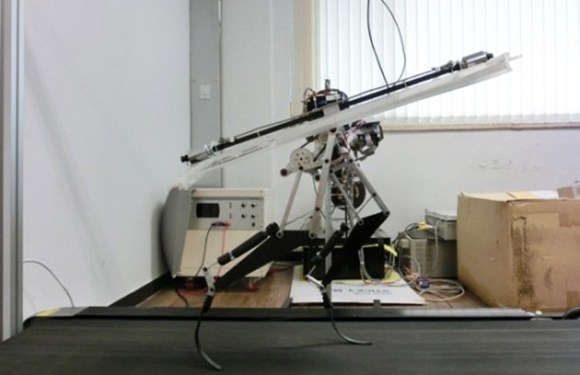
[Jongwon Park] and his team of students at the Korea Advanced Institute of Science and Technology have created a fast biped robot based upon the Velociraptor. Raptor weighs in at just 3Kg, and stands only 470mm tall, yet it is capable of running at 46 km/h. That’s almost as fast as Boston Dynamic’s Cheetah.

Raptor uses carbon fiber composite legs to absorb and release energy while running. The system is similar to that used in high performance prosthetic legs. A rotating tail assembly further helps to balance Raptor on rough terrain. We have to admit, the tail system does look a bit dangerous for any humans who might need to interact with the robot. It does work though, as evidenced by Raptor bounding over Styrofoam blocks.

The Raptor robot is quite impressive when running at full speed. Considering this project’s budget was nowhere near the resources of Boston Dynamics, it’s an amazing accomplishment. The video reminds us of  Boston Dynamics founder [Marc Raibert’s] early robots at the MIT Leg Lab. We can’t wait to see what this team produces in the future.

Continue reading “Velociraptor Robot Ready To Run With The Big Dogs”

Meet Jimmy: An Open Source Biped Robot From Intel

Jimmy_Arm_Up

Intel’s CEO [Brian Krzanich] stopped by the Re/Code conference to announce Jimmy, the first robot from the 21st Century Robot project. The project is the brainchild of [Brian David Johnson], Intel’s resident futurist. We love the project’s manifesto:

 Robot Is: Imagined first. Easy to build. Completely open source. Fiercely social. Intentionally iterative. Filled with humanity and dreams. Thinking for her/him/itself.

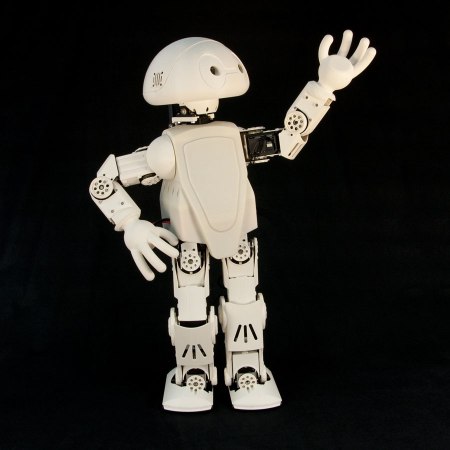
Jimmy may not be all those things yet, but he definitely is exciting. For starters, he wasn’t built in some secret lab at Intel HQ. Much of Jimmy’s construction took place at Trossen Robotics, a name well known to Hackaday. [Matt] and [Andrew] at Trossen describe all the details in their video down past the break.

This version of Jimmy is a research robot, which mean’s he’s not going to come cheap. Jimmy sports an Intel i5 NUC motherboard, 20 Dynamixel servos, a 5052 aluminum frame and a host of sensors. A  4S 14.8v 4000mAh LiPo battery will power Jimmy for 30 to 60 minutes between charges, so be sure to budget for a few spare packs. The most striking aspect of Jimmy is his 3D printed shell. The 21st Century Robot Project gave him large, friendly eyes and features, which will definitely help with the social aspect of their goals.

Jimmy is all about open source. He can run two flavors of Linux: Ubuntu 14.04 LTS or a custom version of Yocto Pokey. There is a lot to be said for running and developing on the same hardware. No specialized toolchains for cross compiling, no NFS shares to move binaries around. If you need to make a change, you can plug a monitor (or launch an VNC session) and do everything with Jimmy’s on-board computer. Jimmy’s software stack is based upon the DARwIn OP platform, and a ROS port is in the works.

We’re excited about Jimmy, but at $16,000 USD, he’s a bit outside our budget. Thankfully a smaller consumer version of Jimmy will soon be available for around 1/10th the cost.

Continue reading “Meet Jimmy: An Open Source Biped Robot From Intel”

Man Builds Concrete 3D Printer In His Garage

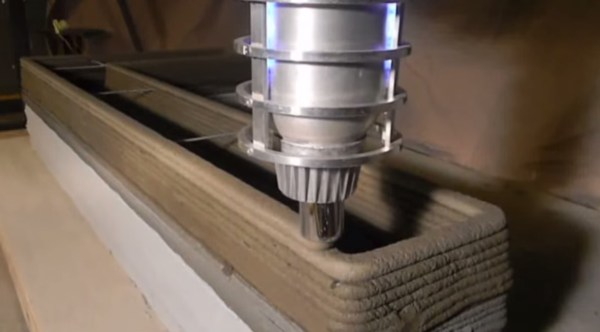
[Andrey Rudenko] is building a house in his garage. Not with nails and lumber, but with concrete extruded by his 3D printer. We’ve seen concrete 3D printers in the past, but unlike those projects, [Andrey] isn’t part of a of a university or corporation. He’s just a contractor with a dream. His printer is directly derived from the RepRap project. It’s even commanded by Pronterface.

[Andrey] started with an Arduino Mega 2560 based RepRap RAMPS style controller. His big printer needed big NEMA34 stepper motors, far beyond the current capacity of the stock RAMPS stepper drivers. [Andrey] got in touch with [James] at MassMind who helped him with an open source THB6064AH based driver. [James] even came up with an adaptor cable and PCB which makes the new drivers a drop-in replacement.

Now that his printer was moving, [Andrey] needed a material to print. Concrete chemistry is a science all its own. There are many specialty blends of concrete with specific strength and drying times. Trucking in custom mixtures can get expensive. [Andrey] has come up with his own mixture based on bags of regular concrete mix, sand, and some additives. [Andrey’s] special sauce doesn’t cure especially quickly, but it is viscous enough to print with.

Every piece of [Andrey’s] printer had to be designed and refined, including the nozzle. The concrete printer works somewhat like a frostruder, extruding concrete in 20mm wide by 5mm tall layers. He’s even managed to print overhanging layers and arches exactly like a giant RepRap Mendel.

The printer’s great unveiling will be this summer. [Andrey] plans to print a playhouse sized castle over the course of a week. He’s looking to collaborate with architects, builders, and other like-minded folks. We’d suggest uploading the project to  Hackaday.io!

Continue reading “Man Builds Concrete 3D Printer In His Garage”

[Ken Shirriff] Explains The TL431

[Ken Shirriff] had to get down into a bit of semiconductor physics to give us an explanation of the TL431, which he calls “the most common chip you’ve never heard of”. [Ken] may well be right about the TL431. Even Texas Instruments can’t nail down a single name for it. Their page for the part calls it a “Adjustable Precision Shunt Regulator”, yet the datasheet is titled “Precision Programmable Reference”. You’d think they’d have figured this out by now, considering the TL431 was launched in 1978.

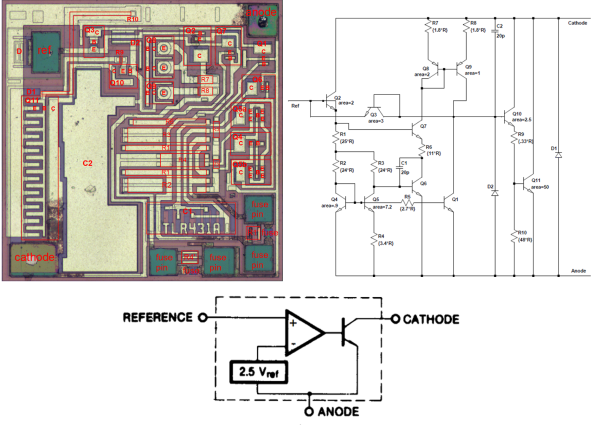
TL431’s can most often be found hiding in switching power supplies. The Apple II switcher had one, and many current ATX supplies have 3. Uninformed parts scroungers may miss them, as they often hide in TO-92 or SOT-23 packages. The TL431 is no transistor though. The TL431’s operation is actually pretty simple. When the voltage at the reference pin is above 2.5V, the output transistor conducts. When the reference voltage falls below 2.5V, the device stops conducting. In a power supply, this operation would help the control electronics maintain a stable output voltage.

The real subject of [Ken’s] article is the layout of the TL431 on its silicon die.  Rather than bust out the fuming nitric acid himself, [Ken] uses some of [Zeptobars’] decapped chip images. Inside the TL431, [Ken] discovers that transistors aren’t made up of the three layer NPN or PNP sandwich we’ve come to know and love. In fact, the base isn’t even in the middle. Transistors, including the BJT’s used in the TL431, can be assembled in a nearly infinite number of ways.

[Ken] moves on to the resistors and capacitors of the TL431. The capacitors are formed two different ways, one as a reverse biased diode, and the other as a more traditional plate style capacitor. The resistors include fuses which can be blown to slightly increase the resistance values.

The takeaway from all this is that once you get down to the silicon level, it’s a whole new ball game. Chip layout may look a bit like PCB layout, but the rules are completely different. [Ken] mentions that in a future blog he’ll go into further detail on the operation of the TL431’s bandgap voltage reference. We’ll be watching for that one, [Ken]!

The Hour Of The 3D Printed Clock Draws Nigh

clock_3d_printed_display_large

Many have tried, but [Christoph Laimer] has succeeded in designing a working, (relatively) accurate clock nearly completely from 3D printed parts. Every gear, pulley, wheel and hand of [Christoph’s] clock is printed. Only a few screws, axles, a weight, and a string are non-printed. Even the crank to wind the clock is a 3D printed part.

[Christoph] designed his clock in Blender. It took quite a bit of design work to create parts that would work and be printable. Even more work was involved in printing over 100 failed prototype parts.

One might think that [Christoph] is using the latest  printers from the likes of Makerbot or Utimaker to achieve this feat. It turns out he’s using a discontinued Rapman 3.2 printer. Further proof that even “older” printers are capable of great things! [Christoph] does run his printer rather slowly. Printing a single gear with 0.125 mm layers and a 0.4 mm nozzle takes him 2 or 3 hours.

Mechanically, the clock is gravity powered with an anchor escapement. Rather than a pendulum, [Christoph] chose to use a balance wheel and hairspring assembly to govern the escapement.  Even the spring is printed from standard PLA. The weight is suspended from a pulley block. The clock isn’t particularly efficient. 70cm of height will run the clock for only 2 hours.

[Christoph’s] clock has proven to be accurate to within 1/4 second per hour. He hasn’t provided temperature stability data – but being PLA, we’d suggest not getting it too hot!

Continue reading “The Hour Of The 3D Printed Clock Draws Nigh”

Repairing A Nikon D3

headless

There are few products out there as electronically and mechanically complex as a modern DSLR. Between the sensor, shutter, various LCD screens, and Flexible Printed Circuit boards (FPC) running everywhere, it’s enough to make even the most organized DIY repair person quake in fear. [TiN] over at the EEVblog forums wasn’t scared off though, as he bought a broken Nikon D3 on eBay in hopes of repairing it.

The D3 was Nikon’s top of the line professional camera in 2008. With a 12 Megapixel Full frame sensor and a host of other features, used models still command a good portion of the original $5000 USD price. [TiN’s] camera was described as having been dropped, and was dead on arrival, exactly as it had been described on eBay. The battery door was destroyed, so [TiN] connected an external supply. The camera was still dead, so it was time to dig in. Thanks to the internet, [TiN] was able to find a service manual for the camera. He decided to check the power supply board next. A TO225 package transistor with an obvious hole blown in the front was a good starting point.

[TiN] replaced the transistor and the camera sprang to life. The main LCD showed the live sensor view, and it would take pictures. All was not perfect though, as the two auxiliary LCDs were still dead, and the D3’s mirror would get stuck every other shot, leading to an error display.

Click past the break for the rest of [TiN’s] story.

Continue reading “Repairing A Nikon D3”