Simple Hack Creates An Inverted Watch Display

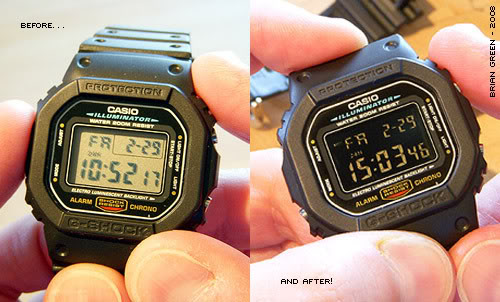
Before and after of a negative display watch conversion

Sometimes you have to bust out the wayback machine to find a good hack. Back in 2008, [Brian] performed this awesome negative display hack on his classic Casio G-Shock watch. The G-Shock, like most digital watches, uses a twisted nematic LCD. All Liquid Crystal Displays are made up of a layer cake of polarizers, glass, and liquid crystal. In non touchscreen displays, the top layer is a sheet of polarizing film glued down with an optical quality adhesive.

[Brian] disassembled his watch to reveal the LCD panel. Removing the glued down polarizing film can be a difficult task. Pull too hard and the thin glass layers will crack, rendering the display useless. After some patient work with an X-acto knife [Brian] was able to remove the film.

Much like the privacy monitor hack, the naked watch appeared to be off. Holding a sheet of linear polarizing film between the watch and the viewer reveals the time. If the film is rotated 90 degrees, the entire screen is color inverted. [Brian] liked the aesthetics of the inverted screen, so he glued down his polarizing film in the offset position. After reassembly, [Brian’s] “customized” watch was ready to wear.

[Via Hacker News]

Super Shoes Lead The Way

Super shoe insole with a red sneaker

Many of us spend so much time looking down at our phones that we miss the world all around us. [Dhairya] hopes to change that with Super Shoes, a pair of enhanced insoles that let your toes do the navigating while you enjoy the sights. Each insole has a Bluetooth radio and a microcontroller. Three coin cell vibrator motors act as an output device under the small toes, while a capacitive touch pad under the big toe handles input. Careful positioning of the electronics keeps the foam insoles flexible.

Using the shoes is as simple as walking around. Say you needed walking directions. You would set the destination on your smartphone. The shoes would then tie in to your smartphone’s GPS and maps application. From there, it’s simply a matter of following your toes. If the toes on your left foot vibrate, turn left. Vibration on the right foot indicates a right turn. When your destination is at hand, both feet will vibrate rapidly to celebrate.

[Dhairya] envisions a cloud service called ShoeCentral which will store a database of the user’s likes and dislikes. Based upon this data, ShoeCentral will guide the user to new restaurants or places they may like. All of this and hands free? Where do we sign up?

Continue reading “Super Shoes Lead The Way”

Rebuilding A Custom IC Saves HP Pulse Generator


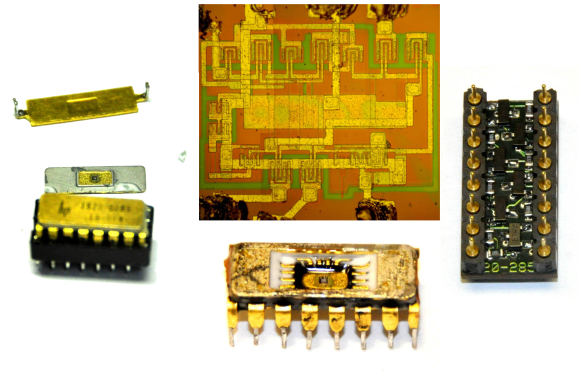
Rebuilding an HP Custom IC[Matthew] got himself into a real pickle.  It all started when he was troubleshooting a broken Hewlett Packard 8007A pulse generator. While trying to desolder one of the integrated circuits, [Matthew] accidentally cracked it. Unfortunately, the chip was a custom HP Pulse shaper IC – not an easy part to source by any means. That broken chip began a 5 year mission: to explore strange new repair methods. To seek out new life for that HP 8007A. To boldy fix what no one had fixed before.

[Matthew’s] first repair attempt was to build a drop in replacement for the HP chip. He took a look at the block diagram, and realized the chip was just some simple logic gates. He built his version with a small PCB and Fairchild TinyLogic gates. Unfortunately, the TinyLogic series is fast CMOS, while HP’s original chip used Emitter-coupled Logic (ECL). Thanks to the wildly different voltage levels of the two logic families, this design had no chance of working.

Five years later, [Matthew] was going to school at MIT, and had access to a wire bonding machine. He rebuilt the package using some epoxy, and managed to re-run the various bond wires. While everything looked promising, this attempt was also a failure. After all that work, the chip was blown.

Continue reading “Rebuilding A Custom IC Saves HP Pulse Generator”

PenguinBot Follows Light, Goes Screech In The Night

The Arduino Based Penguin Robot
Ever have one of those weekend projects that takes on a life of its own? [Michael] did, and the result is this PenguinBot. While [Michael’s] wife was away for the weekend he happened upon a broken toy penguin. The batteries had leaked inside, destroying the contacts. Rather than bin the toy, [Michael] made it awesome by turning it into an autonomous robot. [Michael’s] goal was to create a robot that could roam around the house avoiding obstacles, or follow a light source like a flashlight.

He started by pulling out most of the original electronics. Two dollar store toy trains gave their lives and their motors to replace the penguin’s original drive system. An Arduino Pro Mini became PenguinBot’s brain. Sensors consisted of two light sensing CdS cells, an AdaFruit sound sensor, and a MaxBotix ultrasonic sensor. With the ultrasonic sensor mounted on a servo, it can detect obstacles in any direction. The CdS cells and some software will allow PenguinBot to follow lights, like any good photovore robot should.

Click past the break to see PenguinBot in action

Continue reading “PenguinBot Follows Light, Goes Screech In The Night”

Re:load Pro, An Open Source Active Load

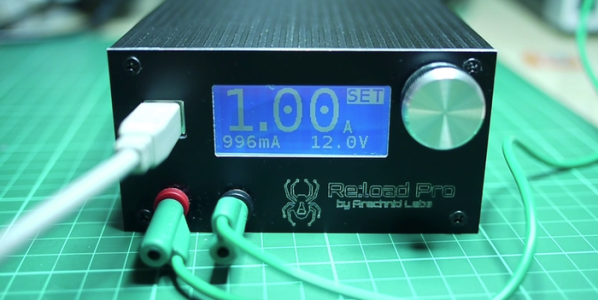
Open source test equipment has to be one of the best gifts open source hardware has given back to the community. Nowhere is this more true than in the case of  [Nick’s] Re:Load Pro over on Kickstarter. Unlike resistors or similar dummy loads, an active load will always draw the set amount of current regardless of voltage. Active loads are often used to test power supplies and batteries. Is that 2500 mAh LiPo battery overstating it’s capacity? Can the power supply you just designed handle 2.5A at 12V? Both of these are jobs where active loads would come in handy.

The Re:Load Pro is actually the third version of the Re:Load. [Nick] designed the original Re:Load after becoming frustrated at the lack of a cheap active load for testing a power supply. Plenty of people showed interest in the Re:Load, but they wanted more features. That’s where the Re:Load Pro comes in. More than a straight analog design, the Pro has a Cypress PSOC 4 Arm Cortex M0 processor running the system.

[Nick] and his company, Arachnid Labs, are no strangers to us here at Hackaday. When we last covered [Nick], he was asking the USB Implementers Forum about a low cost Vendor ID option for open source hardware projects. Fittingly, the Re:Load Pro is an open source project. The schematics and source code are available on Github.

Continue reading “Re:load Pro, An Open Source Active Load”

Inkjet Transfers To Wood

Color Image on wood board

You can’t feed a piece of wood through a stock inkjet printer, and if you could it’s likely the nature of the material would result in less than optimal prints. But [Steve Ramsey] has a tutorial on inkjet transfers to wood over on his YouTube Channel which is a simple two-step method that produces great results. We really love quick tips like this. Steve explains the entire technique while creating an example project – all in under 2 minutes of video. We don’t want to get your hopes up though – this method will only work on porous absorbent surfaces like bare wood, not on PC boards. We’ve featured some great Inject PCB resist methods here in the past though.

The transfer technique is dead simple. [Steve] uses the backing from a used sheet of inkjet labels (the shiny part that normally gets thrown away). He runs the backing sheet through his inkjet printer. Since plastic coated backing sheet isn’t porous, the ink doesn’t soak in and dry. He then presses the still wet page onto a piece of wood. The wet ink is instantly absorbed into the wood. A lacquer clear coat seals the image in and really make the colors pop. We’d like to see how this method would work with other porous materials, like fabrics (though the ink probably wouldn’t survive the washing machine).

Click past the break for another example of [Steve’s] work, and two videos featuring the technique.

Continue reading “Inkjet Transfers To Wood”

A 7″ Touchscreen TV Remote Control From Scratch

[Jason] always wanted a touchscreen TV remote control. He could have pressed an older Android tablet into service, but he wanted to roll his own system. [Jason] gathered the parts, and is in the process of building his own 7″ touchscreen setup. He started with a 7″ LCD capacitive touchscreen. He ordered his display from buy-display.com, a Far East vendor.

[Jason’s] particular display model comes mounted on a PCB which includes controllers for the display and touchscreen, as well as some memory and glue logic. The LCD controller board has quite a few jumpers to support multiple interfaces and options. While the documentation for the display was decent, [Jason] did find a few errors. After getting in touch with tech support at buy-display, he wrote a simple application which determines which jumpers to set depending on which hardware interfaces are selected from drop down lists.

With the LCD sorted, [Jason] still needed a processor. He selected the venerable Microchip PIC32MX series. This decision allowed him to use a Fubarino for the early prototypes, before switching to his own board as the system matured. [Jason] was able to get a simple GUI up and running, with standard remote buttons to control his TV and cable box. Code is on his Github repository.

[Jason’s] most recent work has centered on cutting the cord. He’s switched over from DC power to a 2600 mAh LiPo battery. Click past the break to see [Jason] test out his fully wireless work in progress.

Continue reading “A 7″ Touchscreen TV Remote Control From Scratch”