Neo Geo Arcade Gets Second Life With A Raspberry Pi

neo-picade

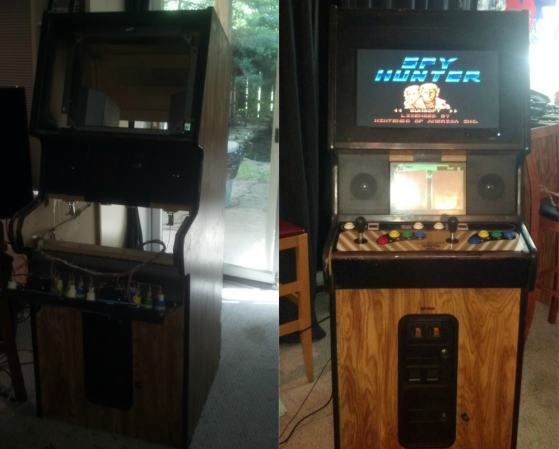
An old Neo Geo Arcade, a Raspberry Pi, and some time were all [Matthew] needed to build this Pi Powered Arcade Emulator Cabinet.

Neo Geo was originally marketed by SNK as a very expensive home video console system. Much like the Nintendo Play Choice 10, SNK also marketed an arcade system, the MVS. The Neo Geo MVS allowed arcade operators to run up to six titles in a single cabinet. The MVS also allowed players to save games on memory cards.

[Matthew’s] cabinet had seen better days. Most of the electronics were gone, the CRT monitor was dead, and the power supply was blown. Aside from a bit of wear, the cabinet frame was solid and the controls were in good shape. He decided it would be a good candidate for an emulator conversion.

We’ve seen some pretty awesome arcade conversions in the past, such as this Halloween rendition of Splatterhouse. For his conversion, [Matthew] stuck to the electronics, leaving most of the old arcade patina intact. The CRT did fire up after some components were replaced. [Matthew] ran into some refresh rate issues with the Raspberry Pi, so he opted to swap it out with a modern LCD monitor. Controls were wired up with the help of an I-PAC board.

[Matthew] had to write a driver to handle the I-PAC, but he says it was a good learning experience. Aside from the LCD screen, the result looks like it could be found in the back of an old bowling alley, or a smokey bar next to Golden Tee. Nice work, [Matthew]!

A Virtual Cane For The Visually Impaired

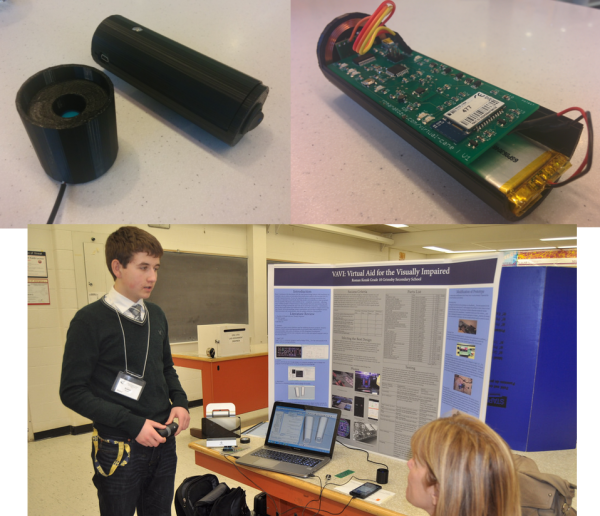
[Roman] has created an electronic cane for the visually impaired. Blind and visually impaired people have used canes and walking sticks for centuries. However, it wasn’t until the 1920’s and 1930’s that the white cane came to be synonymous with the blind. [Roman] is attempting to improve on the white cane design by bringing modern electronics to the table. With a mixture of hardware and clever software running on an Android smartphone, [Roman] has created a device that could help a blind person navigate.

The white cane has been replaced with a virtual cane, consisting of a 3D printed black cylinder. The cane is controlled by an ATmega328 running the Arduino bootloader and [Roman’s] code. Peeking out from the end of the handle is a Maxbotix ultrasonic distance sensor. Distance information is reported to the user via a piezo buzzer and a vibration motor. An induction coil allows for charging without fumbling for tiny connectors. A Bluetooth module connects the virtual cane to the other half of the system, an Android phone.

[Roman’s] Android app runs solely on voice prompts and speech syntheses. Navigation commands such as “Take me to <address>” use the phone’s GPS and Google Maps API to retrieve route information. [Roman’s] app then speaks the directions for the user to follow. Help can be summoned by simply stating “Send <contact name> my current location.” In the event that the user drops their virtual cane, “Find my device” will send a Bluetooth command to the cane. Once the command is received, the cane will reveal its position by beeping and vibrating.

We’ve said it before, and we’ll say it again. Using technology to help disabled people is one of the best hacks we can think of. Hackaday alum [Caleb Kraft] has been doing just that with his work at The Controller Project. [Roman] is still actively improving his cane. He’s already won a gold medal at the Niagara Regional Science and Engineering Fair. He’s entered his project in several more science events, including the Canada Wide Science Fair and the Google Science Fair. Good luck [Roman]!

Play Peek-A-Boo With Blind Spot

blindspot

You’re at a concert, and a car filled with balloons is in a glass box. As you approach the box, vertical blinds close to block the view directly in front of you. You move left, more blinds close to block your view. The blinds follow your every move, ensuring you can’t get a close up view of the car inside. You’ve just met Blind Spot, an interactive art installation by [Brendan Matkin].

Blind Spot was presented at Breakerhead, an incredible arts and engineering event which takes place every September in Calgary, Canada. Blind Spot consists of a car inside a large wooden box. Windows allow a view into the box, though there are 96 vertical blinds just behind the glass. The vertical blinds are individually controlled by hobby servos. The servos are wired to six serial servo controllers, all of which are controlled by an Arduino.

A PC serves as Blind Spot’s brain. For sensors, 6 wide-angle webcams connect to a standard Windows 7 machine. Running 6 webcams is not exactly a standard configuration. To handle this,  [Brendan] switched the webcams to friendly names in the windows registry. The webcam images are read by a Processing sketch. The sketch scans the images and determines which of the 96 blinds to close. The code for Blind Spot is available on github.

Continue reading “Play Peek-A-Boo With Blind Spot”

Never Lose Your Pencil With OSkAR On Patrol

OSkAR

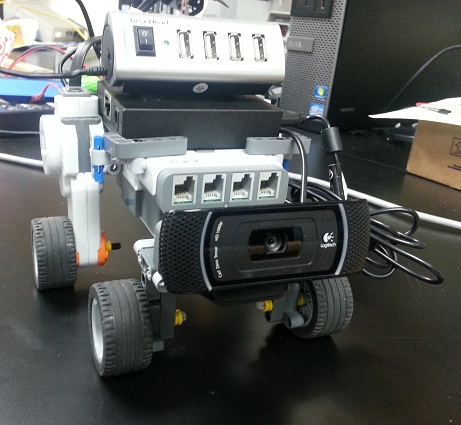
[Courtney] has been hard at work on OSkAR, an OpenCV based speaking robot. OSkAR is [Courney’s] capstone project (pdf link) at Shepherd University in West Virginia, USA. The goal is for OSkAR to be an assistive robot. OSkAR will navigate a typical home environment, reporting objects it finds through speech synthesis software.

To accomplish this, [Courtney]  started with a Beagle Bone Black and a Logitech C920 webcam. The robot’s body was built using LEGO Mindstorms NXT parts. This means that when not operating autonomously, OSkAR can be controlled via Bluetooth from an Android phone. On the software side, [Courtney] began with the stock Angstrom Linux distribution for the BBB. After running into video problems, she switched her desktop environment to Xfce.  OpenCV provides the machine vision system. [Courtney] created models for several objects for OSkAR to recognize.

Right now, OSkAR’s life consists of wandering around the room looking for pencils and door frames. When a pencil or door is found, OSkAR announces the object, and whether it is to his left or his right. It may sound like a rather boring life for a robot, but the semester isn’t over yet. [Courtney] is still hard at work creating more object models, which will expand OSkAR’s interests into new areas.

Continue reading “Never Lose Your Pencil With OSkAR On Patrol”

Festo Creates Bionic Kangaroo; Steve Austin Unimpressed


festo-roo

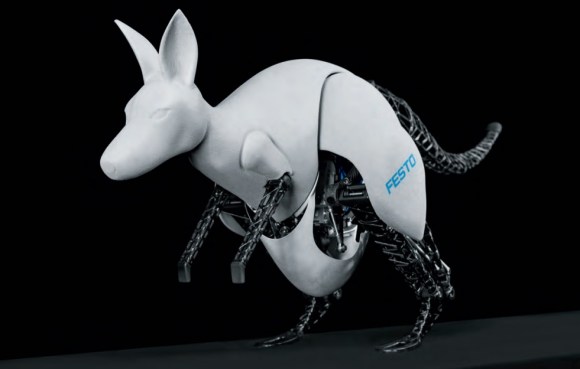
[Dr. Wilfried Stoll] and a team at Festo have created an incredible robot kangaroo. Every few years the research teams at Festo release an amazing animal inspired robot. We last covered their smartbird. This year, they’ve created BionicKangaroo (pdf link). While The Six Million Dollar Man might suggest otherwise, Bionics is use of biological systems in engineering design. In this case, Festo’s engineers spent two years studying the jumping behavior of kangaroos as they perfected their creation.

Kangaroos have some amazing evolutionary adaptations for jumping. Their powerful Achilles tendon stores energy upon landing. This allows the kangaroo to increase its speed with each successive jump. The kangaroo’s tail is essential for balancing the animal as it leaps through the air. The Festo team used a thick rubber band to replicate the action of the tendons. The tail is controlled by electric servomotors.

Festo is known for their pneumatic components, so it’s no surprise that the kangaroo’s legs are driven by pneumatic cylinders. Pneumatics need an air supply though, so the team created two versions of the kangaroo. The first uses an on-board air compressor. The second uses a high-pressure storage tank to drive the kangaroo’s legs. An off the shelf Programmable Logic Controller (PLC) acts as BionicKangaroo’s brain. The PLC monitors balance while controlling the pneumatic leg cylinders and electric tail motors. Unfortunately, BionicKangaroo isn’t completely autonomous. The Thalmic Labs Myo makes a cameo appearance in the video. The Kangaroo’s human controller commands the robot with simple arm movements.

While the BionicKangaroo is graceful in its jumps, it still needs a bit of help when turning and taking simple steps. Thankfully we don’t think it will be boxing anytime soon.

Continue reading “Festo Creates Bionic Kangaroo; Steve Austin Unimpressed”

Recreating The THX Deep Note

THX logo

Few sounds are as recognizable as the THX Deep Note. [Batuhan] did some research, and set about recreating the sound. The original Deep Note (mp3 link) was created in 1982 by [Dr. James A. Moorer]. [Dr. Moorer] used the Audio Signal Processor (ASP) (AKA SoundDroid) to create the sound. The ASP was a complex machine to program. The Deep Note took about 20,000 lines of C code to program. The C code was compiled to about 250,000 discrete statements to command the ASP.

Only one ASP was ever built, and LucasFilm owned it. Instead of recreating the hardware, [Batuhan] used SuperCollider to recreate the sound. Just like the ASP, SuperCollider is a tool for real-time audio synthesis. The difference is that SuperCollider is open source and runs on modern computers. [Batuhan] used his research and ears to perform an analysis of the Deep Note. He created two re-creations. The first is carefully constructed to replicate the sound. The second is a Twitter worthy 140 character version. Both versions are reasonable facsimiles of the original Deep Note, though they’re not quite perfect to our ears.

[Batuhan] isn’t the only person working on recreations. Deep Note in 1KB of JavaScript can be heard at  http://thx.onekb.net/. We’d love to hear other versions created by Hackaday readers!

[Via Reddit]

CPLD Tutorial: Learn Programmable Logic The Easy Way

The guys over at hackshed have been busy. [Carl] is making programmable logic design easy with an 8 part CPLD tutorial. (March 2018: Link dead.  Try the Wayback Machine.) Programmable logic devices are one of the most versatile hardware building blocks available to hackers. They also can have a steep learning curve. Cheap Field Programmable Gate Arrays (FPGA) are plentiful, but can have intricate power requirements. Most modern programmable logic designs are created in a Hardware Description Language (HDL) such as VHDL or Verilog. Now you’ve got a new type of device, a new language, an entirely new programming paradigm, and a complex IDE to learn all at once. It’s no wonder FPGAs have sent more than one beginner running for the hills.

The tutorial cuts the learning curve down in several ways. [Carl] is using Complex Programmable Logic Devices (CPLD). At the 40,000 foot level, CPLDs and FPGAs do the same thing – they act as re-configurable logic. FPGAs generally do not store their configuration – it has to be loaded from an external FLASH, EEPROM, or connected processor. CPLDs do store their configuration, so they’re ready as soon as they power up. As a general rule, FPGAs contain more configurable logic than CPLDs. This allows for larger designs to be instantiated with FPGAs. Don’t knock CPLDs though. CPLDs have plenty of room for big designs, like generating VGA signals.

[Carl] also is designing with schematic capture in his tutorial. With the schematic capture method, digital logic schematics are drawn just as they would be in Eagle or KiCad. This is generally considered an “old school” method of design capture. A few lines of VHDL or Verilog code can replace some rather complex schematics. [Carl’s] simple designs don’t need that sort of power though. Going the schematic capture route eliminates the need to learn VHDL or Verilog.

[Carl’s] tutorial starts with installing Altera’s Quartus II software. He then takes the student through the “hardware hello world” – blinking an LED.  By the time the tutorial is done, the user will learn how to create a 4 bit adder and a 4 bit subtractor. With all that under your belt, you’re ready to jump into big designs – like building a retrocomputer.

[Image via Wikimedia Commons]