Weather Clock Puts OLPC To Work

weather-clcok

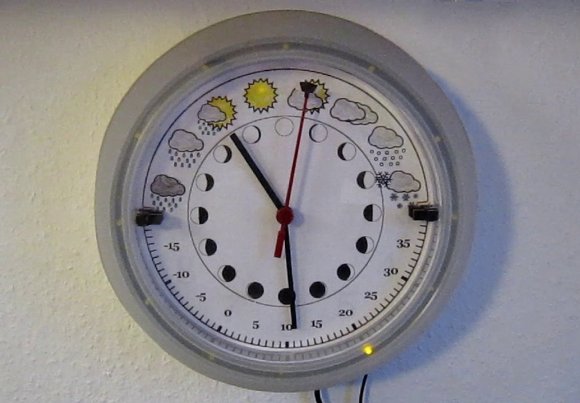
A clock to tell the weather? [Andrew] has created a device to do that and more. Inspired by [Sean’s] weather clock, [Andrew’s]clock displays the current weather conditions, temperature, moon phase, and of course the time. The whole project started years ago with a broken keyboard. [Andrew] wanted to try to use the keyboard controller PCB as a bidirectional computer interface. Data to the computer would go in via the key matrix. Output data would be read via the status LEDs. Cheap simple microcontroller boards like the Arduino sidelined the project for a few years, but he never completely left it behind.

With an unused OLPC XO-1 in hand, [Andrew] pulled out his old keyboard controller and started hacking. His first task was getting meaningful data out of the keyboard LEDs. He coded up his own keyboard led control library in python. On the hardware side an op amp took on the roll of a comparator to ensure proper logic levels were present. [Andrew] then hooked two LEDs up as clock and data lines to standard 74 series shift registers (most likely 74HC/HCT595). He found that his data was completely garbled due to bounce. A second shift register buffering the clock cleaned things up. [Andrew] was left with a stable 40 bits per second serial link to his shift registers. With all this done, the next step was the clock itself. [Andrew] bought a RUSCH Wall clock from IKEA, and converted the clockwork to a gear reduction for a DC motor he pulled from an old answering machine. He could now move the hands at will, but had no way to determine their position. IR break beam sensors from old printers came to the rescue.

After connecting the motor drive, [Andrew] still had a number of outputs available. A few LEDs were in his parts box, so into the project they went. 12 LEDs around the outside of the clock to display the current time. 3 LEDs hide behind the weather icons as status indicators. [Andrew’s] python software really ties this together. His OLPC grabs data from the internet and displays it on the clock. A web interface allows the user to perform manual updates on the clock and to set alarms. The alarms even incorporate speech output via eSpeak. We love the reuse and recycling of parts in this hack. The end result is a clock any hacker would be proud to display on their wall.

Continue reading “Weather Clock Puts OLPC To Work”

Omnidirectional Robot Takes On A Candy Factory

OmniRobot

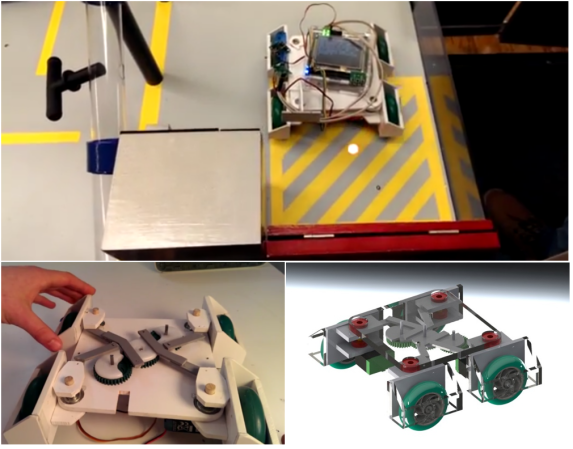
[AltaPowderDog] is building a competition robot as part of his freshman engineering course at Ohio State University. The contest is sponsored by Nestle, so it’s no surprise the robots have to perform various tasks in a miniature candy factory. Broken up into teams of four, the students are building autonomous robots to move pallets, scoop candy, operate switches and pull pins from tubes. Each team is provided a standard microcontroller board and funds to purchase robot parts from an online store. The factory also sports an overhead infrared navigation system, which should help the robots stay on track.

[AltaPowderDog] took his inspiration from [Michal’s] OmniBot, which used adjustable geometry wheels. A lever and gear system allows the robot to pivot all four wheels synchronously. This effectively allows the robot to turn within its own axis. With some proper path planning and end effector placement, [AltaPowderDog’s] team should be able to shave down their time through the candy factory. The team has run into a few issues though. This robot design only utilizes two powered wheels, which has caused the team to become stuck up on a ramp in the factory. To combat this, the team is installed a simple suspension which allows the non-powered wheels to move up and out of the way on the ramp. The results look promising. The video after the break includes a short clip of [AltaPowderDog’s] ‘bot making a quick turn and activating a switch. Very nice work!

Continue reading “Omnidirectional Robot Takes On A Candy Factory”

Arduino Gets Fowl With Flappy Bit

flappy-bit

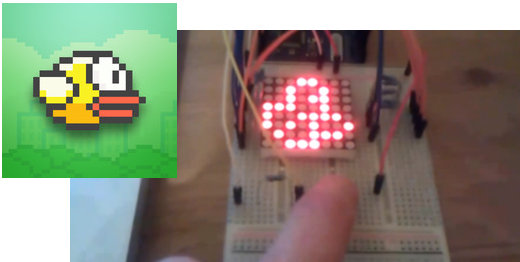
We have to swallow our pride and hand it to [Dan200]. He may have finally found an application that everyone can agree is a perfect fit for Arduino. Flappy Bit is [Dan’s] Arduino Uno based Flappy Bird clone. [Dan] is a software guy at heart, but he’s taken a peck at electronics of late. Flappy Bit was just a fun side project for him to learn how to program the Arduino. The hardware consists of an 8×8 LED matrix, current limiting resistors, and a single button.

[Dan’s] implementation isn’t 100% faithful to the iOS/Android original. Rather than simply parrot Flappy Bird, he changed it up a bit. The user presses and holds the button to climb, and releases it to descend. This seems to make the game a bit more forgiving. We also won’t be missing all the lovely sound effects from Flappy Bird.  While there is less flapping in Flappy Bit, it does make us more nostalgic for those  tabletop LCD/LED games we played in the 80’s and can’t stop crowing about today.

[Dan] has released the full source code to the project (Pastebin link), and there is more information available on his reddit thread. Give flappy bit a try. You won’t egret it!

Continue reading “Arduino Gets Fowl With Flappy Bit”

Low Budget Omnidirectional Treadmill

Omni-treadmill

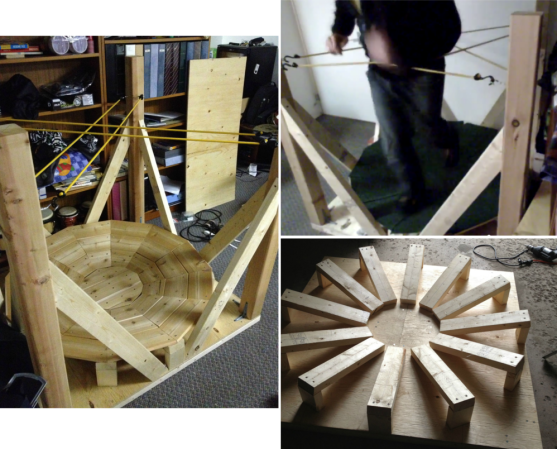
Moving around in space is one of the major hurdles in virtual reality. A holodeck wouldn’t be much fun if you kept walking into walls.  [Gamnaught] is working on a simple solution to this complex problem with his budget omnidirectional treadmill. Omnidirectional treadmills have been around in various forms for a number of years. The idea behind them simple: allow a person walk in any direction without actually changing their position. This is a bit different from the unidirectional treadmill models found at the local gym. Some very complex solutions have been used to create omnidirectional treadmills, including multiple motors and computer control systems as can be found in the US Army omnidirectional treadmill.  [Gamnaught] kept it simple. He built a circular 2×4 platform 13-15 degree bowl. The bowl is covered with carpet, and the user wears furniture sliders on their shoes. The low friction of the sliders allows the user to walk, run, and even walk backwards on the platform. Bungie cords provide resistance so the user doesn’t walk off the platform.

The early results look promising. [Gamnaught] says the balance felt a bit weird at times and took some getting used to. Anyone who has spent time with the Oculus Rift or other VR systems will tell you – many aspects of virtual reality take some getting used to. The treadmill is still open loop, however [Gamnaught] hopes to add motion tracking with a Sixense STEM system. We think a OpenCV based system would work as well. We’ve also seen carpet sliders sold as a children’s toy to be strapped over regular sneakers. Going the toy route would avoid needing a dedicated pair of footwear for the treadmill. More build information can be found on [Gamnaught’s] Reddit thread on the topic.

Continue reading “Low Budget Omnidirectional Treadmill”

Lichtspiel Crosses Board Games With Video games

Lichtspiel

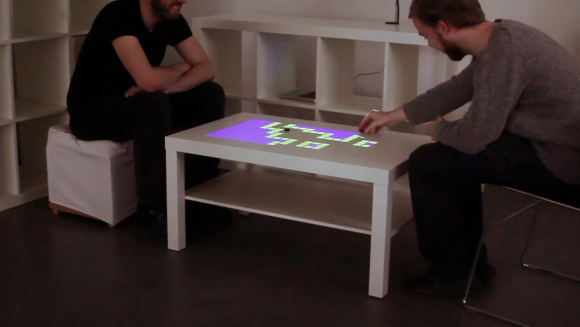
Video games are amazing these days. Cinemagraphic game play, incredible accelerated graphics, you name it. The average tabletop board game though, has not received the benefit of all this technology. [Marcel] hopes to provide some options for changing that with Lichtspiel, an Interactive Digital Boardgame. Lichtspiel uses a Philips Pico-Beamer projector to project the game board onto a white surface. A camera (either a Raspberry Pi camera module or a Logitech USB webcam) then picks up the players interactions with the game board. Actual interaction is done with small black chips. When a player moves their chip, the vision system sends the x,y coordinates main processor. The game then changes based upon the chip position. [Marcel’s] video shows two demonstrations, a matrix style board game simulation for two and a co-operative asteroids style game. In the asteroids style game one player moves the ship while the other aims the weapons.

We can’t help but see the similarities between this system and the board game demos for castAR , though we feel they fill different niches. Lichtspiel does away with 3D, and by doing so doesn’t require projection glasses to play. Lichtspiel definitely has possibilities. We’d love to see [Marcel] open up his software design so that it can be further developed.

Continue reading “Lichtspiel Crosses Board Games With Video games”

Fixing The Unfixable: Pebble Smartwatch Screen Replacement

[Colt] found himself with a broken Pebble, so he fixed it. The Pebble watch really ignited the smartwatch world with its record-breaking Kickstarter campaign. Working on the Pebble has proved to be frustrating experience for hardware hackers though. Ifixit’s teardown revealed the Pebble extremely difficult to repair. This isn’t due to some evil plan by the smartwatch gods to keep us from repairing our toys. It’s a problem that comes from stuffing a lot electronics into a small waterproof package. [Colt’s] problem was a bad screen. Pebble has a few known screen issues with their early models. Blinking screens, snow, and outright failed screens seemed to happen at an alarming rate as the early Kickstarter editions landed. Thankfully all those issues were corrected and replacements sent to the unlucky owners.

The actual screen used in the Pebble is a Sharp Memory LCD. Memory is an apt name as the screens actually behave as a SPI attached write only memory. Sharp sells flexible printed circuit (FPC) versions of the LCDs to aid in debugging. For space constrained designs though, an elastomeric or “zebra strip” connector is the common way to go. Alternating bands of conductive and insulating material make electrical connections between the Pebble’s circuit board and the conductive portions of the LCD glass.

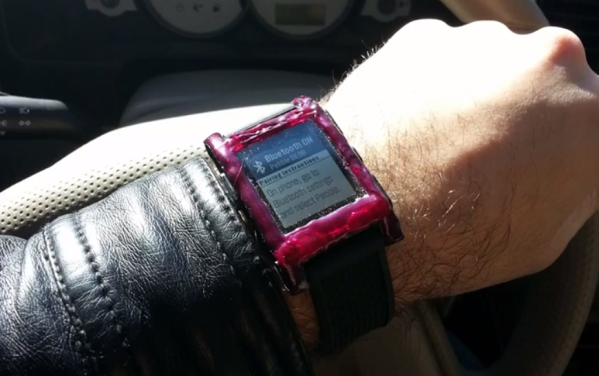
[Colt] found himself with a dead screen out of warranty, so he decided to attempt a screen replacement. He found a replacement screen from Mouser, and proceeded to remove the top case of his watch. The top plastic case seems to be the hardest part of getting into a Pebble. It appears to be bonded with a glue that is stronger than the plastic itself. [Colt] broke the glass of his screen during the removal, which wasn’t a big deal as it was already dead. Prying only destroyed the top plastic, so he broke out a rotary tool which made quick work of the plastic.  The new screen worked perfectly, but had to be held in just the right position over its zebra connector. Some waterproof epoxy held it in place permanently. The next step was a new top cover. An old flip phone donated its plastic shell to the effort, and hot glue kept everything in place. [Colt] finished his work with a couple of layers of model paint. The result certainly isn’t as pretty or waterproof as the original. It is functional though, and about $120 USD cheaper than buying a new Pebble.

Continue reading “Fixing The Unfixable: Pebble Smartwatch Screen Replacement”

Call For Hams And Hackers: Welcome ICE/ISEE-3 Home

ISEE-3, one of America’s most dedicated space exploration vessels is on its way home. Unfortunately, when it gets here, no one will be talking to it. NASA decommissioned the equipment needed to communicate with the satellite nearly 15 years ago. [Emily Lakdawalla] at the planetary society has been following the long traveled probe for years. Her recent article on the topic includes the news that NASA essentially gave up the battle before it even started.

Originally named International Sun/Earth Explorer 3 (ISEE-3), the spacecraft was launched atop a Delta rocket on August 12, 1978. Its mission was to study interaction between the Earth’s magnetic field and solar wind. As part of this mission ISEE-3 became the first spacecraft to enter halo orbit. It did this by positioning itself at Lagrangian point L1, directly between the sun and the Earth. In 1982, scientists on earth were preparing for the 1986 flyby of Halley’s Comet. ISEE-3 was repurposed as a comet hunter, and renamed International Cometary Explorer (ICE). The craft flew back to Earth and entered lunar orbit, coming within 120km of the moon’s surface. It used this momentum to achieve a heliocentric orbit, on track for two comet encounters. ICE/ISEE-3 encountered Comet Giacobini-Zinner on September 11, 1985, collecting data and becoming the first spacecraft to fly through a comet’s plasma tail. While not considered part of the Halley Armada, ICE/ISEE-3 took measurements as it passed within 28 million km of Comet Halley’s nucleus. Since then, ICE/ISEE-3 has continued on its 355 day heliocentric orbit. It studied coronal mass ejections in the early 90’s, before being shut down in May of 1997. Follow us past the break to learn ICE/ISEE-3’s fate.

Continue reading “Call For Hams And Hackers: Welcome ICE/ISEE-3 Home”