Shopping Trolley Is Wired For Camp

[James] needed some cool transportation for the upcoming Easter Camp in New Zealand, so he created a custom motorized shopping trolley that is sure to turn heads. The base of this project is a standard mobility scooter, which conveniently has a modular design. All of the electronics have connectors for quick service and the entire rear axle and motor assembly pop off with the pull of a lever.

[James] had to do a bit of welding and chassis rework to achieve his goal of mounting a shopping cart top to the scooter’s frame. Once finished, though, the setup looked great. It was actually comfortable to sit in, as [James] made a cutout for the driver’s feet to pass through. The real fun came with the electronics. The trolley is the most wired mobility scooter mod we’ve ever seen. Most of the electronics are contained in a project box under the seat, with several Arduinos that control the various systems: interfacing with the original scooter electronics, a GPS receiver, and a GSM radio. [James] also went as far as to add RGB LED headlights, a horn, and a multi-tone siren from Jaycar.

Driving the trolley is simple. An arcade joystick selects the speed, and the scooter’s standard hand controls are used for forward, reverse, and steering. One of the more interesting mods [James] made was a custom Windows app to control the trolley via a USB radio module. The entire system can be secured, with the security code stored in NVRAM to prevent a power cycle from unlocking the system. [James] can even command the trolley to go forward or reverse from his touch screen. We’d love to see him add a steering servo to make it a completely remote-controlled solution, though this step would require some sort of clutch for manual control.

The final design works very well.  [James] may not win any drag races by keeping scooter’s original speed controls and associated electronics, but he did extend the range with larger batteries, so we’re sure the trolley will be a hit all over the camp. Similar projects have been built using the base of an electric wheelchair. If you have one that you want to control without invasive changes to the hardware, check out this accessibility hack which interfaces using a connector.

Continue reading “Shopping Trolley Is Wired For Camp”

Attacknid Becomes Laser Death Drone

Laser Drone

[styroPyro] liked his Attacknid, but decided it needed just a bit more blue death ray laser. We’ve seen [styroPyro’s] high-powered laser hacks before, but this time he’s taken to hacking one of [Jaimie Mantzel’s] Attacknid robots. According to one of the top comments on [styroPyro’s] video—a comment by Attacknid inventor [Jaimie] himself—the robots were meant to be hacked, and [Jamie] is ecstatic.

[styropyro] removed the disk shooter from his Attacknid and used the fire control circuit to activate a 2 watt blue laser. A low powered, red laser pointer serves as a laser sight, allowing you to aim at your target before unleashing the beefy blue laser. As the video shows, 2 watts is a heck of a lot of power. The Attacknid easily pops balloons and sets fire to flash paper. As usual, we urge you to use caution when handling 2 watt lasers, which fall under Class 4: aka the most dangerous class of lasers. Goggles, skin protection, and safety interlocks are the order of the day. [styroPyro] has been working with high power lasers for a few years, and seems to know what he’s doing. That said, we’ll leave the burning lasers to the professionals.

Continue reading “Attacknid Becomes Laser Death Drone”

Build An In Line Network Bandwidth Monitor

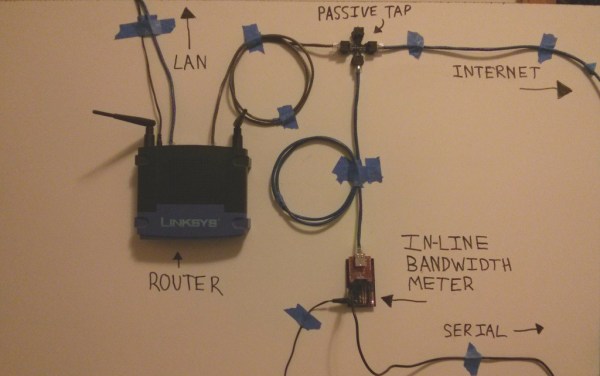
[Kurt] likes to know what’s going on with his network. He already uses bandwidth checking software on his DD-WRT capable router, but he wanted a second opinion. So he built his own network monitor. [Kurt] started by building a passive Ethernet tap. He then needed a network interface chip that would serve his purposes. The common Wiznet chips used with Arduinos didn’t allow enough manipulation of raw packet data, so he switched to a Microchip ENC624J600 (PDF). The Microchip controller allowed him to count the bytes in the raw Ethernet packets.

With the Ethernet interface complete, [Kurt] turned his attention to a microcontroller to run the show. He started with an Arduino, but the lack of debugging quickly sent him to an Atmega128 in Atmel Studio. After getting the basic circuit working, [Kurt] switched over to a PIC24F chip. With data finally coming out of the circuit, he was able to tell that his original back-of-the-napkin calculations for bandwidth were wrong. [Kurt] created a PCB to hold the microcontroller, then wrote a Python program to plot the data output from his circuit. The bandwidth plot matched up well with the plot from DD-WRT. Now he just needs a giant LED matrix to show off his current network stats!

Digital Electric Meter Monitor Goes Old School

powerMeter

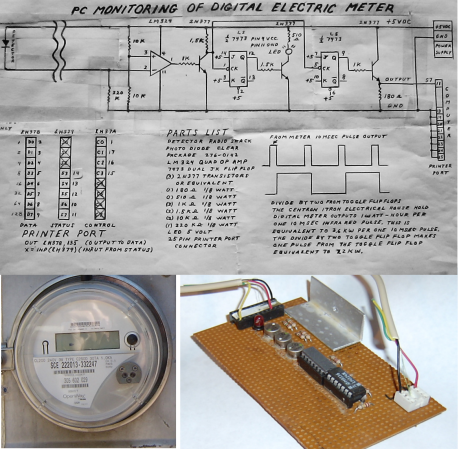
[Sal] sent us his digital electric meter monitor, which immediately made us nostalgic for some of Forrest Mims’ books. Sal’s schematic and circuit description are similar to Forrest’s style, and we mean that as a compliment. Even in today’s world of CAD and EDS packages, sketching out a circuit by hand is sometimes both easier and faster. The schematic isn’t the only classic aspect of [Sal’s] design. He’s collecting data using a parallel port on an unused PC: in this case, a Toshiba Libretto running Windows 95. Before cheap flash-based microcontrollers and dev boards were available, the PC parallel port was the go-to hardware hacking interface for many of us. Plenty of the software running those old hacks was written in basic, and [Sal’s] meter is no exception. His software runs on Microsoft QBasic, which shipped with Windows 95.

The circuit takes advantage of the digital meter’s output: a 10 ms pulse for every 1 Wh of energy used. An IR photo detector from RadioShack detects the meter pulses, which are amplified by an LM324 Op Amp. An NPN transistor then shifts the output to send it to two 74LS73 JK flip flops. The first flip flop uses a transistor to drive an LED for visual output. The second JK flip flop sends the data to the PC. The flip flop has the effect of dividing the number of meter pulses by two, creating a much longer toggled signal that a PC can better detect.

Although using an AVR or PIC would consume less power, [Sal’s] setup has already more than paid for its power usage. By monitoring and adapting his electrical usage, [Sal] is saving $20 a month on his electric bill. We’ve included [Sal’s] circuit diagram and source code after the break (apologies to our readers on RSS).

Continue reading “Digital Electric Meter Monitor Goes Old School”

Over Engineered Kegerator Is Glorious

keger

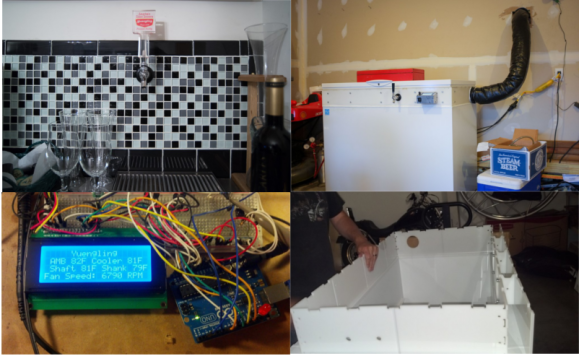
When [Joey] decided to build a kegerator, he didn’t skimp. No commercial unit or simple kit would do. [Joey] wanted complete temperature monitoring, with a tap on the kegerator itself and a cooled tap remotely mounted at his bar. He started with a box freezer, which was a bit short for his purposes. Not a problem, as [Joey] cut an extended collar for the freezer from HDPE on his shopbot. The new collar gives mounting points for the beer lines, gas lines, as well as all the electronics.

Temperature control is handled by a commercial controller, however temperature monitoring is another thing altogether. An Arduino sits in a custom aluminum case on the outside of the kegerator. The Arduino reports temperature, beer type and also controls the cooling system for the beer lines. The cooling system alone is incredible. [Joey] designed everything in CAD and cut the parts out on his shopbot. Two fans sit in an aluminum air box. One fan is used to push cold air out from the freezer around the beer line. A second fan pulls air back in, keeping the kegerator/line/tap air system a (relatively) closed loop. The entire line set is insulated with 2″ fiberglass flex duct.

Temperature data and trend graphs can be monitored on the web, and [Joey] is using a Raspberry Pi to create a wall mounted status screen for his bar room. We love this build! [Joey] we’d buy you a beer, but it seems like you’ve got that covered already!

Status Light Tells You The Code Is Borked Again

status light

[Arthur] is teaching himself product development. Rather than create a few mock-up products, he’s taking the path of designing real devices he can use. His current device is a status light for automated software tests.  We’ve seen test and GitHub status lights before, however this is the first one to integrate with an outside web service. The status light’s state is based upon output from CodeShip, an online continuous deployment test engine.

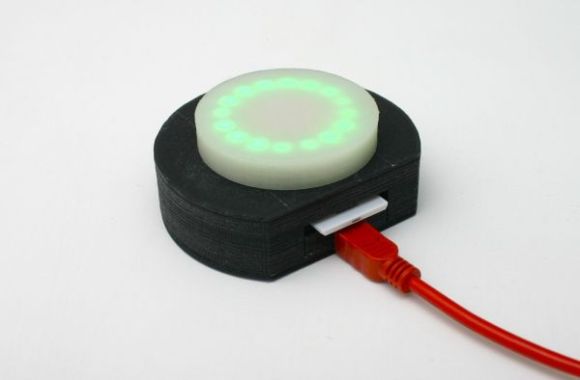
The electronic design is simple. An Electric Imp retrieves test status data from CodeShip. The Imp then sends the status data over two GPIO lines to an AdaFruit Trinket. The Trinket controls a NeoPixel ring. A green ring indicates all tests are passing. Purple means tests are in progress. A spinning red ring (of death) means one or more tests have failed. Power is supplied via a mini USB connector.

[Arthur] spent quite a bit of time on the mechanical design of the status light as well. All the parts are 3D printed. This allowed him to quickly go through several revisions of each part. We like the use of white PLA for a frosted effect on the top section of the light, as it diffuses the eye piercing glow from all those RGB LEDs. As a finishing touch, [Arthur] created a fake product page for his light. He doesn’t have any plans to sell it, but we hope he drops the source and STL files so we can create one of our own.

Continue reading “Status Light Tells You The Code Is Borked Again”

E-volo VC200 Makes Maiden Flight. Flying Cars Incoming

The e-volo VC200 has made it’s maiden unmanned flight. Does the craft above look a bit familiar? We first reported on the e-volo team back in 2011. Things have been going great for the team since then. They’ve created an 18 motor (Octadecacopter?) prototype dubbed the VC200. The group has taken a smart approach to building their craft. Rather than try to keep everything in-house, they’ve created a network by partnering with a number of companies who are experts in their fields. A sailplane company laid up the carbon fiber composite frame for the EC200. Junkers Profly, a German aviation company, developed a ballistic parachute system in case something goes wrong in flight.

From the outside, the VC200 looks like a grown up version of the Quadcopters we’ve seen here on Hackaday. Even the control system used for the test flight looks like a modified Radio Control Transmitter. The motors are outrunner brushless motors. Props are carbon fiber. We’re hoping the control system is a bit more evolved (and redundant) than the systems used in R/C quads though. Just like in smaller scale models, batteries are still the limiting factor. The VC200 will only fly for about 20 minutes on a charge. However, e-volo says that new technology should allow it to extend that time to around an hour. Not very much for a cross country flight, but plenty to pioneer a new type of aircraft. Where do we sign for the beta program?

Continue reading “E-volo VC200 Makes Maiden Flight. Flying Cars Incoming”