Hacker Tactic: Pimp Your Probes

Is your multimeter one of your trusty friends when building up boards, repairing broken gadgets, and reverse-engineering proprietary ones? Is it accompanied by a logic analyzer or an oscilloscope at times?

Having a proper probing setup is crucial for many a task, and the standard multimeter probes just won’t do. As a PCB is slipping under your grip as you’re trying to hold the standard multimeter probes on two points at once, inevitably you will ponder whether you could be doing things differently. Here’s an assortment of probing advice I have accumulated.

Beyond The Norm

There’s the standard advice – keep your board attached firmly to a desk, we’ve seen gadgets like the Stickvise help us in this regard, and a regular lightweight benchtop vise does wonders. Same goes for using fancy needle probes that use gravity to press against testpoints – they might be expensive, but they are seriously cool, within limits, and you can even 3D-print them!

Continue reading “Hacker Tactic: Pimp Your Probes” →

Portable Router Build: Picking Your CPU

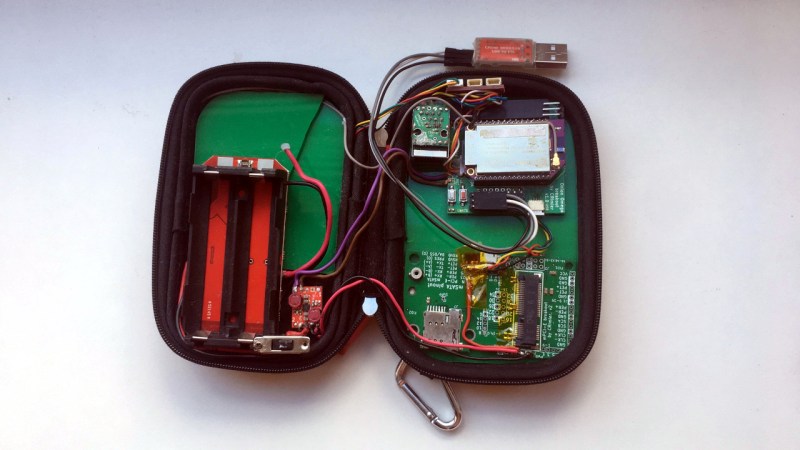
I want to introduce you to a project of mine – a portable router build, and with its help, show you how you can build a purpose-built device. You might have seen portable routers for sale, but if you’ve been in the hacking spheres long enough, you might notice there are “coverage gaps”, so to speak. The Pi-hole project is a household staple that keeps being product-ized by shady Kickstarter campaigns, a “mobile hotspot” button is a staple in every self-respecting mobile and desktop OS, and “a reset device for the ISP router” is a whole genre of a hacker project. Sort the projects by “All Time” popularity on Hackaday.io, and near the very top, you will see an OpenVPN &Tor router project – it’s there for a reason, and it got into 2014 Hackaday Prize semifinals for a reason, too.

I own a bunch of devices benefitting from both an Internet connection and also point-to-point connections between them. My internet connection comes sometimes from an LTE uplink, sometimes from an Ethernet cable, and sometimes from an open WiFi network with a portal you need to click through before you can even ping anything. If I want to link my pocket devices into my home network for backups and home automation, I can put a VPN client on my laptop, but a VPN client on my phone kills its battery, and the reasonable way would be to VPN the Internet uplink – somehow, that is a feature I’m not supposed to have, and let’s not even talk about DNSSEC! Whenever I tried to use one of those portable LTE+WiFi[+Ethernet] routers and actively use it for a month or two, I’d encounter serious hardware or firmware bugs – which makes sense, they are a niche product that won’t get as much testing as phones.

Continue reading “Portable Router Build: Picking Your CPU” →

Audio On Pi: Here Are Your Options

There are a ton of fun Raspberry Pi and Linux projects that require audio output – music players, talking robots, game consoles and arcades, intelligent assistants, mesh network walkie-talkies, and much more! There’s no shortage of Pi-based iPods out there, and my humble opinion is that we still could use more of them.

To help you in figuring out your projects, let’s talk about all the ways you can use to get audio out of a Pi or a similar SBC. Not all of them are immediately obvious and you ought to know the ropes before you implement one of them and get unpleasantly surprised by a problem you didn’t foresee. I can count at least five ways, and they don’t even include a GPIO-connected buzzer!

Let’s rank the different audio output methods, zoning in on things like their power consumption, and sort them by ease of implementation, and we’ll talk a bit about audio input options while we’re at it.

Continue reading “Audio On Pi: Here Are Your Options” →

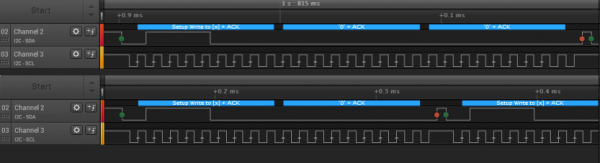
I2C For Hackers: The Basics

You only really need two data wires to transfer a ton of data. Standards like UART, USB2, I2C, SPI, PS/2, CAN, RS232, SWD (an interface to program MCUs), RS485, DMX, and many others, all are a testament to that. In particular, I2C is such a powerful standard, it’s nigh omnipresent – if you were to somehow develop an allergy to I2C, you would die.

Chances are, whatever device you’re using right now, there’s multiple I2C buses actively involved in you reading this article. Your phone’s touchscreen is likely to use I2C, so is your laptop touchpad, most display standards use I2C, and power management chips are connected over I2C more often than not, so you’re covered even if you’re reading this on a Raspberry Pi! Basically everything “smart” has an I2C port, and if it doesn’t, you can likely imitate it with just two GPIOs.

If you’re building a cool board with a MCU, you should likely plan for having an I2C interface exposed. With it, you can add an LCD screen with a respectable resolution or a LED matrix, or a GPS module, a full-sized keyboard or a touchpad, a gesture sensor, or a 9 degree of freedom IMU – Inertial Measurement Unit, like a accelerometer+compass+gyroscope combination. A small I2C chip can help you get more GPIOs for your MCU or CPU, or a multi-channel motor driver, or a thermal camera, or a heap of flash memory; if you’re adding some sort of cool chip onto your board, it likely has an I2C interface to let you fine-tune its fancy bits.

As usual, you might have heard of I2C, and we sure keep talking about it on Hackaday! There’s a good few long-form articles about it too, both general summaries and cool tech highlights; this article is here to fill into some gaps and make implicit knowledge explicit, making sure you’re not missing out on everything that I2C offers and requires you to know!

Continue reading “I2C For Hackers: The Basics” →

Hack On Self: Sense Of Time

Every now and then, a commercial product aims to help you in your life journey, in a novel way, making your life better through its presence. Over the years, I’ve been disappointed by such products far more often than I have been reassured, seeing each one of them rendered unimaginative and purposeless sometimes even despite the creator’s best intentions. The pressures of a commercial market will choke you out without remorse, metal fingers firmly placed on your neck, tightening with every move that doesn’t promise profit, and letting money cloud your project’s vision. I believe that real answers can only come from within hacker communities, and as we explore, you might come to see it the same way.

This is the tip of the iceberg of a decade-long project that I hope to demonstrate in a year or two. I’d like to start talking about that project now, since it’s pretty extensive; the overall goal is about using computers to help with human condition, on a personal level. There’s a lot of talk about computers integrating into our lives – even more if you dare consult old sci-fi, much of my inspiration.

Tackling a gigantic problem often means cutting it down into smaller chunks, though, so here’s a small sub-problem I’ve been working on, for years now, on and off: Can you use computers to modify your sense of time?

Continue reading “Hack On Self: Sense Of Time” →

Embedded Python: MicroPython Toolkits

Last time, I talked about how MicroPython is powerful and deserving of a place in your toolkit, and it made for a lively discussion. I’m glad to see that overall, MicroPython has indeed been getting the recognition it deserves – I’ve built a large number of wonderful projects with it, and so have people I’ve shown it to!

Sometimes I see newcomers dissatisfied with MicroPython, because the helper tools they initially pick don’t suit it well. For instance, they try and start out with a regular serial terminal application that doesn’t fit the MicroPython constraints, or a general IDE that requires a fair bit of clicking around every time you need to run your code. In particular, I’d make sure that you know your options no matter whether you prefer GUI or commandline – both have seriously nice tools for MicroPython use!

The main problem to be solved with MicroPython is that you have a single serial port that everything happens through – both file upload and also debugging. For ESP8266/32-based boards, it’s a physical serial port, and for chips like RP2040 and ESP32-S* where a hardware USB peripheral is available, it’s a virtual one – which makes things harder because the virtual port might get re-enumerated every now and then, possibly surprising your terminal application. If you want to upload a program of yours, you need to free up the serial port, and to see the program’s output, you will need to reopen that port immediately after – not a convenient thing to do if you’re using something like PuTTy.

So, using MicroPython-friendly software is a must for a comfortable hacking experience. What are your options? Continue reading “Embedded Python: MicroPython Toolkits” →

The UMPC powered up, case-less showing the black PCB, with the display standing upwards and showing a blue colour scheme desktop with a CLI terminal open. To the right of it is one of the UMPCs that served as an inspiration for this project.

Bringing The UMPCs Back With A Pi Zero

Miss PDAs and UMPCs? You wouldn’t be the only one, and it’s a joy to see someone take the future into their own hands. [Icepat]’s dream is reviving UMPCs as a concept, and he’s bringing forth a pretty convincing hardware-backed argument in form of the Pocket Z project. For the hardware design, he’s hired two engineers, [Adam Nowak] and [Marcin Turek], and the 7-inch Pocket Z7 version is coming up quite nicely!

The Hackaday.io project shows an impressive gallery of inspiration devices front and center, and with these in mind, the first version of the 7-inch UMPC sets the bar high. With a 1024×600 parallel RGB (DPI) touchscreen display, an ATMega32U4-controlled keyboard, battery-ready power circuitry, and a socketed Pi Zero for brains, this device shows a promising future for the project, and we can’t wait to see how it progresses.

While it’s not a finished project just yet, this effort brings enough inspiration all around, from past device highlights to technical choices, and it’s worth visiting it just for the sentiment alone. Looking at our own posts, UMPCs are indeed resurfacing, after a decade-long hiatus – here’s a Sidekick-like UMPC with a Raspberry Pi, that even got an impressive upgrade a year later! As for PDAs, the Sharp memory LCD and Blackberry keyboard combination has birthed a good few projects recently, and, who can forget about the last decade’s introductions to the scene.