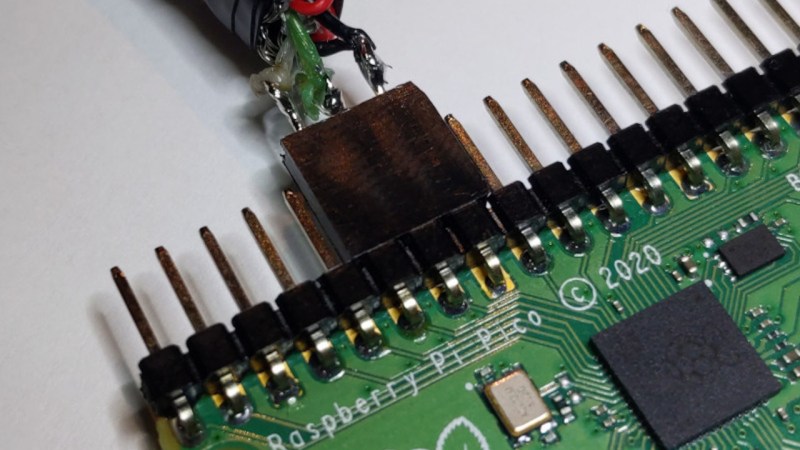
D+ and D- wires from a USB cable connected to GPIO pins on the Pi Pico, using a female header plugged onto the jumper wires

Need A USB Sniffer? Use Your Pico!

Ever wanted to sniff USB device communications? The usual path was buying an expensive metal box with USB connectors, using logic analyzers, or wiring devboards together and hacking some software to make them forward USB data.

Now, thanks to [ataradov]’s work, you can simply use a Pi Pico – you only need to tap the D+ and D- pins, wire them to RP2040’s GPIOs, and you can sniff communication between your computer and any low-speed (1.5 Mbps) or full-speed (12 Mbps) devices. On the RP2040 side, plug the Pico into your computer, open the virtual serial port created, and witness the USB packets streaming in – for the price of a Pico, you get an elegant USB sniffer, only a little soldering required.

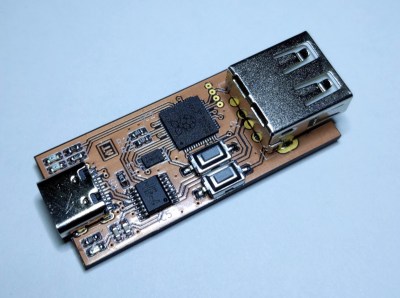
[ataradov] also offers us a complete board design with a RP2040 and a USB hub on it, equipped with USB sockets that completely free us from the soldering requirement; it’s an open-source KiCad design, so you can simply order someĀ  sniffers made from your favourite fab! This project is a great learning tool, it’s as cheap and easy to make as humanly possible, and it has big potential for things like reverse-engineering old and new systems alike. Just couple this hack with another Pico doing USB device or host duty, maybe get up to date with USB reverse-engineering fundamentals, and you could make a Facedancer-like tool with ease.
Need to reach 480 Mbit/s? [ataradov] has a wonderful board for you as well, that we have covered last year – it’s well worth it if a device of yours can only do the highest speed USB2 can offer, and, it offers WireShark support. Want WireShark support and to use a Pico? Here’s a GitHub project by another hacker, [tana]. By now, merely having a Pi Pico gives you so many tools, it’s not even funny.

We thank [Julianna] for sharing this with us!

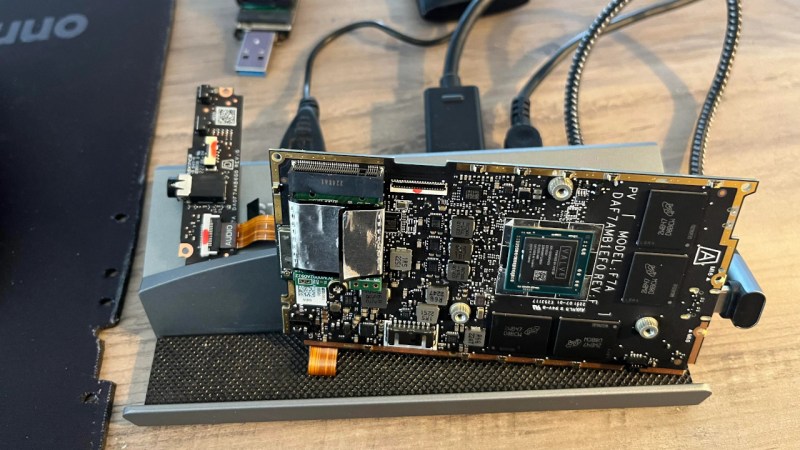
Steamdeck motherboard standing upright propped onto a USB-C dock it's wired up to, showing just how little you need to make the steamdeck board work.

Steam Deck, Or Single Board Computer?

With a number of repair-friendly companies entering the scene, we have gained motivation to dig deeper into devices they build, repurpose them in ways yet unseen, and uncover their secrets. One such secret was recently discovered by [Ayeitsyaboii] on Reddit – turns out, you can use the Steam Deck mainboard as a standalone CPU board for your device, no other parts required aside from cooling.

All you need is a USB-C dock with charging input and USB/video outputs, and you’re set – it doesn’t even need a battery plugged in. In essence, a Steam Deck motherboard is a small computer module with a Ryzen CPU and a hefty GPU! Add a battery if you want it to work in UPS mode, put an SSD or even an external GPU into the M.2 port, attach WiFi antennas for wireless connectivity – there’s a wide range of projects you can build.

Each such finding brings us closer to the future of purple neon lights, where hackers spend their evenings rearranging off-the-shelf devices into gadgets yet unseen. Of course, there’s companies that explicitly want us to hack their devices in such a manner – it’s a bet that Framework made to gain a strong foothold in the hacker community, for instance. This degree of openness is becoming a welcome trend, and it feels like we’re only starting to explore everything we can build – for now, if your Framework’s or SteamDeck’s screen breaks, you always have the option to build something cool with it.

[Via Dexerto]

Hacker Tactic: Multi-Design Panels

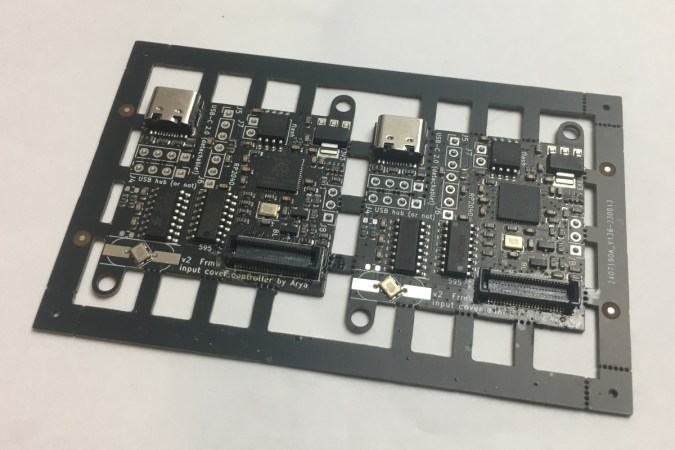
Last time, we talked about single-PCB-design panels, all the cool aspects of it, including some cost savings and handling convenience. Naturally, you might wonder, and many did – can you put multiple different PCBs on a single panel? The answer is “yes, without a doubt!” The tool we used last time, KiKit, will not be as helpful here, so we’ll be looking elsewhere.

Making multi-PCB panels can help you save money, naturally, but it can also make your assembly a whole lot easier, and it can bring you hacking to a whole new level. It sure helped with mine! You might have already learned that some fabs scoff at multi-design panels and add surcharges. Well, you’ll be delighted to learn that there are more hacker-friendly fabs out there, too.

Developing PCBs In Bulk

So far, I’ve worked on about 300 different PCB designs, with half of them available in my monorepo. I’ve assembled and tested just about half of these. You might guess that this would cost a lot of money, and that assembly would take a fair bit of time, but I have some tricks up my sleeve. For a start, you can easily order PCBs 10-12 times more cheaply if you do multi-panel.

Continue reading “Hacker Tactic: Multi-Design Panels” →

Hacker Tactic: Single-PCB Panels

Ordering a PCB? Two of them? Three? Five? For about eight years now, I’ve been regularly ordering large numbers of different PCBs, and, naturally, have developed a toolkit to make things smoother. One trick is PCB panelization, and you should really know about it.

You might’ve encountered PCB panels already. Perhaps, if you order PCBA at a fab, you will get your board returned in a whole new form-factor, with rails on the sides that you have to snap off before your PCB is usable. Those rails are used so that your PCBs are easier to handle during assembly, but that’s far from the only reason why you would make a panel.

If you need multiple pieces of a PCB, your fab may say that building 50 pcs is classified as “large batch” and that takes longer than 30 days, which delays your entire PCB order. I’ve been there, five years ago, running out of time right before Chinese New Year. The fix was simple – I made a 2×2 panel and ordered that in quantity of 10-15. Panelization might be a little more expensive, or maybe even cheaper, but, most importantly, it will be faster.

In a few hours’ time, I sat down, figured out that KiCad has built-in features for panelization, and ordered panels instead of separate PCBs. Thanks to that, I made the Chinese New Year deadline that year and could successfully restock my store, letting me earn a fair bit of money instead of keeping a popular product out-of-stock – ultimately, helping my family stay up on rent that month.

Panelization lets you hack around many PCB ordering and assembly limitations, and I’ve only gotten started – there’s way way more! For now, let’s sort out panelizing multiples of the same PCB. As long as your boards are using KiCad (or KiCad-converted from Eagle/EasyEDA/Altium/gerbers), there’s no better software than KiKit.

Continue reading “Hacker Tactic: Single-PCB Panels” →

Embedded Python: MicroPython Is Amazing

In case you haven’t heard, about a month ago MicroPython has celebrated its 11th birthday. I was lucky that I was able to start hacking with it soon after pyboards have shipped – the first tech talk I remember giving was about MicroPython, and that talk was how I got into the hackerspace I subsequently spent years in. Since then, MicroPython been a staple in my projects, workshops, and hacking forays.

If you’re friends with Python or you’re willing to learn, you might just enjoy it a lot too. What’s more, MicroPython is an invaluable addition to a hacker’s toolkit, and I’d like to show you why. Continue reading “Embedded Python: MicroPython Is Amazing” →

PCB Design Review: HAB Tracker With ATMega328P

Welcome to the Design Review Central! [VE3SVF] sends us their board, and it’s a HAB (High Altitude Balloon) tracker board. It’s got the venerable ATMega28P on it, a LoRa modem and a GPS module, and it can be powered from a LiIon battery. Stick this board with its battery onto a high-altitude balloon, have it wake up and transmit your coordinates every once in a while, and eventually you’ll find it in a field – if you’re lucky. Oherwise, it will get stuck hanging on a tree branch, and you will have to use a quadcopter to try and get it down, and then, in all likelihood, a second quadcopter so that you can free the first one. Or go get a long ladder.

The ATMega328P is tried and true, and while it’s been rising in price, it’s still available – with even an updated version that sports a few more peripherals; most importantly, you’re sure to find a 328P in your drawer, if not multiple. Apart from that, the board uses two modules from a Chinese manufacturer, G-Nice, for both GPS and Lora. Both of these modules are cheap, making this tracker all that more accessible; I could easily see this project being sold as a “build your own beacon” kit!

Let’s make it maybe a little nicer, maybe a little cheaper, and maybe decrease the power consumption a tad along the way. We’ll use some of the old tricks, a few new ones, and talk about project-specific aspects that might be easy to miss.

Continue reading “PCB Design Review: HAB Tracker With ATMega328P” →

Hack All The Things, Get All The Schematics

When I was growing up, about 4 or 5 years old, I had an unorthodox favourite type of reading material: service manuals for my dad’s audio equipment. This got to the point that I kept asking my parents for more service manuals, and it became a running joke in our family for a bit. Since then, I’ve spent time repairing tech and laptops in particular as a way of earning money, hanging out at a flea market in the tech section, then spending tons of time at our hackerspace. Nowadays, I’m active in online hacker groups, and I have built series of projects closely interlinked with modern-day consumer-facing tech.

Twenty three years later, is it a wonder I have a soft spot in my heart for schematics? You might not realize this if you’re only upcoming in the hardware hacking scene, but device schematics, whichever way you get them, are a goldmine of information you can use to supercharge your projects, whether you’re hacking on the schematic-ed device itself or not. What’s funny is, not every company wants their schematics to be published, but it’s ultimately helpful for the company in question, anyway.

If you think it’s just about repair – it’s that, sure, but there’s also a number of other things you might’ve never imagined you can do. Still, repair is the most popular one.
Continue reading “Hack All The Things, Get All The Schematics” →