Nvidia Announces Jetson TX2 High Performance Embedded Module

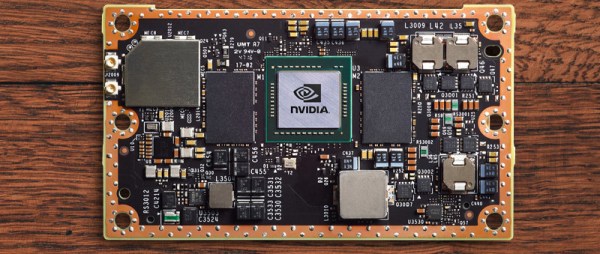
The last year has been great for Nvidia hardware. Nvidia released a graphics card using the Pascal architecture, 1080s are heating up server rooms the world over, and now Nvidia is making yet another move at high-performance, low-power computing. Today, Nvidia announced the Jetson TX2, a credit-card sized module that brings deep learning to the embedded world.

The Jetson TX2 is the follow up to the Jetson TX1. We took a look at it when it was released at the end of 2015, and the feelings were positive with a few caveats. The TX1 is still a very fast, very capable, very low power ARM device that runs Linux. It’s low power, too. The case Nvidia was trying to make for the TX1 wasn’t well communicated, though. This is ultimately a device you attach several cameras to and run OpenCV. This is a machine learning module. Now it appears Nvidia has the sales pitch for their embedded platform down.

Continue reading “Nvidia Announces Jetson TX2 High Performance Embedded Module”

VGA Without A Microcontroller

One of the most challenging projects you could ever do with an 8-bit microcontroller is generating VGA signals. Sending pixels to a screen requires a lot of bandwidth, and despite thousands of hackers working for decades, generating VGA on an 8-bit microcontroller is rarely as good as a low-end video card from twenty years ago.

Instead of futzing around with microcontrollers, [Marcel] had a better idea: why not skip the microcontroller entirely? He’s generating VGA frames from standard logic chips and big ‘ol EEPROMs. It works, and it looks good, too.

VGA signals are just lines and frames, with RGB pixel values stuffed in between horizontal sync pulses, and frames stuffed between vertical sync pulses. If you already know what you want to display, all you have to do is pump the right bits out through a VGA connector fast enough. [Marcel] is doing this by saving images on two parallel EEPROMs, sending the output through a buffer, through a simple resistor DAC, and out through a VGA connector. The timing is handled by a few 74-series four-bit counters, and the clock is a standard 25.175 MHz crystal.

There’s not much to this build, and the entire circuit was assembled on a breadboard. Still, with the clever application of Python to generate the contents of the ROM, [Marcel] was able to build something that displays eight separate images without using a microcontroller.


Open Source Firmware For A Cheap Programmable Power Supply

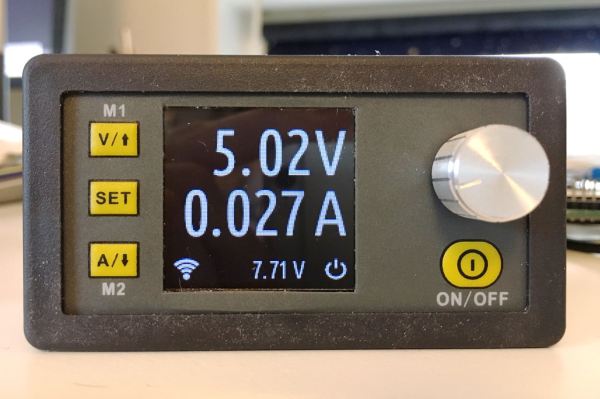
A few months ago, someone clued us in on a neat little programmable power supply from the usual Chinese retailers. The DPS5005 is a programmable power supply that takes power from a big AC to DC wall wart and turns it into a tiny bench-top power supply. You can pick one of these things up for about thirty bucks, so if you already have a sufficiently large AC to DC converter you can build a nice 250 Watt power supply on the cheap.

[Johan] picked up one of these tiny programmable power supplies. His overall impression was positive, but like so many cheap products on AliExpress, there wasn’t a whole lot of polish to the interface. Additionally, the DPS5005 lacked the ability to be controlled over a serial port or WiFi.

This programmable power supply is built around an STM32, with the programming pads exposed and labeled on the PCB. The changes [Johan] wanted to make were all in software, leading him to develop OpenDPS, a firmware replacement for the DPS5005. Continue reading “Open Source Firmware For A Cheap Programmable Power Supply”

Fixing Fake FTDIs

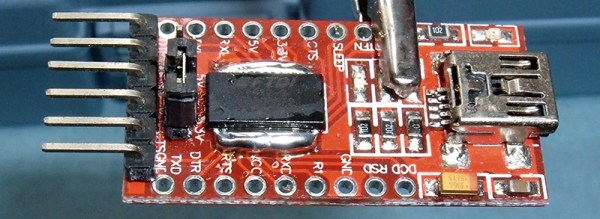
If you know where to go on the Internet, you can pick up an FTDI USB to Serial adapter for one dollar and sixty-seven cents, with free shipping worldwide. The chip on this board is an FTDI FT232RL, and costs about two dollars in quantity. This means the chips on the cheap adapters are counterfeit. While you can buy a USB to serial adapter with a legitimate chip, [Syonyk] found a cheaper solution: buy the counterfeit adapters, a few genuine chips, and rework the PCB. It’s brilliant, and an excellent display of desoldering prowess.

Why is [Syonyk] replacing non-genuine chips with the real FTDI? The best reason is FTDIgate Mk. 1, where the official FTDI driver for Windows detected non-genuine chips and set the USB PID to zero. This bricked a whole bunch of devices, and was generally regarded as a bad move. FTDIgate Mk. 2 was a variation on a theme where the FTDI driver would inject garbage data into a circuit if a non-genuine part was found. This could also brick devices. Notwithstanding driver issues, the best reason for swapping out fake chips for real ones is the performance at higher bit rates; [Syonyk] is doing work at 3 Mbps, and the fake chips just don’t work that fast.

To replace the counterfeit chip, [Syonyk] covered the pins in a nice big glob of solder, carefully heated both sides of the chip, and slid the offending chip off when everything was molten. A bit of solder braid, and the board was ready for the genuine chip.

With the new chip, the cheap USB to serial adapter board works perfectly, although anyone attempting to duplicate these efforts might want to look into replacing the USB mini port with a USB micro port.

Hackaday Links: March 5, 2017

Statistically, more celebrities died in 2016 than would be expected. 2017 is turning out to be a little better, but we did recently lose the great [Bill Paxton]. Game over, man. Game over. A few years ago, [Benheck] built his own pinball machine. It’s Bill Paxton Pinball. A great build, and worth revisiting, just like another viewing of Aliens and Apollo 13.

Some of the most popular 3D-printable objects are [flowalistik]’s low-poly Pokemon series. They’re great models, even though he missed the most obvious Pokemon. Of [flowalistik]’s low-poly Pokemon models, the Bulbasaur is a crowd favorite. Because this model is constructed from flat planes joined at an angle, it’s possible to make a huge low-poly Bulbasaur on a laser cutter or a CNC router. Go home Bulbasaur, you’re drunk. We are eagerly awaiting details on how this grass and poison-type tank was made.

For the last few months, [Matthew Cremona] has been building a huge bandsaw mill in his backyard. It’s built for cutting logs into lumber, and this thing is massive. He’s been posting build log videos for the last few months, but this week he’s finally gotten to where we want him to be: he’s cutting gigantic logs. In the coming weeks, he’s going to be cutting a maple crotch that’s 60 inches (1.5 meters) across.

It’s still a bit early, but here are the details for the 2017 Open Hardware Summit. It’s October 5th in Downtown Denver. If you want to speak at OHS, here you go. If you want to sponsor OHS, here you go. Tickets are over on Eventbrite.

What happens when you give away a new Raspberry Pi Zero W to the fifth caller? This. In other news, Adafruit somehow acquired a real New York City payphone. I’ve heard they were replacing these with WiFi hotspots, which means there are a ton of payphones in a warehouse somewhere? Can anyone hook us up?

Powering A Laptop With Supercapacitors

What do you do when you find a small horde of supercapacitors? The correct answer is a spectrum of dangerous devices ranging from gauss guns to quarter shrinkers. [Rinoa] had a less destructive idea: she’s replaced the battery in a laptop with a bank of supercapacitors.

The supercaps in question are 2.7 Volt, 500 Farad caps arranged in banks six for a total of about 3 watt-hours in each bank. The laptop used for this experiment is an IBM Thinkpad from around 1998. The stock battery in this laptop is sufficiently less advanced than today’s laptop batteries. Instead of using a microcontroller and SMBus in the battery, the only connections between the battery and laptop are power, ground, and connections for a thermocouple. This is standard for laptops of the mid-90s, and common in low-end laptops of the early 2000s. It also makes hacking these batteries very easy as there’s no associated microprocessors to futz around with.

With all the capacitor banks charged, the laptop works. It should – there isn’t a lot of intelligence in this battery. With one bank of six supercaps, [Rinoa] is getting a few minutes of power on her laptop. With a stack of supercaps that take up about the same volume as this already think Thickpad, [Rinoa] can play a few turns of her favorite late-90s turn-based strategy game. It’s not much, but it does work.

Check out [Rinoa]’s video below.

Continue reading “Powering A Laptop With Supercapacitors”

Good USB – Protecting Your Ports With Two Microcontrollers

If you’ve ever needed an example of why you should not plug random USB peripherals into your computer, you need only look at BadUSB. The BadUSB attack relies on the fact that the microcontroller inside every USB device is a black box. If you plug a USB thumb drive into your computer, the microcontroller could quickly set up an additional network interface, forward all your traffic to the attacker’s server, and still keep serving up all those files and documents on the drive. Do you want a thumb drive that attaches a virus to every file? Bad USB can do that.

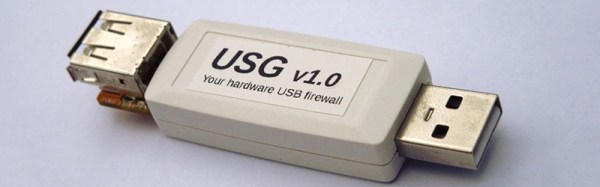
Until now, there is no cure or fix for a device using an implementation of BadUSB. [Robert Fisk] just came up with the first prophylactic USB device, designed to keep BadUSB off your computer. He’s calling it USG, and it’s basically a hardware firewall for USB devices.

The basic design of the system goes something like this: take an ARM microcontroller with a USB host port, take another microcontroller with a USB device port, and have these devices talk to each other over SPI. The command protocol between these two microcontrollers is very simple, and thus decreases the attack surface.

[Robert] is building USG dongles, but in the spirit of Open Hardware and verifiable hardware, he’s also released a design based on two dev boards wired together. This DIY version is basically two STM32F4 dev boards smashed together with bodge wires. The total cost – less solder and a JTAG programmer – is about $50 USD. No, it doesn’t look as pretty as [Robert]’s commercial version of USG, but it does the same job of keeping your computer safe from BadUSB devices.