Rad-Hard ARM Microcontrollers, Because Ceramic Components Are Just Cooler

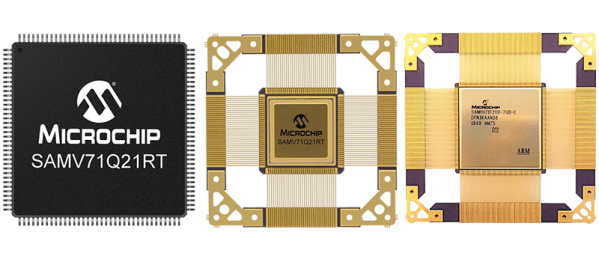
If you’re building a cubesat, great, just grab a microcontroller off the shelf, you probably don’t need to worry about radiation hardening. If you’re building an experiment for the ISS, just use any old microcontroller. Deep space? That’s a little harder, and you might need to look into radiation tolerant and radiation hardened microcontrollers. Microchip has just announced the release of two micros that meet this spec, in both radiation-tolerant and radiation-hardened varieties.

The new devices are the SAMV71Q21RT (radiation-tolerant) and the SAMRH71 (rad-hard), both ARM Cortex-M7 chips running at around 300 MHz with enough RAM to do pretty much anything you would want to do with a microcontroller. Peripherals include CAN-FD and Ethernet-AVB, analog front-end controllers, and the usual support for I2C, SPI, and other standards. This chip does it in space, and comes in a ceramic quad flat package with gold lead frames. These are beautiful devices.

Microchip has an incredible number of space-rated, rad-hard hardware; this is mostly due to their acquisition of Atmel a few years ago, and yes, it absolutely is possible to build a rad-hard Arduino Mega using the chip, space rated.

Of course, there are very, very, very few people who would actually ever need a rad-hard microcontroller; I would honestly expect this to be relevant to only one or two people reading this, and they too probably got the press release. If you’ve ever wanted to build something that goes to space, and you’d like to over-engineer everything about it, you now have the option for an ARM Cortex-M7.

Ask Hackaday: Experiences With Capacitor Failure

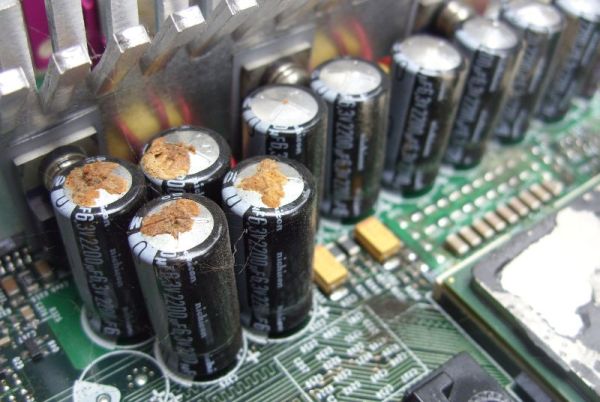
Regular readers of Hackaday are intimately knowledgeable about old electronics, and whether it’s about that old oscilloscope sitting in the pile of other oscilloscopes, or the very rare vintage computer made in a Soviet bloc country, someone somewhere knows how to fix it. One of the biggest problems with these old electronics are capacitors. If it isn’t the battery that’s gone dead and leaked all over, it’s the caps that are either out of spec or have already exploded.

These machines can be brought back from the dead, and in recent months and years we’ve seen an uptick in the number of restomods hitting the Hackaday tip line. If you have a soldering iron and the patience to do so, any machine can be brought back from the grave.

Continue reading “Ask Hackaday: Experiences With Capacitor Failure”

Automated Tuning Of Linux Audio

Audio systems in Linux are terrible. You’ve never known true pain until you’ve tried to set up a recording or broadcasting workstation running Linux. I did, twenty years ago, and nothing has changed since. This wasn’t really a problem when Linux was either used in server spaces or some nerd’s battle station, but now we have small single board computers that everyone uses and wants to turn into a modular synth. Welcome to paintown, because the Linux audio stack is terrible.

For the past ten years, [Dynobot] has been working on improving audio in Linux. This is a decade of reading manuals from IBM and Oracle, and a deep knowledge of how to adjust settings so audio actually works. All of this work is now combined into a single script that improves everything. This means the priority of the Audio group is changed, the thread priority is better, the latency is better, and for anyone who wants to set up a local streaming service, the network latency is better. It’s not everything, and there’s no mention of recording multitrack audio, but we’ll accept the baby steps here.

There are two relevant Github repositories for this, the first containing audio adjustments for Debian-based systems, including the Raspberry Pi. This should work on any single board computer running Debian, and has been tested on all the Raspberry Pis, the Allo Sparky, ASUS Tinkerboard, and the Odroid C2. There’s also a version for TinyCore-based Linux systems that improves the priority of the audio threads, changes the thread scheduling from ‘whatever’ to FIFO, and improves the latency. If you’re running Linux, and you’re doing something with audio, this is what you need.

This Is The Delay Pedal You Can Build Yourself

If you’re looking to make money in electronics, there’s no better market than guitar pedals and modular synths. The margins are high, and all the consumers are otakus who will spend outrageous amounts of money chasing the next big thing. The products are just one step above audiophile wank with zero oxygen cables, and if your opamp sounds ‘more transparent’, you’re going to make a fortune, never mind how something can sound more transparent, whatever that is to begin with.

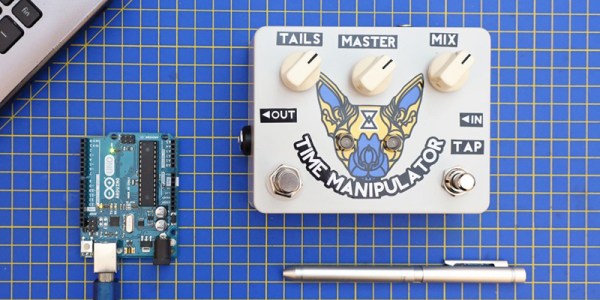
If you want to do something really cool, build a delay, because everyone needs another delay. If you want to build the latest in delay technology, just grab a PT2399 chip. That’s what ElectroSmash did with their Open Source Time Manipulator delay. Everything’s right there, all the parts of the circuits are described, and you too can become an effects pedal engineer.

This pedal is based on the PT2399 chip from Princeton Technology, a digital delay chip that can be used with something that sounds like an old-school bucket brigade chip or something resembling a tape echo. As a digital chip, you’ve also got the clean, clear sounds of a digital delay, with just a few tweaks of the circuit. We’ve taken a look at the PT2399 before, but surprisingly not many people are sharing their secrets.

The circuit for the ElectroSmash Time Manipulator is built around the ATMega328, the same chip in the Arduino Uno, with two PT2399s that can be configured to operate in serial or parallel for everything from a slapback echo to a 600ms digital delay. If you set everything right, you can get choruses, reverbs, or some psychobilly flange-ish sounds.

The entire circuit is open, with a board designed in KiCad, the code is right there written in C, and the only hard-to-replicate tech is the PT2399 chip itself, which can be had from the usual vendors for less than a dollar a piece. It’s a great pedal, and be sure to check out the video below.

Continue reading “This Is The Delay Pedal You Can Build Yourself”

The Display For When You Want Nixies Without All The Hassle

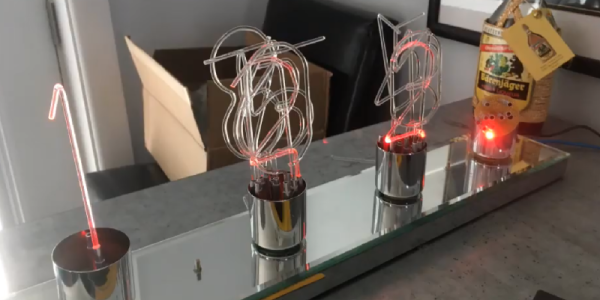
If you want to display numbers, just go for Nixies. There’s no better way to do that job, simply because they look so cool. Unfortunately, Nixies require high voltages, controlling them is a tiny bit strange, and they suck down a lot of power. These facts have given us a few Nixie alternatives, and [Dave] is here with yet another one. It’s a light pipe Nixie, made from acrylic rod.

The idea of using lights shining into a piece of acrylic to display a number is probably as old as the Nixie itself. There were a few tools in the 60s that used side-lit plastic panels to display numbers, and more recently we’ve seen a laser-cut version, the Lixie. This display is just ten sheets of acrylic etched with the numbers 0 through 9. Shine a light through the right acrylic sheet, and that number lights up.

You can do just about everything in acrylic, and it’s already used for a light pipe, so [Dave] grabbed some acrylic rod and bent it into the shape of a few numbers. With a little work, he was able to make his own FauxNixie by mounting these numbers in a carefully modified lamp socked wired up with ten individual LEDs. The results make for big, big, big Nixie-style numbers, and the perfect clock for the discerning glowey aficionado.

Continue reading “The Display For When You Want Nixies Without All The Hassle”

Portable Pi Power Pack Makes For Petite Projects

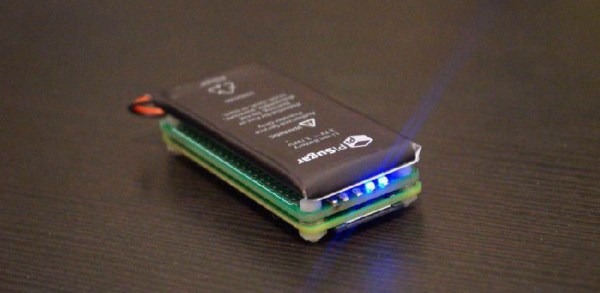
Since the Pi Zero was released, there have been many attempts to add a power bank. Cell phone batteries are about the same size as a Pi Zero, after all, and adding a USB charging port and soldering a few wires to a Pi is easy. The PiSugar is perhaps the cutest battery pack we’ve seen for the Pi Zero, and it comes in a variety of Hats compatible with the Pi, capable of becoming a small display, a keyboard, or any other thing where a small, portable Linux machine is useful.

The core of this build is a small circuit board the size of a Pi Zero. Attached to this board is a 900mAh battery, and the entire assembly is attached to the Pi Zero with a set of two spring clips that match up with with a pair of pads on the back of the Pi. Screw both of these boards together, and you have a perfect, cableless solution to adding power to a Pi Zero.

But the PiSugar doesn’t stop there. There are also cases, for a 1.3 inch LCD top, a 2.13 inch ePaper display, an OLED display, a camera, a 4G module, and something that just presents the pins from the Pi GPIO header. This is an entire platform, and if you print these parts in white plastic, they look like tiny little sugar cubes filled to the brim with electronics and Linux goodness.

Yes, you’ve seen 3D printed Pi cases before, but nothing in the way of an entire platform that gives you a Pi Zero in an extensible platform that can fit in your pocket and looks like sweet, sweet cubes of sucrose.

A Petite Pico Projector For Portable Pi

A few years ago, new, innovative pico projectors, influenced by one of the TI development kits, started appearing in Kickstarter projects and other various DIY endeavours. Those projects fizzled out, most likely due to the cost of the projectors, but we got a few laughs out of it: that wearable smartphone that projected a screen onto your wrist used the same technology.

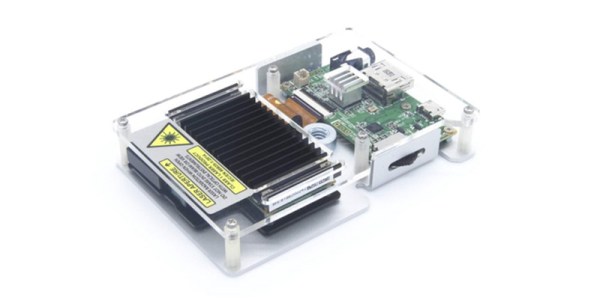
But there’s a need for a small projector, a pico projector, or in this case a femto projector. It’s the Nebra Anybeam, and it’s a small projector that uses lasers, and it comes in the form of a Raspberry Pi hat. We would like to congratulate the team for shipping the ideal use case of their product first.

The key features of this pico projector address the shortcomings of existing projectors that can fit in your pocket. This uses a laser, and there’s no bulb, and the power consumption can be as low as 3 Watts. Power is provided over a micro USB cable. The resolution of this projector is 720p, which is sufficient for a quick setup for watching a movie, but the brightness is listed as equivalent to 150 ANSI lumens, about the same as small projectors from a few years ago.

But of course the big selling point isn’t the brightness or resolution, it’s all about the smallness of the projector itself. There is a developer’s kit, a Pi Hat, a fit-in-your-pocket version with an enclosure, and a ‘monster ball’ version of the Anybeam.