Mathematica And Wolfram On The Raspberry Pi

[Stephen Wolfram], possibly the only person on Earth who wants a second element named after him, is giving away Mathematica for the Raspberry Pi.

For those of you unfamiliar with Mathematica, it’s a piece of software that allows you to compute anything. Combined with the educational pedigree of the Raspberry Pi, [Wolfram] and the Pi foundation believe the use of computer-based math will change the way students are taught math.

Besides bringing a free version of Mathematica to the Raspberry Pi, [Wolfram] also announced the Wolfram language. It’s a programming language that keeps most of its libraries – for everything from audio processing, high level math, strings, graphs, networks, and even linguistic data – on the Internet. It sounds absurdly cool, and you can check out a preliminary version of the language over on the official site.

While a free version of Mathematica is awesome, we’re really excited about the new Wolfram language. If it were only an interactive version of Wolfram Alpha, we’d be interested, but the ability to use this tool as a real programming language shows a lot of promise for some interesting applications.

Measuring The Lifespan Of Nixie Tubes

nixie

Nixie tubes have two things going for them: they’re awesome, and they’re out of production. If you’re building a clock – by far the most popular Nixie application, you’re probably wondering what the lifespan of these tubes are. Datasheets from the manufacturers sometimes claim a lifetime as low as 1000 hours, or a month and a half if you’re using a tube for a clock. Obviously some experimentation is in order to determine the true lifetime of these tubes.

Finding an empirical value for the lifetime of Nixies means setting up an experiment and waiting a very, very long time. Luckily, the folks over at SALTechips already have a year’s worth of data.

Their experimental setup consists of an IN-13 bargraph display driven with a constant current sink. The light given off by this Nixie goes to a precision photometer to log the visual output. Logging takes place once a week, and the experiment has been running for 57 weeks so far.

All the data from this experiment is available on the project page, along with a video stream of the time elapsed and current voltage. So far, there’s nothing to report yet, but we suppose that’s a good thing.

An ARM Powered Business Card, Part Two

Card

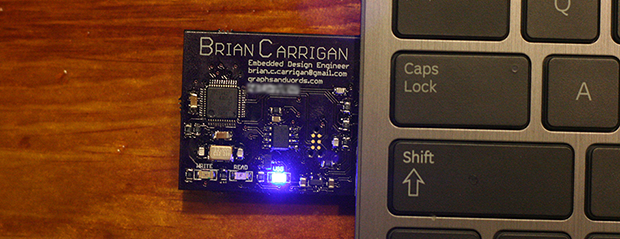
While most microcontroller powered business cards opt for something small and cheap, [Brian] is going in an entirely different direction. His business card features an ARM processor, some Flash storage, a USB connection, and enough peripherals to do some really cool stuff.

This is the second iteration of [Brian]’s business card. We saw the first version, but this new version makes up for a few mistakes in the previous version. The biggest improvement is the replacement of the Molex USB plug with bare traces on the board. [Brian] couldn’t find a board house that could fab a board with the proper thickness for a USB plug, but a few strips of masking tape did enough to beef up the thickness and make his plug nice and snug. Also, the earlier version had a few pins sticking out of the board for programming purposes. This wasn’t an idea solution for a business card where it would be carried around in a pocket, so these pins were replaced with a connectorless programming adapter. Just a few exposed pads gives [Brian] all the programming abilities of the last version, without all those prickly pins to catch on clothing.

With his new business card, [Brian] has an excellent display of his engineering prowess and a very cool toy; he has a project that will turn this card into a keyboard emulator, randomly activating the Caps Lock button for a few seconds every few minutes. A great prank, and a great board to give to future employers.

Solder Sucker Meets Industrial Vacuum Pump

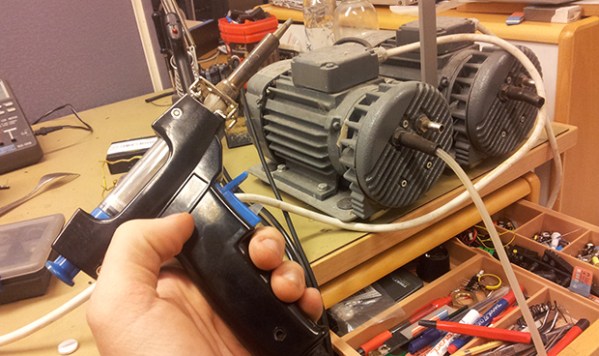
[borgartank] is starting a hackerspace with a few guys, and being the resident electronics guru, the task of setting up a half-decent electronics lab fell on his shoulders. They already have a few soldering stations, but [borgar] is addicted to the awesome vacuum desolderers he has at his job. Luckily, [bogar]’s employer is keen to donate one of these vacuum desolderers, a very old model that has been sitting in a junk pile since before he arrived. The pump was shot, but no matter; it’s nothing a few modifications can’t fix.

The vacuum pump in the old desoldering station was completely broken, and word around the workplace is the old unit didn’t work quite well when it was new. After finding a 350 Watt vacuum pump – again, in the company junk pile – [bogar] hooked it up to the old soldering station. Everything worked like a charm.

After bolting the new and outrageously large pump to the back of the desoldering station, [bogar] wired up a relay to turn on the pump with the station’s 24V line. Everything worked as planned, netting the new hackerspace a 18 kg soldering station.

Learn Engineering And Draw Narwhals

narwhals

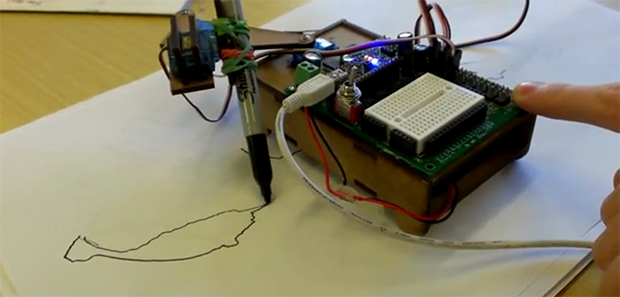
Using LEGO robots and other ‘intro to robotics’ platforms is a great introduction to kinematics and programming, but if you’re teaching a classroom of people who don’t know what a 1/4-20 screw is, perhaps it’s not the right introduction to engineering. That’s the thinking behind NarwhalEdu’s upcoming, Kickstarted online course: give kids a bunch of servos, bolts, and a microcontroller, and they’ll be able to build anything, and not just what the instructions for a Mindstorm’s robot says.

Robots, Drawing, and Engineering is an online course built around a simple SCARA arm robot. It’s made out of laser cut hardboard and powered by three servos and an Arduino Nano with an extension shield. After building this robot in the first hour of the online class, students then learn a little programming and get their robot drawing everything from narwhals to nyan cats and faces.

In the second part of the course, students then tear apart their robot kit and start making other, cooler interesting devices. There’s a contest for the coolest project that will hopefully go a long way to show how creative engineering can be.

Two videos below of the NarwhalEdu SCARA arm in action.

Continue reading “Learn Engineering And Draw Narwhals”

Making The Worst Linux PC Useful

AVR

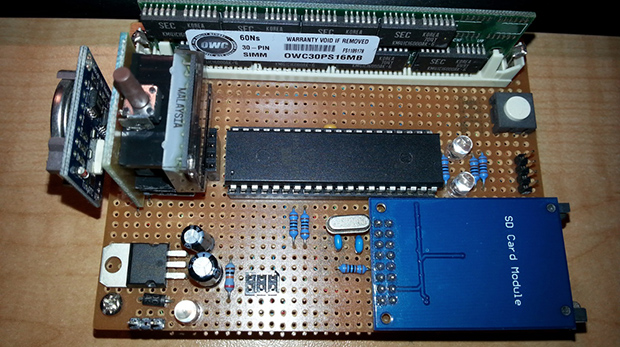
After seeing [Dimitry] build the most minimal Linux computer ever, [Kyle] decided he needed one for himself. In true hacker fashion, he decided to take this build for the worst Linux PC one step further: he would add I2C to his version, making it somewhat useful, considering the number of I2C peripherals out there.

This build is based on [Dmitry]’s ARM Linux computer emulated on an 8-bit AVR. It’s a full-blown Linux computer with 16 MB of RAM courtesy of a 30-pin SIMM, a lot of storage provided by an SD card, all running on an emulated ARM processor inside a lowly ATMega1284p. [Kyle] built this clone over the course of a few months, but from the outset decided he wanted to implement an I2C protocol on this terribly under specced computer.

After booting his computer, [Kyle] eventually got an I2C module loaded by the kernel. With an I2C module and a few spare GPIO pins, he set out to create something to attach to this terribly slow computer – an ancient LED dot matrix display. With a real-time clock, this display became a clock  with the help of a homebrew program written in C. Considering the speed of the emulated processor, the program takes nearly three seconds to read the RTC and display the current time to the display. We’re thinking it was a wise choice to only implement hours and minutes in this clock.

If having a useful computer running at about 10 kilohertz isn’t enough, [Kyle] also compiled the classic text-based adventure Zork. It actually runs, proving you don’t need Megahertz of power to do something useful and fun.

A Pair Of Toaster Reflow Oven Builds

For some reason or another, the Hackaday tip line sometimes sees a short burst of submissions for the same project. The latest one of these was for toaster oven reflow stations. They’re both great builds and different approaches to making a useful tool out of home appliances.

First up is [Richard]’s build. he ended up with a fairly high-end build using a Rocket Scream Reflow Oven Controller Arduino shield. This shield accepts a normal K-type thermocouple and controls an external solid state relay with the Arduino’s PID library. [Richard]’s build has a few neat additions – a properly dremeled enclosure, computer fan, and a welding blanket for insulation. Now that we think about it, it’s odd we’ve rarely seen any sort of insulation in these reflow oven builds.

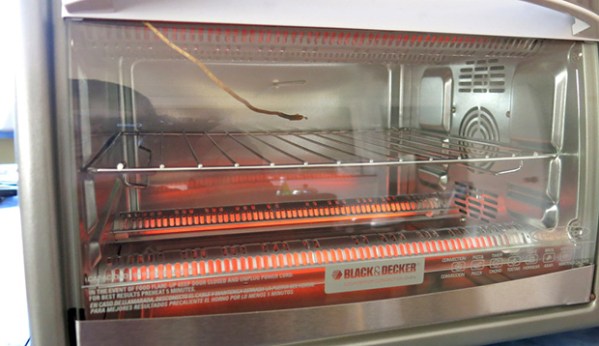
Next up is [Ray]’s version of a Black & Decker reflow oven. While not as fancy as [Richard]’s build, this one does have a few features that make it very interesting. Instead of messing around with thermocouples, [Ray] simply took a digital kitchen thermometer – a neat tool that already a thermistor in a compact metal probe – and read the analog value with an Arduino. To control the power, [Ray] is using a cheap 433 MHz radio transmitter to control a few remotely operated power sockets. It’s a very clever and inexpensive replacement for a SSR, especially since [Ray] had these power sockets just lying around.

So there you go. The same tool, built two different ways. A great demonstration of how you can not only build anything, but you can build anything any way you want.