An Interview With The Creator Of Slic3r

[youtube=https://www.youtube.com/watch?v=vA6jmg_zcQo&w=580]

When in Rome, most people visit great works of art, see masterpieces of architecture, or simply try to convince random tourists that a modern recreation of naval battles in the Colosseum would be really cool and somebody should really get on that. [Andrew] had a different idea, though. He thought meeting up with Slic3r developer [Alessandro Ranellucci] would be just as educational and entertaining as visiting a basilica and thoughtfully decided to film his interview for all to see.

Whenever a file of a 3D object is sent to a 3D printer, the object must first be converted into GCode – the language of lines, circles, and computer aided design that all 3D printers speak. To convert 3D objects to GCode, every piece of 3D printer software from Pronterface, ReplicatorG, and Repetier must first ‘slice’ the file up so the object can be printed one layer at a time.

As the lead dev for Slic3r, [Alessandro], a.k.a. [Sound] goes over the current happenings of his STL to GCode converter – he’s even getting a little support from the very cool people at LulzBot – and the future of Slic3r. There’s still a lot of work to be done optimizing the current software, improving the user interface, and getting rid of all those nasty edge-case bugs.

For as much as we at Hackaday focus on the hardware half of 3D printers, it must be said the current state of the art in desktop manufacturing wouldn’t be where it is without [Alessandro] and other software devs. There’s still a lot of room for improvement – try printing a single wall thickness cylinder without a seam, for example – but without software projects like Slic3r, 3D printing wouldn’t be where it is today.
Breadboard Friendly FPGAs

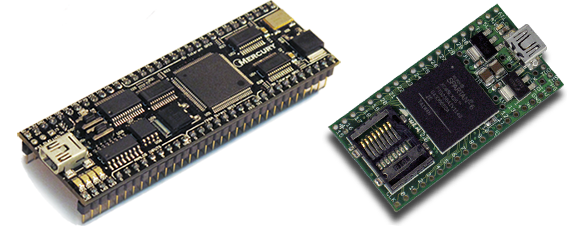
Regular Hackaday readers will be familiar with all the cool things you can do with FPGAs; emulating old video game consoles, cracking encryption protocols, and DIY logic analyzers become relatively simple projects with even a modest FPGA dev board on your workbench. Many FPGA boards aren’t geared towards prototyping, though, and breadboard friendly devices are hard to come by. Here’s a pair of breadboardable FPGAs we’ve found while searching for some related hardware over the past few days

First up is the Mercury FPGA Module. Packaged in a DIP-64 format, the Mercury features a Spartan-3A FPGA with the equivalent of 200k logic gates. Elsewhere on the board is 512kB of RAM and 128kB of Flash storage. There are enough GPIO pins for nearly any project, but sadly only a 10-bit ADC – the same resolution you’d find in an AVR or PIC ‘micro.

Of course the Mercury isn’t the only breadboard-friendly FPGA dev board out there. There’s also the slightly more capable XuLA2 board powered by a Spartan-6 with 32 MB of RAM, 1MB of Flash. Unlike the Mercury, the XuLA2 can also fit in one of those ‘half-sized’ solderless breadboards.

Yes, it’s a different form factor than the commonly recommended Papilio One or the DE0. If you can suggest any other ‘beginners’ (i.e. doesn’t cost an arm and a leg) FPGA boards, leave a note in the comments and we’ll summarize them in another post.

Beautiful Table Made From A Bowling Alley

table

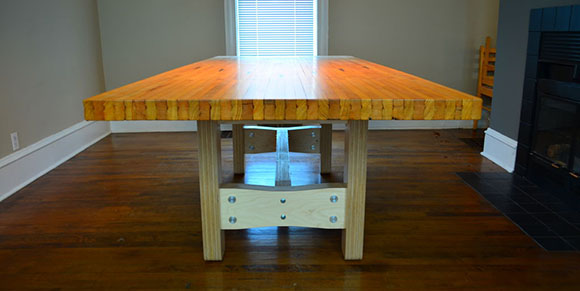
For a workbench, desk, or even a dining room table, there’s nothing quite like a massive piece of laminated maple put to use as the surface of a table. Whether in the form of butcher block, a shop class table, or in [Dillon]’s case, a reclaimed bowling lane, laminated maple provides one of the best possible table surfaces.

A while back, [Dillon] found someone on Craigslist willing to part with an eight foot section of a bowling alley for about $300. After trucking this two and a half inch thick, 250 pound monstrosity home, work began on converting it to a dining room table.

Bowling alleys are constructed by workers laying down maple strips and nailing them together one row at a time. This provides a stable surface when mounted on a concrete platform, but is completely insufficient for a table. To keep his bowling alley table from sagging, [Dillon] routed out three slots for aluminum bars going across the width of the lane. These bars were then screwed into each individual maple strip in the lane, resulting in a very sturdy surface.

The strengthened lane was then resurfaced with the help of a huge industrial belt sander and finished with a satin polyurethane. The legs of the table are made out of CNC’d 18mm Baltic birch plywood held together with metal fasteners.

The end result is a beautiful table ready to last 100 years. Considering [Dillon] spent less than $1000 on this table – and the price of eight feet of 2.5″ butcher block – we’re going to call this a win for [Dillon], his kids, and grandkids.

An Automat Of Wireless 3D Printers

vending

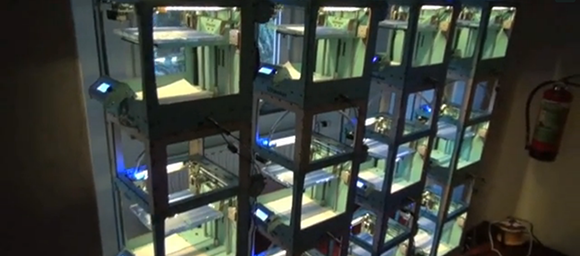
There’s a lot of really cool 3D printer stuff happening in the fashion district of NYC this month. It’s called 3DEA, and shows off  the awesomeness of Shapeways, Ultimaker, and the Up! 3D printer to all the fashionistas, trend setters, and the caliphate of coolness that is midtown Manhattan. The folks at Ultimaker wanted to bring something awesome to this exposition and came up with the Vendingwall: a wall of 3D printers connected into a vending machine able to print multiple objects at once.

Ultimaker has made a name for themselves as the top open source 3D printer manufacturer with absolutely impressive build quality and even a 20-foot-high printer able to manufacture entire rooms. The Vendingwall is their next step in the commercialization of 3D printers; all you need to do to create your own 3D printed object is walk up to the Vendingwall, order a print, and later retrieve from one of the many Ultimakers.

To control these ranks of Ultimakers, a piece of software runs on a wireless router loaded up with OpenWRT. From there, the router serves up a website powered by JQuery-mobile for all the Android and iDevices at the 3DEA open house, turning a wall of 3D printers into a vending machine reminiscent of the automats of yore.

Continue reading “An Automat Of Wireless 3D Printers”

10 Ways To Etch PCBs At Home

[youtube=http://www.youtube.com/watch?v=Q4tWEse2rDI&w=580]

There are a ton of benefits for etching your own circuit boards at home, chief among them the ability to design a circuit in the morning and have a prototype in your hand by lunch. There’s always the question of how to etch the board, but [NurdRage] over on Youtube has all the chemistry covered on ten different etchant solutions for DIY PCB manufacturing.

The peroxide-based methods use simple over-the-counter Hydrogen Peroxide to remove all the copper on a PCB. By combining H2O2 with either Hydrochloric (muriatic) acid or Sulfuric acid, you’ll get a relatively easy to acquire and somewhat safe etching solution.

Historically, the favorite etchant for the home PCB manufacturer has been Ferric Chloride and is still surprisingly available at a few Radio Shacks around the US. Another chloride etchant – Copper Chloride – is one of the most reusable etchants available, able to be regenerated by simply bubbling air through the solution. You can actually make Copper Chloride etchant by reducing down the products of an H2O2 + HCl etchant, making this a very good etchant for PCB pros.

In the ‘miscellaneous’ category, [NurdRage] goes over some alternative etchants such as Bleach and HCl, Nitric acid, and potassium nitrate and HCl; the potassium nitrate etchant is fairly similar to aqua regia, so if you’ve ever wanted a gold PCB, this is the way to go.

Balancing the ease of production and safety of all these etchants, we’ll stick with our Hydrogen Peroxide and HCl etchant for now, at least until we move up to CuCl for the best etching machine we’ve ever seen.

Continue reading “10 Ways To Etch PCBs At Home”

FUBAR Labs Builds A Rocket Engine

engine

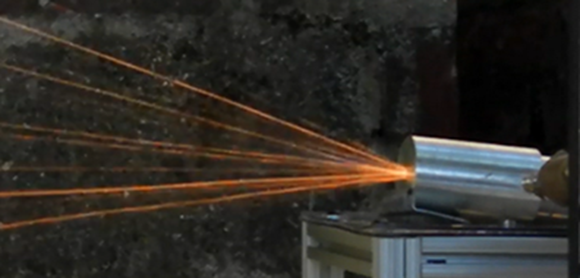
[Graham] over at FUBAR labs took it upon himself to build a rocket engine. This isn’t a simple solid-fuel motor, though: [Graham] went all out and built a liquid-fueled engine that is ignited with a spark plug.

The build started off with a very small ‘igniter’ engine meant to shoot sparks into a larger engine. This engine is fueled with ethanol and air – not the best fuel for a rocket engine by a long shot but save and cheap enough to do a few serious experiments with.

To test out this small engine, [Graham] made a test platform out of aluminum extrusion to remotely control the fuel and oxidizer valves. The valves are controlled by an Arduino and XBee for remote operation and a telemetry downlink for measuring the fluid flow into the engine.

After he had some experience with pressure, plumbing, valves, and engines, [Graham] upgraded his fuel and oxidizer to gaseous oxygen and ethanol. With proper safety protocol in place, [Graham] was able to a series of three 3-second burns less than a minute apart as well as a single burn lasting nearly 5 seconds.

Even though [Graham] eschewed the usual stainless steel construction of rocket engines (his engine is milled out of aluminum), he demonstrated it is possible to build a real liquid-fueled rocket engine at home.

Bird Buggy Soothes A Screeching Parrot

bird

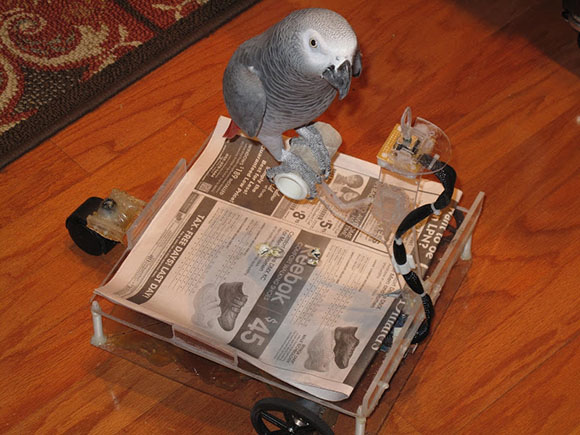
[Andrew] has enjoyed the company of [Pepper] the parrot for more than a decade, but the screeching of a bird in the next room is something you just don’t get used to. [Pepper] gets very lonely some times, and short of having someone carry him around on a shoulder, there’s not much that will calm this parrot down. [Andrew] had the idea of allowing [Pepper] to wander around the house with the help of a mobile platform. Thus was born the Bird Buggy, a parrot-controlled vehicle built just for [Pepper].

The buggy itself is a basic two-wheel drive platform driven with a small beak-compatible joystick mounted just forward of [Pepper]’s perch. With this system, it’s possible for [Pepper] to follow [Andrew] through the house. [Andrew] wanted to make sure [Pepper] couldn’t drive into walls or table legs, so a suite of sensors on the front stops the buggy whenever an object is detected.

One very cool feature of the bird buggy is its ability to drive itself to a recharging station. It does this with the help of a webcam and OpenCV and a pair of markers just behind the charging port. When the Beagleboard on the buggy sees the green and yellow markers for the charging port align, it knows its directly in front of the charging port.

You can see [Pepper] driving his new whip around after the break, along with a very cool demo of the bird buggy docking with its charging port.

Continue reading “Bird Buggy Soothes A Screeching Parrot”