Graphing The Efficiencies Of LED Light Strips

After adding a few LED light strips above his desk, [Bogdan] was impressed with the results. They’re bright, look awesome, and exude a hacker aesthetic. Wanting to expand his LED strip installation, [Bogdan] decided to see if these inexpensive LED strips were actually less expensive in the long run than regular incandescent bulbs. The results were surprising, and we’ve got to give [Bogdan] a hand for his testing methodology.

[Bogdan]’s test rig consists of a 15 cm piece of the LED strip left over from his previous installation. A Taos TSL2550 ambient light sensor is installed in a light-proof box along with the LED strip, and an AVR microcontroller writes the light level from the sensor and an ADC count (to get the current draw) of the rig every 6 hours.

After 700 hours, [Bogdan]’s testing rig shows some surprising results. The light level has decreased about 12%, meaning the efficiency of his LED strip is decreasing. As for projecting when his LEDs will reach the end of their useful life, [Bogdan] predicts after 2200 hours (about 3 months), the LED strip will have dropped to 70% of their original brightness.

Comparing his LED strip against traditional incandescent bulbs – including the price paid for the LED strip, the cost of powering both the bulb and the strip, the cost of the power supply, and the time involved in changing out a LED strip, [Bogdan] calculates it will take 2800 hours before cheap LEDs are a cost-effective replacement for bulbs. With a useful life 600 hours less than that, [Bogdan] figures replacing your workshop lighting with LED strips – inexpensive though they are – isn’t an efficient way to spend money.

Of course with any study in the efficiency of new technology there are bound to be some conflating factors. We’re thinking [Bogdan] did a pretty good job at gauging the efficiency of LED strips here, but we would like to see some data from some more expensive and hopefully more efficient LED strips.


Controlling A Cockroach Leg With Your Mind

If one hack that controls amputated cockroach legs this week wasn’t enough for you, we’ve got another.

Earlier this week we saw two neuroscientists at Backyard Brains put on a show at a TED talk by connecting an amputated cockroach leg (don’t worry, they grow back) to a $100 electronic device called the SpikerBox. The SpikerBox allows students to explore the world of axons and action potentials by listening in on the electronic signals generated by the hair on the legs of a cockroach. For the finale for their TED talk, the SpikerBox guys attached an MP3 player to the cockroach leg, causing the now dead appendage to dance a little jig.

This new build – the Salt Shaker from Thinker Thing again allows students to amputate cockroach legs, pin them down with electrodes, and cause muscle contractions with the sound of science. Thinker Thing took this one step further than the neuroscientists at Backyard Brains; now you can control a cockroach leg with your mind.

The folks at Thinker Thing are using an off the shelf EEG system from Emotiv to capture the alpha, beta, and delta brainwaves of their new human test subjects. By interpreting these brain signals, they can convert these small variations in cerebral electrical activity to sound files. From there, it’s simply a matter of plugging in the Salt Shaker and moving a cockroach leg with your mind.

In the video after the break you can check out the folks at Thinker Thing playing around with their Salt Shaker and controlling a cockroach leg with a team member’s mind.

Continue reading “Controlling A Cockroach Leg With Your Mind”

Exploring The Mandelbrot Set In Real Time

The Mandelbrot set – the fractal ‘snowman turned on its side’ seen above – has graced the covers of magazines, journals, and has even been exhibited in art galleries. An impressive feat for what is nothing more than a mathematical function, and has become something of an obsession for [Chiaki Nakajima].

Even on modern computers, generating an image of a portion of the Mandelbrot set takes a good bit of time. When [Chiaki] discovered this fractal in the mid-1980s, the computers of the day took hours to generate a single, low-resolution image. Real-time zooming and scrolling was impossible but [Chiaki] made the best of what he had on hand and built Pyxis, a Mandelbrot set generator made entirely out of TTL logic chips (Google Translate here).

The original Pyxis connected to a desktop computer via a breakout box. while a special program toggled the bits and registers inside the Pyxis to generate pictures of the Mandelbrot set a thousand times faster than the CPUs of the day could muster.

Time marches on, and the original logic chip Pyxis is can be easily surpassed by even the slowest netbooks. There is, however, another way to build a hardware Mandelbrot set generator: FPGAs.

A few years ago, [Chiaki] began work on the Pyxis2010 (translation), an FPGA-based Mandelbrot set generator able to dynamically zoom and pan around the world’s most popular fractal. Built around an Altera Cyclone III FPGA he picked up from Digikey for $600 (no, not a dev board, just a bare chip), [Chiaki] began deadbugging his circuit directly onto the pins of the hugely expensive FPGA. A man with a steady hand and no fear if there ever was one.

Instead of connecting his Mandelbrot generator to a computer and using it as a co-processor, [Chiaki] decided he wanted something more portable. He found an old Sony PSP, removed the LCD screen, and integrated it into his circuit. After a careful bit of dremeling and fabrication, [Chiaki] had a hand-held Mandelbrot generator that is able to display images of the world’s most famous fractal faster than any desktop computer.

It goes without saying this build is incredible. The technical skill to build an insanely fast Mandelbrot generator on an FPGA is astonishing, but basing it off a logic-chip based build reaches into the realm of godliness. You can check out a video of this amazing build after the break.

Props to [Ian Finder] for sending this one in.

Continue reading “Exploring The Mandelbrot Set In Real Time”

We’re *this* Close To A Real Pip-Boy

Whether inspired by the vaults of Fallout or the mysterious wrist device worn by [Turanga Leela], we’re just glad to see someone finally made a wrist-worn cellphone,

The Ultimate Wrist Watch, as the creator [Rob] calls it, is based on his Motorola Defy smart phone, tucked inside a neatly modified iPod wrist band meant to hold a runner’s music player. Simply mounting a cellphone to a wrist would be a bit awkward and a huge drain on battery life, so [Rob] wrote an app to automatically turn on the display when the accelerometer detects the phone is in the correct watch-reading position, and turns it off when [Rob] lowers his arm once again.

Right now the Ultimate Wrist Watch only stands in for the functions of a standard wrist watch – time, date, a chronometer and stopwatch are just about the only features implemented so far. Still, this is dangerously close to the wrist-mounted computers we’ve been promised for so long.

You can grab the source for the Ultimate Wrist Watch on [Rob]’s git, or just download it off Google Play. Check out the video of the Ultimate Wrist Watch after the break.

Continue reading “We’re *this* Close To A Real Pip-Boy”

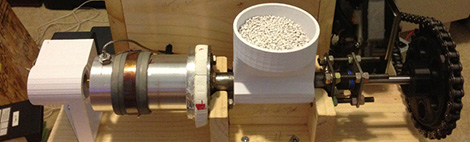
Finally, Turning Plastic Pellets Into 3D Printer Filament

Here’s the situation: a kilogram of 3D printer filament costs about $50. A kilogram of plastic pellets costs less than a tenth of that. Does anyone have a solution to this problem?

For years now, the general consensus was making your own 3D printer filament at home was nigh impossible, dealing with temperatures, pressures, and tolerances that home-built machines simply can’t handle. [Bradley] sent in a filament extruder he made because he was disturbed at this current mindset that desktop filament factories have huge technical issues that have yet to be overcome.

[Bradley]’s extruder is based on the Lyman Filament Extruder, a machine that has successfully demonstrated taking plastic pellets, forming them into a filament, and having this filament used in the production of 3D printed parts. [Bradley]’s improvements include a variable-speed motor, a larger hot end, and an automatic timing system to produce set quantities of printer filament.

Of course, since Inventables threw $40,000 at the problem of creating filament at home there were bound to be more than a few successful designs making their way out into the public. When we last covered the developments of home filament manufacturing, the Filabot seemed to be in the lead. Now with [Bradley] (and  [Lyman])’s machines turning out usable filament, it’s only a matter of time before the 40 grand prize is snatched.

Giving The Arduino Deques, Vectors And Streams With The Standard Template Library

The Arduino IDE is extremely similar to C++, but judging from the sketches you can find on the Internet, you’d never know it. Simpler Arduino projects can make do with just toggling IO pins, reading values, and sending serial data between two points. More complex builds fall into the category of real software development, and this is where the standard Arduino IDE falls miserably short.

[Andy] saw this lack of proper libraries for more complicated pieces of software as a terrible situation and decided to do something about it. He ported the SGI Standard Template Library to bring all those fun algorithms and data structures to any AVR chip, including the Arduino.

Going over what’s included in [Andy]’s port reads just like a syllabus for an object-oriented programming class. Stacks, queues, and lists make the cut, as do strings and vectors. Also included is just about everything in the   and headers along with a few Arduino-oriented additions like a hardware serial and liquid crystal streams.

With all these objects floating around, [Andy] says it will make an impact on Flash and SRAM usage in an AVR. Still, with all the hullabaloo over faster and larger ARM micros, it’s nice to see the classic 8-bit microcontroller becoming a bit more refined.

Debugging The Stellaris With OpenOCD

It looks as though Texas Instruments are really reaching out to the hacker community with their new ARM-powered Stellaris dev board. On the Stellarisiti forums, a member asked about the debugging options for the Stellaris board. The Stellaris already features an In-Circuit Debug Interface (ICDI), but unfortunately it’s a little hard to get working in Linux-ey environments.

One of the devs for the Open On-Chip Debugger was already talking with TI to get the ICDI spec released for the Stellaris board. TI released the info, and after quite a bit of work, everything is open for all to see.

Right now, OpenOCD support for the Stellaris is still incomplete, but there is an project up on the Gits that allows for multi-platform development for TI’s new board.

Needless to say, getting everything up and running is still a chore. That’s not really a concern, though; the Stellaris has only been around for a few months and it takes devs time to put all the required tools into nice, neat packages. We’re just glad TI is being so forthcoming with the relevant documentation, lest development becomes a million times harder.