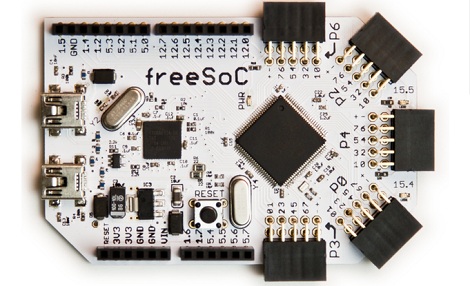
FreeSoC, For When You Need 68 I/O Pins

Like many of us, [Jon] began his journey through the magical world of microcontrollers with an Arduino. For a beginner, the Arduino is a wonderful tool, but [Jon] quickly found himself limited by the platform. There are too few pins on the Arduino, and and the platform doesn’t really lend itself to extremely complex projects. To this end, [Jon] designed freeSoC, an Arduino-compatible platform based on the Cypress Semiconductor PSoC 5.

The Cypress PSoC 5 is an extremely capable microcontroller with 60 general purpose I/O pins and 8 special purpose, high current outputs. Every pin on [Jon]’s freeSoC is completely configurable; if you want 24 SPI ports and a dozen 20-bit ADCs, just launch Cypress’ design software and configure the chip graphically. With this many I/O ports, the PSoC 5 is as useful as an FPGA, without all the hassle of actually being and FPGA.

A really neat feature of the freeSoC is its ability to be programmed graphically. Using Cypress’ PSoC Creator IDE, the multitude of I/O pins can be configured to just about anything very easily. Because the PSoC 5 is based on an ARM Cortex-M3, programming the freeSoC is as easy as any one of many ARM dev boards that were recently released.

[Jon] came up with a very, very neat project here, and it’s something we can definitely see the utility of.

Thanks [Dale] for sending this one in.

Hackaday Links: October 6, 2012

Upgrading a desktop with a diamond cutting wheel

[Michail] needed a new graphics card. The only problem was his motherboard didn’t have any free PCI-E x16 slots available. Unable to find a PCI-E x1 card, he did what any of us would do and broke out the Dremel. Yes, he got it working, but don’t do this unless you know what you’re doing.

It’s recycling!

[Steve] recently got a Galaxy S3 and was looking for something to do with his old phone. It’s got WiFi, it’s got a camera, and with a free app, [Steve] now has an IP Webcam. Neat way to recycle a phone.

This is now bookmarked

We’re not much for plugging other blogs, but Math ∩ Programming – that’s intersection, remember – is really cool. Apparently it has been around for a little more than a year and already there are quite a few really cool posts. How to use cellular automaton to generate caves in video games and facial recognition through Eigenvalues are amazingly in depth, and show the theory behind some really cool techniques. Very, very cool.

Troll Physics: now wireless!

Remember [Fredzislaw100], the guy who puzzled the Internet with impossible circuits? He’s back again, this time with wireless LEDs. We’re guessing something similar to an induction charging system in the battery clip, wirelessly coupled to something under the paper, and that is wirelessly coupled to the LEDs. Your guess will probably be better than ours, though.

Not shown: Captain Obvious, Major Major

Pv2 [Zachary Ricks] of the U.S. Army thought we would get a kick out of the last name of one of the guys in his company. Yes, it’s ‘Hackaday,’ and yes, it’s a real surname. Here’s the full pic [Zach] sent in. Apparently it’s a name along the lines of ‘Holiday.’ Honestly, we had no idea this was a real surname, but we’re thinking Private Hackaday could use a care package or two (dozen).

Anyone up for sending a few hacker friendly (for [Zach] and a few other guys) care packages? Even socks or books or Oreos would make for an awesome care package. Email me if you want the mailing address.

Hackaday-proofing Your Hackerspace’s Server

Last month we posted a tutorial from Hub City Labs on making your own PCBs at home. At the time, Hub City was hosting their hackerspace web site on a tiny vps graciously provided by a member. As you might expect, the throngs of Hackaday readers turned Hub City Labs’ server into a pile of molten slag and made their admin’s hair a little more gray. Their web site is up again, and Hub City provided a tutorial on protecting your server from the ravages of being Slashdotted, Farked, Reddited, and even Hackaday’d.

The solution for the first few hours was to transfer Hub City Labs’ site to an Amazon EC2 instance. Since then, they’ve moved over to a Debian EC2 instance that is able to handle half a million pageviews an hour for a WordPress site.

This amazing capability required a good bit of optimizations. A WordPress installation is set to run cron tasks on every page load; not good if you’re going to see thousands of hits every minute. The guys added define(‘DISABLE_WP_CRON’, true) to their wp-config.php file and set all the background tasks – checking to see if a page should be updated – to a fixed schedule every minute or so. Along with an increase in the WordPress cache, these optimizations increased the number of pageviews an hour from 1500 to 60000.

To get up to half a million pageviews an hour, the EC2 instance was loaded up with Varnish, a front-end cache that really speeds things up.

The result – 375 million pageviews for $15 a month – is more than Hub City Labs will probably ever need. The nature of hackerspace web sites, though – light load until Hackaday, Slashdot, or Reddit figure out you did something cool – means hosting on an expandable EC2 instance is probably the way to go.

Web IDE For The Raspi

For this month’s release of Adafruit’s Raspberry Pi Linux distribution, [Limor], et al. decided to build a web-based IDE for the Raspberry Pi.

The Raspberry Pi WebIDE is a web server that runs on the Raspi. By connecting to your raspi in a web browser, you’re able to create your own Python programs that are able to interact with the GPIO pins. All the code is stored in the cloud with the help of bitbucket.

The WebIDE is in its early Alpha stage right now; there are a few bugs and minor issues, but in the video after the break, [Limor] shows us it’s possible to push code to a Raspi through the Internet and view the result in a web-based serial terminal.

For fear of editorializing, we have to point out that Adafruit’s web IDE – along with other Arduino web IDEs such as Codebender and the Wifino – work on the cloud. If you’re planning a long-term project that relies on a web-based IDE, you might be in for a world of hurt if only because you can’t host a cloud on a personal server. We’d love to see a package that allows us to have the same functionality as bitbucket on a personal server. If you can find a project that does something similar, or have written your own, send it in and we’ll spread the word.

Continue reading “Web IDE For The Raspi”

A JavaScript Interpreter For ARM ‘micros

When programming a microcontroller to do your bidding, you only have two choices. You could write your code in a proper language such as C and cross-compile your source into a piece of firmware easily understood by a micro. Alternatively, your could load an interpreter on your microcontroller and write code via a serial connection. Interpreters are a really fast and easy method to dig in to the hardware but unfortunately most microcontroller interpreters available are based on BASIC or Forth.

[Gordon] figured it’s not 1980 anymore, and interpreters for these relatively low-level languages aren’t a good fit with the microcontrollers of today. To solve this problem, he created Espruino, a JavaScript interpreter for the new batch of ARM development boards that have been cropping up.

Espruino is designed for the STM32VL Discovery board, although [Gordon] plans on porting his interpreter to the Arduino Due when he can get his hands on one. Installation is as easy as uploading any other piece of firmware, and even though [Gordon]’s STM32VL doesn’t have a USB port for a serial terminal, it’s a snap to connect a USB to TTL converter and get this interpreter working.

Espruino isn’t open source yet, only because [Gordon] would like to clean up his code and write a bit of documentation. He’d also like to make Espruino profitable so he can work on it full-time, so if anyone has an idea on how [Gordon] can do that, leave a note in the comments.

LED Illuminated Isomorphic Keyboard Looks As Good As It Sounds

Unlike the traditional ebony and ivory found on pianos, isomorphic keyboards arrange buttons on a grid. This makes every chord the same shape, and to transpose a piece it’s simply a matter of moving your fingers a few places to the left or right. [Brett Park] sent in an isomorphic keyboard he built loaded up with LEDs, and we’re thinking it the perfect instrument for musicians looking to move up from playing their MacBook.

The body of [Brett]’s keyboard is made out of a sheet of acrylic. After drilling 64 holes for each of the clear arcade buttons, [Brett] bent the sides of his hexagonal keyboard into a very sturdy-looking enclosure.

On the hardware side, [Brett] used a 64 button Arduino shield and a Sparkfun MIDI shield. The RGB LEDs behind each button are controlled via MIDI sysex messages generated outside the instrument, making it perfect for a little bit of visual feedback from whatever soft synth you desire.

In the videos after the break, you can check out the light patterns in action along with one of [Brett]’s improvs. Notice how all the chords are the same shape, and changing the key only requires [Brett] to move his hands slightly to the side.

Continue reading “LED Illuminated Isomorphic Keyboard Looks As Good As It Sounds”

Jailbreaking The Kindle Paperwhite

The Kindle Paperwhite, Amazon’s newest e-ink reader featuring a touch interface with a higher contrast display, is now officially jailbroken.

[geekmaster], the geek master behind this hack, based his jailbreak off [Yifan]’s previous hack  to jailbreak the Kindle Touch. Installation is a snap, and only requires you to upload the data.stgz file to the root directory of the Paperwhite and restart the device. On the next boot, the Paperwhite will be jailbroken, allowing you to do tons of cool stuff with a tiny Linux device connected to an e-ink screen.

We’ve already seen a few really cool uses for jailbroken Kindles including a weather station display and a serial terminal for your Raspberry Pi. Cracking the newer and better Kindle Paperwhite means those e-ink projects you’ve been thinking about building just became much more attractive.

One word of warning from [geekmaster], though: USB downloader mode isn’t yet enabled. If you brick your device, you’ll need to connect your Kindle to a serial port. This shouldn’t be a problem for Hackaday readers, but it is something to watch out for.