Single Sided Arduino Is A Great Introduction To PCB Etching

After you’ve taken the plunge and decided to learn how to etch your own circuit boards, you’ll quickly find even the simplest boards are still out of your grasp. This is due mostly to the two-layer nature of most PCBs, and turn making a homemade Arduino board an exercise in frustration and improving your vocabulary of four-letter words.

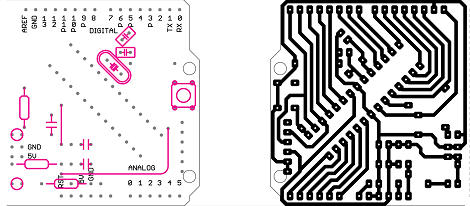
After looking around for an easy-to-manufacture single-sided Arduino board, [Johan] realized there weren’t many options for someone new to board etching. He created the Nanino, quite possibly the simplist Arduino compatible board that can be made in a kitchen sink.

Billing it as something between the Veroduino and the Diavolino, [Johan]’s board does away with all the complexities of true Arduinos by throwing out the USB interface and FTDI chip. A very small parts count makes the Nanino much less expensive to produce in quantity than even the official Arduino single sided board.

For an introduction to etching your own PCBs at home, we couldn’t think of a better first board. As an Arduino, you’re guaranteed to find some use for it and the ease of manufacture and low parts count makes it the perfect subject for your hackerspace’s next tutorial series.
Building Up An Inventory Of SMD Parts

Once you’ve been tinkering around with electronics for a while, you’ll realize the through-hole components that make breadboarding a circuit so easy won’t cut it anymore. Surface mount parts are the future, and make it incredibly easy to build a semi-professional mockup at home. The question arises, though: how do you store thousands of surface mount parts smaller than a grain of rice?
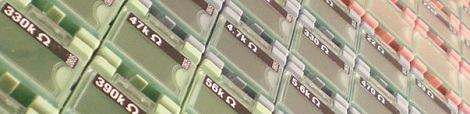
As [George] was building up his SMD inventory, he came across a few clever solutions. The first was a binder sold by Adafruit (and others) that holds strips of cut tape SMD components. [George] wanted something a little more modular, and when he came across an eBay auction for 5000 0805 resistors and 3000 0805 caps, he needed to find a storage solution.

[George] ran across these tiny modular boxes while shopping at Adafruit. These boxes are completely modular, interlock with each other, and have a hinged lid that will hopefully prevent the eventual, ‘SMD parts everywhere’ spill everyone his likely to have.

After printing out some labels for his boxes, [George] had a very tidy solution to his SMD organization problems. We’re wondering what other Hackaday readers use to organize their parts, so if you have a better solution send it in.

OS X Port Of Gqrx Is The Easiest Way To Get Into Software Defined Radio

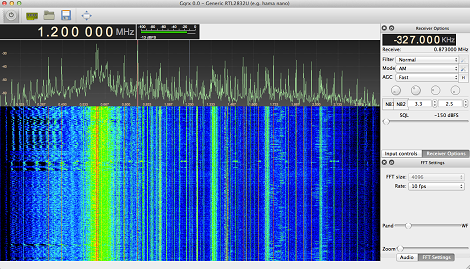
Many have tried to put together an easy package for running software defined radio packages on the Mac. Not many have succeeded the way [Elias]’ port of the gqrx SDR package has. It’s simply the easiest way to get a software defined radio up and running on the mac.

gqrx is a front end for the very popular GNU Radio software defined radio toolkit. Originally designed for the FUNcube SDR dongle, gqrx can also be made to work with one of the many, many USB TV tuners that have come out of China this past year for use as a software radio.

[Elias]’ port of gqrx isn’t the first app to put software defined radio on the Mac, but it certainly is the easiest. Simply by downloading [Elias] disk image, plugging in a TV tuner dongle, and starting the app, I was able to have a software radio receiver on my MacBook Air in less than a minute.

Everything required by GNU Radio and gqrx is already included, making this the easiest way to get SDR on a Mac. Very awesome work from [Elias], and we thank him.

Hackaday Retro Roundup, This Time With A PowerPC And A PET

Thought we forgot about this, didn’t you? Well, the Hackaday Retro Edition is still going strong, and this time we have a few more retro successes that were able to load our retro site with ancient hardware.

First up is a submission by [rusbus]. He had a Power Macintosh 6100/60 lying around – the first Macintosh with a PowerPC processor instead of the Motorola 68k – and loaded up our retro site. There are some weird quirks about the 6100, notably the AAUI Ethernet tranceiver connected to a 10BASE-T network.

Although some browsers are available for the 6100, notably iCab (it’s not great, but it also works on 68k machines), [rusbus] had to settle for Internet Explorer 3.01. He eventually got it working and has a picture to prove it.

On the subject of finding a proper web browser, [azog] loaded up the retro site with a Commodore PET. There aren’t any web browsers for a PET, you say? Well, [azog] had to make one.

The network adapter is a Retroswitch Flyer Internet Modem, and after finding some network-aware projects on the Retroswitch site such as an IRC and Telnet client, [azog] put together an extremely crude web browser. In BASIC. Old BASIC. We’re impressed.

With [azog]’s browser, the PET opens up a channel to a URL, reads the text coming in, and processes it. There’s only 1kb of video RAM and 32kb of system RAM, so small luxuries like scrolling are nearly impossible. An amazing piece of work, really.

Finally, [Bob] from Portugal sent in a neat Flickr gallery of a Schneider euro XT he found in his basement. It’s based on the IBM PC/XT running an Intel 8088 processor, but is enclosed in a ‘the keyboard is the computer’ form factor reminiscent of a C64 or TRS-80. He hasn’t gotten it on the Internet yet, but it’s still a cool piece of kit.

Giving The MSP430 A GUI

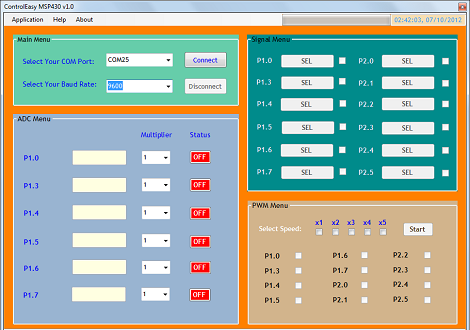
Sometimes you need to toggle or read a few pins on a microcontroller for a project so simple (or so temporary) that coding some firmware is a rather large investment of time. [Jaspreet] had the same problem – wanting to read values and toggle pins without writing any code – so he came up with a rather clever solution to control an MSP430 through a serial connection.

[Jaspreet] calls his project ControlEasy, and it does exactly as advertised: it provides a software interface to control ADC inputs, PWM outputs, and the state of output pins via a desktop computer. ControlEasy does this with a matching piece of code running on any MSP430 with a hardware UART (like the TI Launchpad) sending and receiving data to the computer.

Right now ControlEasy can read analog values, generate PWM output, and set individual pins high and low. [Jaspreet] plans on expanding his software to allow control of LCDs and I2C and SPI devices.

In the video after the break you can see [Jaspreet] fiddling around with some pins on his LaunchPad via the GUI. The software is also available for download if you’d like to try it out, but unfortunately it’s a Windows-only build at this point.

Continue reading “Giving The MSP430 A GUI”

A Mobile Electronics Lab For All Your Projects

When [Nisker]’s son got a very, very loud and annoying toy, he did what any good maker parent would do: instead of removing the batteries, he sought a way to lower the volume instead. This, of course, meant cracking open the toy and going at the circuit board with a soldering iron. Not having a permanent electronics workbench meant [Nisker] needed to dig out his Weller from a bag full of tools. Surely there must be an easier way to be a tinkerer with a small workspace.

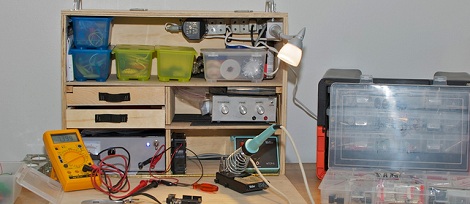
[Nisker]’s solution was to build a mobile electronics workbench. The resulting wooden box has more than enough space to hold a signal generator, power supply, soldering iron, multimeter, and a bunch of other tools required for making or modding electronics projects.

The case was designed in Google Sketchup and constructed out of 12mm plywood for the sides and 6mm ply for the shelves. All the pieces were cut out with a circular saw and pieced together with screws and glue.

Now [Nisker] has a very compact – 16.9 x 7.9 x 22 inches – electronics lab he can carry just about anywhere. Not a bad project if you’re limited by your current space, and classy enough to keep around once you finally set up a proper workshop.

Using UAVs To Find Mannequins Lost In The Outback

Every other year the Australian Research Center for Aerospace Automation, the government of Queensland, Australia  and other government and research institutions hold a contest to develop technology for unmanned aerial vehicles for the wastes of central Australia. Canberra UAV – a group of autonomous drone enthusiasts from the Make, Hack, Void hackerspace – took part in this UAV challenge this year. They ended up with one of the most successful UAVs to every compete, and while they didn’t quite finish the competition they were one of the most successful entries to date.

The goal of the Search and Rescue Outback Challenge is to take off from a landing strip, search for a mannequin named Outback Joe, and deliver 500 ml of life-giving water via air drop. Out of 72 teams entered in to this year’s Outback Challenge, only 6 were allowed to take off – safety restrictions, don’t you know – and all but two hadn’t been destroyed via ‘rapid, unplanned descent’ during qualifications.

UAV Canberra was the only team able to search the entire 5 nautical mile radius search area with their cameras and find Outback Joe. Contest judges gave them permission to drop their payload, but unfortunately the bottle of water was snagged on the engine.

In the many iterations of the Search and Rescue Outback Challenge, UAV Canberra is only the second team to locate a mannequin in the outback, and the first to do it autonomously. A shame, then, that they were unable to claim a victory, but we’ll look forward to their entry in the next Search and Rescue competition.

You can check out a few videos of the Canberra UAV team’s flights after the break.

Continue reading “Using UAVs To Find Mannequins Lost In The Outback”