LED IM status indicator

Green Light Go, Red Light Come Back Later

Depending on your taste for social interaction and tolerance for distraction, an open floor plan or “bullpen” office might not be so bad with a total of four people. Hackaday.io user [fiddlythings] likes it, but people often stop by to see him or one of his coworkers only to find them busy or absent. While their status is something they could plainly see in Microsoft Communicator from their own desk, some people like to chat in person or stop by on their way to and from meetings.

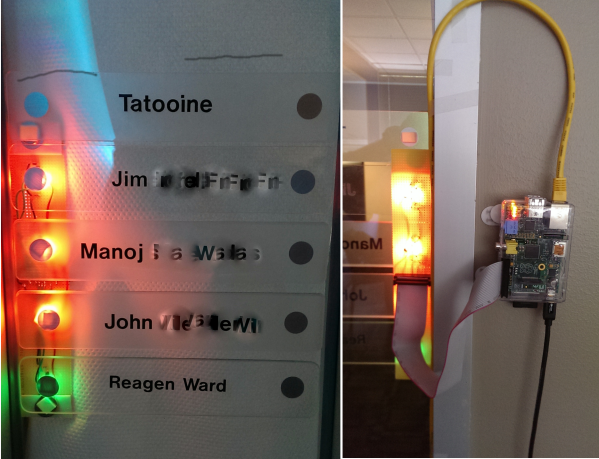
In order to save these visitors a few seconds, [fiddlythings] came up with an IM status indicator using their existing nameplates outside the door. Each of their names has a little silver dot by it which he backlit with a flattish RGB LED. These LEDs are driven by a Raspberry Pi and NPN transistors through a ribbon cable.

The plan was to imitate the Communicator status colors of green for available, red for busy, and yellow for away. [fiddlythings] dialed up a lovely shade of amber for away using a mix of red and green. Since he really only needs two colors, he’s using eight NPN transistors instead of twelve. The quick ‘n dirty proof of concept version used Python and a Pidgin IM console client called Finch. Once he got IT’s blessing, he implemented the final version in C++ using Libpurple to interface with Communicator.

This isn’t the first time we’ve seen a Pi used to indicate status—remember this mobile hackerspace indicator?

Go On A Power Trip With Powerduino

powerduinoThings don’t always run the way we want them to or operate at the ideal temperature out of the box. Instead of spending extra for power controls that may or may not meet your needs, wouldn’t it make more sense to dial in the ideal level from the source? That’s what [dekuNukem] had in mind when he decided to make Powerduino, an arduino-compatible programmable power strip.
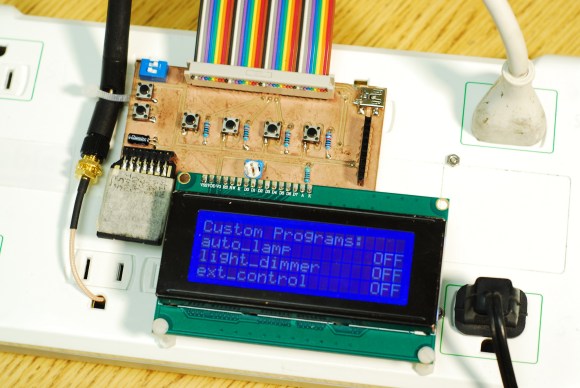
With Powerduino, [dekuNukem] can control the electrical consumption of all kinds of things without ever worrying about the irreversible deadliness of mains voltage. It actually uses a Teensy 3.1 which can be programmed with the Arduino IDE through the micro USB connector. He’s really tricked it out to the point of putting Kill A Watt meters to shame. A wi-fi module lets him control any of the outlets from anywhere, and the RTC module lets him make customized schedules for them. Powerduino has an SD card slot for logging energy consumption, and a 20 x 4 LCD screen makes it easy to directly interface with the power strip.

The Powerduino code is up on GitHub, and [dekuNukem]’s walkthrough video is after the jump.

Continue reading “Go On A Power Trip With Powerduino”

Sink Your Teeth Into PiPhone

Raspberry Pi cell phoneHave you ever dreamed of independence from smartphone bloatware? If you have a Raspberry Pi and an Adafruit TFT, you’re halfway to making your own version of [Dave]’s PiPhone.
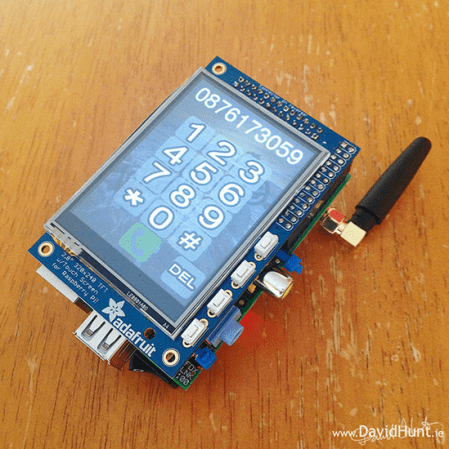
This tasty proof-of-concept cellular sandwich is made by adding a Sim900 GSM/GPRS module, which communicates via UART, to the Pi/TFT hardware while using a piece of foam core board in the middle to prevent shorts. You won’t get free service or anything, but you can pop a pre-paid SIM card into it. He’s powering it with a LiPo battery and using a DC-to-DC converter to set up the 3.7V to 5V. You could do a lot worse than the $158 BOM, and we’re betting you have a Pi lying around already. We wish more phones had baby rocker switches.

There’s a slight problem with the PiPhone: it gets pretty warm and there isn’t a lot of room for air circulation. For best results, let it cool on a well-attended windowsill or operate it near a fan like [Dave] did. He doesn’t have the code up on GitHub as of this writing, but he will capitulate to high demand. Make the jump to see [Dave]’s tour of the PiPhone and watch him make a call with it.

Continue reading “Sink Your Teeth Into PiPhone”

Black Mirror, Black Hole: Kill Your Television

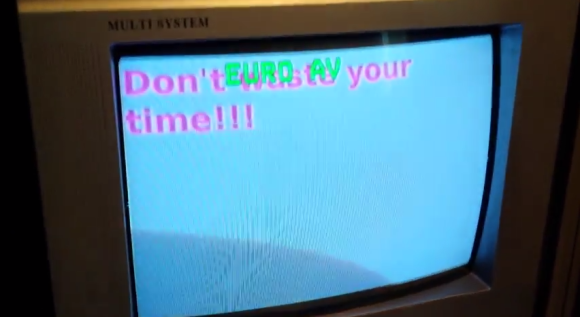
don't waste your time TV screenWould you believe that some people think the internet is a time waster? Well, not at this particular address of course, but we can think of some other sites that are absolute rabbit holes without so much as a rousing game of croquet at the bottom. If you need help achieving what Tim Ferriss dubbed a Low Information Diet, there are browser extensions that will block your access to sites that keep you from getting things done. [Ivan’s girlfriend] has taken this time management tack seriously and even created a simple web page that states “Don’t Waste Your Time!” that will show if she tries to get to Facebook.
There’s one small problem with all this, and it’s been around for a long time. [Ivan’s girlfriend] still watches TV. Out of love and respect for her goals, he decided to prank her by blocking her TV viewing. In a delightful twist, the TV will display her own web page to her after 30 seconds.

They have digital and analog TVs, so he had to set up both in order to cover his bases. The digital TV is a monitor fed from a set-top box with HDMI out. As the STB can only be controlled via IR remote, [Ivan] used an HDMI switch to change from the STB input to a Raspi that will display the reprimanding web page and play Pink Floyd’s “Time“.

The analog TV took  slightly more doing. He put a Raspi on the AV input, but connected it from the inside so nothing looked suspicious. The Raspi checks the TV status every second and switches to the Pi once the TV is on. Same deal: judgmental web page, Pink Floyd. The beauty part is that both of [Ivan]’s setups also record her reaction; the digital TV uses a dash camera and the analog  uses an Android phone. Check out [Ivan]’s tour of the analog TV Pi after the break.

If you or [Ivan’s girlfriend] need even more time management help, there’s always the roll-your-own-Pomodoro timer.


Continue reading “Black Mirror, Black Hole: Kill Your Television”

2048: Embedded Edition

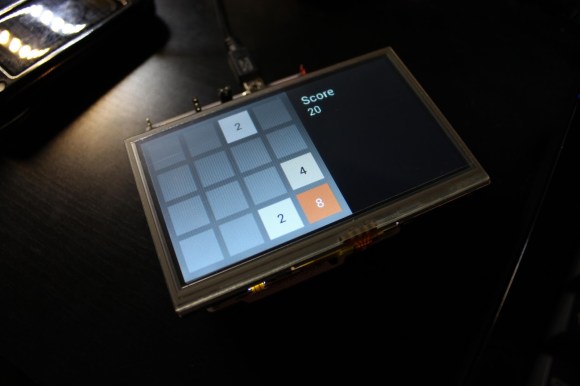
Embedded touch version of 2048 tile gameHow ’bout that 2048 game? Pretty addictive, huh? Almost as addictive as embedded systems are, at least if you’re [Andrew]. Armed (pun intended) with a Nucleo F4 and a Gameduino 2 shield, he decided to have a go at making an embedded version of the popular tile pusher web game.
If you’re unfamiliar with the Nucleo boards from STMicroelectronics, check out our post on the Nucleo family from a couple of months ago. The Gameduino 2 shield ships with a 4.3″ touchscreen driven by an FT800 GPU EVE. [Andrew] wrote his own driver for it and his blog post goes into great detail about its programming model and the SPI read, write, and command functions he wrote. Full code is available from [Andrew]’s repo.

He started by generating a blank screen based on clues found in the Gameduino 2 source. Pretty soon he had rendered a rectangle and then a full 2048 board. A minor difference between [Andrew]’s creation and the original is that his always creates new tiles as ‘2’ while the web game cranks out the occasional ‘4’.

We were unable to embed [Andrew]’s gameplay videos, but you’ll find two on his blog.


Kyub MIDI Keyboard Puts A Piano In Your Pocket

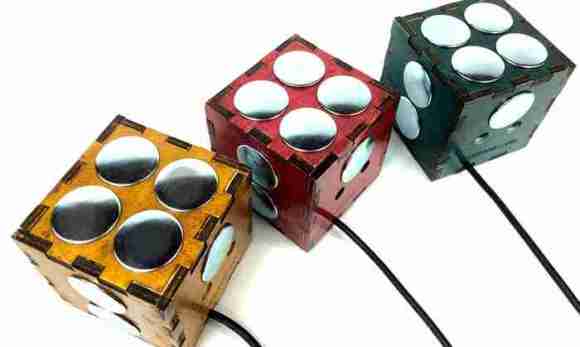
[Keith Baxter] loves making electronic instruments. His latest vision has come to life as Kyub, an open-source MIDI keyboard. [Keith] has previously graced our site and cracked Popular Science with his servoelectric guitar.

[Keith] wanted to make a completely open source instrument that’s elegant, useful, and a bit more accessible than the servoelectric guitar, so he teamed up with a hacker/electronic music expert and an industrial designer. He built the early prototypes around an Arduino Uno. The current iteration uses a Teensy 2.0 and is available in various forms through Kickstarter. [Keith] opened the Kyub up to crowd funding in an effort to obtain volume pricing on some of the parts as well as an Eagle license to make the PCB files available commercially.

The Kyub has eleven pressure-sensitive capacitive keypads on five sides of the cube. The accelerometer can be used to vary note volume, bend the pitch, or whatever else you program it to do. Of course, you’ll need a computer with a synthesizer program, but [Keith] says it is compatible with most software synth programs, some of which are free.

There’s a demo video of an early prototype after the break. Videos of the Kyub in its current form are available on the Kickstarter page.

Continue reading “Kyub MIDI Keyboard Puts A Piano In Your Pocket”

Zenotron: The Looks Of A Kaypro II With The Soul Of A Nebulophone

This beautiful instrument of musical delight is called the Zenotron, and it was built by [Mike Walters] for his friend [Zeno] in exchange for some keyboards. The Zenotron is the latest musical hack in a long line of awesome from the same guy who built the Melloman, its successor, the Mellowman II, and Drumssette, a programmable sequencer.

The sweet sounds of those babies all come from tape loops, but the Zenotron is voiced with a modified [Bleep Labs] Nebulophone synthesizer. Instead of the Nebulophone’s pots controlling the waveform and arpeggio, he’s wired up a 2-axis joystick. He left the LFO pot wired as-is. When it’s turned all the way down, he’s noticed that the joystick takes over control of the filter. [Mike] fed the audio through a 4017 decade counter and each of the steps lights up an array of four to five of the randomly-wired 88 LEDs.

[Mike] made the case from the top half of a small filmstrip viewer and an old modem, which is way better than the Cool Whip container housing we made for our Nebulophone. He re-purposed a toy keyboard and made a contact board for it with small tactile switches. This results in nice clicky feedback like you get from mouse buttons.

Of course there’s a demo video. You know the drill.


Continue reading “Zenotron: The Looks Of A Kaypro II With The Soul Of A Nebulophone”