HOPE 2008: Methods Of Copying High Security Keys


[Barry Wels] is well known for his lockpicking talks, but this year he wanted to talk about how he copies high security keys. If a key blank is available, you could make a copy just by viewing the original. High security keys generally have profiles with more side cuts, which means you can guess at how deep a specific pin is by observing how many cuts it crosses. He also showed that you could imprint your arm with the key and use that as a guide. If a blank isn’t available, you could fill a similar key with solder and file that down.

[Barry] showed two different kits for casting keys. The first used soft clay in a clam shell to make an imprint of the original key. The form is then filled with a low melting point alloy (probably Wood’s metal) to create the new key. A second style uses a metal form and two part silicone to create the mold. This method works for most high security keys, but will not work on keys with active elements like sliders or magnets.

Finally, [Barry] talked about his favorite method: impressioning. Unlike picking a lock, when you’re done impressioning you have a funtional key. You start with key blank and file off the top layer. Place the blank in the lock and turn it till it jams. Then, you rock the key up and down. Observing the key under light you’ll see a small mark where each pin is. File a bit where the marks appear and repeat the process. You can’t use too much force or you might break the blank. This also works on dimple keys and as this video shows, laser cut keys. [Barry] highly recommends the impressioning book by [Oliver Diederichsen].

[photo: Rija 2.0]

Build A ROBONOVA-I


On the latest episode of Systm, they talk to [David Calkins], founder of the RoboGames competition, about humanoid robotics. The robots featured in the episode are Hitec’s ROBONOVA-I. The ROBONOVA is about a foot high and has 16 servos with support for up to 24, all connected to an Atmel controller. The episode is quite long: At around 15 minutes, they demonstrate the programming enviroment. You can program it traditionally or pose the bot to work out the motions. At 30 minutes, [David] mentions that next year’s competition will allow airsoft weapons to be attached, but bots have to be controlled from a first person perspective. If you’re interested in one of these kits, they have a ROBONOVA special of $900 or as low as $500 for educational institutions (that’s us, right?). Now is the perfect time to get one since you’ll have nearly a full year to prepare for RoboGames.

Related: You’ll hear builder [Matt Bauer]’s name mentioned several times.

[via BotJunkie]

DNS Exploit In The Wild


We’ve been tracking Metasploit commits since Matasano’s premature publication of [Dan Kaminsky]’s DNS cache poisoning flaw on Monday knowing full well that a functional exploit would be coming soon. Only two hours ago [HD Moore] and [I)ruid] added a module to the Metasploit Project that will let anyone test the vulnerability (with comment: “ZOMG. What is this? >:-)“). [HD] told Threat Level that it doesn’t work yet for domains that are already cached by the DNS server, but it will automatically wait for the cached entry to expire and then complete the attack. You can read more about the bailiwicked_host.rb module in CAU’s advisory. For a more detailed description of how the attack works, see this mirror of Matason’s post. You can check if the DNS server you are using is vulnerable by using the tool on [Dan]’s site.

[photo: mattdork]

Hacking At Random 2009


Hacking At Random 2009 has recently been announced. It’s brought to you by the same people who held the outdoor hacking event What The Hack, which we covered in 2005. Date, location, and many other details are still up in the air. They’re looking to host 3000 attendees and we’re guessing it will be similar in nature to last Fall’s incredible Chaos Communication Camp near Berlin. 2009 will also feature the beta run of outdoor hacker event ToorCamp near Seattle. Two great events we’re certainly looking forward to.

[photo: mark]

Name That Ware


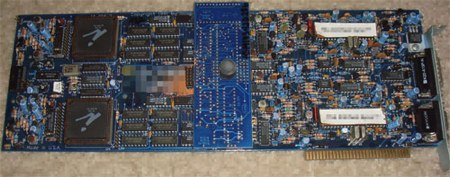
Last month we mentioned [bunnie]’s Name that Ware competition where participants try to guess the functionality of a random bit of hardware. We thought you might want to see another example; pictured above is the June 2008 ware provided by [xobs]. You can see a high res version here and an image of the daughter card as well. Be forewarned that someone has already posted the solution in the comments. At first glance there are quite a few interesting bits: board is copyright 1991, the 8-bit ISA connector doesn’t have any data lines connected, just power, and it’s got a lot of analog circuitry. Take a guess and then check out the comments on [bunnie]’s site to see the solution.

IPhone Pwnage Tool 2.0 Released


Earlier today, the iPhone Dev Team teased that they wouldn’t release their latest Pwnage Tool until Sunday. Since this was yet another in a week long bit of teasing, we were somewhat surprised when a few hours later they posted a rather relaxed Thanks for waiting :) post announcing that Pwnage Tool 2.0 is available. Here’s a direct link to the tool and a mirror courtesy of [_BigBoss_].

According to TUAW, Pwnage Tool 2.0 will activate, jailbreak, and unlock first generation iPhones running any firmware up to and including version 2.0. Unfortunately, it will not unlock an iPhone 3G (at least, not yet). iPhone 3G owners can still use the tool for activation and jailbreaking (so you can run 3rd party apps not supported by Apple and the new iPhone App Store).

So far, skimming through the 1322 comments on their announcement post, I’ve not seen any complaints or death threats about the tool bricking iPhones, but one should still proceed with caution. According to one update to the post, some people either get an error 1600 from iTunes or they notice a “failure to prepare x12220000_4_Recovery.ipsw” in the log. They’ve provided a workaround, however. If this happens to you, simply mkdir ~/Library/iTunes/Device Support or alternately nuke all the files in that already extant folder and re-run Pwnage Tool.

UPDATE: Image is from Engadget’s iPhone review we covered earlier.