DIY SMD Twofer: Manual Pick-and-Place And The Beak

Populating a board with tiny SMT parts can be really tricky, and we’ll take all the help we can get. If you’re in the same boat, [vpapanik] has two devices you should check out.

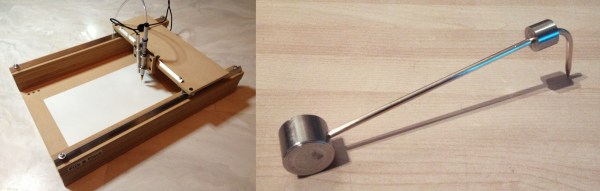
First up is the manual pick-and-place machine. Wait, what? A manual pick-and-place? It’s essentially an un-driven 2-axis machine with a suction tip and USB inspection microscope on the stage. The picker apparatus is the “standard” needle-plus-aquarium-pump design, and the rails are made from angle aluminum and skateboard bearings.

Yeah, yeah, yeah. It’s not a robot. But sometimes the right jig or tool makes all the difference between a manual procedure being fiddly and being graceful. And we couldn’t help but laugh at the part in the video where he demonstrates the “machine” moving in a circular pattern.

Continue reading “DIY SMD Twofer: Manual Pick-and-Place And The Beak” →

Logic Noise: Sweet, Sweet Oscillator Sounds

Welcome to part one of a series taking you down the rabbit hole of DIY electronic synthesizers based on (largely) CMOS logic chips. Instead of synths being commodity gear made by large corporate enterprises, we’ll be building with the cheapest available parts, using and misusing digital logic. In short, don’t expect pre-packaged smooth tones, because we’ll be making creative noise machines.

If you’re the chiptunes type, you’ll probably find something you like here. If you’re the circuit bender or electro-noise-punk type, this is gonna be right up your alley. If you just like to see CMOS chips wriggle and squirm in unintended ways, feel free to look over my shoulder. If you’re the type who insists that a screwdriver can’t be used to pry open a paint can, then maybe you’d better move along. There’s a thin line between the glitch as bug and the glitch as interesting discovery, and we’ll be dancing all over it.

Continue reading “Logic Noise: Sweet, Sweet Oscillator Sounds” →

Semi-Auto PCB Drill Press Makes Drilling Semi-Painless

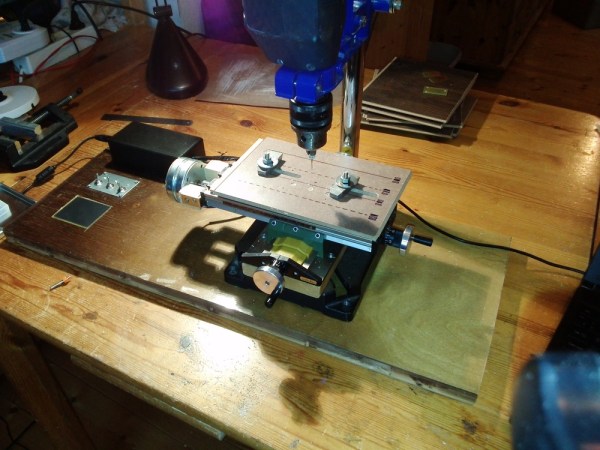
DIY PCBs are the fastest and cheapest way to iteratively prototype circuits, and there’s a lot of great tricks to get the copper layer just the way you want it. But if you’re using through-hole parts, you eventually have to suffer the tedium of drilling a potentially large number of precisely aligned holes. Until now. [Acidbourbon] has built up a very nice semi-automatic PCB drill machine.

Semi-automatic? The CNC machine (with PC-side software) parses the drill file that most PCB design software spits out, and moves an X-Y table under your drill press to just the right spots. The user manually drills the hole and hits enter, and the table scoots off to the next drilling location. All of this is tied together with a simple calibration procedure that figures out where you’ve got the board using two reference drill locations; you initially jog the platform to two reference drill holes, and you’re set.

The CNC conversion of a relatively cheap X-Y table is nicely documented, and the on-board touchscreen and USB interface seem to make driving the machine around painless. Or at least a lot less painful than aligning up and drilling all the holes the old-fashioned way. Everything is open-source, so head on over and check it out.  (And while you’re there, don’t miss [Acidbourbon]’s tips and tricks for making PCBs using the toner transfer method.)

Seeing this machine in action, we can’t wait for the fully automatic version.

Continue reading “Semi-Auto PCB Drill Press Makes Drilling Semi-Painless” →

3D Printed Surfboard

You whippersnappers these days with your 3D printers! Back in our day, we had to labor over a blank for hours, getting all sweaty and covered in foam dust. And it still wouldn’t come out symmetric. Shaping a surfboard used to be an art, and now you’re just downloading software and slinging STLs.

Joking aside, [Jody] made an incredible surfboard (yes, actual human-sized surfboard) out of just over 1 kilometer of ABS filament, clocking 164 hours of printing time along the way. That’s a serious stress test, and of course, his 3D printer broke down along the way. Then all the segments had to be glued together.

But the printing was the easy part; there’s also fiberglassing and sanding. And even though he made multiple mock-ups, nothing ever goes the same on opening night as it did in the dress rehearsal. But [Jody] persevered and wrote up his trials and tribulations, and you should give it a look if you’re thinking of doing anything large or in combination with fiberglass.

Even the fins are 3D printed and the results look amazing! We can’t wait for the ride report.

Shaka.

When Adding Noise Helps

It’s a counterintuitive result that you might need to add noise to an input signal to get the full benefits from oversampling in analog to digital conversion. [Paul Allen] steps us through a simple demonstration (dead link, try Internet Archive) of why this works on his blog. If you’re curious about oversampling, it’s a good read.

Oversampling helps to reduce quantization noise, which is the sampling equivalent of rounding error. In [Paul’s] one-bit ADC example, the two available output values are zero volts and one volt. Any analog signal between these two values is rounded off to either zero or one, and the resulting difference is the quantization error.

In oversampling, instead of taking the bare minimum number of samples you need you take extra samples and average them together. But as [Paul] demonstrates, this only works if you’ve got enough noise in the system already. If you don’t, you can actually make your output more accurate by adding noise on the input. That’s the counterintuitive bit.

We like the way he’s reduced the example to the absolute minimum. Instead of demonstrating how 16x oversampling can add two bits of resolution to your 10-bit ADC, it’s a lot clearer with the one-bit example.

[Paul’s] demo is great because it makes a strange idea obvious. But it got us just far enough to ask ourselves how much noise is required in the system for oversampling to help in reducing quantization noise. And just how much oversampling is necessary to improve the result by a given number of bits? (The answers are: at least one bit’s worth of noise and 22B, respectively, but we’d love to see this covered intuitively.) We’re waiting for the next installment, or maybe you can try your luck in the comment section.

The Original Seven (Eight?) Segment Display

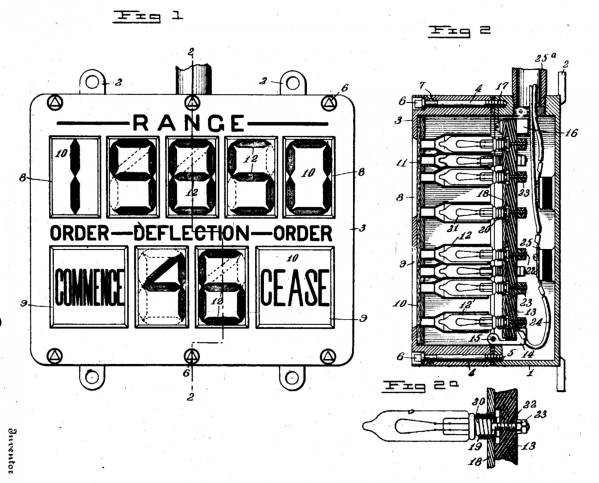
The seven-segment LED display is ubiquitous. But how old do you think the fundamental idea behind it is? You nixie tube fans will be thinking of the vacuum-tube era, but a reader sent us this patent filed in 1908 where [Frank W. Wood] builds a numeric display with plain-vanilla light bulbs, slots cut in wood, and lots of wires.

The OCR on the patent is poorly done — you’re going to want to download the PDF and read it locally. But as it states in the patent, “Referring again to Fig. 1, the novel arrangement of the lamp compartments will be readily understood.”

Technically it’s not a seven-segment display at all. [F.W. Wood] designed these really nice-looking “4”s with the diagonal heads, and so he needed eight segments per digit. But the basic idea shines through, if you pardon the pun.

The other figures demonstrate the machine that’s used to send the signals to light up the lights. It’s a rotating drum with the right contacts on the bottom side to make connections and turn on the right lights at the other end. Low tech, but it’s what was available at the time.

We’re stoked that we’re not responsible for wiring this thing up, and we’re a bit awed by how old the spirit behind one of our most ubiquitous technologies is.

Thanks to [mario59] for the nostalgic tip!

Global Space Balloon Challenge

Looking for a reason to put up a balloon and payload into near-space? Not that one’s necessary, but the Global Space Balloon Challenge has got a variety of good reasons for you to do so, in the form of prizes and swag from their sponsors. Go for highest altitude, best photograph, longest ground track, best on-board science payload, or a bunch more. Have a look through the gallery to check out last year’s winners, including teams that dropped a 3ft paper airplane or floated an R2D2 replica.

Basically all you need to do is register on their website and then go fly a high-altitude balloon between April 10th and 27th. Last year 60 teams took part, and this year they’ve already got 90 teams from 31 countries.

And if you’re just getting into the (hobby? sport?) of high-altitude ballooning, be sure to check out their tutorials and forum. Of course Hackaday has been covering folks’ near-space balloon efforts for a while now too, so you’ve got plenty of reading.

So what are you waiting for? Helium’s not getting any cheaper and spring is on its way. Start planning your balloon launch now.