Playing Snake On A PCB!

When conversation turns to the older Nokia mobile phones, it’s unlikely to be the long battery life or ability to conjure a signal out of thin air that tickles people’s memory, instead it’s the Snake game built into the stock firmware. Snake was an addictive yet extremely simple game in which a line of pixels — the snake in question — was navigated around the screen to eat the fruit without crashing into walls or itself. As the game progressed the snake grew in length, making it a surprisingly difficult challenge. If you hanker for Snake, as [VK5HSE ] writes, you can now play it in a PCB layout.

The software in question is PCB-RND, a cross-platform open-source PCB CAD tool, and the game is achieved through the magic of user scripting. Simply download the script, run it in your favourite circuit board, and away you go!

We can’t imagine a productive use for this piece of software, but it wouldn’t surprise us to see a snake slithering into a few boards we feature. It does provide a handy reminder though of the power in your PCB CAD tool’s scripting features, something it’s likely not many of us use to their full potential.

We’ve featured [VK5HSE]’s work with PCB-RND before, in a very useful Eagle import tool.

NFTs Are The Hope For A New Tomorrow!

Here at Hackaday, we’re always working as hard as we can to bring you the latest and most exciting technologies, and like so many people we’ve become convinced that the possibilities offered by the rise of the Blockchain present unrivaled opportunities for humanity to reinvent itself unfettered by the stifling regulations of a dying system. This is why today we’ve decided to join in with the digital cognoscenti and celebrities embracing Non-Fungible Tokens, or NFTs, as a new promise of non-corporeal digital investment cryptoasset that’s taking the world by storm.

Crypto Non-Fungible Investment Gains!

Imagine for a minute, yourself owning a very expensive car. Skievl, CC BY-SA 4.0.

An NFT is a digital token representing something in the real world, and coupled to a unique ID held in a secure entry in the Blockchain. It’s non-fungible, which means that it’s unique and not interchangeable in the manner of a traditional old-style cryptoasset such as Bitcoin. As it allows a real-world object to be tokenised in digital form it represents a way to own something that provides an irrefutable connection to it as as a digital cryptoasset.

It’s a complex system that’s maybe too difficult to explain fully in a single article, but think of an NFT as a way to invest in a cryptoasset in digital form with its uniqueness guaranteed by Blockchain security, without having the inconvenience of physically owning it. Instead your NFT is safely held on a server on the Internet, and can’t be physically stolen as it would from a bank vault because it has the Blockchain cryptosecurity baked in.

Non Fungible Blockchain Cryptoassets!

You don't own this. Yet.
You don’t own this. Yet.

NFTs have so far found a space in the creative markets, where they have provided a revolutionary opportunity for artists to expand their sales in the digital realm by selling NFTs of their work. A struggling artist can now access buyers all over the world, who can in turn now invest with confidence in creative talent to which they would never otherwise be exposed. It’s a win-win situation in which both cryptoinvestor and artist benefit from The Power of the Blockchain.

Hackaday is excited to offer a once-in-a-lifetime chance to acquire a Blockchain-cryptosecured NFT representing one of our own articles; our first ever NFT is the only officially sanctioned digital copy of a Hackaday article presenting a novel method of handling toilet paper shortages. The original article will continue to exist on Hackaday.com with all rights reserved, but we will not make any other NFTs of it. We may also decide to update the original article to let everyone know you are the lucky owner of the only digital copy of this piece of greatness. That’s right, this NFT will let you prove you own a screenshot!

Having today sold you on the incredible cryptoinvestment opportunity offered by NFTs, we’ll be back on another date with a more sober and in-depth technical examination of the technology behind them. Meanwhile should our brief foray into NFTs garner any interest (and we really hope it does not), we will donate proceeds to the excellent Girls Who Code, a truly solid investment with a tangible bright future.

Thanks [Micah Scott] for some NFT consultancy during the making of this piece.

Wet Country Wireless; How The British Weather Killed A Billion Pound Tech Company

A dingy and cold early February in a small British town during a pandemic lockdown is not the nicest time and place to take your exercise, but for me it has revived a forgotten memory and an interesting tale of a technology that promised a lot but delivered little. Walking through an early-1990s housing development that sprawled across the side of a hill, I noticed a couple of houses with odd antennas. Alongside the usual UHF Yagis for TV reception were small encapsulated microwave arrays about the size of a biscuit tin. Any unusual antenna piques my interest but in this case, though they are certainly unusual, I knew immediately what they were. What’s more, a much younger me really wanted one, and only didn’t sign up because their service wasn’t available where I lived.

All The Promise…

The TV advert looked promising in 1998.

Ionica was a product of Cambridge University’s enterprise incubator, formed at the start of the 1990s with the aim of being the first to provide an effective alternative to the monopolistic British Telecom in the local loop. Which is to say that in the UK at the time the only way to get a home telephone line was to go through BT because they owned all the telephone wires, and it was Ionica’s plan to change all that by supplying home telephone services via microwave links.

Their offering would be cheaper than BT’s at the socket because no cable infrastructure would be required, and they would aim to beat the monopoly on call costs too. For a few years in the mid 1990s they were the darling of the UK tech investment world, with a cutting edge prestige office building just outside Cambridge, and TV adverts to garner interest in their product. The service launched in a few British towns and cities, and then almost overnight they found themselves in financial trouble and were gone. After their demise at the end of 1998 the service was continued for a short while, but by the end of the decade it was all over. Just what exactly happened?

Continue reading “Wet Country Wireless; How The British Weather Killed A Billion Pound Tech Company”

The Vibrating Reed Inverter: Possibly The Simplest Inverter You Can Make

Those of us who work on the road have a constant dread of being stuck somewhere without power, facing a race between a publication deadline and a fast-failing laptop battery. We’re extremely fortunate then to live in an age in which a cheap, lightweight, and efficient solid-state switch-mode inverter can give us mains power from a car cigarette lighter socket and save the day. Before these inverters came much heavier devices whose transistors switched at the 50Hz line speed, and before them came electromechanical devices such as the rotary converter or the vibrating reed inverter. It’s this last type that [Robert Murray-Smith] has taken a look at, making what he positions as the simplest inverter that it’s possible.

If you’ve ever played with relays, you’ll probably be aware that a relay can be wired as a buzzer, and it’s this property that a vibrating reed inverter harnesses. He takes an octal relay and wires it up with a small mains transformer for an immediate and very cheap inverter. It’s not perfect, as he points out the frequency isn’t right. The relay will eventually wear out unless the arcing problem is improved with the addition of a capacitor. But it does make a rough and ready inverter if you find yourself in a MacGyver-style tight spot with only your junk box for salvation.

If inverters pique your interest, it might benefit you to know how they work.

Continue reading “The Vibrating Reed Inverter: Possibly The Simplest Inverter You Can Make”

A Practical Electric Motorcycle, Made From A Motorcycling Classic

If you were to try to name the vehicle that brought transport to the world’s masses, where might you start? The Ford Model T perhaps, or maybe the VW Beetle? If this was the direction you took, then we’re sorry to say you aren’t even close. The answer lies in Soichiro Honda’s Dream and its descendants, small cheap and reliable motorcycles that have been manufactured in their many millions in some form continuously for over seven decades, and which have been sold in every country in the world that has any form of road. They may be unglamorous, but if you had to pick a bike to circumnavigate the globe they can be fixed by a local mechanic anywhere on the planet. That little horizontal single-cylinder engine may be reliable though, but it’s hardly green. [David Budiatmaja] has fixed that, by transforming an elderly Honda C70 into an electric motorcycle worthy of a 21st-century city (Indonesian, Google Translate link).

The conversion appears to have achieved wide coverage in the Indonesian motoring press, and there’s more about it in the video we’ve placed below the break (Indonesian, you may have to enable subtitle translation). The C70 has been stripped of its fairing, engine, and gearbox, and a wheel motor has been laced into the rear rim. There are three battery packs made from surplus 18650 cells, and an ammo can top box containing most of the electrical wiring. Driven at 72V, it gives a modest top speed that isn’t exactly fast but isn’t too bad on a city bike. A set of trail bike bars replaces the stock ones, and something of a cosmetic makeover has given it a tougher image than your local pizza delivery bike. If it didn’t still sport the C70’s somewhat archaic front forks, it might be easy to mistake it for something else entirely.

If wheel motor motorcycle conversions interest you, this isn’t the first one we’ve brought you.

Continue reading “A Practical Electric Motorcycle, Made From A Motorcycling Classic”

An Ancient 8 Inch Floppy, With A PC

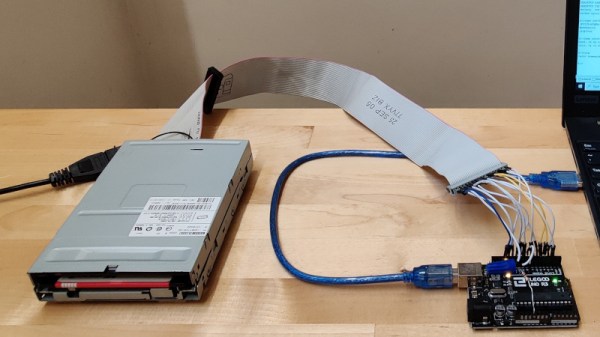
Most of us may have gratefully abandoned the floppy disk a decade or more since, but even today many PCs and their operating systems retain the ability to deal with these data storage relics. The PC was widely fitted with either 5.25″ or 3.5″ disk drives, but other formats such as the older 8″ discs were not a fixture in the 16-bit desktop computing world. It’s something [Jozef Bogin] has taken aim at, with his exploits in connecting a variety of 8″ drives to a PC.

In the early 1970s there were a variety of different 8″ drive standards that weren’t all entirely compatible, but a de facto standard emerged as clones of the Shuggart drives used by IBM. It’s a modified version of this interface that can be found in a PC floppy controller. While there is enough electrical compatibility to connect the two there remains a variety of connectors used on the drives. There are also a wide range of power supplies, with drives requiring 5, 12, and 24 volts, and some of them even requiring AC mains with different versions for 50Hz and 60Hz mains frequencies.

With an 8″ drive hooked up to a PC, how might DOS, or even older Windows versions, interface with it? To that end he’s created a piece of software called 8format, which not only allows 8″ disks to be formatted for the PC, but also provides a driver that replaces the BIOS floppy settings for these drives. This doesn’t work for imaging disks from other older platforms, but he provides pointers to more capable floppy controllers for that.

If these drives interest you, there’s more to be gleaned from a tale of interfacing them with 8-bit retrocomputers.

To Kill A Blockchain, Add Naughty Stuff To It?

Even if not all of us are blockchain savants, we mostly have a pretty good idea of how they function as a distributed database whose integrity is maintained by an unbroken chain of conputational hashes. For cyryptocurrencies a blockchain ledger stores transaction records, but there is no reason why the same ledger can not contain almost any other form of digital content. [Bruce Schneier] writes on the potential consequences of content that is illegal or censored being written to a blockchain, and about how it might eventually form a fatal weakness for popular cryptocurrencies.

It’s prompted by the news that some botnet operators have been spotted using the Bitcoin ledger to embed command and control messages to hide the address of their control server. There have already been cases of illegal pornography being placed within blockchain ledgers, as well as leaked government data.

[Schneier] uses these two content cases to pose the question as to whether this might prove to be a vulnerability for the whole system. If a government such as China objects to a block containing censored material or a notoriously litigious commercial entity such as Disney objects to a piece of copyrighted content, they could take steps to suppress copies of the blockchain that contain those blocks. Being forced by hostile governments or litigious corporations to in effect remove a block from the chain by returning to the previous block would fork the blockchain, and as multiple forks would inevitably be made in this way it would become a threat to the whole. It’s an interesting possible scenario, and one that should certainly be ready by anyone with an interest in blockchain technologies.

Only a few weeks ago we looked at another threat to blockchain technologies – that they might be legislated out of existence by environmental rules.