The World’s Lightest Brushless FPV Quadcopter

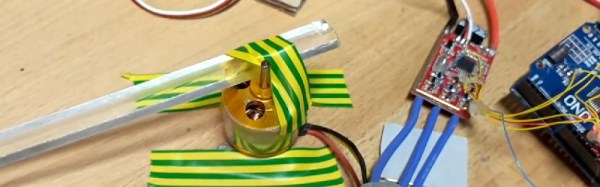
When a claim is made for something being the world’s lightest it is easy to scoff, after all that’s a bold assertion to make. It hasn’t stopped [fishpepper] though, who claims to have made the world’s lightest brushless FPV quadcopter. Weighing in at 32.4 grams (1.143 oz) it’s certainly pretty light.

The frame is a circular design cut from carbon-fiber-reinforced polymer, and on it are mounted four tiny brushless motors. In the center are the camera and battery on a 3D printed mount, as well as custom flight and speed controller boards. There are a series of posts detailing some of the design steps, and the result is certainly a capable aircraft for something so tiny. If you fancy experimenting with the design yourself, the files are available for download on the first page linked above.

There are two aspects to this build that make it interesting to us. First, the lightest in the world claim. We think someone will come along with something a bit lighter, and we can’t wait to see a lightest multirotor arms race. Good things come of technology races, which brings us to the second aspect. Governments are busy restricting the use of larger multirotors, to the extent that in some parts of the world all that will be available for non professionals will be sub-200g toy craft. Any project like this one which aims to push the boundaries of what is possible with smaller multirotors is thus extremely interesting, and we hope the community continue to innovate in this direction if only to make a mockery of any restrictions.

To get some idea of the sort of legislative measures we might be seeing, take a look at our coverage of a consultation in just one country.

From IKEA Lamp To Robot Arm

We’re used to projects that take everyday household objects and modify or enhance them into new and exciting forms that their original designers never intended. A particular theme in this endeavour comes from the IKEA hacking community, who take the products of the Swedish furniture store and use them for the basis of their work.

A particularly inventive piece of IKEA hacking is a project from [anastas.car], a low-cost 3D-printed robot arm based on Ikea Tertial lamp. The lamp in question is a relatively inexpensive spring-balanced desk lamp that when looked at in another light has all the metalwork ready-cut for a 5 degrees of freedom robot arm when combined with 3D-printed servo holders for five servos at its joints. The resulting design has all files available on Thingiverse, and judging by the video we’ve posted below the break makes for a rather effective arm.

Continue reading “From IKEA Lamp To Robot Arm”

A Ten Turn Pot, For Not A Lot

If you have a traditional regulated power supply that you want to make adjustable, you’ll have somewhere in the circuit a feedback line driven by a potential divider across the output. That divider will probably incorporate a variable resistor, which you’ll adjust to select your desired voltage.

The problem with using a standard pot to adjust something like a power supply is that a large voltage range is spread across a relatively small angle. The tiniest movement of the shaft results in too large a voltage change for real fine-tuning, so clearly a better means of adjustment is called for. And in many cases that need is satisfied with a ten-turn potentiometer, simply a pot with a 10 to 1 reduction drive built-in.

[Dardo] had just this problem, and since 10-turn pots are expensive to buy and expensive to ship to his part of the world he built his own instead of buying one.

Continue reading “A Ten Turn Pot, For Not A Lot”

Getting The Amiga 500 Online

If you were lucky enough to have a Commodore Amiga or one of its competitor 16-bit home computers around the end of the 1980s, it’s probable that you were doing all the computing tasks that most other people discovered a few years later when they bought their first 486 or Pentium. So in the mid 1990s when all your friends were exclaiming at Paint Shop Pro or their Soundblaster cards you’d have had an air of smugness. Multitasking? Old hat! Digital audio? Been there! Graphics manipulation? Done that!

There was one task from that era you almost certainly wouldn’t have done on your Amiga though, and that was connect it to the Internet. The Internet was certainly a thing back in the late 1980s, but for mere mortals it was one of those unattainable marvels, like a supercomputer with a padded seat round it, or a Jaguar XJ220 supercar.

Later Amigas received Internet abilities, and Amiga enthusiasts will no doubt be on hand to extol their virtues. But the machine most people will think of as the archetype, the Amiga 500, lacks the power to run most of the software required to do it. If your 500 with its tasteful blue and orange desktop colour scheme is languishing though, never fear. [Shot97] has produced a guide to getting it online.

It’s important to understand that an Amiga 500 is never going to run a copy of Chrome or play a YouTube video. And he makes the point that any web browsers that might have surfaced for hardware of this class delivered a painful browsing experience. So instead he concentrates on getting the 500 online for something closer to the online scene of the day, connecting to BBSs. To that end he takes us through setting up a PC with  Hayes modem emulator, and connecting it to the Amiga via a null modem cable. On the Amiga is a copy of the A-Talk terminal emulator, and as far as the Amiga is concerned it is on a dial-up Internet connection.

The PC in this case looks pretty ancient, and we can’t help wondering whether a Raspberry Pi or even an ESP8266 module could be put in its place given the appropriate software. But he has undeniably got his A500 online, and shown a way that you can too if you still have one lurking in the cupboard. He has also produced a video which we’ve put below the break, but be warned, as it’s nearly an hour long.

Continue reading “Getting The Amiga 500 Online”

Comfort Thermometer With Impressive LED Display

A frequent early project for someone learning to use a microcontroller such as an Arduino board involves hooking up a temperature sensor and an LCD display to make a digital thermometer. Not many components are involved, but it provides a handy practical introduction to interfacing peripherals. Once you’ve passed that step in your tech education, do you ever return to thermometers? Probably not, after all what can you add to a thermometer but a sensor and a display?

Perhaps if you have asked yourself that question you might be interested in [Richard Stevens]’s thermometer project, as he refers to it, a Comfort Thermometer Display. It takes the form of an Ikea Ribba frame inset with 517 LEDs arranged as a central set of seven segment displays, a ring of bar graphs, and an outer ring of RGB LEDs. Behind the scenes is a mass of cabling, and four shaped pieces of stripboard to fit the area around the LEDs. The display cycles through readings for temperature, heat index, and humidity.

Powering it all are a brace of microcontrollers: an ATMega328 for the 7-segments and a range of PICs controlling the bar graphs and RGB LEDs. Another PIC handles RF communication with the sensors, which are housed in a remote box. We’ve embedded the video of the device in operation below the break, and we’re sure you’ll agree it’s an impressive piece of work.

Continue reading “Comfort Thermometer With Impressive LED Display”

SST Is A Very Tidy ESP8266 Smart Thermostat

The smart thermostat has become in a way the public face of the Internet of Things. It’s a demonstration that technological uptake by the general public is driven not by how clever the technology is, but by how much use they can see in it. A fridge that offers your recipes or orders more eggs may be a very neat idea, but at street level a device allowing you to turn your heating on at home before you leave work is much cooler. Products like Nest or Hive have started to become part of normal suburban life.

There is no reason though for an IoT thermostat to be a commercial product like the two mentioned. Our subject today demonstrates this; SST is a Wi-Fi smart thermostat using an ESP8266 that can be controlled by an app, thanks to its use of the open-source Souliss IoT Framework.

The build is very well finished, with PCBs, colour display and other components in a neat 3D-printed box. It’s a project that you could put in front of an end-user, it’s finished to such a high standard. Physical entity files are available from the hackaday.io page linked above, while its firmware is available in a GitHub repository. THere is a video showing some of the device’s capabilities, which we’ve put below the break.

Continue reading “SST Is A Very Tidy ESP8266 Smart Thermostat”

Move A Robotic Hand With Your Nerve Impulses

Many of us will have seen robotics or prosthetics operated by the electrical impulses detected from a person’s nerves, or their brain. In one form or another they are a staple of both mass-market technology news coverage and science fiction.

The point the TV journalists and the sci-fi authors fail to address though is this: how does it work? On a simple level they might say that the signal from an individual nerve is picked up just as though it were a wire in a loom, and sent to the prosthetic. But that’s a for-the-children explanation which is rather evidently not possible with a few electrodes on the skin. How do they really do it?

A project from [Bruce Land]’s Cornell University students [Michael Haidar], [Jason Hwang], and [Srikrishnaa Vadivel] seeks to answer that question. They’ve built an interface that allows them to control a robotic hand using signals gathered from electrodes placed on their forearms. And their write-up is a fascinating read, for within that project lie a multitude of challenges, of which the hand itself is only a minor one that they solved with an off-the-shelf kit.

The interface itself had to solve the problem of picking up the extremely weak nerve impulses while simultaneously avoiding interference from mains hum and fluorescent lights. They go into detail about their filter design, and their use of isolated power supplies to reduce this noise as much as possible.

Even with the perfect interface though they still have to train their software to identify different finger movements. Plotting the readings from their two electrodes as axes of a graph, they were able to map graph regions corresponding to individual muscles. Finally, the answer that displaces the for-the-children explanation.

There are several videos linked from their write-up, but the one we’re leaving you with below is a test performed in a low-noise environment. They found their lab had so much noise that they couldn’t reliably demonstrate all fingers moving, and we think it would be unfair to show you anything but their most successful demo. But it’s also worth remembering how hard it was to get there.

Continue reading “Move A Robotic Hand With Your Nerve Impulses”