Real NES Plays Frame-Perfect For You On Twitch

Have you ever wanted to be the best Super Mario Brothers speedrunner, but you just couldn’t do the frame-perfect inputs? Fear not, because [Gregory Strike] is here to save the day with his automatic NES controller!

In his previous video, [Greg] already made an automatic controller that plays a sequence of inputs at the perfect time, but it still failed some of the frame-perfect tricks. So what gives? Deviation in the timing of the NES itself gives, as he shows how the NES doesn’t sample inputs at exactly the same time every frame. To account for this, he used the latch signal, which starts the controller reading process as a time reference, and replaced his digital “mixtape” with a more time-flexible Arduino. After the modification, he shows it pulling off frame-perfect inputs every time he plays Super Mario Brothers.

But if you have a controller that can do frame-perfect inputs and it can be connected to a computer, you can connect the controller to the internet! That’s right, [Greg] created a Twitch bot that tells the Arduino exactly what inputs to send, which then relays it to the NES. It accepts simple sequences of inputs via chat, and you can try it out right now on [Greg]’s Twitch stream.

This project shows promising results, and we think it’s possible to do much more with its internet connection. We’re certainly looking forward to what [Greg] decides to make next.

Video after the break.
Continue reading “Real NES Plays Frame-Perfect For You On Twitch”

Game Graphics: Racing The Beam

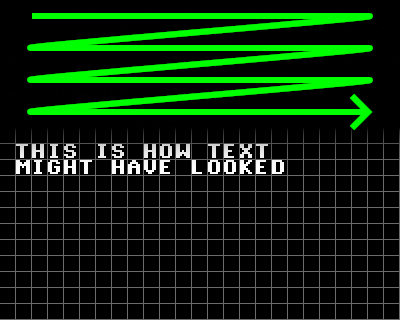
Have you ever wondered how the graphics in your favorite video games worked? This is the start of a series on game graphics, and what better place to start than how exactly the original Mario Bros. got those glorious pixely pixels onto the screen. Buckle in, because we’re “racing the beam” with systems like the NES, Commodore 64, and many other classics from the 1980s.

And to understand the 1980’s, it’s important to understand how the televisions of the time worked. Cathode Ray Tube (CRT) televisions work by precisely bombarding a phosphor layer with electrons, which excites the phosphor, which then releases visible light. The beam scans from left to right then top to bottom, giving each pixel a small fraction of a second of time. All of this effectively means that pixel data needs be sent at the same time as when the pixels are being lit up, which is why this type of graphics is often dubbed “racing the beam”.

Continue reading “Game Graphics: Racing The Beam”

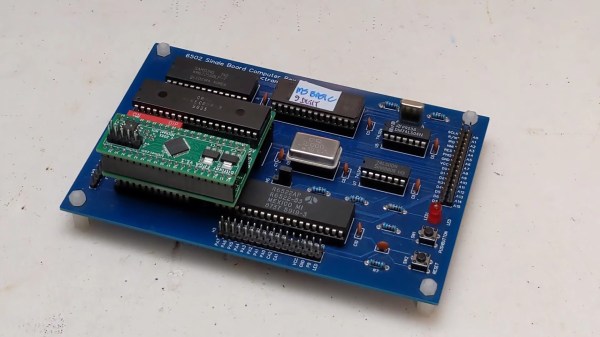
A 6502-based single-board computer with a ROMulator attached

Debug Your Senile Computers With The ROMulator

Some of you may have heard of the ROMulator, a device that can emulate RAM and ROM on 6502-based computers. But how does it work? How do you use it? What computers is it compatible with? [Jeff Tranter] covers that and more in his review of the ROMulator 6502.

The ROMulator is an FPGA-based board that slots between the 6502 and its socket on whatever computer it came from. It can emulate, but not intercept, accesses to RAM and ROM, which can be used to e.g. replace a ROM that you’re swapping very often or expand the RAM available to the CPU.

In his review, [Jeff] shows the ROMulator in action many computers, notably his custom 6502-based computer, a replica of an Apple 1 and two different replicas of the SUPERBOARD 2. He shows how the ROMulator can be configured, tested, used to debug the computers and even expand their RAM. Overall, [Jeff] thinks it’s a useful 6502 debugger that would have saved him lots of time in the past and we definitely agree.

Continue reading “Debug Your Senile Computers With The ROMulator”

Explore Linux Space Time

If you’ve ever wondered how much memory a process uses, you’ve probably used a form of task manager or system monitor. System monitors can be useful to identify resource hogs, but are often less versatile if you want more details about just one process. If you’ve ever faced this problem, then [Fabien Sanglard]’s Space-Time explorer is for you!

The wonderfully punny Space-Time tool records physical memory usage, time spent in user space vs. kernel space and even threads and subprocesses created. These words may not mean much to some readers, so let’s quickly go over them: Physical memory usage is the actual amount of RAM given (not always the same as requested). The kernel (which lives in kernel space) is the supervisor to all processes on a computer. In contrast, every process lives in it’s own “user space”, a way of protecting the kernel. Finally, a subprocess (or “child process”) is simply a process started by another process (the “parent”). Continue reading “Explore Linux Space Time”

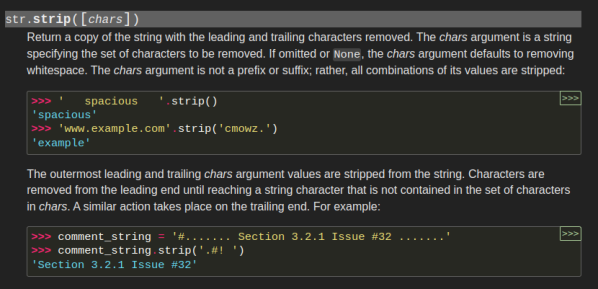
The Python documentation for str.strip().

Faster String Processing With Bloom Filters

At first, string processing might seem very hard to optimize. If you’re looking for a newline in some text, you have to check every character in the string against every type of newline, right? Apparently not, as [Abhinav Upadhyay] tells us how CPython does some tricks in string processing.

The trick in question is based on bloom filters, used here to quickly tell whether a character possibly matches any in a predefined set. A bloom filter works by condensing a set of more complex data to a couple of bits in an array. When an element is added, a bit is set, the index of which is determined by a hash function. To test whether an element might be in the filter, the same is done but by testing the bit instead of setting it. This effectively allows a fast check of whether an element might be in the filter.

CPython doesn’t stop optimizing there: instead of a complicated hash function, it simply uses the lowest 6 bits. It also has a relatively small bit array at only 64 bits which allows it to avoid memory all together, which in turn makes the comparisons much faster. [Abhinav] goes far into more detail in his article, definitely worth a read for any computer scientists among us.

Nowadays there is ever increasing amounts of talk about AI (specifically large language models), so why not apply an LLM to Python to fix the bugs for you?

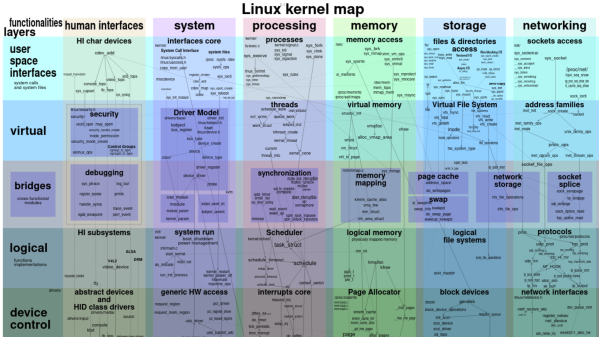
A colorful diagram representing the inner structure of the Linux kernel.

Find That Obscure Function With This Interactive Map Of The Linux Kernel

Linux has become one of the largest operating systems on the servers that run large websites, and hopefully, one day, it will be big in the desktop market too. Some of you may know how Linux as an operating system is structured, but have you ever wondered how the kernel itself is structured? Maybe you’ll find this colorful interactive map of the Linux kernel by [Costa Shulyupin] useful.

The interactive map depicts the major levels of abstraction and functionalities, dotted with over 400 prominent functions from the Linux kernel, which are also links to a cross-reference site so you can see all the definitions and usages. It divides the kernel into 7 rows and 7 columns containing domains with well-known terms like security and debugging, but also more obscure things like block devices and address families. These are also links, this time to the definition of the term in question. Finally, there are arrows flying everywhere, to show the relationships between all the many functions in the kernel.
Continue reading “Find That Obscure Function With This Interactive Map Of The Linux Kernel”

A rotary subwoofer made out of a speaker coil, a medium-size fan an a grey wooden box to stand on.

Tear Apart Your House For $200 With This Rotary Subwoofer

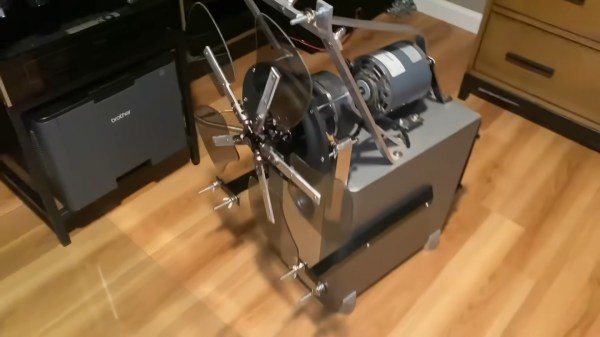
Many movies and songs use a lot of of bass to make it feel more real to the viewer or listener. Because of this, subwoofers are common in high-quality audio setups, often costing a substantial part of the budget. [Daniel Fajkis] takes the subwoofer to it’s logical extreme by building a rotary subwoofer on a $200 budget.

The principle of a rotary subwoofer is that a normal subwoofer physically moves the air, and so does a fan. If you could make a fan oscillate the air instead of only pushing it, you could turn it into such a subwoofer, which is exactly what [Daniel] did. [Daniel] mounts a large electric motor on the case of an ex-subwoofer to spin the fan. Then, he uses the rotor linkage of a model helicopter and a modified subwoofer speaker to pitch the fan blades, spinning around to create a truly impressive gust of air oscillating at as low as 1 Hz.

The video, after the break, is well made with some good humor, including the legendary quote: “It’s gonna tear apart my household, there’s no way we’re surviving this one.”
Continue reading “Tear Apart Your House For $200 With This Rotary Subwoofer”