Teardown Of FGM-148 Javelin Missile’s Guidance Computer

You know it’s a good teardown when [Michel] starts off by saying to not ask him where exactly he got the guidance section of an FGM-148 Javelin from. This shoulder-launched anti-tank guided missile (ATGM) is a true marvel of engineering that has shown its chops during recent world events. As a fire-and-forget type guided missile it is designed to use the internal IR tracker to maintain a constant lock on the target, using its guidance system to stay exactly on track.
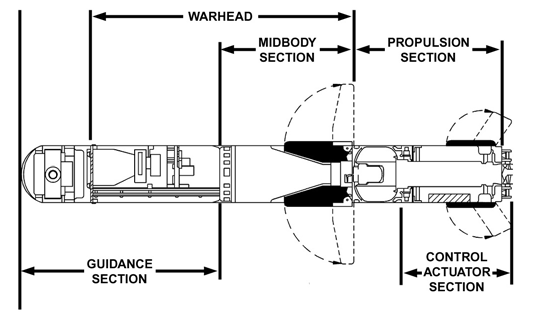
FGM-148 Javelin schematic overview. (Source: U.S. Army, FM 3-22.37)

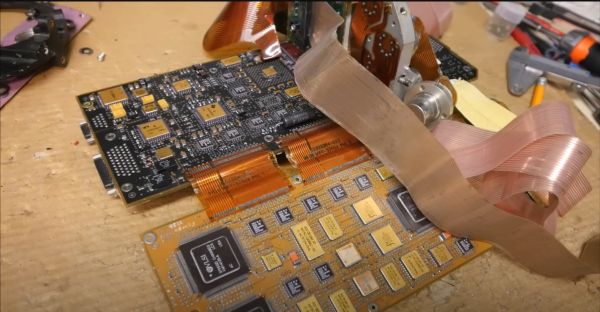
Initially designed in 1989 and introduced into service in 1996, it has all the ceramic-and-gold styling which one would expect from a military avionics package from the era. Tasked with processing the information from the IR sensor, and continuously adjusting the fins to keep it on course, the two sandwiched, 3 mm thick PCBs that form the main section of the guidance computer are complemented by what looks like a milled aluminium section which holds a sensor and a number of opamps, all retained within the carbon-fiber shell of the missile.

In the video [Michel] looks at the main components, finding datasheets for many commercially available parts, with the date codes on the parts confirming that it’s a late 80s to early 90s version, using presumably a TMS34010 as the main CPU on the DSP board for its additional graphics-related instructions. Even though current production FGM-148s are likely to use far more modern parts, this is a fun look at what was high-end military gear in the late 1980s and early 1990s.

Continue reading “Teardown Of FGM-148 Javelin Missile’s Guidance Computer”
NASA’s Tech Demo Streams First Video From Deep Space Via Laser

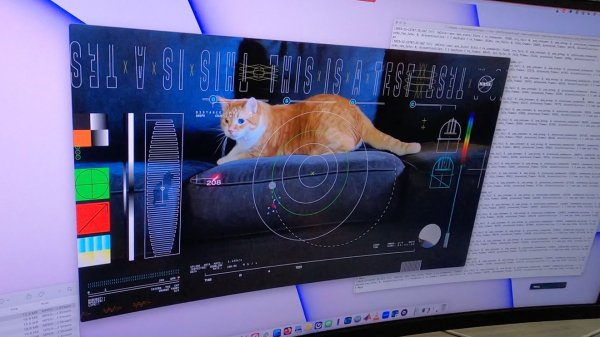
Everyone knows that the most important part of a tech demo is to make the right impression, and the team over at NASA’s Jet Propulsion Laboratory (JPL) definitely had this part nailed down when they showed off streaming a cat video from deep space using laser technology as part of NASA’s Deep Space Optical Communication (DSOC) program. This system consists out of a ground-based laser transmitter and receiver along with a space-based laser transceiver, which for this experiment was positioned at a distance of 31 million kilometers – 80 times the distance between the Moon and Earth – as a part of the Psyche spacecraft.

After a range of tests with the system to shake out potential issues, the team found that they could establish a 267 Mbps link, with a one-way latency of a mere 101 seconds, allowing Psyche’s transceiver to transmit the preinstalled 15-second high-definition video in effectively real-time and making the cat Taters instantly world-famous. Although the potential for space-based cat videos cannot be underestimated, the main purpose of DSOC is to allow spacecraft to send back much larger data sets than they could before.

For robotic and potential future manned missions DSOC would mean high bandwidth video and data links, enabling more science, better communication and possibly the occasional cat video during interplanetary travel.

Continue reading “NASA’s Tech Demo Streams First Video From Deep Space Via Laser”

Reverse-Engineering The Stadia Controller Bluetooth Switching Procedure

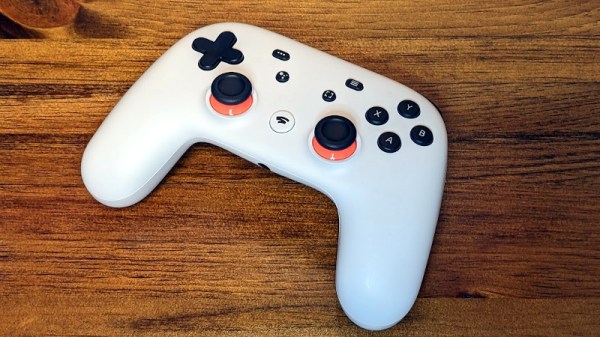
Ever since the demise of Google’s Stadia game streaming service, the associated Stadia controllers have found themselves in limbo, with the only way to switch them from the proprietary WiFi mode to Bluetooth by connecting to a special Google website. Yet as [Gary] found out, all this website does is flash a firmware file via WebUSB and WebHID over the original Stadia firmware with a generic Bluetooth controller firmware image. This is the reason why it’s a one-way process, but this wasn’t to [Gary]’s liking, so he figured out how to flash the controller himself, with the option to flash the original Stadia firmware or something else on it later, too.

[Gary]’s stadiatool follows the same procedure as the Google Stadia website, just implemented in Python and outside the control of Google. Although Google has recently announced that it will keep the Bluetooth switching website online one year longer – until December 31st 2024 – at some point this service will go away and only projects like [Gary]’s together with squirreled away firmware images can still save any stray Stadia controllers that will inevitably discovered in the back of a warehouse in the future.

Although we reported on the demise of Stadia when it happened in January of 2023, as Ars Technica notes it was common in 2022 to buy into Stadia and get a controller manufactured in the 2019 launch year, suggesting massive overproduction.

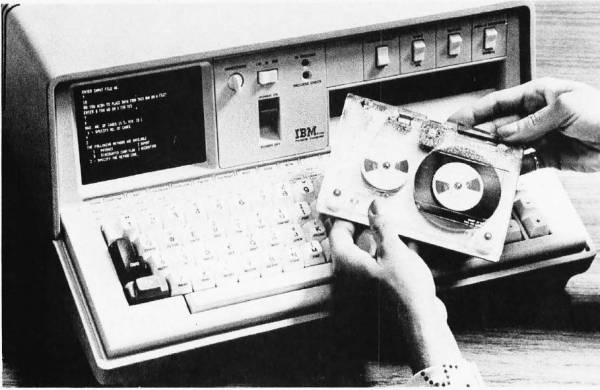
The IBM 5100, image from December 1975 issue of BYTE.

Bringing APL To The Masses: The History Of The IBM 5100

The 1970s was a somewhat awkward phase for the computer industry — as hulking, room-sized mainframes became ever smaller and the concept of home and portable computers more capable than a basic calculator began to gain traction. Amidst all of this, two interpreted programming languages saw themselves being used the most: BASIC and APL, with the latter being IBM’s programming language of choice for its mainframes. The advantages of being able to run APL on a single-user, portable system, eventually led to the IBM 5100. Its story is succinctly summarized by [Bradford Morgan White] in a recent article.

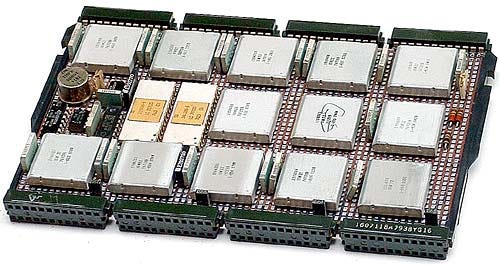
The IBM PALM processor.

Although probably not well-known to the average computer use, APL (A Programming Language) is a multi-dimensional array-based language that uses a range of special graphic symbols that are often imprinted on the keyboard for ease of entry.

It excels at concisely describing complex functions, such as the example provided on the APL Wikipedia entry for picking 6 pseudo-random, non-repeating integers between 1 and 40 and sorting them in ascending order:

x[x6?40]

Part of what made it possible to bring the power of APL processing to a portable system like the IBM 5100 was the IBM PALM processor, which implemented an emulator in microcode to allow e.g. running System/360 APL code on a 5100, as well as BASIC.

Despite [Bradford]’s claim that the 5100 was not a commercial success, it’s important to remember the target market. With a price tag of tens of thousands of (inflation-adjusted 2023) dollars, it bridged the gap between a multi-user mainframe with APL and far less capable single-user systems that generally only managed BASIC. This is reflected in that the Commodore SuperPET supported APL, and the 5100 was followed by the 5110 and 5120 systems, and that today you can download GNU APL which implements the ISO/IEC 13751:2001 (APL2) standard.

We’ve previously looked at the Canadian-made MCM/70, another portable APL machine that embodied the cyberdeck aesthetic before William Gibson even gave it a name.

Top image: The IBM 5100, image from December 1975 issue of BYTE.

Thanks to [Stephen Walters] for the tip.

Hacking An NFC E-Paper Display From Waveshare With Mystery MCU

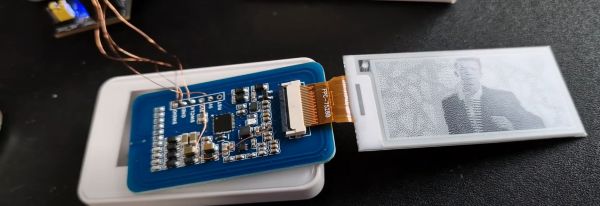
These days e-paper (eInk) displays are everywhere, with stores being one of the largest users of smaller, monochrome versions of these persistent displays. This has also made them a solid target of hackers who seek to not only reverse-engineer and reuse discarded ones, but also ones sold to consumers, with [Aaron Christophel] recently reverse-engineering and flashing custom firmware (GitHub source) to a Waveshare 2.13″ NFC-Powered E-Paper display.

What’s perhaps most notable is how locked-down and devoid of documentation these devices are. The board [Aaron] looked at did not have any markings on the main IC, and Waveshare did not provide more information other than the Android and iOS apps. This led to some matching of various NFC-enabled MCUs with the pinout, with the Chivotech TN2115S2 rolling out as the most likely candidate. This is an 8 MHz Cortex-M0 MCU with not only NFC, but also an energy harvesting feature (up to 300 mW), which is why this e-paper tag can update the display without external power or a battery.

With the Chivotech datasheet being rather sparse, more reverse-engineering needed to be done, which included dumping the firmware and exploring it with Ghidra. During this, the secret key was discovered to make the Flash writeable along with how to control the peripherals and display. With this knowledge it’s now possible to make this tag display update without being limited by manufacturer-supplied tools and software, making it infinitely more useful.

Continue reading “Hacking An NFC E-Paper Display From Waveshare With Mystery MCU”

Second Life UPS Mark II: A UPS For Low-Voltage DC Applications

When you have a whole stack of devices and appliances that all have an AC to DC adapter and which you’d like to put on an uninterruptable power supply (UPS), you could do the obvious thing and get an off-the-shelf UPS with myriad AC outputs. In the case of a 19″ rack this means wrangling a power strip or two and any combination of differently sized AC/DC adapters into the rack, with questionable efficiency and waste heat dumped into the rack. This is where a DC-only UPS like [Maciej Grela]’s Second Life UPS Mark II provides an interesting alternative.

At its core it’s a pretty simple concept: A single 400Watt power supply handles the AC/DC conversion from mains to 24 VDC, which feeds the battery charger as well as the outputs. These outputs include 5 VDC, 12 VDC and Vrail, with the latter being either the output from the PSU, or the battery voltage. In case of AC power failure, an LT4416 dual power path controller handles the switch-over from the PSU output to the internal batteries. In the article, [Maciej] covers how the buck modules for the 12 & 5 VDC rails were sized, along with the conversion of an old rack-mounted network switch into a UPS. Continue reading “Second Life UPS Mark II: A UPS For Low-Voltage DC Applications”

The Dark Side Of Hacking XMas Lights, Literally

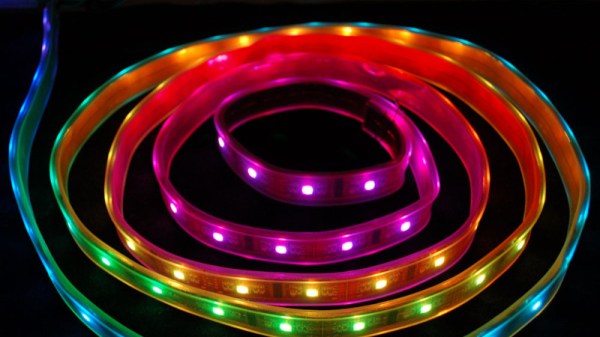
When looking at the piles of cheap RGB, Bluetooth-controlled LED strips you can find for sale just about anywhere these days, integrating them into a home-automation setup is very tempting. Normally these strips are controlled via a special smartphone app, that speaks whatever dodgy protocol was thrown together for the LED strip controller in question. Reverse-engineering this Bluetooth protocol is fairly easy these days, as [Will Cooke] describes in a recent tutorial, although for him there was a bit of a tragic ending with one particular RGB set.

With previous experiences reverse-engineering the Bluetooth protocol with Wireshark under his belt and having published the BJ_LED repository for LED strips that use the MohuanLED app, reverse-engineering this new LED strip with the associated “iDeal LED” app seemed fairly routine. Initially it was indeed routine, with just a curveball in the form of some encryption that the Jadx decompiler used on the app couldn’t help with. Fortunately the key ended up floating around on the internet, and the protocol was wide open. That’s when disaster struck.

While trying to throw payloads at the LED controller to find hidden modes and settings, [Will] found that he could indeed increase the brightness beyond what the app supported, but poking at lighting modes beyond the 10 presets gave a nasty shock. Modes 1 through 10 worked fine, 11 also did something new, but when the controller was asked to switch to mode 12, it shut off. Permanently. Whether this corrupted the firmware or caused some other issue is unknown, but it’s a clear warning that reverse-engineering comes with potentially fried hardware.

We hope that [Will] can get an autopsy performed on this controller to see the cause of this seemingly permanent failure that persisted across hard resets and disconnecting from power overnight. The protocol for this controller has been published on GitHub for those who’d like to take their chances.

LED lights: LadyAda, CC BY-SA 4.0.