Leap Motion Controls Hexapod With Hand Signals

leap-motion-hexapod-hand-control

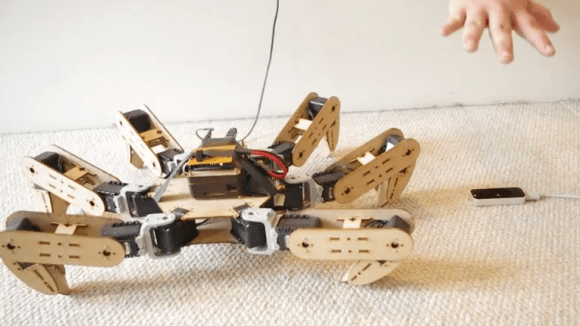
Moving your hand makes this hexapod dance like a stringless marionette. Okay, so there’s obviously one string which is actually a wire but you know what we mean. The device on the floor is a Leap Motion sensor which is monitoring [Queron Williams’] hand gestures. This is done using a Processing library which leverages the Leap Motion API.

Right now the hand signals only affect pitch, roll, and yaw of the hexapod’s body. But [Queron] does plan to add support for monitoring both hands to add more control. We look at the demo after the break and think this is getting pretty close to the manipulations shown by [Tom Cruise] in Minority Report. Add Google Glass for a Heads Up Display and you could have auxiliary controls rendered on the periphery.

While you’re looking at [Queron’s] project post click on his ‘hexapod’ tag to catch a glimpse the build process for the robot.

Continue reading “Leap Motion Controls Hexapod With Hand Signals”
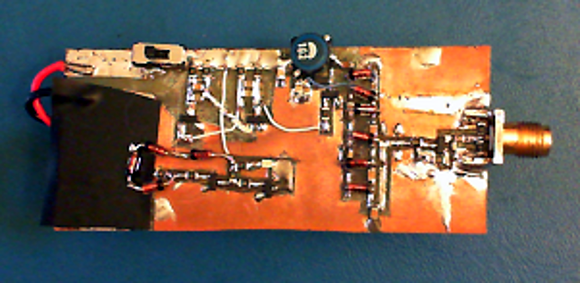
Avalanche Pulse Generator Design

avalanche-pulse-generator

This avalanche pulse generator is a great way to test your mettle as an Electronics Engineer. The challenge is to truly understand how each part of the design works. We certainly got a failing grade when first studying the schematics more than a week ago. But we’re slowly beginning to understand what’s going on under the hood.

The concept of an avalanche transistor is some wicked voodoo from the analog side of the street which leverages a transistor’s breakdown voltage to achieve a predictable result. In laymen’s terms it (mis)uses a transistor to produce a really fast pulse. The write-up linked above references several previous avalanche pulse generator designs, but this one is a bit different in how it produces about 50V from a pair of AAA batteries using a multivibrator circuit.

Even if you have no idea what’s going on here you may be interested in the last few paragraphs where the circuit is measured using a cutting-edge Teledyne LeCroy Wavemaster 820Zi-A. That’s a 20 GHz scope with a 15.3″ screen which you’ll never ever own.

Bench Equipment Tip: Screenshot Of Old Oscilloscopes

oscillocam-oscilloscope-camera-accessory

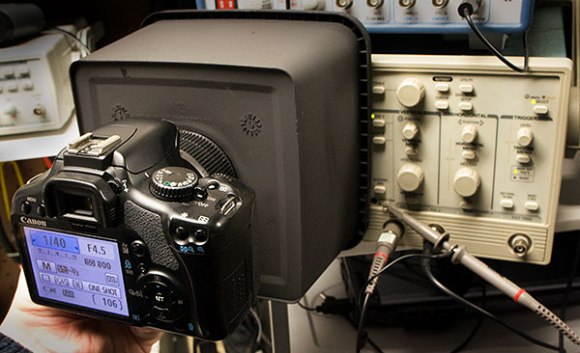
Here’s a quick tip on capturing the output of oscilloscopes that don’t have that native feature. [Paulo Renato] used a cookie tin as a camera cowl for capturing CRT oscilloscope screenshots.

We figure if you’ve got any kind of functioning oscilloscope you’re lucky. And although it’s nice to pull down the measurements to your PC on the newer models, the results [Paul] gets with this rig are still satisfactory. The plastic cookie box he used blocks out ambient light while holding the camera at a consistent focal length. He used some flat black spray paint to make sure the obnoxious yellow plastic didn’t interfere with the image, then drilled a hole which fits tightly around his camera lens.

You’ll need to monkey with the exposure settings to get the best image. But once you’ve got it dialed in it should be the same every time you want to take a picture of the screen.

Raspberry Pi Camera Built As Part Of Advertising Campaign

the-rpi-camera

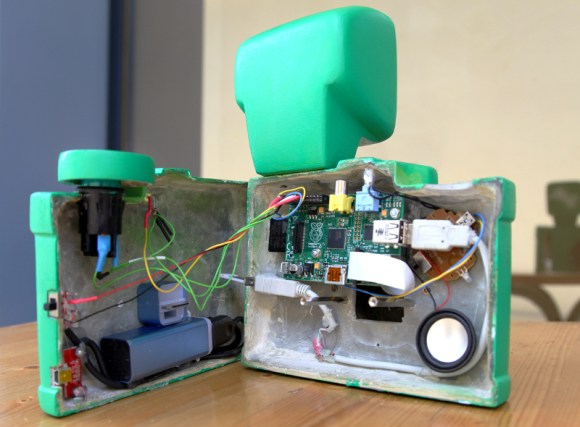
Here’s yet another example of well targeted advertising. This camera built around a Raspberry Pi is a giveaway from Sprite. The “lucky” winner of the camera will have the pleasure of seeing the Sprite logo as a watermark on all of the images they snap with it. But in the right hands it’s a simple hack to remove that “feature” (they published the Python script that adds the watermark) or to just scrap the parts for another project. Either way, Sprite got us to say their name three times in this paragraph so the campaign worked.

The most obvious part of this build is the custom cast resin case that they came up with which is a gaudy cartoon-like monstrosity. It protects the case-less Raspberry Pi board, and mounts the Pi Camera board so that the lens is positioned correctly. The lipstick-sized module mounted in the lower back half of the case is a 2400 mAh portable power supply with a USB charging port sticking out the side. This makes us wonder, do you have to wait for the RPi to power up before snapping a picture? If the size and color didn’t get you noticed by everyone the shutter sound will. it shouts the name of the soda company whenever you press the shutter release button.

If you’re more of a high-end photography enthusiast this DSLR wedded with an RPi will be of more interest.

Have You Failed Hard Enough To Be On Hackaday?

hackaday-fail-announcement

There’s so much more to be discovered when your projects just don’t want to work. Grinding out the bugs, getting past roadblocks, and discovering gotchas is where real hacking know-how comes from. But most people aren’t motivated to document their failures. We want to change that.

We want to roll out a new weekly feature that showcases failure… well documented failure. But we need YOU to give up the goods. Write about your failed experience on your blog, post it to our project forums with [FAIL] in the title, or you can just write everything in an email and send it to us. Which ever way you choose, you’ll need to tip us off that you’d like to make it to the front page (come on, it’s not bragging since it didn’t even work!). If you already know of well documented project fails send in those links too even if they’re not your projects.

Make sure you include at least one descriptive image — snapshots, diagrams, schematics, screencaps, anything that tells the story is fair game. To show you what we’re after here’s a few of our favorite failed projects:

We’d like to point out that all of these projects are interesting ideas that show off missteps along the way. We will not be trashing on your skills as a hacker, but instead celebrating the lessons learned and hearlding the sharing of ideas from otherwise doomed projects.

No Computer Ambilight Clone Uses A Computer

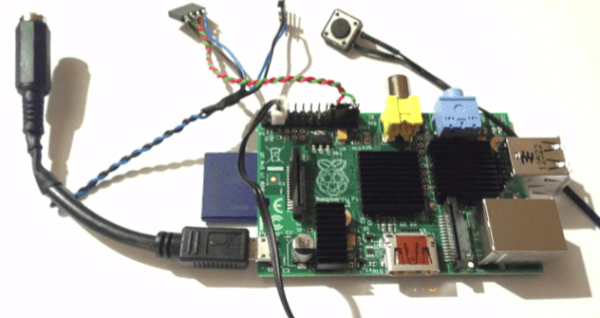
It may seem confusing that you’re looking at a Raspberry Pi when this hack is about an Ambilight clone system that doesn’t need a computer. The point here is that this system works no matter what your video source is, where many projects in the past have required the video to be playing from a computer.

This hack follows in the same path of the ARM based custom job we was almost a month ago. Just like that project you use an HDMI splitter to gain access to the feed going to your television. The split signal is fed into an HDMI to composite video adapter. The composite signal is captured by a USB video encoder. The GPIO header drives a strip of addressable RGB LEDs. The whole thing is powered as one using a bit of cable hacking.

It’s slightly convoluted. But all of the components are easy to source and relatively cheap. The one caveat is that it works best if you are already using a hardware HDMI source selector instead of the one build into your TV. That way there is just one HDMI cable going to the television, and this can siphon off of that feed.

Continue reading “No Computer Ambilight Clone Uses A Computer”

Android Hack Adds Missing Chromecast Button To Netflix App

We finally got our hands on a Chromecast over the weekend and we love it! But it wasn’t without a bit of a speed bump. Including a quick initial setup, we had a YouTube video playing in our living room about three minutes after the package hit our mailbox. But we spent the next twenty minutes feeling like a moron because we couldn’t get the Netflix app on an Android phone to cast the video. Turns out there is a bug in the Netflix app that doesn’t add the Chromecast icon for all devices.

The issue is that the newest version of the Netflix app isn’t pushed to all devices. A fix is on the way, but we’re not good at waiting. We used this technique to trick Netflix into thinking we have different hardware. Notice from the screenshots above that one lists our device as an LG-P769 manufactured by LGE. That’s how our /system/build.prop file originally looked. By using the BuildProp Editor app we changed those settings to Nexus S by samsung. After rebooting several of our apps were missing from the app drawer, including Netflix. But they all still worked hitting the Play Store for reinstallation and we now have no problem casting Netflix.