MIT Media Lab’s Month In Shenzhen

When you’ve got a month worth of blog postings it’s pretty difficult to choose one photograph that sums it all up. This one shows the tour group from MIT Media Lab in ESD garb ready for their tour of Okano SMT and Speaker Factory. It was part of a tour of Shenzhen aimed at bringing graduate students up to speed on what it means to manufacture products in the city. Luckily, Freaklabs member [Akiba] was one of the staff members of the program and blogged extensively about the experience. At first glance his page full of post abstracts looks really boring, but click through because both his recount and the commented images associated with each day are fun and fascinating ways to tag along with the group.

If you’re really good with faces you can pick [Bunnie Huang] out of the lineup above (he’s the third from the right). He had the original idea for the program and brought aboard a few others to help make the thing a success. The group toured a wide range of factories and parts markets in the city. This included your traditional electronics manufacturing venues but there was even a side trip to a diaper and feminine napkin plant to see the non-electronic factories in operation. In addition to tours there were lectures by industry members like HAXLR8R, a group that specializes in helping start-ups navigate the manufacturing jungle.

A Look At The (now Patched) Security Of [Kim Dotcom’s] MEGA Cloud Storage Service

mega-cloud-storage-security

MEGA is a new, encrypted cloud storage system founded by [Kim Dotcom] of MegaUpload fame. They’re selling privacy in that the company won’t have the means to decrypt the data stored by users of its service. As with any software project, their developers are rapidly making improvements to the user interface and secure underpinnings. But it’s fun when we get some insight about possible security problems. It sounds like the issue [Marcan] wrote about has been fixed, but we still had a great time reading his post.

The article focuses on the hashes that the website uses to validate data being sucked in from non-SSL sources using some JavaScript. Those insecure sources are a CDN so this type of verification is necessary to make sure that the third-party network hasn’t been compromised as part of an attack on the MEGA site. The particular security issue came when the hashes were generated using CBC-MAC. [Marcan] asserts that this protocol is not adequate for the application it’s being used for and goes on to post a proof-of-concept on how the messages can be forged while retaining a hash that will validate as authentic.

[Thanks Christian]

Messenger Bag LED Matrix Keeps Bikers Safe At Night

messenger-bag-led-matrix

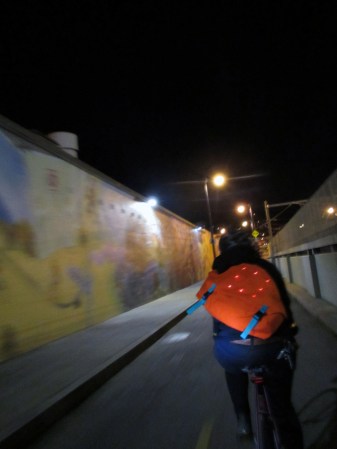
Get a little more exposure than one under-saddle bike light can provide by building your own LED enabled messenger bag. It looks like the bag itself was fabricated from scratch by [Andrew Maxwell-Parish] rather than altering an existing bag. He had a few goals for the project, the most interesting of which was to make the electronics removable. His reasoning for this is so he can get the bag past security at the airport.

The design is quite simple, there’s a large flap which is attached at the top of the bag and has a couple of clips at the bottom to keep ti closed. On the inside of the flap he sewed a snap system which holds one piece of material on which all of the electronics are attached. The Lilypad system is used (it looks like the original hardware and not the FLORA upgrade). The main unit is sewn to one side, while the Charlieplex LED matrix was attached in a grid centered on the flap. The lights shine through the orange fabric, keeping them fairly safe from the weather and giving them a reddish hue.

If you’re looking for a few more features check out this GPS enabled messenger bag.

Adapting The Nexus 7 For A Double DIN Car Dashboard Opening

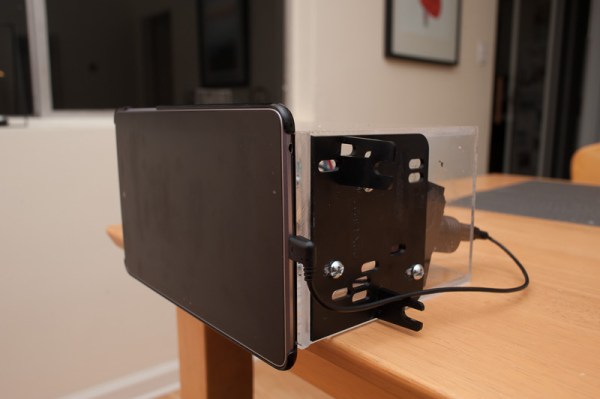
It turns out that the Nexus 7 Android tablet is the perfect size to fit in a double DIN opening. DIN is the form factor of a single CD head unit for an automobile. Many models have room for a double DIN, which is defined as 4″ high by 7″ wide. Once [Meta James] figured out that the dashboard bezel for his Subaru framed the Nexus 7 perfectly he set out to fabricate the mounting system for an in-dash tablet installation.

Unlike a lot of these dashboard tablet installs, [James] didn’t need any Bondo, sanding, or painting to get things to look right. Like we mentioned, the bezel is a perfect fit so his alterations are hidden behind the tablet itself. He removed the stock head unit and ordered a DIN adapter kit to get the black bracket plate seen above. He built an acrylic box the same size as a double DIN head unit, then mounted the plates to the sides and a Nexus 7 case to the front. This holds the tablet in firmly, lets him mount the entire assembly using the factory mounting points, and leaves plenty of room for the cabling that connects the device to the car. Since he already had a hands-free phone system he just uses that to amplify the audio fed to it via Bluetooth.

[via Reddit]

Hand Bind Your Own Books

hand-bind-your-own-books

This guide will show you how to bind books by hand. The process from start to finish isn’t very difficult as long as you follow each step along the way. The final product looks great, and we can’t think of a better gift… as long as you have something meaningful on the pages.

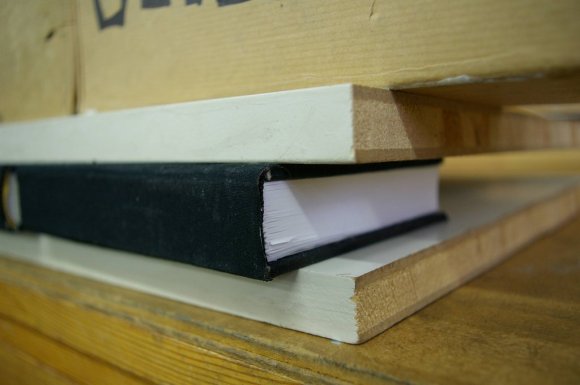
We never really thought about the direction of the fibers in a sheet of paper, but that’s the first thing you’ll have to take into consideration here. You want the fibers running up and down when the book is in a bookcase. Next the sheets are organized into stacks of four, then folded in half forming eight pages. After stacking these packets together a series of lines are marked on the folded side. Holes are then punched from the inside at each mark using a sturdy needle. This is where the stitching for the binding will happen. Bands are added using coarse linen thread. After stitching these in place and knotting, glue is added and finally a piece of cloth is adhered to the binding and a portion of each inside cover. From there it’s onto fabricating the cover before pressing the finished project as seen above. What a piece of work!

[via Reddit]

Portable Gaming Console Uses SSD1289 And Propeller

building-a-portable-video-game

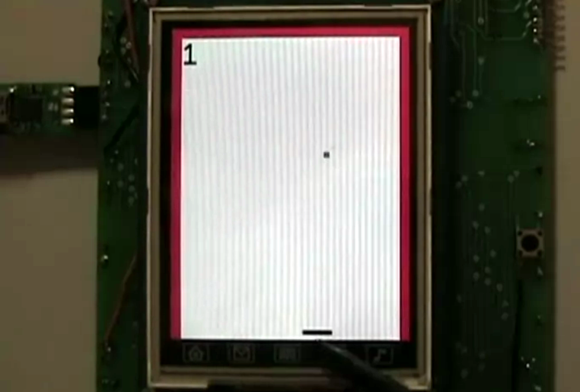
[Samir] dabbles in hobby electronics and decided to put his skills to the test by building this portable gaming console (Note: this site uses an HTTPS address which cannot be used through Google Tranlator. It does work for the Chrome browser translator). The image above is a screenshot from his Breakout-style game. The paddle at the bottom is controlled with the touchscreen. You move it back and forth to keep the ball from traveling past the bottom edge (it bounces off of the red borders on the sides and top).

The main PCB is larger than the 3.2″ LCD footprint, but [Samir] made sure to include a lot of peripherals to make up for it. The board sports a Parallax Propeller chip to run the games. It interfaces with the SSD1289 screen (this is a cheap and popular choice) but that really eats up a lot of the IO pins. To control the game the touchscreen can be used as we’ve already mentioned. But there are two other options as well. There is an expansion port which uses a shift register (74HC165) to serialize the input. For prototyping this allowed [Samir] to use an Atari joystick. He also rolled a Bluetooth adapter into the project which we would love to see working with a Wii remote. Rounding out the peripherals are an SD card slot, audio jack for sound, and an RTC chip for keeping time.

There are several videos included in the post linked above. After the break we’ve embedded the game-play demo from which this screenshot was taken.

Continue reading “Portable Gaming Console Uses SSD1289 And Propeller”

Telepresence Upgrade With A Minimum Of Effort

telepresence-upgrade-with-very-simple-parts

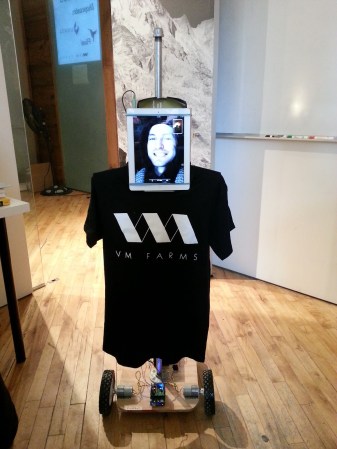
This telepresence upgrade lets an employee take part in the office from more than four thousand kilometers away. It’s an upgrade of their previous setup which used a laptop on a rotating platform to add a bit of control to the video conferencing experience. But all that original version could do was swivel, this one lets you drive your virtual self around for fifteen hours between battery charges.

The real work is in the base of the robot, as the audio and video are handled by a tablet independently from the locomotion. The team spent about four hundred bucks to throw the thing together. It starts with a hunk of plywood. Two 3A motors were mated with lawnmower wheels for the front of the bot. Dragging under the back of the base are a couple of casters that make it possible to turn without skidding. A motor shield and a WiFi shield for the Arduino make it possible to control the thing over the Internet. They even added some functionality on the client side to use a PlayStation 3 controller. Check out the completed machine in the clip after the break.

Continue reading “Telepresence Upgrade With A Minimum Of Effort”