More Laser Shooting Range Goodness; Now With Duckies

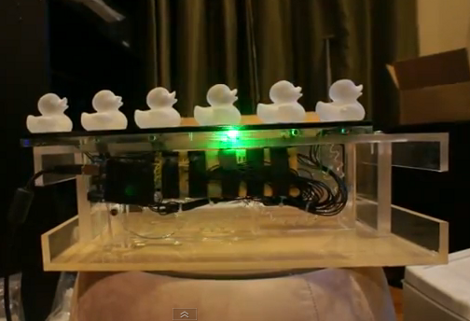
Here’s another project that reminds us of the shooting games at a carnival. This was actually inspired by the video game Duck Hunt, and was undertaken as a class project between four students at San Jose State University. It uses moving glass targets that look like rubber duckies. The player shoot sensors at their base with a laser-tipped gun. A direct hit is indicated by the duck glowing blue.

[Lananh Nguyen] is a Business Marketing major, but he’s also minoring in Studio Art and has been blowing glass for years. We think he’ll always have a side job making and selling glass because those ducks look fantastic. [Michael] and [Chris] worked together, building out the oscillating platform which moves the targets back and forth, as well as wiring up light sensors to the Arduino. A green laser diode was added to an acrylic gun to complete the project. Check out the game play video after the break to see how it all comes together.

If you missed the other laser shooting range when we featured it last week, you’ll want to revisit that project which uses tin cans as targets.

Continue reading “More Laser Shooting Range Goodness; Now With Duckies”
This Digital Picture Frame Runs Linux Better Than You Might Think

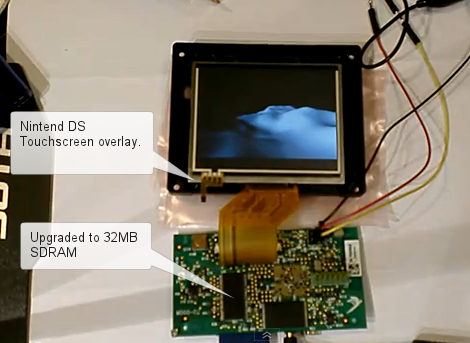
Ah, the beauty of spreading the guts of some hackable hardware across your workbench. This happens to be the circuit board and LCD screen from a Parrot DF3120 digital picture frame. The device is pretty powerful, considering you can still find them available for around $25. You’ll get a 3.5″ screen, ARM9 processor with 8MB or RAM, Bluetooth, a tilt sensor, and more. It seem that [BusError], [Sprite_tm], [Claude], and few others really went to town and spilled all of the secrets this device has to offer.

Their goal of the hack was to get their own Linux kernel running. It is possible to reprogram the processor using its JTAG interface. And if you really want to drill down to the good stuff, there’s access to all of the BGA pins on the bottom of the board thanks to a grid of micro vias. But the device can be tricked into flashing your own firmware just by altering a stock upgrade image.

You can get a pretty good idea of what there is to do once you’ve replaced the firmware from the video after the break. A RAM upgrade (using a chip from an old PC133 stick) lets the video run smoothly as it’s controlled via a Wii remote.

Continue reading “This Digital Picture Frame Runs Linux Better Than You Might Think”

Using A Touch Screen With An STM32 Microcontroller

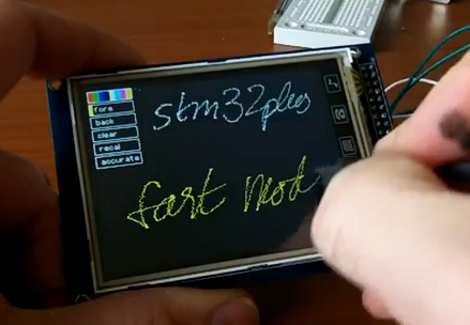
[Andy Brown] has been working on a series of tutorials revolving around the STM32 processor family. He’s using the STM32plus development board, with an STM32F1 ARM Cortex M3 processor to drive a couple of different full color graphic LCD screens. His latest installment shows how to read from the touch screen included with both displays.

After the break we’ve embedded the video from which this screenshot was taken. As an example, [Andy] has programmed a painting program to show off what the touchscreen overlay is capable of. It starts off with the calibration routine we’re all familiar with, then drops to this screen with a virtual control panel and blank canvas.

This hardware uses the Texas Instruments ADS7843 controller, which [Andy] says is extremely common and that several other manufacturers use the same communications protocols. He discusses how to communicate with the controller, and how to incorporate the data into your program. Included is an open source library which you can use in your own projects.

Continue reading “Using A Touch Screen With An STM32 Microcontroller”

Build An Intervalometer With These Simple Fabrication Techniques

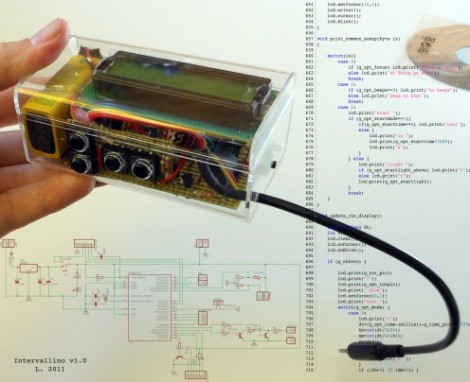
[L] just finished building this intervalometer and his verbose documentation of the project has a little bit of everything. The fabrication uses common prototyping materials, and simple skills that are easy to master even for the beginner.

The hardware is based around an ATmega8 microcontroller. After snooping around the Internet [L] wanted to see if the voltage divider based focus and shutter commands that are present in some camera remote shutter controls would work for his model. Investigation with a commercial shutter release showed him how it was done, so he incorporated that into his design. When it comes to firmware for the device we really like his explanation of the menu system. There’s a lot of settings and he did a great job of planning the user interface to make them all work on the finished product.

The schematic and board layout were done with Eagle. During the layout process he made choices for easy assembly using strip board, and even walks us through the steps when cutting the traces and adding jumper wires. It’s nicely finished in this clear plastic case and demonstrated in the video after the break.

Continue reading “Build An Intervalometer With These Simple Fabrication Techniques”

Using A Mac And XCode As A Linux Development Platform

[Ricard Dias] wrote in to tell us about his guide for developing Linux applications on a Mac. He really enjoys the development environment provided by XCode, and it doesn’t take much to make it work as an all-in-one solution for Linux development.

The real trick here is the use of SSH to access a Linux environment. In this example he uses Ubuntu running as a virtual machine, but also mentions that the same thing can be done just as easily with a separate box as long as it is on the same network as the Mac. SSHFS (the SSH Filesystem) lets him mount the development directory on the Linux box locally. This is where the XCode project and files will be stored, but building the program will be done by the Linux machine via a script calling the make comand via SSH. To test out the newly built program, [L] tunnels in using X11 forwarding for ssh, and the application will be shown as a window in OSX, even though it is running on the Ubuntu machine.

We love SSH and use it all the time. It’s amazing how hand it can be.

A Salinometer Built For The Science Olympiad

This is a Digital Salinometer which [Daniel Kramnik] built as a Science Olympiad entry. He’s a Junior in High School and when looking for a project to enter into the Water Quality event he was interested in achieving greater accuracy than a mechanical hydrometer provides.

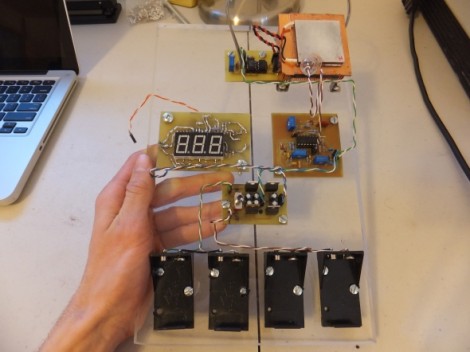
We think the circuit design is very impressive for anyone who hasn’t complete formal training as an engineer, and outstanding for someone as young as [Daniel]. Measurements depend on two main parts, a temperature control and a salinity sensor. These are both necessary because fluctuation in sample temperature will affect the salinity reading.

A Peltier element is used to heat the water sample if it doesn’t fall within a set range of temperatures. From there, an Op-Amp circuit conditions a signal running through the sample, passing an output to the ADC converter chip which drives the three-digit readout. [Daniel] calculates an accuracy within 0.0014%. He must be on the mark because he’s won his regional competition and will soon compete at the state level.

Projector Project Bears No Fruit But It Was A Fun Ride

No matter how good the intentions or how strong your hack-fu may be, sometimes you just can’t cross the finish line with every project. Here’s one that we hate to see go unfinished, but it’s obvious that a ton of work already went into reclaiming these smart white-board projectors and it’s time to cut the losses.

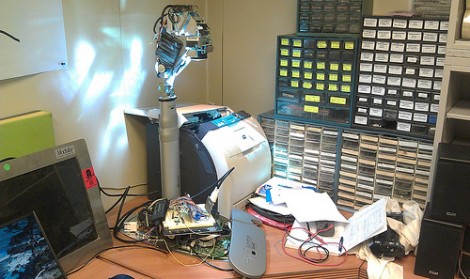
The hardware is a Smartboard Unifi 35″ computer with a projector mounted on a telescoping rod. It was manufactured for use with a touch-sensitive white board which the guys at the Milwaukee Makerspace don’t have. The projector works, but all it will display is a message instructing the user to connect the computer to the white board. Since they’ve got a couple of these projectors, it would be nice to salvage the functionality.

The first attempt was to replace the video signal to the projector. A few test boards were etched to experiment with DVI input. This included several logic sniffing runs to see what the computer is pushing to get the warning message to display. Alas, the group was not able to get the device to respond. But this opens up a great opportunity for you to play Monday morning hacker. Take a look at the data they’ve posted in the link above and let us know how you would’ve done it in the comments.