A Bicycle Built For… Siamese Twins?

This project really puts an end to arguing over who has to ride in the back of the tandem bicycle. We challenge you not to smile while viewing the maiden voyage that [Carlos] and his daughter take on this side-by-side bicycle. The video can be found after the break.

It certainly makes a bit more sense than an over-under tandem, and the fabrication process is really quite manageable. This requires alterations to the seat, handle bars, and pedals, but the majority of the bike (frame, gearing, fork, wheels) is unaltered.

The cranks have been replaced by a custom welded cam mechanism that reminds us of how the pedals on a paddle boat work. Both riders must pedal at the same time and rate. To give each a place to sit the seat post was converted into a T bar to host saddles to the right and left of the frame. Finally, the handle bars are the most complicated of all. Extra framing was welded onto both sides for the front tube to provide a place to mount two pair of handle bars. One of them is fixed in place, the other can be turned, using a lever mechanism to steer the front fork.

It looks a bit awkward to get started, but once both riders are up it seems quite stable.
Continue reading “A Bicycle Built For… Siamese Twins?”

Treaded Robot Modified For Stair Climbing

[Mike Li] is showing of his stair climbing robot. It’s a bot that cruises around on a pair of tank treads, but some interesting modifications gave him the traction needed to ascend a flight of stairs without slipping backward.

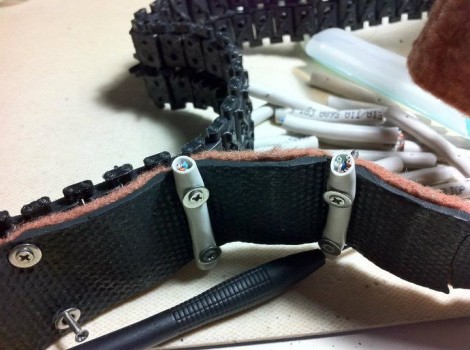
The image above shows this process in great detail. You can see the unaltered treads leaving the top of the image. In the foreground, strips of rubber-backed rug add some sticking power to the otherwise smooth surface. To really stop the bot from slipping, segments of CAT5 cable have been screwed to the tread at regular intervals, holding the carpeting tightly in the process.

You can see in the video after the break the little robot has no problem with rough terrain. The design was inspired by the iRobot Packbot which has a set of treaded appendages sticking off the front end. These ensure that the vertical face of an obstacle, such as the beginnings of a staircase, can still be reached by the main set of treads.

Continue reading “Treaded Robot Modified For Stair Climbing”

737 Cockpit Will Satisfy Even The Most Discriminating Simulator Afficiandos

This isn’t an airplane, it’s a simulator. But you won’t find it at a flight school as this labor of love is a home build of a 737 cockpit (translated) that has been going on for more than two years.

It started off as a couple of automotive bucket seats in a room with two computer monitors to display the view out the windscreen. From there each piece has been meticulously added for a wonderful overall reproduction. The range of skills needed to pull this off is impressive. The seats have been rebuilt with padding and upholstery true to the Boeing factory options. The support structure that forms the domed front of the aircraft was built from wood with a metal bracket system to hold the overhead control panels in the right position. The only thing missing here is the rest of the plane. Take a look at the simulated landing run in the video after the break to see what this thing can do.

Looking for something that will take you for a bit more of a ride? Here’s a collection of motion simulators that might satisfy your craving.

Continue reading “737 Cockpit Will Satisfy Even The Most Discriminating Simulator Afficiandos”

Running The Numbers On A Cheap PSU

[Mike] picked up a cheap USB hub for four pounds (about $6) including delivery. He wanted to know how it’s possible to get quality electronics for that price, and as you may have guessed it’s not possible. He cracked open the power supply that shipped with the hub and hooked it up for some testing.

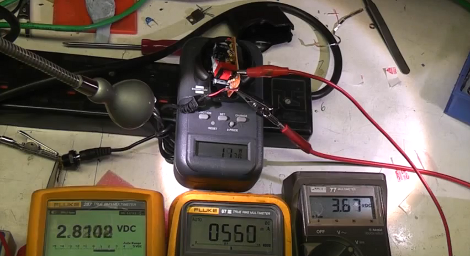
The wall wart has a sticker on it that claims a rating of 1 Amp at 5 volts. It’s pretty easy to see that this hardware cannot meet that spec just by looking at the circuit board. It’s a low-end single sided board that has some really disappointing isolation between the mains and regulated side of the circuit. As far as we can tell there’s really no reliable regulation circuit on the low side of the transformer, and the tests that [Mike] runs in the clip after the break show this. From left to right in the picture above you can see voltage at the hub-side of the power cord, current on the load, and voltage leaving the circuit board. At just 560 mA the voltage the USB hub is receiving has fallen below 3 volts!

The link to this project was sent in by [Paul] after reading about that fake Canon camera PSU. We love this kind of stuff so keep the tips coming as you find them!

Continue reading “Running The Numbers On A Cheap PSU”

LED Cube Is A Little Bit Of Kit, A Lot Of Point-to-point Soldering

[Craig Lindley] recently finished building his own RGB LED cube project. It’s made up of four layers of 4×4 LED grids, but you may notice that the framework that supports the structure is not the usual ratsnet of wires we’ve come to expect. They’re actually long, thin circuit boards. [Craig] grabbed the Rainbow Cube kit sold by Seeed Studio for this project. But instead of pairing it with their Rainbowduino driver, he built his own to give him more options on how to control the blinky lights.

He’s using an Arduino Uno to control the display, choosing TLC5940 driver chips to safely provide the juice necessary to light up the grid. These drivers also offer 12-bit pulse-width modulation for easy color mixing. Driving the LEDs directly would have taken a large number of these expensive chips (over $4 a piece), but if multiplexed the design only calls for two of them.

Check out a video of the finished cube reacting to music thanks to the microphone and amplifier circuit [Craig] build into the driver board.

Continue reading “LED Cube Is A Little Bit Of Kit, A Lot Of Point-to-point Soldering”

OsPID: The Open Source PID Controller

Need PID control in your next project? Perhaps this little beauty can help. It’s an Open Source PID controller that also follows the Open Hardware guidelines. [Brett Beauregard] based the project on the newly minted Arduino PID library which he wrote. In the video after the break [Brett] takes apart the device, walking through some of the ways this might be hacked. If you want an overview of every part of this project to-date the best resource is probably his personal blog post.
The front circuit board is the meat and potatoes of the device. It hosts the user interface in the form of buttons, LEDs, and a graphic LCD screen. You can also see the USB mini-b connector which gives you access to the Arduino compatible ATmega328 microcontroller on the back. There is also a piezo buzzer for your alarm needs.
The prototype that [Brett] shows off uses pin connectors to join the main board to the two daughter boards. Unfortunately, the production model moved to dual-sided edge connectors. That’s fine if you you’re using it in its stock condition, but it makes it a bit harder to replace those boards with your own hardware. None-the-less, we love to see great Open Hardware projects brought to market! Continue reading “OsPID: The Open Source PID Controller”

Custom Screensaver On The Non-touch Kindle 4

[Kubbur87] put together a guide to replacing the Non-touch Kindle 4 screensavers with your own images. We’ve already seen a way to remove the Special Offers banners from the newest version of Kindle Hardware, this hack lets you use your own 600×800 Portable Network Graphics (.png) file instead of the images pushed to the device by Amazon.

Frankly, we’re shocked at how easy this hack is. [Kubbur87] puts the device into developer mode, enables SSH, and then goes to work on the Linux shell within. It seems the only line of protection is the root password which he somehow acquired.

After the break you’ll find his videos which show how to enable developer mode and how to perform this hack. By putting a file named “ENABLE_DIAGS” with no extension on the device when it is recognized as a USB storage device you’ll gain access to the diagnostic menu system. From there it’s just a matter of cruising that menu to get SSH access. Like we said, you’ll need the root password, that that’s as easy as naming your favorite video game character from the 1980’s.

Continue reading “Custom Screensaver On The Non-touch Kindle 4”