Learn A New Fabrication Technique From DIY Prosthetics Builders

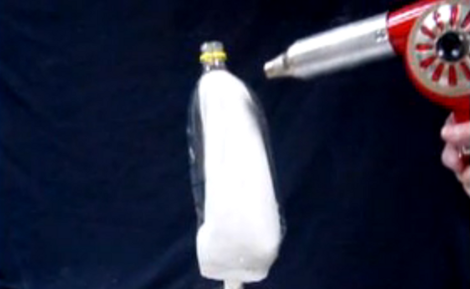
This is a screenshot from a video tutorial on making your own prosthetic parts from 2-liter soda bottles. The opaque white part is a mold made of plaster. It’s a representation of the wearer’s limb, and provides the hard, heat-resistant form necessary for this manufacturing technique. You can see the clear plastic soda bottle which fits over the form after the bottom was removed. A heat gun causes the plastic to shrink to the shape of the plaster model.

Once formed, the threaded neck is split down the middle with a band saw. This will receive a piece of 1/2″ PVC pipe to be held in place by the neck and a pipe clamp. It’s possible to stop there, but a second video details an additional bottle used to make the device more rigid. See both videos after the break.

This manufacturing process is aimed at parts of the world that don’t have access to advanced prosthetics. We think it’s a wonderful demonstration of what can be done to improve the lives of amputees. We also think it’s a technique that can be used in other projects… we just haven’t figured out what those are as of yet.

It’s amazing how versatile this plastic waste can be if you put your mind to it.

Continue reading “Learn A New Fabrication Technique From DIY Prosthetics Builders”
Building A 1300 Lumen Bike Light

[Brainiac27] isn’t going to let the absence of sun prevent him from biking. He has no trouble lighting his path with this 1300 Lumen bike light he built.

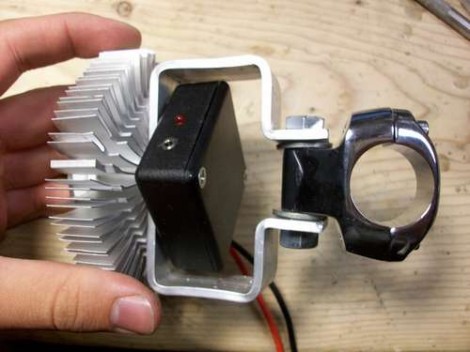
The light source is a 3-up star by Cree. It puts off a lot of light, but also generates quite a bit of heat which is the reason for that large heat sink. It is meant to be used with a CPU but works well for this purpose thanks to the adhesive thermal paste used to unite the two parts.

The mounting bracket is a custom job, bent from 1″ by 1/8″ aluminum bar. [Brainiac27] had some issues with length the first time he tried making it. For his second attempt he started with an overly long piece, made the bends from the center out, and only made cuts once the bends were all completed. The bracket makes it easy to mount to his bike, with the battery stored in a bike bottle and a remote switch (with attaches to the jack you can see on the project box above) hidden underneath one of the brake hoods.

The intensity of this light nearly doubles one of our other favorites.

Two Ways To Convert An Electric Cooler To A Humidor

It’s not a proper humidor in the technical sense (there isn’t any specific way to moderate the humidity) but [Dzzie] came up with a couple of ways to keep his cigars cool in the summer heat.

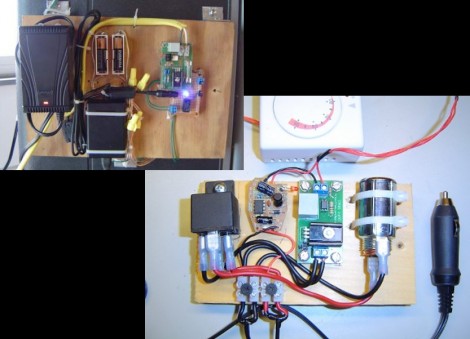
Both versions use a Coleman electric cooler as the enclosure. This hardware uses a Peltier device to keep it cool inside. The first attempt at use a thermostat with this worked by adding an external relay to switch mains power. A thermostat dial hangs out inside the cooler to give feedback to the relay board. This worked, but it’s a really roundabout approach since the cooler operates on 12V, and this method uses a mains-to-12V adapter. If [Dzzie] decides to hit the road the relay won’t work when the cooler is powered from a 12V cigarette lighter in the car.

The second rendition fixes that issue. He moved to a 12V relay, and used a car cellphone charger to supply the 5V of regulated power his control circuitry needs to operate.

ARM Programming Primer; Getting The USART Running

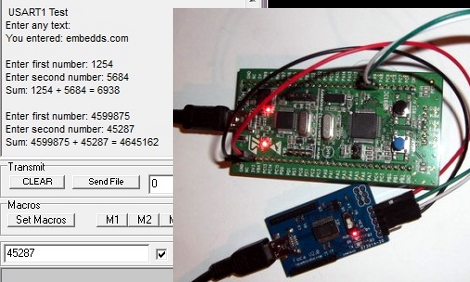
We find it interesting that PIC and AVR programming is very common in hobby electronics but ARM doesn’t have nearly the same foothold. This is partly because there’s a knowledge barrier involved with making the transition (the other part is probably the lack of DIP packaged chips). But if you’ve worked with 8-bit microcontrollers you can certainly make the jump into the 32-bit realm. Here’s a great opportunity to get your feet wet. This guide will show you how to get the USART on an STM32 Discovery Board working, which makes it easy to get feedback about what’s going on in your program.

One difference you’ll notice when moving to ARM microcontrollers is that there is almost always a library bundle available from the manufacturer which includes all of the functions you need for hardware control (USART, USB, Ethernet, ADC, etc.). That’s the case here, so simply including the USART library makes it a snap to finish the rest of the program. Once you hook up your communications hardware (an FTDI cable in this case) just use the library initialization functions, followed by the send and receive commands and you’ll be pushing messages to a computer terminal in no time.

If you’re trying to use the STM32 Discovery Board with a Linux box here’s a shove in the right direction.

Pushing Chest Strap Heart Rate To A Stock Exerciser Display

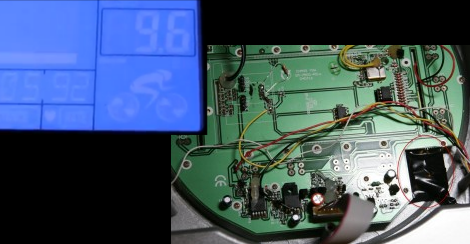
This hack came out so well that [Levent] wishes he had tried it years ago. When exercising he wears a Polar heart rate monitor which sends data from a chest strap to his wristwatch. But his exercise bike also has a heart rate readout that depends on your hands touching metal contacts on the handlebars. He set out to see if he could patch the chest strap data into the exercise bike LCD display.

The first part of the hack is really simple. As we’ve seen several times before, you can buy a receiver module which grabs data from the chest strap. Now it was a matter of patching the data from this receiver into the Schwinn 213 recumbent exercise bike. [Levent] pulled out the PCB and located the small daughterboard that is responsible for the hand grip heart rate. With careful study he was able to identify the pinout. There are two data lines. One is responsible for the heart rate detected signal, the other pushes the actual heart rate data. On a hunch he hooked a signal generator up to the latter and discovered that all it takes is a square wave.

The rest is pretty straight forward. Check out the proof in his video after the break. Continue reading “Pushing Chest Strap Heart Rate To A Stock Exerciser Display”

Replacing Solder Tab Batteries

There’s a ton of devices out there that have batteries in them but most people never think about it. That’s because they use rechargeables that are sealed inside and topped off with external chargers. [Todd Harrison] has a couple of them, including a cordless shaver and a Christmas light timer. He’s had these for years and the batteries have gone south. They’re not meant to be consumer-replaceable, but that did stop him from cracking them open and swapping out the solder-tab batteries himself.

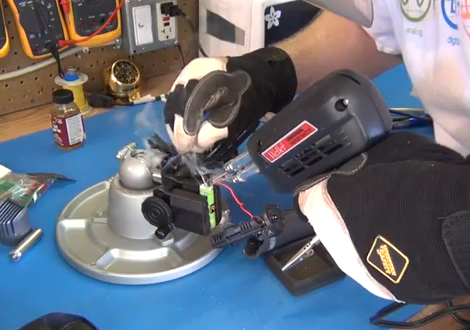
The batteries themselves won’t be all that hard to source. The shaver just takes a NiMH AA cell. But since they’re not meant to be replaced [Todd] needed to do some soldering. Here you can see he’s using a solder gun to make the connection between the new battery and one of the solder tabs. He uses the gun instead of an iron because he needs to heat the joint quickly, and must avoid heating the rest of the cell which could rupture. As a safety precaution he’s wearing gloves and a full face-shield.

Check out the video after the break to see this, as well as the coin cell replacement in the lighting controller.

Continue reading “Replacing Solder Tab Batteries”

This Dongle Makes Any Screen An Android Device

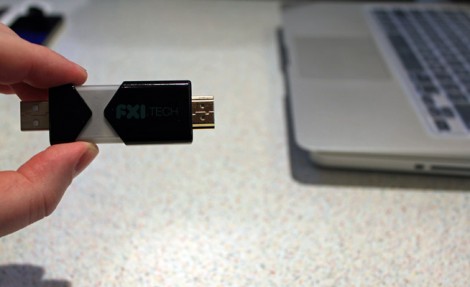
Want that 70″ LCD television in your living room to be an Android device? This little guy can make it happen. With an HDMI port on one end, and a USB plug on the other for power, just plug in FXI Technologies’ Cotton Candy dongle to create a 1080p Android television.

The price isn’t set for the device, but it’s expected to be available at less than $200. Considering what’s inside that’s pretty reasonable. There’s a dual-core 1.2 GHz ARM processor, 1 gig of RAM, 64 gigs of storage, Bluetooth, WiFi, and a microSD card slot. Wow!

So is it hackable? Absolutely. Well, kind of? The company doesn’t intend to bring Cotton Candy to the retail market. Instead, they will sell the device to developers who may do what they wish. From there, said developers have the option to license the technology for their own products. This begs the question, will the development kit come in under $200? Hard to say.

Check out the video after the break to hear an interview with the company’s CEO. It certainly sounds fascinating, and like the Chumby NeTV, we can’t wait to see what comes of this. Continue reading “This Dongle Makes Any Screen An Android Device”