Double-pendulum Spray Gives This Graffiti Bot Some Style

Here’s an art exhibit that does its own painting. The Senseless Drawing Bot (translated) uses the back and forth motion of the wheeled based to get a double-pendulum arm swinging. At the end of the out-of-control appendage, a can of spray paint is let loose. We’re kind of surprised by the results as they don’t look like a machine made them.

The video after the break gives a pretty good synopsis of how the robot performs its duties. The site linked above is a bit difficult to navigate, but if you start digging you’ll find a lot of build information. For instance, it looks like this was prototyped with a small RC car along with sticks of wood as the pendulums.

We can’t help but be reminded of this robot that balances an inverted double pendulum. We wonder if it could be hacked to purposefully draw graffiti that makes a bit more sense than what we see here?

Continue reading “Double-pendulum Spray Gives This Graffiti Bot Some Style”

Adding Keypad Security To Your Automobile’s Ignition System

[BadWolf] managed to make some free time to get back to his own electronic projects. This time around he’s created a security system for his car. It’s patched into the ignition, preventing the engine from starting when the key is turned. A driver must first insert the key, then type the combination on a keypad in the center console before the car will fire up.

While he was working on the project he also decided to add a start button to the dash-board (we think it does make it look like a later model vehicle). The keypad is driven by an Arduino Nano which has the start code stored in it. Power for the system is provided by a USB hub hidden behind the dash which he thinks will also come in handy with future hacks.

When the proper code is entered, you’ll hear a rendition of the Super Mario Bros. theme. The speaker also lends a pleasant beep with each keypress. See the demo clip after the break to hear it for yourself.

Continue reading “Adding Keypad Security To Your Automobile’s Ignition System”

Whole House Battery Backup Used For Lower Power Bills

[Photonicinduction] has an impressive battery backup installation that powers his whole house. Unlike a standalone emergency generator which would require you to hook up all of the device you want to run, this setup sits in between the power meter and the breaker box, ready to step in when needed.

But get this, he’s not just using it as a backup system. It kicks in during the day to run everything including two freezers, a refrigerator, his lights, television, and computers. That’s because the price per kilowatt-hour is quite a bit higher during the day than at night. So after 10:30pm the system patches his house back into the grid and charges the batteries for use the next day.

What you see here is just a portion of his system. The control board is not pictured but is very impressive, including a network of relays which are used as a fail-safe system so that there are no conflicts between mains and the battery system. Check out his 15-minute walk through of the system after the break. Continue reading “Whole House Battery Backup Used For Lower Power Bills”

Building A Heat Sealer For Anti-static Bags

[Raphaël Assénat] needed anti-static bags for some boards he is selling. He had a lot of leftovers on hand (presumably from the components he ordered to assemble these boards) and wanted to reuse them. Instead of buying a heat sealer he built his own to cut them down to size.

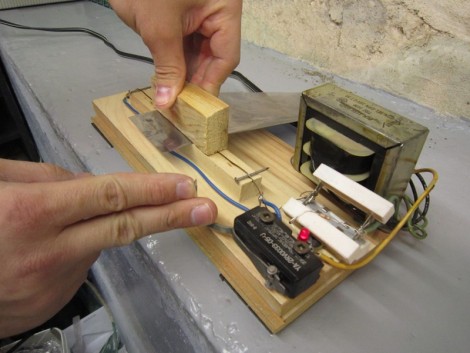
His build starts with a transformer to drop mains voltage down to 9 Volts. From there, you can see the two power resistors used in series to limit the current. Without these, the wire would get way too hot. Just in front of those resistors is a momentary push switch which cuts the power by default. Here we can see that [Raphaël] is using a wood block to press the bag against the wire as it heats up.

The wire itself is a piece of straightened tension spring. Apparently this spring material is a poor conductor, which is why it gets hot enough to melt the plastic bag when you run current through it.

Simple Telepresence Hack Lets Remote User Rotate This Laptop

[Kris] wanted to make the telecommuting employees at his office feel a little more in control of their virtual presence in the office. He gave them a way to look around without needing to go into full-blown robotics. This laptop stand has a Lazy Susan connected to a servo motor to give the user control of where the computer is pointed.

We’ve certainly seen our share of really complicated surrogate builds like this balancing robot. There have been simpler options too, such as this smartphone-carrying motorized base. But when you get right down to it, the ability to pan the camera is probably good enough for most situations. [Kris’] solution can be built in an afternoon, using simple materials. The box is made out of MDF with a base for the laptop connected by the ball-bearing hardware that supports the weight and makes sure the servo is able spin it freely. It is driven by an Arduino which connects to the computer via USB; making it easy to control remotely. Check out a quick clip of the laptop going round and round after the break.

Continue reading “Simple Telepresence Hack Lets Remote User Rotate This Laptop”

EagleUp Pulls Your PCBs Into SketchUp

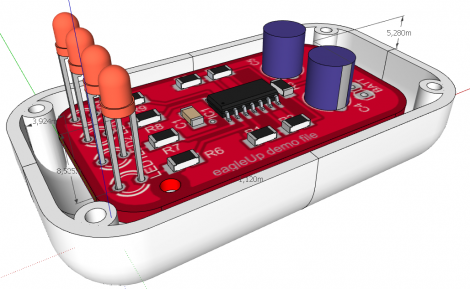
[Karl] wrote in to tell us about a software package called EagleUp that will import your Eagle CAD PCB designs into Google SketchUp. It bridges the gap between the two using the open source image processing software ImageMagick.

As you can see above, you’ll end up with a beautifully rendered 3D model of your hardware. This is a wonderful way to make sure that your enclosure designs are going to work without needing to wait for the PCBs to arrive from the fab house. It is available for Windows, OSX and Linux (although the last time we tried to run Sketchup under Wine nothing good came of it — perhaps it’s time to try again).

In [Karl’s] case, he’s working on an Arduino compatible board based around the Xmega. He mentions that EagleUp is a great way to get an idea of how component placement will end up, and to see if the silk screen layer is going to turn out well or not. Here’s a link to one of his test designs.

Electronic Recorder Conversion

As we wrote the title to this feature we can see why [Jeff Ledger] calls it an electronic flute and not a recorder; this is a musical instrument and not something for archiving audio. Confusion aside, we’re all familiar with these plastic ‘musical’ instruments. Many elementary schools in our area require students to buy one as part of music class. So it shouldn’t be hard to find one if you want to try this for yourself (heck, [Jeff] grabbed his a the dollar store).

Basically, he’s replaced the finger holes with momentary press switches, then uses a Propeller dev board to turn the button presses into music. It’s simple and quick, but what does it for us is the breath actuator. Sure, you can set this up to play whenever a button is depressed, but [Jeff] went that extra mile and added a piezoelectric element to the bottom. When you blow through the instrument it flexes slightly, generating a tiny current that can be measured by the microcontroller. Check out the short clip after the break.

Do a little more work and you could turn this into some type of musical game controller. We’re thinking Zelda!

Continue reading “Electronic Recorder Conversion”