IPhone To Arduino Communications Sans Jailbreak

iphone_to_arduino

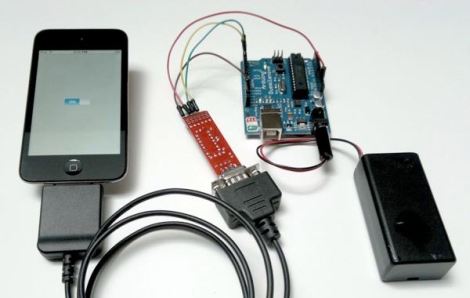
When Google released their ADK allowing Android smart phones to interact with Arduino-based devices, we’re sure there were at least one or two iPhone users who felt left out. Thanks to the folks over at Redpark, those people can now interact with an Arduino without having to jailbreak their phone.

For anyone looking to do any sort of iPhone/Arduino interaction, this is a good thing – except for the price. The 30-pin to serial cable is currently available over at Make for $59, which honestly seems pretty steep to us. When we first saw this announced, our initial thoughts were that we would see an open-source version in no time.

Unfortunately, that idea was short-lived, as we were quickly reminded of Apple’s MFI program. If you are not familiar, MFI (aka Made for iStuff) program limits what can be connected to an iDevice via licensing fees and a boatload of legal agreements. While we won’t be picking up this dongle any time soon, we’re all ears if someone has done any reverse-engineering of those pesky MFI chips.
Getting More Information From Your Battery Charger

echo_6_battery_charger_serial_hacking

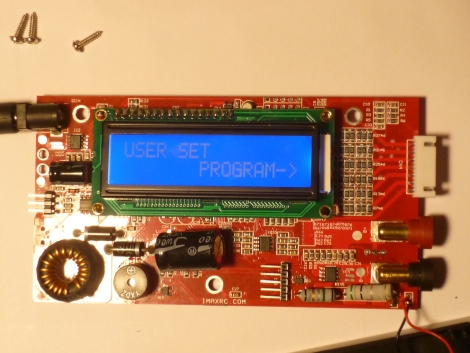
[Dane] bought a reasonably cheap ($17) Hobbyking Echo-6 battery charger and wanted to see what sort of information he could pull from the unit. Since the charger is designed for a variety of battery chemistries and sports an LCD screen, he figured that it contained a fairly decent microcontroller which he could tap into for some useful data.

He disassembled the unit and started looking around for any useful items. He discovered that it used an ATMega32 microcontroller and had quite a few unpopulated areas on the PCB, which led [Dane] to believe that the Echo-6 shared its main board with a more robust charger. He tapped into the ATMega’s UART and began seeing data immediately. Once he figured out what was coming over the serial line, he piped the data into LogView, resulting in some nice graphs showing off the charge/discharge processes in detail.

Tapping into the Echo-6 seems easy enough for any skill level, and we assume that just about anyone would benefit from getting kind of information out of their battery charger.

Hacking Your NES/Famicom Console For Better Video And Audio

famicom_playchoice_ppu_mod

[Dominic] wrote in to share a pretty neat Famicom console mod that improves both the video and audio output of the system. While some of you may be familiar with the PlayChoice 10, we’re guessing that many of you are not. The PlayChoice 10 was an arcade-style machine that allowed you to play up to 10 different NES games. The system’s hardware was quite similar to the Famicom/NES consoles, but the graphics and sound performance was superior to either console.

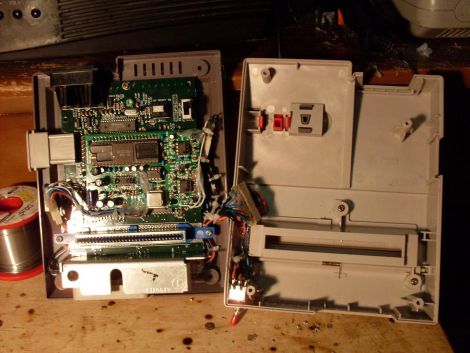
[Dominic] decided to tweak his Famicom system, and ended up replacing its native Picture Processing Unit (PPU) with one from a PlayChoice 10. This allows the console to output RGB video natively, resulting in a crisper picture with brighter coloring. He didn’t stop there however. His Famicom system also sports an upgraded audio circuit that boasts psuedo-stereo sound as well as increased bass response and better overall audio clarity.

The console looks nearly stock, and performs quite well according to [Dominic]. Be sure to check out the video comparison embedded below to see how the modifications improved his system’s performance.

Continue reading “Hacking Your NES/Famicom Console For Better Video And Audio”

Cheap And Easy PCB Agitator From An Old CD-ROM

cdrom_pcb_agitator

Instructables user [mzsolt] enjoyed making his own PCBs, but he wanted to speed up the etching process just a bit. While some people put together elaborate bubble tanks and agitators, he wanted to keep his simple and more importantly, cheap.

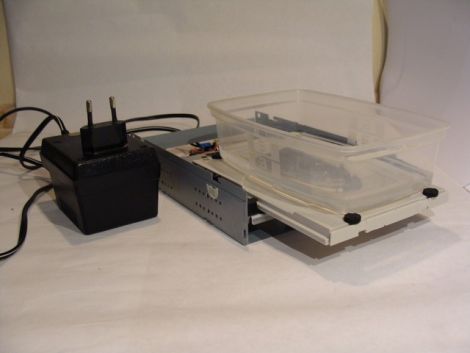
He looked around the house and discovered an ancient CD-ROM drive that was collecting dust, which he figured would make a great agitator for smaller projects. He picked up a decade counter and a handful of other cheap components, then got busy pulling the drive apart. He connected the motor and the drive’s limit switches to the decade counter, which controls the entire setup.

When powered on, the drive ejects, taking his container full of etchant with it. When the drive hits the outer limit switch, the decade counter reverses the motor until it hits the inner switch, reversing the motor once again.

As you can see in the video below, it works reasonably well. He suggests using a variable power supply to regulate the motor’s speed, but a variable pot would probably work just as well. Obviously the agitator is best suited for smaller projects, but since it was so cheap to put together, you won’t hear us complaining.

Continue reading “Cheap And Easy PCB Agitator From An Old CD-ROM”

Megavallometer Camera Trigger

megavallometer_camera_trigger

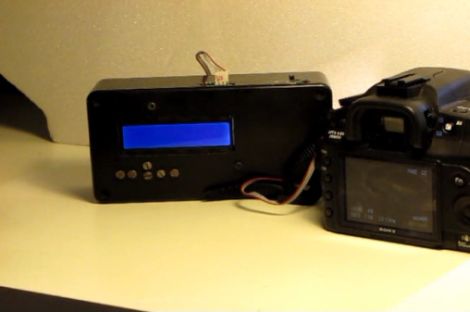
[Tobe] has an intervalometer for his camera, but he wanted a device that could trigger the shutter using several different methods, not just time. He calls his creation the Megavallometer, which can utilize any one of three distinct criteria.

He recently purchased an Arduino and a couple of shields, so he figured this would be a perfect project in which to use them. He hooked up a microphone and a photodiode to the Arduino, allowing him to use both sound and light to trigger his camera, depending on which mode he selects. Of course, the Megavallometer still incorporates the functionality of a standard intervalometer as well.

Once connected to his camera he selects one of the three trigger programs, and the Arduino handles the rest. If either the light or sound triggers are selected, the respective sensors measure the ambient levels upon selection, allowing for accurate results in any setting.

While the Megavallometer is a bit larger than other intervalometers we have seen, it looks incredibly useful and can likely be strapped to a tripod or similar if need be.

If you have a minute, be sure to check out the video on his site for a sneak peak if his Megavallometer in action.

Building A Simple FM Transmitter Bug

simple_fim_transmitter_hack_a_week

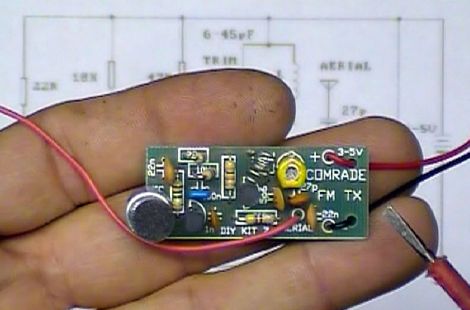
[Dino] got his hands on an FM transmitter “bug” kit via a friend, and thought it would make for an easy and fun Hack a Week project. The kit is simple two transistor half-wave FM transmitter, which the manufacturer suggests could be used to bug a room, hence the name. After poking a bit of fun at the instructions, [Dino] gets to work building the transmitter, wrapping things up in a little less than an hour.

Once he finished soldering everything together, he takes a few moments to test out the bug and to explain how various parts of the board work together in order to transmit the FM signal. He mentions that adding a dipole antenna would make it easy to extend the range of the transmitter, and briefly teases next week’s episode, where he plans on constructing a similar dual-stage transmitter.

This sort of FM circuit is one of the first few simple projects you would see in a beginner’s electronics class, so if you know anyone that is just starting to get their feet wet, be sure to pass this Hack a Week episode along.

Continue reading to see [Dino] explain the ins and outs of his FM bug transmitter.

Continue reading “Building A Simple FM Transmitter Bug”

Race Car POV LED Displays

race_car_pov

Last year, when [Alex] was asked by his friend [Martin] to help him out with building some LED POV modules for a race car, his response was a enthusiastic “YES!”

[Martin’s] goal was to involve fans more deeply in the race, so he decided that the POV modules would carry messages from fans on-board, printing them in the night as the race cars screamed around the track. The pair started prototyping and testing a design, wrapping things up shortly before this year’s 24 hours of Nürburgring.

The modules consist of an Arduino-compatible AVR, a GPS module, a 16-LED light bar, and the circuitry for driving the LEDs. While most of the components are pretty standard fare, the we don’t often see a GPS sensor built into a POV display. [Alex] says that the sensor is used to calculate the speed of the cars, ensuring a uniform font size.

They took their LED displays to the 24 hours of Nürburgring, where they were invited by Audi to install the modules on a pair of R8 Le Mans race cars. As you can see by the pictures on his blog and Flickr set, the POV units worked out nicely without having to stretch the camera exposure times too far.

If you’ re interested to hear a bit more about how the displays were built, check out this entry in[Alex’s] blog, where he goes through some additional details.

Update:[Alex] pointed us to the videos!