
Tweeting Home Alarm System

tweeting_home_alarm_system

Instructables user [willnue] wanted to build a DIY Tweeting alarm system from the ground up, but reconsidered after taking a close look at the scope of such a project. He settled on using an off the shelf security system, taking care of the Twitter interface on his own. He bought a GE 45142 Wireless alarm and promptly disassembled it to see how he might retrieve status messages from the unit.

He figured that monitoring the alarm’s LEDs would make the most sense, so he used a bit of Ethernet cable and wired all of the system’s indicators to his Arduino board. He hooked up an Ethernet shield to the Arduino, then wrapped the pair up in a plastic project box that closely matched the look of the security system. Once that was done, he wrote some simple code for the Arduino that monitors each of the alarm system’s six status lights, sending updates to Twitter via the ThingTweet service.

With this system you might not get your status messages in time to foil whoever is carrying off your plasma TV, but at least you will know what to expect once you get home!

If you want to keep tabs on [Will’s] security system to find out the best time to rob him see how things are going, check out his Twitter feed here.
DIY Servo Activated Door Lock With Capacitive Touch Keypad

diy_servo_activated_door_lock_capacitive_touch

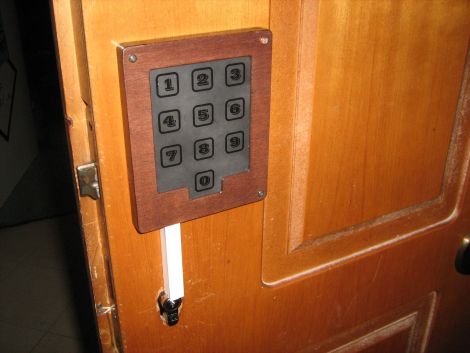
Since he was a kid [Giorgos Lazaridis] has always loved the idea of having an electronic door locking mechanism, and now that he has the means, he’s decided to construct one for securing the door to his apartment. He calls the project “simple and cheap”, though we’re not sure about the first part. Taking a look at his very detailed build log, you can see that he has invested quite a bit of time and effort into this impressive project.

Buying an off the shelf product was expensive and not a whole lot of fun, so [Giorgos] disassembled his door’s locking mechanism to see how he might be able to actuate the lock electronically himself. With minimal modifications to the lock, he was able to add a servo which reliably opens the it when triggered.

With the mechanical portion of the project out of the way, he spent a great deal of time working on the door’s electronic components, including the PIC-based controller and capacitive keypad. The keypad proved to be a bit of a problem, but after a few revisions he found a design that was both reliable and pleasing to the eye.

The locking mechanism works pretty well, as you can see in the video below, and [Giorgos] is quite pleased with the results.

Continue reading “DIY Servo Activated Door Lock With Capacitive Touch Keypad”

Google Android ADK Bluetooth Wireless Communications

arduino_to_android_ADK_bluetooth_communications

Once the Google ADK was announced, the team over at [ElectFreaks] jumped right in and started experimenting to see what they could do with the new Arduino/Android interface. While the ADK was great for allowing the two devices to interact over a USB connection, they felt that the system would be far better if it allowed for wireless communications instead.

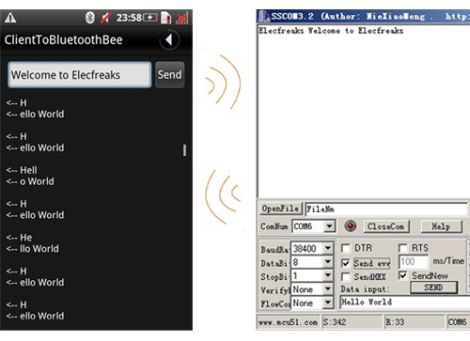
They added a Bluetooth Bee to their Arduino setup and got busy writing an Android application that uses the handset’s built in Bluetooth module to communicate using the ADK. The application configures your phone to act as either a client or server when pairing. This does not affect data flow, as communications are bi-directional, it merely decides which device is placed in discoverable mode.

As you can see in the second part of their post, once the phone and Arduino are connected, it is quite easy to send serial data back and forth between the two devices.

As of right now, their Bluetooth API is in Beta, so things might still be a bit rough around the edges. They do encourage anyone to download and modify the code, which is freely available on their site.

A Doorbell Loud Enough To Wake The Dead

really_loud_doorbell

[Ed Nauman] runs a machine shop, which we imagine can be quite loud at times. Sick of never hearing the doorbell when he was busy working on things, he decided that the solution to his problem was a new doorbell…an incredibly loud doorbell.

His Really Loud Doorbell (RLD for short) is actually a pretty simple device. We imagine he could have wired up an old alarm bell instead, but where’s the fun in that? The doorbell was built using a PIC16F876 uC, which is used to control the air flow through a pneumatic valve. When someone rings his doorbell, the pneumatic actuator pulses up and down, rapidly striking a piece of 1/4” thick steel pipe. As you can see in the video below, it is quite loud and likely to cut through any shop noise without much trouble.

We have seen some extremely loud doorbells before, but we figured that at least a handful of you work in similar environments – have you implemented any inventive ‘notification’ systems in your workspace? Let us know in the comments.

[via Adafruit Blog]

Continue reading “A Doorbell Loud Enough To Wake The Dead”

Tesla Coil Bullet-time Photography

tesla_coil_bullet_time_photography

One thing we can all probably agree on is that Tesla coils are one part high-voltage electricity and two parts pure awesome. [Rob Flickenger] thinks so too, and he built a pretty nice one in his workshop some time ago. He took a bunch of pictures showing off the coil’s capabilities, but he thought that one photo taken from a single angle didn’t do much to relay just how fantastic it is to watch a Tesla coil in action.

Taking a cue from the Matrix movies, he bought a stack of Canon point and shoot cameras and constructed a bullet time rig in his workshop. In order to get the pictures just right, he flashed each camera with a customized version of the CHDK firmware that allowed him to trigger all ten shutters with a single button press. A few scripts help facilitate collecting all of the images for processing, after which he identifies the good shots and stitches them together. You can see the awesome results in the video below.

[via LaughingSquid]

Continue reading “Tesla Coil Bullet-time Photography”

Giant POV Tube For Light Painting

writing_in_the_night_with_the_light_scythe

When you really want your feelings known, we always say that bigger is better. [Gavin Smith, aka The Mechatronics Guy] must come from the same school of thought, because there’s absolutely no mistaking what he is trying to say with his latest project.

Inspired by this WiFi signal painter we featured a while back, the LightScythe is a 2 meter long bar composed of multi-color LED strips that he bought from Adafruit. The light bar is controlled by a Seeduino micro controller, which takes direction from his laptop via a pair of XBee units. Once he generates an image from text with ImageMagic, a Python script is used to match the colors as close as possible to the RGB color space. The image is then converted to raw serial data for playback on the Scythe. When he is ready to go, he triggers his camera to take a 10-15 second exposure, during which he walks across the frame, painting his images with the LightScythe.

We always enjoy seeing creative derivations of previous projects we have covered, and the LightScythe does it well. He actually built a pair of these that can work in concert or independently, which we imagine can make for some pretty awesome pictures.

Be sure to check out his Flickr photostream for more examples of what the LightScythe can do.

Teensy AVRs Used In Penetration Testing

netragard_penetration_testing_mouse

While some people know that you should be wary of USB drives with unknown origins, the same care is rarely, if ever exercised with USB peripherals. The security firm Netragard recently used this to their advantage when performing a penetration test at a client’s facility. When the client ruled out the use of many common attack vectors including social networks, telephones, social engineering, and unauthorized physical access from the test, the team at Netragard knew they would have to get creative.

They purchased a Logitech USB mouse and disassembled it in order to add their clever payload. A Teensy uC was programmed to emulate keyboard input, entering commands via the mouse’s USB connection once it had been connected to a computer. Using an undocumented exploit in McAfee’s antivirus suite, they were able to evade detection while their system entered commands to install malware from the flash drive they hid along side the Teensy.

Once the mouse was reassembled, they repackaged it along with some marketing materials to make it look like part of a promotional event. They purchased a detailed list of employees and singled out an easy target, sending their malicious mouse on its way. Within three days, their malware was loaded onto the victim’s computer and their test was deemed a success.

[Thanks, Aaron]