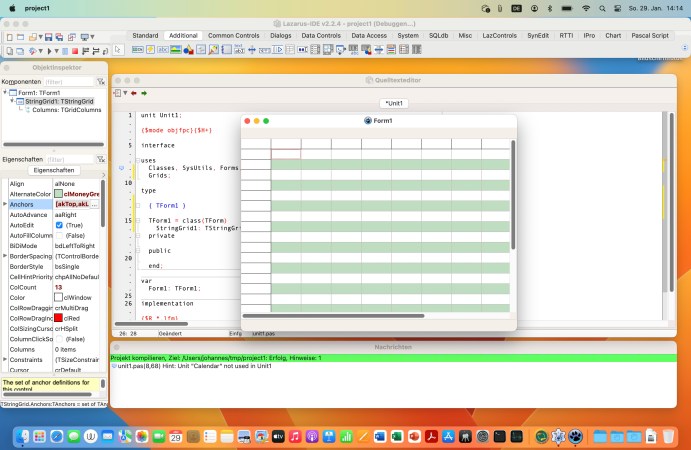
Screenshot of Lazarus IDE on MacOS Ventura

The Case For Pascal, 55 Years On

The first version of Pascal was released by the prolific [Niklaus Wirth] back in 1970. That’s 55 years ago, an eternity in the world of computing. Does anyone still use Pascal in 2025? Quite a few people as it turns out, and [Huw Collingbourne] makes the case why you might want to be one of them in a video embedded below.

In all fairness, when [Huw] says “Pascal” he isn’t isn’t talking about the tiny language [Wirth] wrote back when the Apollo Program was a going concern. He’s talking about Object Pascal, as either Free Pascal or Delphi– which he points out are regularly the tenth most popular of all programming languages. (Index.dev claims that it has climbed up to number nine this year, just behind Go.) As a professional move, it might not be the most obvious niche but it might not be career suicide either. That’s not his whole argument, but it’s required to address the criticism that “nobody uses Pascal anymore”.

Pascal, quite simply, can make you a better programmer. That, as [Huw] points out, was an explicit goal of the language. Before Python took over the education world, two generations of high school students learned Pascal. Pascal’s strong typing and strict rules for declaration taught those kids good habits that hopefully carried over to other languages. It might help you, too.

For experienced programmers, Pascal is still a reasonable choice for cross-platform development. Free Pascal (and the Lazarus IDE) brings the graphical, drag-and-drop ease that once made Delphi rule the Windows roost to any modern platform. (And Delphi, a commercial Pascal product, is apparently still around.) Free Pascal lets you code on Linux or Mac, and deploy on Windows, or vice-versa. While you could do that on Python, Pascal gets you a lot closer to the metal than Python ever could.

Sure, it’s a modern object-oriented language now, with objects and classes and hierarchies and all that jazz– but you don’t always have to use them. If you want to go low-level and write your Pascal like it’s 1985, you can. It’s like being able to switch into C and manipulate pointers whenever you want.

On some level, perhaps the answer to the question “Why use Pascal in 2025” is simply– why not? It’s likely that the language can do what you want, if you take the time to learn how. You can even use it on an Arduino if you so wish– or go bare metal on the Raspberry Pi.

Thanks to [Stephen Walters] for the tip.
Continue reading “The Case For Pascal, 55 Years On” →

Phonenstien Flips Broken Samsung Into QWERTY Slider

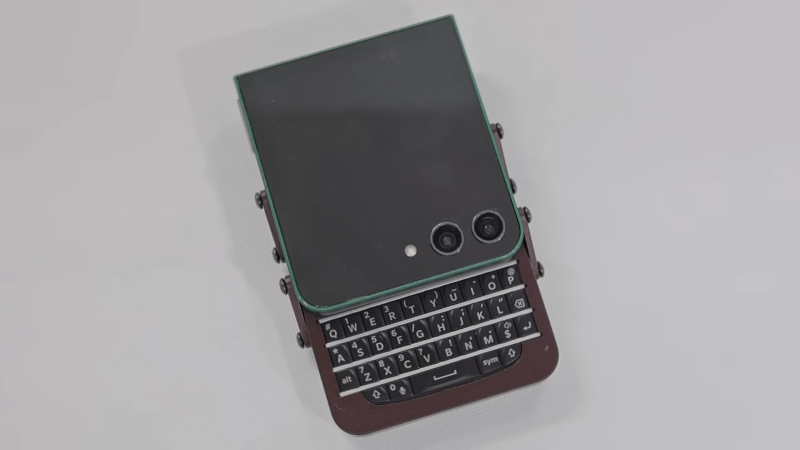
The phone ecosystem these days is horribly boring compared to the innovation of a couple decades back. Your options include flat rectangles, and flat rectangles that fold in half and then break. [Marcin Plaza] wanted to think outside the slab, without reinventing the wheel. In an inspired bout of hacking, he flipped a broken Samsung zFlip 5 into a “new” phone.

There’s really nothing new in it; the guts all come from the donor phone. That screen? It’s the front screen that was on the top half of the zFlip, as you might have guessed from the cameras. Normally that screen is only used for notifications, but with the Samsung’s fancy folding OLED dead as Disco that needed to change. Luckily for [Marcin] Samsung has an app called Good Lock that already takes care of that. A little digging about in the menus is all it takes to get a launcher and apps on the small screen.

Because this is a modern phone, the whole thing is glued together, but that’s not important since [Marcin] is only keeping the screen and internals from the Samsung. The new case with its chunky four-bar linkage is a custom design fabbed out in CNC’d aluminum. (After a number of 3D Printed prototypes, of course. Rapid prototyping FTW!)

The bottom half of the slider contains a Blackberry Q10 keyboard, along with a battery and Magsafe connector. The Q10 keyboard is connected to a custom flex PCB with an Arduino Micro Pro that is moonlighting as a Human Input Device. Sure, that means the phone’s USB port is used by the keyboard, but this unit has wireless charging,so that’s not a great sacrifice. We particularly like the use of magnets to create a satisfying “snap” when the slider opens and closes.

Unfortunately, as much as we might love this concept, [Marcin] doesn’t feel the design is solid enough to share the files. While that’s disappointing, we can certainly relate to his desire to change it up in an era of endless flat rectangles.  This project is a lot more work than just turning a broken phone into a server, but it also seems like a lot more fun.

Continue reading “Phonenstien Flips Broken Samsung Into QWERTY Slider” →

Tiny Datasette Uses USB For The Modern Day

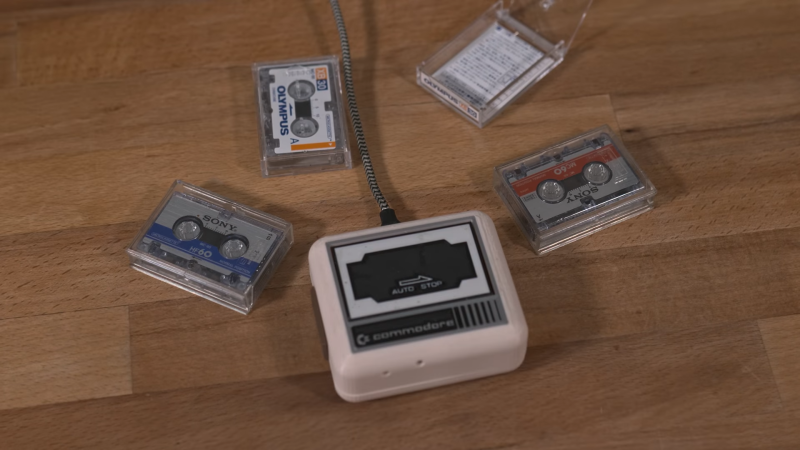
While you can still find tape being used for backup storage, it’s pretty safe to say that the humble audio cassette is about as out of date as a media format can be. Still, it has a certain retro charm we’re suckers for, particularly in the shape of a Commodore Datasette. We’re also suckers for miniaturization, so how could we not fall for [bitluni] ‘s tiny datasette replica?

Aesthetically, he’s copying the Commodore original to get those sweet nostalgia juices flowing, but to make things more interesting he’s not using compact cassette tapes. Instead, [bitluni] started with a micro cassette dictaphone, which he tore down to its essentials and rebuilt into the Commodore-shaped case.

The prototyping of this project was full of hacks — like building a resistor ladder DAC in an unpopulated part of a spare PCB from an unrelated project. The DAC is of course key to getting data onto the micro cassettes. After some playing around [bitluni] decided that encoding data with FSK (frequency-shift keying), as was done back on the C-64, was the way to go. (Almost like those old engineers knew what they were doing!) The dictaphone tape transport is inferior to the old Datasette, though, so as a cheap error-correction hack, [bitluni] needed to duplicate each byte to make sure it gets read correctly.

The micro cassettes only fit a laughable amount of data by modern standards this way (about 1 MB) but, of course that’s not the point. If you jump to 11:33 in the video embedded below, you can see the point: the shout of triumph when loading PacMan (all 8 kB of it) from tape via USB. That transfer was via serial console; eventually [bitluni] intends to turn this into the world’s least-practical mass storage device, but that wasn’t necessary for proof-of-concept. The code for what’s shown is available on GitHub.

If you have an old Datasette you want to use with a modern PC, you’d better believe that we’ve got you covered. We’ve seen other cassette-mass-storage interfaces over the years, too. It might be a dead medium, but there’s just something about “sticky tape and rust” that lives on in our imaginations.

Continue reading “Tiny Datasette Uses USB For The Modern Day” →

A worker inspects JUNO's acrylic sphere under the watching eye of PMTs

Worlds Largest Neutrino Detector Is Collecting Data In China

To say that neutrinos aren’t the easiest particles to study would be a bit of an understatement. Outside of dark matter, there’s not much in particle physics that is as slippery as the elusive “ghost particles” that are endlessly streaming through you and everything you own. That’s why its exciting news that JUNO is now taking data as the world’s largest detector.

First, in case you’re not a physics geek, let’s go back to basics. Neutrinos are neutral particles (the name was coined by Fermi as “little neutral one”) with very, very little mass and a propensity for slipping in between the more-common particles that make up everyday matter. The fact that neutrinos have mass is kind of weird, in that it’s not part of the Standard Model of Particle Physics. Since the Standard Model gets just about everything else right (except for dark matter) down to quite a few decimal points, well… that’s a very interesting kind of weird, hence the worldwide race to unravel the mysteries of the so-called “ghost particle”. We have an explainer article here for anyone who wants more background.

Continue reading “Worlds Largest Neutrino Detector Is Collecting Data In China” →

This Soviet-Style Clock Uses Homemade Nixie Tubes And Glowing Logic

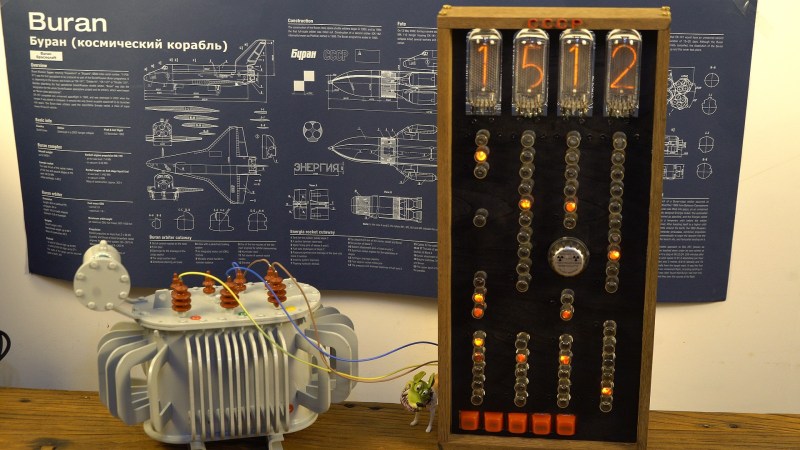
The Neon glow of a Nixie tube makes for an attractive clock, but that’s not enough neon for some people. [Changliang Li] is apparently one of those people, because he’s using soviet-era cold-cathode tubes as the logic for his “Soviet-Era Style Clock”

Aside from the nixies for display, the key component you see working in this beautiful machine are the MTX-90 cold cathode thyratrons, which look rather like neon tubes in action. That’s because they essentially are, just with an extra trigger electrode (that this circuit doesn’t use). The neon tubes are combined into a loop counter, which translates the 50 Hz mains circuit in to seconds, minutes, and hours. The circuit is not original to this project, and indeed was once common to electronics books. The version used in this project is credited to [PA3FWM].

The Nixie tubes are new-made by [Sadudu] of iNixie labs, and we get a fascinating look in how they are made. (Tubemaking starts at around 1:37 in the video below.) It looks like a fiber laser is used to cut out glow elements for the tube, which is then encapsulated on a device which appears to be based around a lathe.

The cold-cathode tubes used as logic rely on ambient light or background radiation to start reliably, since the trigger electrode is left floating. In order to ensure reliable switching from the thyratrons, [Changliang Li] includes a surplus smoke detector source to ensure sufficient ionization. (The video seems to imply the MTX-90 was seeded with radioisotopes that have since decayed, but we could find no evidence for this claim. Comment if you know more.)

The end result is attractive and rather hypnotic. (Jump to 3:37 to see the clock in action.) If you want to know more about this sort of use for neon lamps (and the Soviet MTX-90) we featured a deeper dive a while back.

Thanks to [Changliang Li] for the incandescent tip. If one of your bright ideas has had a glow up into a project, don’t hesitate to share it on our tips line.

Continue reading “This Soviet-Style Clock Uses Homemade Nixie Tubes And Glowing Logic” →

[Linus] playing his instrument

The Qweremin Is A QWERTY Theremin With A C-64 Heart

While we have nothing against other 1980s 8-bit machines, the Commodore 64 has always been something special. A case in point: another new instrument using the C-64 and its beloved SID chip. Not just new to retrocomputing, either, but new entirely. [Linus Åkesson] has invented the QWERTY Theremin, and there’s a Commodore at its core.

If this project sounds vaguely familiar, it’s because it’s based off of the C-64 Theremin [Linus] built a couple of years back. According to [Linus], there were a few issues with the instrument. A real thereminist told him there were issues with the volume response; his own experience taught him that theremins are very, very hard to play for the uninitiated.

This model fixes both problems: first, the volume circuit now includes a pair of digital-analog-converters (DACs) connected to the Commodore’s user port, allowing smooth and responsive volume control.In this case the DAC is being used solely for volume control: SID provides the analog reference voltage, while the 12-bit digital input served as volume control. That proved noisy, however, thanks to the DC bias voltage of the audio output being scaled by the DAC even when the SID was silent. A second DAC was the answer, providing a signal to cancel out the scaled bias voltage. That in and of itself is a clever hack.

The biggest change is that this instrument no longer plays like a theremin. Pitch has been taken out of the 555-based antenna circuit entirely; while vertical distance from the spoon-antenna still controls volume as in a regular theremin and the last version, the horizontal distance from the second antenna (still a clamp) now controls vibrato. Pitch is now controlled by the QWERTY keyboard. That’s a much easier arrangement for [Linus] — this isn’t his first chiptune QWERTY instrument, after all.

Continue reading “The Qweremin Is A QWERTY Theremin With A C-64 Heart” →

No Die? No Problem: RealDice.org Has You Covered

Have you ever been out and about and needed to make a check against INT, WIS or CON but not had a die handy? Sure, you could use an app on your phone, but who knows what pseudorandom nonsense that’s getting up to. [Lazy Hovercraft] has got the solution with his new site RealDice.org, which, well, rolls real dice.

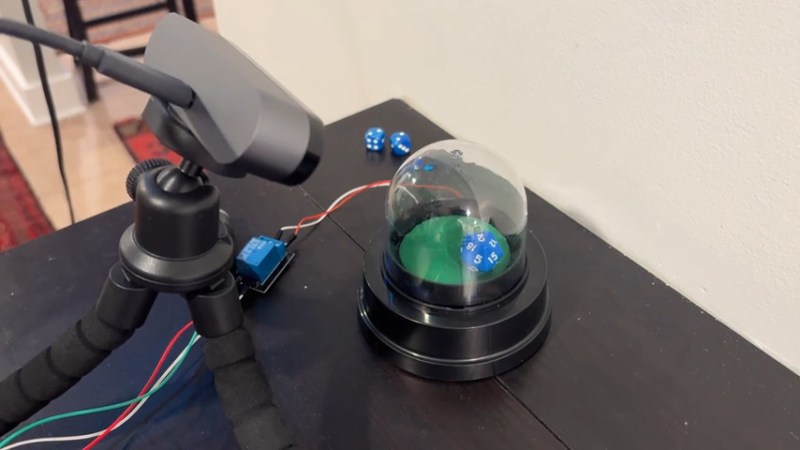
Well, one die, anyway. The webpage presents a button to roll a single twenty-sided die, or “Dee-Twenty” as the cool kids are calling it these days. The rolling is provided by a unit purchased from Amazon that spins the die inside a plastic bubble, similar to this unit we covered back in 2020.  (Alas for fans of the venerable game Trouble, it does not pop.) The die spinner’s button has been replaced by a relay, which is triggered from the server whenever a user hits the “roll” button.

You currently have to look at the camera feed with your own eyes to learn what number was rolled, but [Lazy Hovercraft] assures us that titanic effort will be automated once he trains up the CVE database. To that end you are encouraged to help build the dataset by punching in what number is shown on the die.

This is a fun little hack to get some physical randomness, and would be great for the sort of chatroom tabletop gaming that’s so common these days. It may also become the new way we select the What’s That Sound? winners on the Hackaday Podcast.

Before sitting down for a game session, you might want to make sure you’re all using fair dice. No matter how fair the dice, its hard to beat quantum phenomena for random noise.