ARM Programming By Example

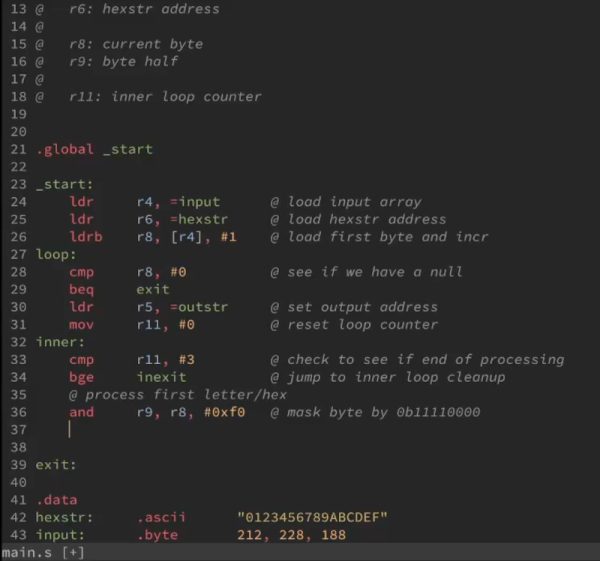
The ARM processor is popping up everywhere. From Raspberry Pis, to phones, to Blue Pill Arduino-like boards, you don’t have to go far to find an ARM processor these days. If you program in C, you probably don’t care much or even think about it. But do you know ARM assembly language? Well, if you look at it one way, it can’t be too hard. The CPU only has about 30 distinct operations — that’s why it is called RISC. Of course, sometimes fewer instructions actually make things more difficult. But you can get a great starting tutorial with the 21 programs on the ARM Assembly by Example website.

You need a 32-bit ARMv6 or better — so Raspberry Pi will work here. The compiler, of course, is gcc and all the associated tools. if you have the right hardware, there are sections on using the floating point unit and the NEON co-processor, too.

Continue reading “ARM Programming By Example”

Hacking Google With Plasma

Google recently made some videos to highlight cybersecurity. The video below is episode three, and it tells an interesting story about the first crash test dummy. However, the really interesting part is the story about a USB plasma globe built to hack into computers. One of the people who built that globe tells the story of its insides in a recent blog post that has a bit more technical detail.

The attack in question was in 2012, when people were starting to get the idea that inserting random USB drives into their computers wasn’t a great idea. However, what harm could there be in a cute little plasma globe that just draws power from the port?

Continue reading “Hacking Google With Plasma”

Power Loss Recovery Might Make 3D-Printed Blobs

[Geek Detour] had a mystery to solve. A round part he was printing had a distinct pattern of blobs. If you’ve been 3D printing for any length of time, you know that pauses in printing can cause blobs like this. He also showed a perfectly-printed version of the same part and claimed it was from the same printer with the same material and even slicer settings. So what was causing the blobs? You can find the answer in the video below.

As you might guess from the title, however, the issue was the power loss recovery feature built into the printer. While there’s a lot going on in the video, you can break it down to a few items, all of which you can fix in one way or another including the simple fix: turn off power loss recovery.

Continue reading “Power Loss Recovery Might Make 3D-Printed Blobs”

Simple CNC Gear Production With Arduino

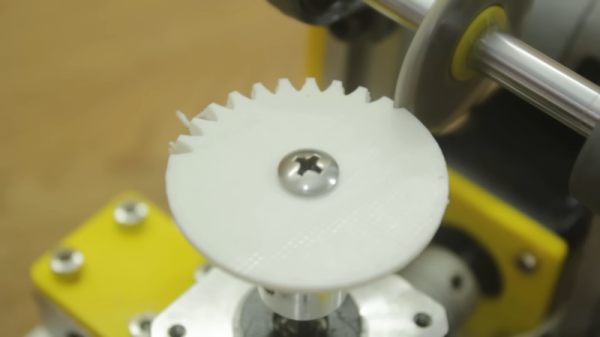
We’ve seen plenty of people 3D printing custom gears over the years, but [Mr Innovative] decided against an additive process for his bespoke component. He ended up using a simple CNC machine that makes use of several components that were either salvaged from a 3D printer or produced on one. Using a small saw blade, the machine cuts gear teeth into some plastic material and — presumably — could cut gears into anything the saw blade was able to slice into, especially if you added a little lubrication, cooling, and dust removal.

If you’ve built a 3D printer, you’ll see a lot of familiar parts. Stepper motors, aluminum extrusion, straight rods, bearing blocks, and rod holders are all used in the build. There’s also a lead screw and the associated components you usually see in a printer’s Z-axis. Naturally, an Arduino drives the whole affair.

The saw blade was custom-made from a washer, grinding an edge and using a 3D printed template to cut teeth in it. We might have been more inclined to use a cut-off wheel from a rotary tool, but this certainly did the trick. An LCD accepts the gear diameter and number of teeth. The stepper rotates the correct number of degrees and another stepper lowers the cutting head which is spinning with a common DC motor.

As impressive as this machine is, the fact remains that a 3D printer can produce more complex designs. For example, a herringbone pattern can help with alignment issues. It has been done many times. You can even use a resin printer, although you might prefer to stick with FDM.

Continue reading “Simple CNC Gear Production With Arduino”

TRX-Duo Is A Red Pitaya Clone For Software Defined Radio

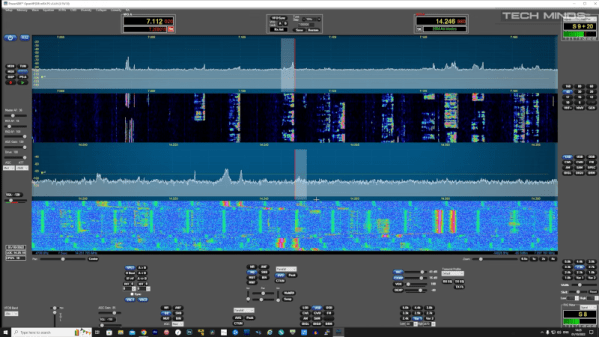
If you’ve noticed the TRX-DUO software-defined radio transceiver, you might have wondered how it stacks up to other choices like Red Pitaya or HackRF.  [Tech Minds] obliges with a review of the Red device in the video below.

While this unit isn’t inexpensive, it also isn’t as expensive as some of its competitors. Sure, you can pick up an RTL-SDR dongle for a fraction of the price, but then you miss out on transmitting. The device is pretty powerful compared to a cheap software defined radio:

  • Frequency: 10 kHz to 60 MHz
  • CPU: Zynq SoC with a dual-core ARM Cortex A9
  • RAM: 512 MB
  • OS: Linux
  • Connectivity: Ethernet and USB connectivity (WiFi with a dongle)
  • ADC: 16-bit at 125 MS/s (2 channels)
  • DAC: 14-bit at 125 MS/s (2 channels)

The board boots off an SD card and there are several to choose from. The video shows two different images. One has a number of applications that run on the device and will also run on a Red Pitaya. The device shows a browser menu with various options and the result is quite impressive. Using the box as a WSPR beacon, it was heard fairly well given the low output power. It was, however, able to hear the world easily.

You can get a less capable Red Pitaya model for about $100 less than the going price. However, for something comparable, you will pay more for the Red Pitaya and — depending on capabilities — perhaps a lot more, although you do get more capability for the increased price.

You can do a lot more with a transmitting SDR — having both transmit and receive opens up many new projects. Of course, canned applications are great, but if you get one of these, you are going to want to try GNU Radio.

Continue reading “TRX-Duo Is A Red Pitaya Clone For Software Defined Radio”

Have 3D Printer, Will Travel

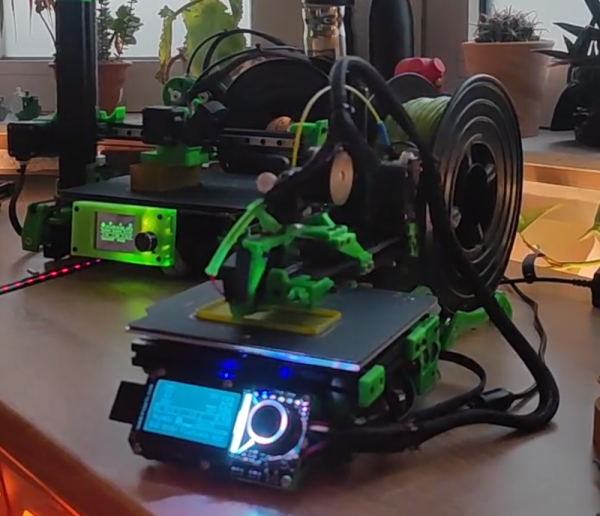
We keep hearing that the desktop computer is dying — everyone wants a mobile device like a laptop, a tablet, or a big horkin’ phone. We suppose [eponra] wants the same thing for 3D printers, since he’s provided plans for “flatpack” a portable 3D printer that can fit in a spool box.

As you might imagine, this isn’t going to give you maximum build volume. The printer’s folded down dimensions are 220x210x75mm. The build plate is fairly small at 120x114x144mm. However, it does have a heated bed and an LCD display. One note, though: you do need an external power supply that does not fit in the box. However, [eponra] notes that with an AC-powered bed, it would be possible to get everything in the box.

Continue reading “Have 3D Printer, Will Travel”

Robot Blade Runner Turns In World Record Time

While we wish colleges and universities competed more on academics, we can’t deny that more people are interested in their athletics programs. Oregon State, however, has done a little of both since their bipedal robot, Cassie, became the world’s fastest bipedal robot according to the Guinness Book of World Records. You can see a video of the 100 meter run below, but don’t blink. The robot turned in a time of around 25 seconds.

Impressive, but still not on par with Usan Bolt’s time of under 10 seconds for the same distance. If you want to see what that would be like, try running the long way across a football field and see how far you get in 25 seconds. There isn’t a lot of technical detail about the robot, but you can intuit some things from watching it go. You can also find a little more information on the robot and some of its siblings on the University’s website.

If you think robots won’t ever run as well as humans, we used to think the same thing about playing chess. This doesn’t look like we normally envision a bipedal robot. Then again, there isn’t any reason robots have to look, or move, like we do.

Continue reading “Robot Blade Runner Turns In World Record Time”