Floppy Disk Sings: I’m Big In Japan

The other day, a medical office needed my insurance card. I asked them where to e-mail it and they acted like I had offered them human flesh as an appetizer. “We don’t have e-mail! You have to bring it to us in person!” They finally admitted that they could take a fax and I then had to go figure out how to get a free one page fax sent over the Internet. Keep in mind, that I live in the fourth largest city in the United States — firmly in the top 100 largest cities in the world. I’m not out in the wilderness dealing with a country doctor.

I understand HIPAA and other legal and regulatory concerns probably inhibit them from taking e-mail, but other doctors and health care providers have apparently figured it out. But it turns out that the more regulations are involved in something, the more behind-the-times it is likely to be.
Continue reading “Floppy Disk Sings: I’m Big In Japan”

3D Printing For Textile Work

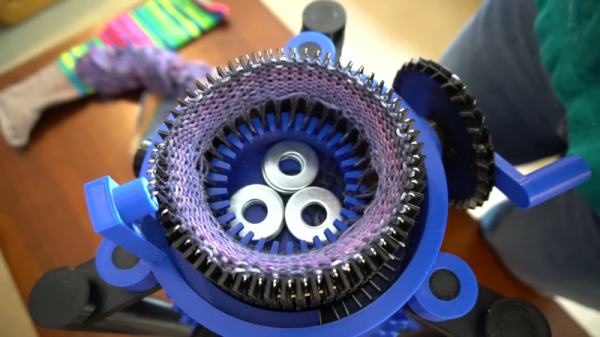
While it isn’t for everyone, some of the best creators we know are experts at working with textiles. While the art is ancient, it isn’t easy and requires clever tools. [Lauren] collected a few 3D prints that can help you with knitting, crochet, and even a knitting loom.

Some of the designs are pretty basic like the yarn bowl, or pretty easy to figure out like the simple machine for re-spooling wool. We were frankly surprised that you can 3D print a crochet hook, although the post does mention that breaking them is a real problem.

We were really impressed though, with the sock knitting machine. There are actually a few of these out there, and you can see a similar one in the video below. Of course, like a RepRap printer, it needs “vitamins” in the form of metal rods, fasteners, and the like. There’s also a  portable knitting loom which looked interesting.

We aren’t adept enough with fabric arts to know if these tools are serious contenders compared to commercial products, but we have to admit the sock knitting machine looks like it could be. We recently saw a sophisticated loom, although that might be a bit more than most people need. We have looked at open-source knitting machines, too. Of course, if you’d rather not create with textiles, you can always 3D print on them, instead.

Continue reading “3D Printing For Textile Work”

Full Transparency: Stronger FDM Prints

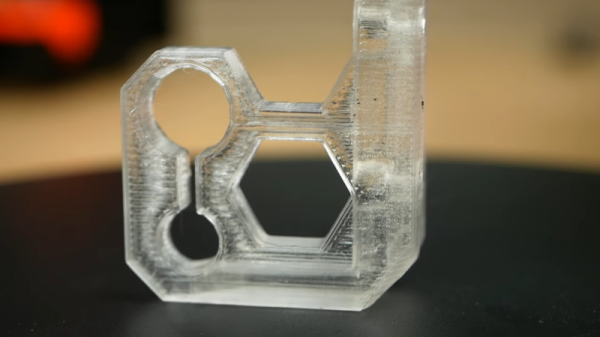
We always look forward to [Stefan’s] CNC Kitchen videos. They are usually useful, but always carefully thought out and backed with experimental data. His latest is about creating transparent and strong FDM prints. You normally don’t associate the FDM process with clear prints even with clear filament. The problem is the filament doesn’t lay down in a particular structure, so light scatters producing a sort of white color. However, [Stefan] found a post on Printables called “How to Print Glass” which changes the structure of the part and, of course, [Stefan] wanted to see if the process also led to stronger parts.

The process is slow and the basic idea is to use no top and bottom layers. The entire part is essentially infill. You also need to set the infill to go in the same direction for each layer. As [Stefan] mentions, there have been other efforts to make transparent parts, especially in vase mode. Of course, you can also get transparent parts using resin printing, although it isn’t always as easy as you might think.

Continue reading “Full Transparency: Stronger FDM Prints”

Understanding Wavelets

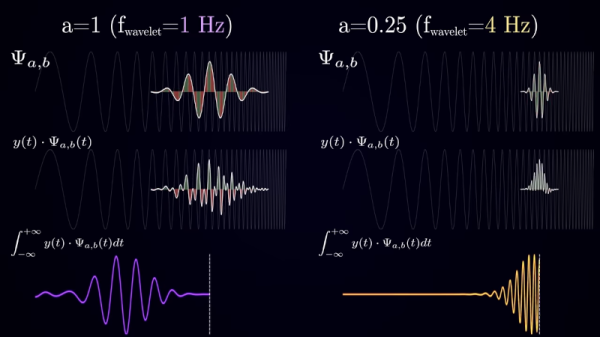
Mathematical transforms can be a great help in understanding signals. Imaging trying to look at a complex waveform and figuring out the frequency components without the Fourier transform. [Artem Kirsanov] calls the wavelet transform a “mathematical microscope” and his video gives you a great introduction to the topic. You can see the video below.

The video starts with a discussion about how the time domain and frequency domain have a dual relationship — not big news if you’ve dealt with Fourier transforms and — in fact — that’s the next topic in the video. However, there are limitations to the transformation — you lose time domain information in the process.

Continue reading “Understanding Wavelets”

Diff Tool Knows What You Mean

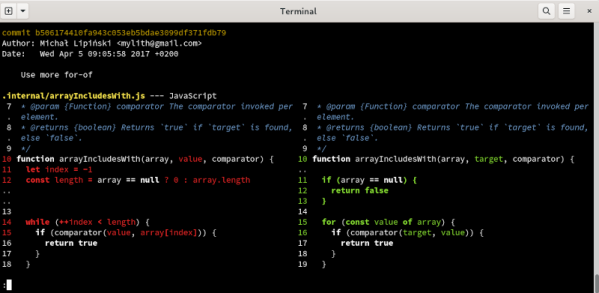
We will admit to not being particularly artistic, but we do remember an art teacher telling us that sometimes it is better to draw what isn’t there instead of what’s there — a concept known as negative space. [Wilfred] makes a similar point when explaining his “fantastic diff” tool called, appropriately, difftastic. He points out that when comparing two programs, the goal isn’t so much to determine what changed, but rather what stayed the same. The more you can identify as the same, the less you have to show as a change.

The tool compares source code in a smart way, assisted by tree-sitter which has many different languages already parsed, at least well enough for this purpose. According to [Wilfred’s] post the tool supports 44 different languages ranging from bash and YAML, Verilog to VHDL, and C++ to Rust, among others.

Continue reading “Diff Tool Knows What You Mean”

The Internet Without The Computer: 1990s Style

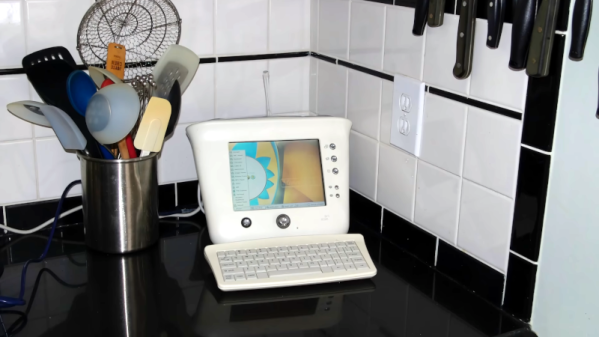
We think of the Internet extending to small devices as a modern trend, but it actually is a good example of how everything makes a circle. Today, we want the network to connect to our thermostat and our toaster. But somewhere between the year 1990 and the year 2010, there was a push to make the Internet accessible to the majority of people who didn’t own a computer. The prototypical device, in our mind, was Microsoft’s ill-fated WebTV, but a recent video from [This Does Not Compute] reminded us of another entry in that race: The Audrey from 3COM. Check out the video, below.

Many devices, like the WebTV, wanted to take over your TV set to save on a display. That doesn’t sound bad today, but you have to remember, the typical TV set in those days was not the high-resolution digital monster you have today, so the experience of surfing the Web on one was suboptimal. The Audrey actually had a cute little screen and a compact keyboard.

Continue reading “The Internet Without The Computer: 1990s Style”

Upcycling Flat Scraps With Open Source Tools

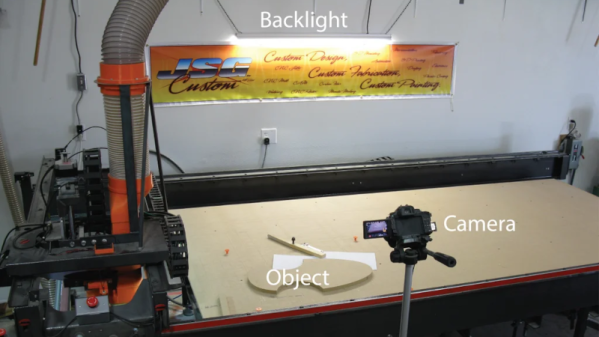
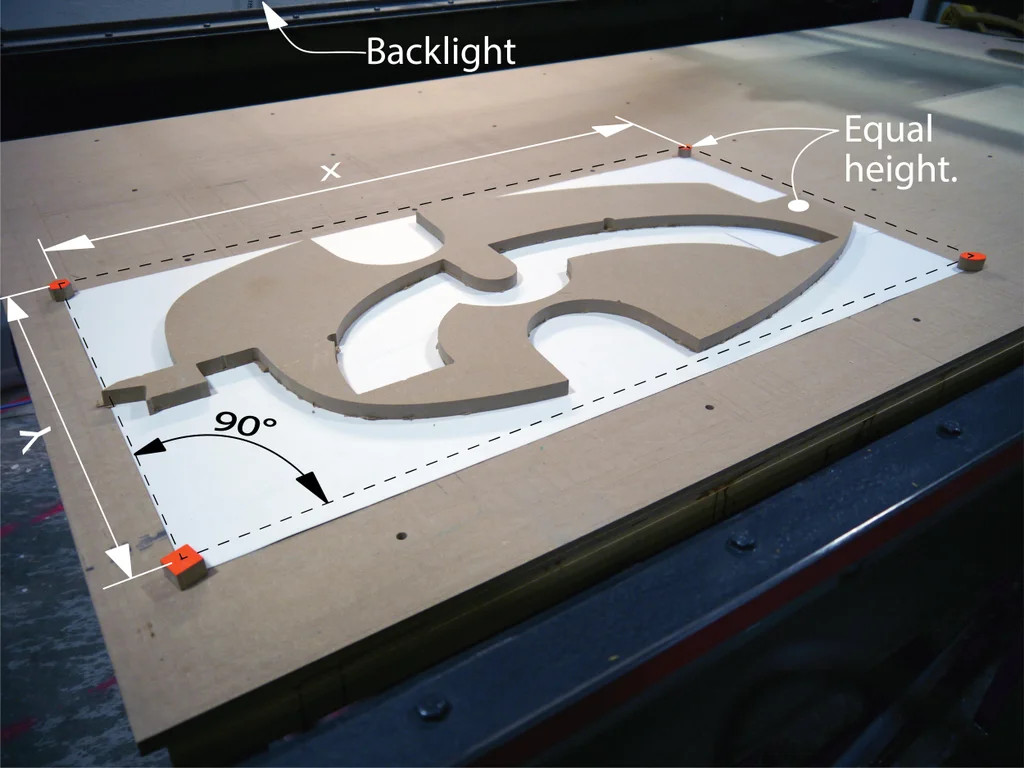
If you have any sort of device that cuts like a CNC mill or a laser cutter, you probably generate a lot of strange-looking scrap material. Most of us hate to throw anything away, but how do you plan to use all these odd shapes? [Caddzeus] has an answer.  Using a camera and some software he digitizes the shapes accurately into a form usable in his CAD package of choice.

The process involves setting up some targets with known dimensions that will appear in the photograph. This allows the picture to be taken without being overly concerned about the distance to the camera or the angle.

Using GIMP, he adjusts the images to remove the perspective. He then brings the image into Inkscape where he can accurately scale and trace the shape.

There are detailed instructions — including videos — but if you know how to use these tools, you can probably figure it out for yourself. This technique would be useful, too, if you wanted to get an outline of something you intend to mill or cut into your CAD program as a reference. We like to do this with a laser cutter so you can burn the outline of something you are engraving or cutting on a piece of paper before you start and easily align the workpiece to the laser.

Of course, a small part could surrender its image to a conventional scanner and you can use a similar technique to adjust the scale. If you start using Inkscape a lot, you’ll want more plugins. You never know what you might build from some scrap odds and ends.

Continue reading “Upcycling Flat Scraps With Open Source Tools”