Hacked GDB Dashboard Puts It All On Display

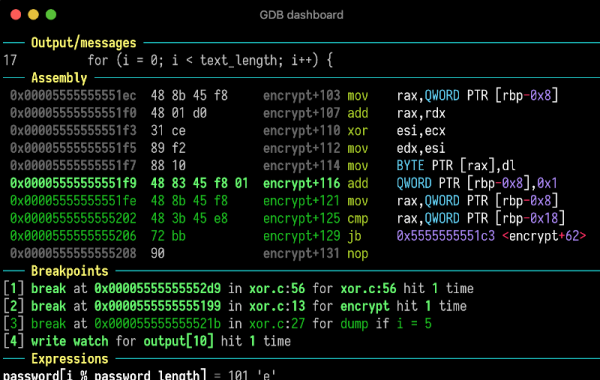
Not everyone is a fan of GUI interfaces. But some tasks really lend themselves to something over a bare command line. Very few people enjoy old command line text editors like edlin or ed. Debugging is another task where showing source files and variables at all times makes sense. Of course, you don’t absolutely have to have a GUIĀ per se. You can also use a Text User Interface (TUI). In fact, you can build gdb — the GNU Debugger — with a built-in TUI mode. Try adding –tui to your gdb command line and see what happens. There are also many GUI frontends for gdb, but [cyrus-and] has an easy way to get a very useful TUI-like interface to gdb that doesn’t require rebuilding gdb or even hacking its internals in any way.

The secret? The gdb program runs a .gdbinit file on startup. By using Python and some gdb commands, [cyrus-and] causes the debugger to have a nice dashboard interface for your debugging sessions. If you install a helper script, you can even get syntax highlighting.

The system uses modules and you can even add your own custom modules and commands, if you like. You can also control what modules appear on each dashboard display. Normally, the dashboard shows when the program stops. For example, on each breakpoint. However, gdb has a hook system that allows you to trigger a dashboard using the appropriately-named dashboard command on other commands, too. Using the layout option to the dashboard command, you can even trigger different modules at different times.

Installation is simple. Just put the .gdbinit file in your home directory. If you want syntax highlights, you need to install Pygments, too. We understand you can even use his under Windows, if you like.

We don’t always take full advantage, but gdb is actually amazing. The flexible architecture makes all sorts of interesting things possible.
IR Remote Transforms To RF

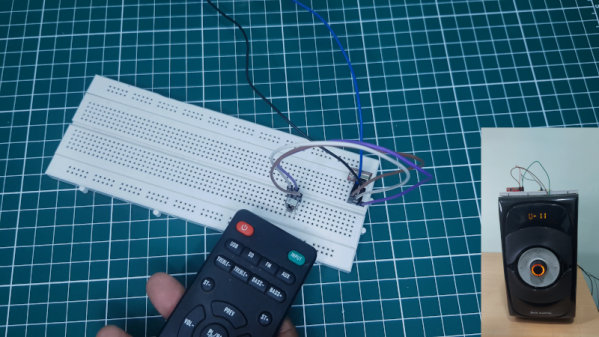
Most consumer remote controls operate using infrared light. This works well assuming the piece of equipment has a line of sight to the remote. But if you have, say a receiver in a cabinet or closet, the IR remote signal can’t reach the sensor. Some equipment has remote receivers that you can leave poking out, but it is still not very handy. That’s why some equipment now uses RF remotes. [Xtropie] used a pair of inexpensive 433 MHz RF modules to convert an IR system to RF. You can see a short video about the project below.

We might have been tempted to simply put an IR LED on the receiver so it could feed IR into the device sensor, but [Xtropie] took a different approach. He found the IR sensor and tied the RF receiver directly into its output. It seems to work, but we probably would have removed the IR sensor to make sure there were no conflicts.

Continue reading “IR Remote Transforms To RF” →

Your Vacuum Cleaner Follows You

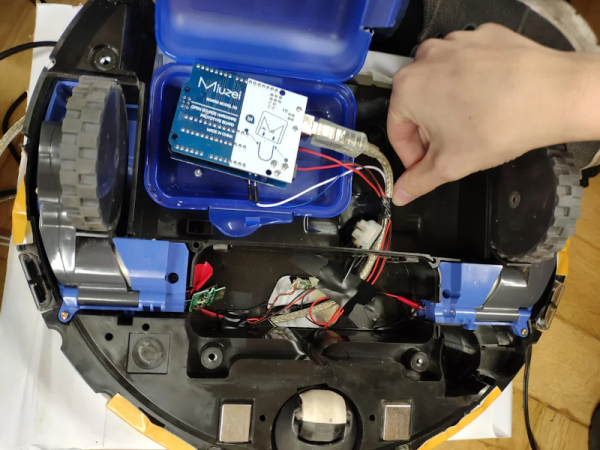
There are several projects you can imagine where it would be useful to have a robot follow you. For example, we’ve always wanted luggage that would trail us at the airport and we’ve seen several coolers that will follow you. [Madmax95] apparently dream of having a medical cart following a patient, though, and that’s good too. But how do you do it? [Max’s] method was to strip down a Roomba and build a work table and electronics on it. An Arduino controls the motor and communicates with a PC. The PC reads video from a Kinect camera on the robot and uses special tracking software to follow the patient.

We could easily imagine all of this project except the tracking. That depended on a service called Nuitrack. There is a free version that only works for 3 minutes, but it costs if you want to use it practically. However, it would still be cheaper than rolling your own if your time has value.

Continue reading “Your Vacuum Cleaner Follows You” →

Wireless Charging For Border Patrol Drones

It makes sense to use drones to patrol borders or perimeters. But there’s a problem. Drones have to carry batteries or fuel and mostly have a short operating time. A new paper from the University of Houston proposes a solution by recharging drones in flight using a novel wireless charging mechanism. What’s the cost? Another paper explores the economics of the approach.

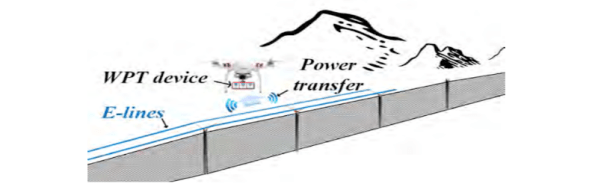
The system relies on electric lines running along a border wall feeding wireless power transfer devices that allow the drone to recharge in flight. This is akin, we think, to an electric train that takes power from the third rail except, in this case, the power rail is wireless. Also, the drone would still have batteries to enable it to go off the rail as needed.

The paper mentions that the source power could be from wind or solar, but that’s not necessarily important and it also requires a storage battery in the system that you could omit if using conventional power. In addition, you’d think batteries and solar panels might be targets for theft in remote areas.

The paper mentions that another alternative is to simply have charging towers along the wall where drones land to recharge. This is easier, we think, but it does put the drone out of full operation status while charging. On the other hand, cheap drones could work in shifts to cover an area, so it seems like that might be a better solution than charging while flying.

What do you think? How would you make a long-duration drone? Fuel cells? In-flight battery swapping from a refueling drone? Laser power? Maybe a magnetic battery swap system where the drone swoops over a charger to drop off and pick up a fresh battery? Let us know what you would try or — even better — what you have done.

We’ve seen a drone pit stop robot already. Refueling drones have been done, too. But it does seem like something better is possible.

OpenGL In 500 Lines (Sort Of…)

How difficult is OpenGL? How difficult can it be if you can build a basic renderer in 500 lines of code? That’s what [Dmitry] did as part of a series of tiny applications. The renderer is part of a course and the line limit is to allow students to build their own rendering software. [Dmitry] feels that you can’t write efficient code for things like OpenGL without understanding how they work first.

For educational purposes, the system uses few external dependencies. Students get a class that can work with TGA format files and a way to set the color of one pixel. The rest of the renderer is up to the student guided by nine lessons ranging from Bresenham’s algorithm to ambient occlusion. One of the last lessons switches gears to OpenGL so you can see how it all applies.

Continue reading “OpenGL In 500 Lines (Sort Of…)” →

Cheap Spot Welder Teardown

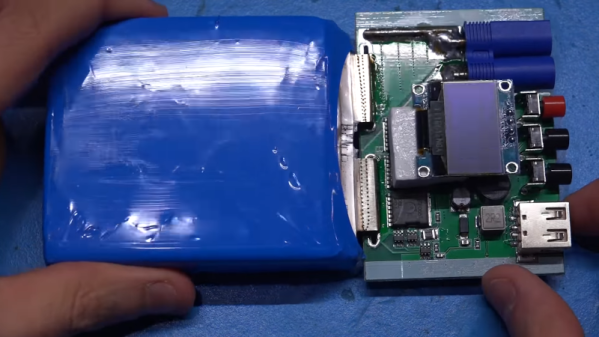
It used to be hard to dump enough electricity through two pieces of metal to meld them together. But a lithium-ion battery can do it. The question is, should it? [The Signal Path] takes a cheap battery-based spot welder apart to see what’s inside and tries to answer that question. You can see the teardown in the video below.

The cheap welder has some obvious safety problems so the first thing was to trim down some wires and also retinning some of the PCB traces to ensure they are the lowest possible resistance. Of course, the less resistance in the wiring, the more current is available for welding.

Continue reading “Cheap Spot Welder Teardown” →

Tired Of 3D Printed Skirts? Try Kisses

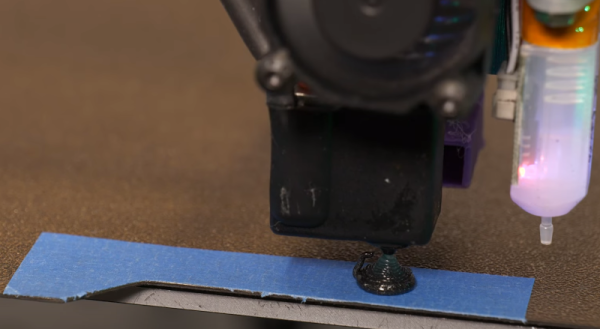
One popular option when 3D printing is to have the printer draw a loop or two around the print before starting. This serves several purposes: it clears the print head for one thing. It also marks the area of the print bed in use and many people use it to adjust the leveling if necessary. However, the little scraps of plastic do add up. [Makers Mashup] decided to try something different and now uses what he dubs the landing strip and kisses method.

The landing strip turns out to be a piece of blue tape and the kiss in question is like the chocolate kind and does not involve pressing your lips against the nozzle. There’s a wizard that generates startup code for you that has the style of purge if you like.

Continue reading “Tired Of 3D Printed Skirts? Try Kisses” →