Linux Fu: Send In The (Cloud) Clones

Storing data “in the cloud” — even if it is your own server — is all the rage. But many cloud solutions require you to access your files in a clumsy way using a web browser. One day, operating systems will incorporate generic cloud storage just like any other file system. But by using two tools, rclone and sshfs, you can nearly accomplish this today with a little one-time setup. There are a few limitations, but, generally, it works quite well.

It is a story as old as computing. There’s something new. Using it is exotic and requires special techniques. Then it becomes just another part of the operating system. If you go back far enough, programmers had to pull specific records from mass storage like tapes, drums, or disks and deblock data. Now you just open a file or a database. Cameras, printers, audio, and even networking once were special devices that are now commonplace. If you use Windows, for example, OneDrive is well-supported. But if you use another service, you may or may not have an easy option to just access your files as a first-class file system.

The rclone program is the Swiss Army knife of cloud storage services. Despite its name, it doesn’t have to synchronize a local file store to a remote service, although it can do that. The program works with a dizzying array of cloud storage providers and it can do simple operations like listing and copying files. It can also synchronize, as you’d expect. However, it also has an experimental FUSE filesystem that lets you mount a remote service — with varying degrees of success.

What’s Supported?

If you don’t like using someone like Google or Amazon, you can host your own cloud. In that case, you can probably use sshfs to mount a file using ssh, although rclone can also do that. There are also cloud services you can self-host like OwnCloud and NextCloud. A Raspberry Pi running Docker can easily stand up one of these in a few minutes and rclone can handle these, too.
Continue reading “Linux Fu: Send In The (Cloud) Clones” →

Ethernet Goes To The Ether

Since the ether is an old term for the fictitious space where radio waves propagate, we always thought it was strange that the term ethernet refers to wired communication. Sure, there are wireless devices, but that’s not really ethernet. [Jacek] had the same thought, but decided to do something about it.

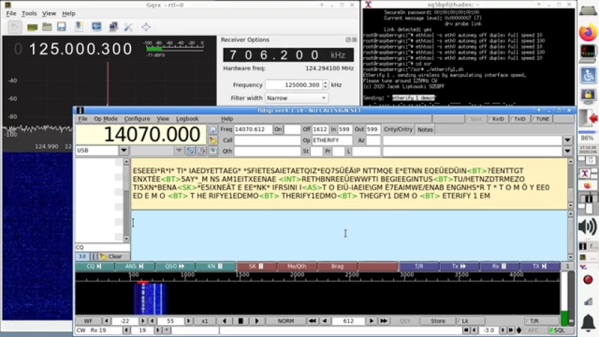
What he did is use two different techniques to alter the electromagnetic emission from an ethernet adapter on a Raspberry Pi. The different conditions send Morse code that you can receive at 125 MHz with a suitable receiver.

Practical? Hardly, unless you are looking to exfiltrate data from an air-gapped machine, perhaps. But it does have a certain cool factor. The first method switches the adapter between 10 Mbps and 100 Mbps. The second technique uses a stream of data to accomplish the modulation. The switching method had a range of around 100 meters while the data-based method topped out at about 30 meters. The code is on GitHub if you want to replicate the experiment.

There is plenty of precedent for this sort of thing. In 1976 Dr. Dobb’s Journal published an article about playing music on an Altair 8800 by running code while an AM radio was nearby. We’ve seen VGA adapters forced to transmit data, too.

Continue reading “Ethernet Goes To The Ether” →

Under The Sea GPS Uses Sound

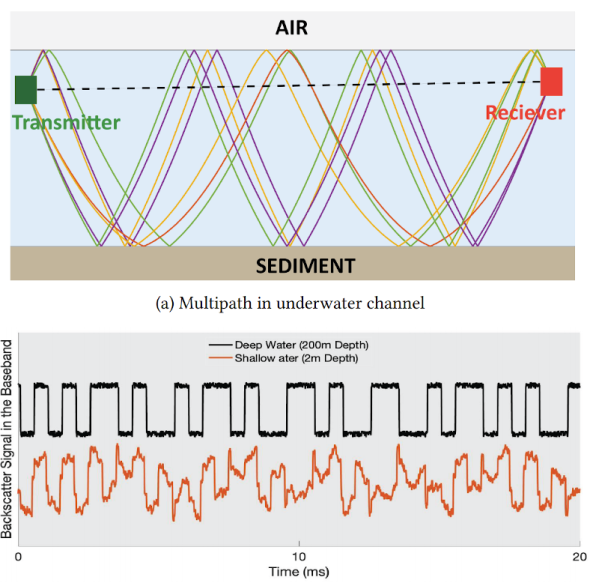
If you’ve ever tried to use GPS indoors, you know that the signals aren’t easy to acquire in any sort of structure. Now imagine trying to get a satellite fix underwater. Researchers at MIT have a new technique, underwater backscatter localization or UBL, that promises to provide a low-power localization system tailored for the subsea environment.

Like other existing solutions, UBL uses sound waves, but it avoids some of the common problems with using sonic beacons in that environment. A typical system has a fixed beacon constrained by the availability of power or battery-operated beacons that require replacement or recharging. Since the beacon acts as a transponder — it receives a signal and then replies — it requires either constant power or time to wake up from the external stimulus and that time typically varies with the environment. That variable startup time interferes with computing the round-trip time of the signal, which is crucial for estimating position.

Continue reading “Under The Sea GPS Uses Sound” →

Walmart Gives Up On Stock-Checking Robots

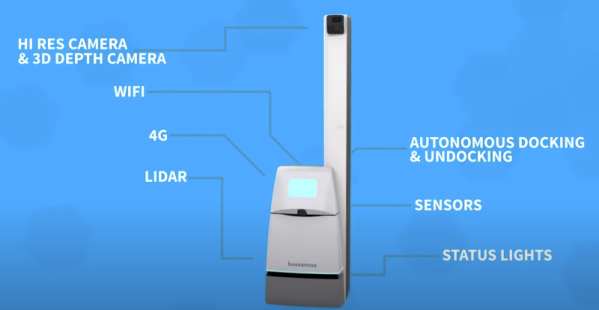
We’ve seen the Jetsons, Star Wars, and Silent Running. In the future, all the menial jobs will be done by robots. But Walmart is reversing plans to have six-foot-tall robots scan store shelves to check stock levels. The robots, from a company called Bossa Nova Robotics, apparently worked well enough and Walmart had promoted the idea in many investor-related events, promising that robot workers would reduce labor costs while better stock levels would increase sales.

So why did the retail giant say no to these ‘droids? Apparently, they found better ways to check stock and, according to a quote in the Wall Street Journal’s article about the decision, shoppers reacted negatively to sharing the aisle with the roving machines.

The robots didn’t just check stock. They could also check prices and find misplaced items. You can see a promotional video about the device below. Continue reading “Walmart Gives Up On Stock-Checking Robots” →

A Super UPS For The Pi

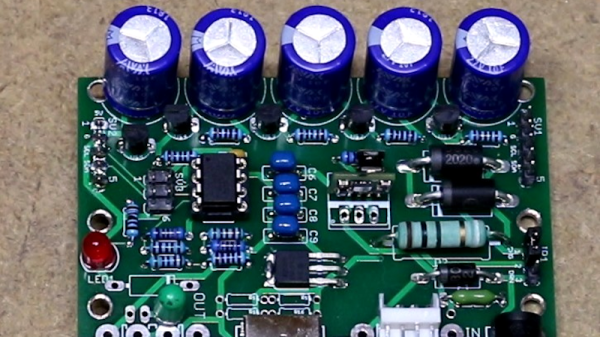
One of the problems with using a Raspberry Pi or most other systems in a production environment is dealing with sudden shutdowns due to power loss. Modern operating systems often keep data in memory that should be on disk, and a sudden power cycle can create problems. One answer is an uninterruptible power supply, but maintaining batteries is no fun. [Scott] wanted to do better, so he built a UPS using supercapacitors.

A supercapacitor UPS is nearly ideal. The caps charge quickly and don’t wear out as a battery does. The capacitors also don’t care if they stay in storage for a long time. The only real downside is they don’t have the capacity that batteries can have, but for a small computer like a Pi Zero it is pretty easy to gang up enough capacitors to do the job.

Continue reading “A Super UPS For The Pi” →

Linux Fu: Monitor Disks

If you want a quick view of a Linux system’s process load, you can use top or — slightly nicer — htop. But what if you want a quick snapshot of how the disk system is doing? There are a few tools you can use, some of which are not nearly as common as top.

First, iotop

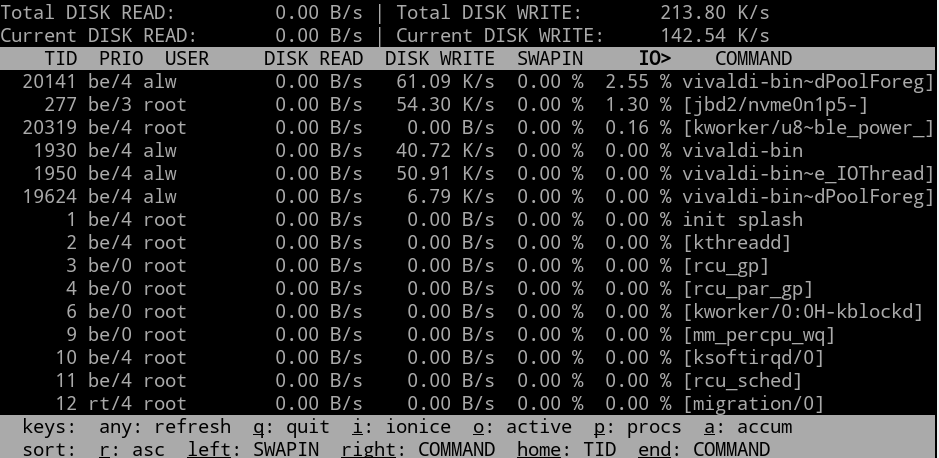
Most similar to top is iotop. This program shows you the total and current disk read and write numbers for the file system and also shows you who is eating up the most disk I/O.  This screen looks busy:

Continue reading “Linux Fu: Monitor Disks” →

Rebuilding A Hero (the Robot, Not The Sandwich)

When [Scott Baker] found a Heathkit Hero Junior on eBay, he grabbed it. He had one as a kid, but it was long sold. The robot arrived with no electronics, so the first order of business is to give it some new modern brains including an ATMega328 and a Raspberry Pi. You can see the start of the project in the video below.

So far, you can see a nice teardown of the chassis and what’s left of the little robot’s drive system. This wasn’t the big Hero-1 that you probably remember, but it was still a pretty solid platform, especially for the time it was on the market.

Continue reading “Rebuilding A Hero (the Robot, Not The Sandwich)” →