CIPODS: Earbuds For Cochlear Implants

If you wear cochlear implants, sound doesn’t enter through your ear, but rather from microphones above your ears. That means earbuds are useless and you have to resort to large and clumsy over the ear headphones. [Mjcraig23] wanted the convenience of earbuds and set out to do what we all do: hack it.

The result is handily portable as you can see in the video, below. The trick is that he used replacement battery covers and then grafted earbud holders (called EARBUDi) to them using one of our favorite fasteners, zip ties. Apparently, you can wire a cable directly into the device, but then you lose the ability to hear what’s going on around you, which would not be a good idea for catching some tunes while walking your dog or other common earbud use cases.

Continue reading “CIPODS: Earbuds For Cochlear Implants”

Hacking A Pint-Sized Mercedes

[Jonas] bought an electric Mercedes “ride on” toy for his one-year-old son. At least that’s his story. However, the vehicle has become a target for dad’s obsession with hacking and he’s already done quite a few upgrades. Even better, he did quite a bit of analysis on what’s already there. He isn’t done, but he’s promised quite a bit in the next installment which isn’t out yet.

The original car can take a driver or it can use remote control. [Jonas] has an ambitious list of ideas, some of which are still not complete:

  • Speed along with softer acceleration and braking
  • Improve the radio controller
  • Proper rubber tires
  • Proper stereo system
  • Individual brake disks on the front wheels
  • Improved horn
  • Proper seat belt or maybe even a new seat

Continue reading “Hacking A Pint-Sized Mercedes”

FPGA Makes ASCII Video

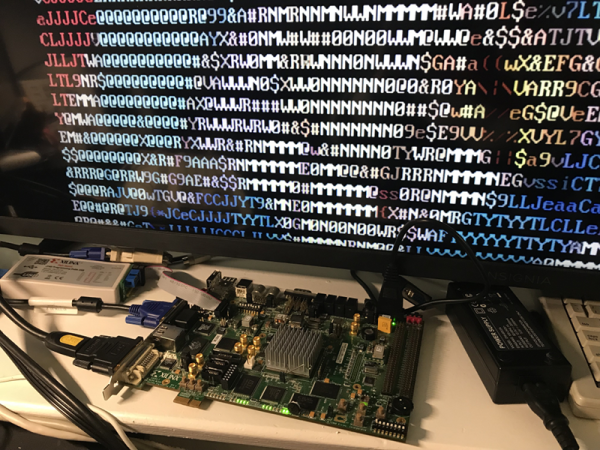
Human beings like pictures which is probably why there’s the old adage “A picture’s worth a thousand words.” We take computer graphic output for granted now, but even in the earliest days for Teletypes and line printers, there was artwork made from characters ranging from Snoopy to Spock. [Wenting Z] continues the tradition by creating an FPGA that converts VGA video to ASCII art and outputs it via DVI.

The device uses a Xilinx Virtex device and uses about 500 LUT (look up tables) which is not much at all. You can see a video (that includes an overlay of the source video) of the device in action below.

In fact, we think of art like this as a computer phenomenon, but [Flora Stacey] created a butterfly on a typewriter in 1898 and ham radio operators were doing art using paper tape for the last half of the twentieth century. Even before that, In 1865, Alice in Wonderland had a certain passage that was typeset to suggest a mouse’s tail. Perhaps the pinnacle is the famous ASCII version of Star Wars.

This is decidedly less mechanical than some of the other ASCII art projects we’ve seen. If you have a taste for more text art, have a look at some other examples, including a very old advertisement that uses character art.

Continue reading “FPGA Makes ASCII Video”

Caped Beagle Is FPGA Superhero

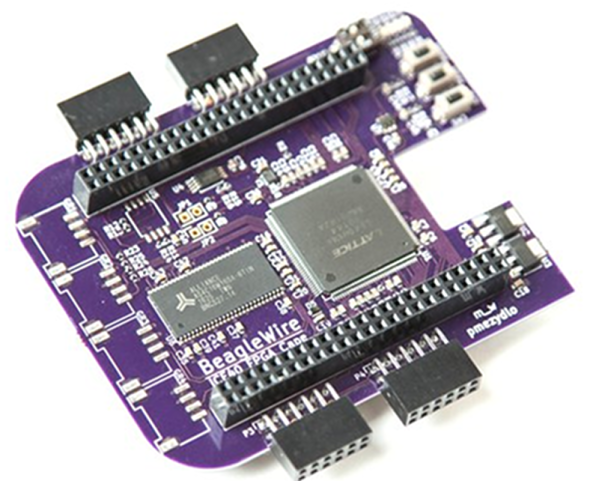
We miss the days when everything had daughterboards. Now, Arduinos have shields and Raspberry Pis have hats. The BeagleBone has capes. Whatever. However, regardless of the name, the open source BeagleWire cape/shield/hat/daughterboard connects to a BeagleBone and provides a Lattice iCE40HX FPGA, some support hardware, and common I/O connectors like Pmod and Grove. You can see a video about the board below.

In addition to the FPGA, the board contains a EEPROM, RAM, flash memory, an oscillator, and a few buttons, switches and LEDs. The buttons even feature hardware debouncing. The parts list and design files are all available and — depending on a successful crowdfunding campaign — you might be able to buy one for $75 in the future.

The board is configured to communicate over the 100 MHz 16-bit GPMC port. Linux software and example drivers are available so it should be fairly simple to get the FPGA and CPU talking to each other for your own purposes.

If you decide to build your own, there’s a one-click button that will populate a DigiKey cart for you with most of the components. Although the DigiKey site complained about an error, it did seem to order 24 of the 26 components and the total came to just over $50. Of course, you’d still need to source the missing parts and the board.

We’ve talked about the Lattice iCE FPGAs quite a bit in the past. Not only do you have our tutorial videos, but there are plenty of others, too.

Continue reading “Caped Beagle Is FPGA Superhero”

Another Introduction To FPGAs

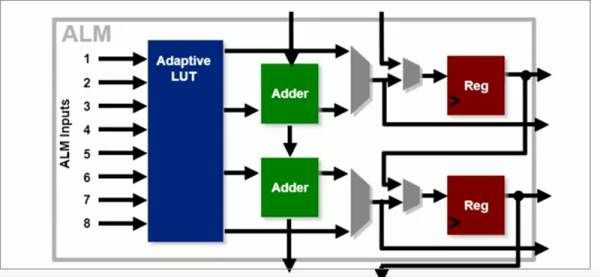
FPGAs can have a steep learning curve, so getting started tutorials are a popular topic. Intel recently published a video titled “Basics of Programmable Logic: FPGA Architecture” and you can see it below. Of course, Intel bought Altera, so the material has a bit of Altera/Intel flavor to it, but the course is generic enough that the concepts will apply to just about any FPGA.

Of course, if you do want to use Quartus, there are quite a few follow-on courses, including the wonderfully named “Become a [sic] FPGA Designer in 4 Hours.” We’d really like to see a sequel titled “Become a Proficient FPGA Designer in 9 Months” but Google didn’t turn that one up.

Continue reading “Another Introduction To FPGAs”

Microsoft Quantum Simulator Goes To Linux And Mac

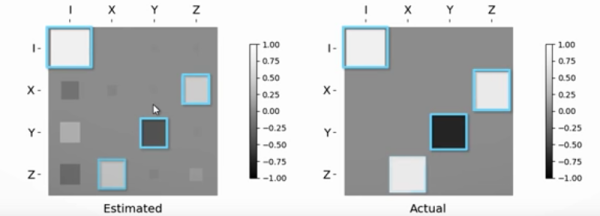
Everyone seems to be gearing up for the race to be the king of quantum computers. The latest salvo is Microsoft’s, they have announced that their quantum simulator will now run on macOS and Linux, with associated libraries and examples that are now fully open source. They have produced a video about the new release, which you can see below.

Microsoft also claims that their simulator is much faster than before, especially on large simulations. Of course, really large simulations suffer from memory problems, not speed problems. You can run their simulator locally or on their Azure cloud.

Continue reading “Microsoft Quantum Simulator Goes To Linux And Mac”

FPGA Calculator Uses Joystick

FPGAs are great fun, but sometimes you need a few starter projects under your belt. These projects might be something you could just as well do with a CPU, but you have to start somewhere. [LambdaPI] recently shared a 4-bit calculator created using an FPGA, and you can see it in the video below.

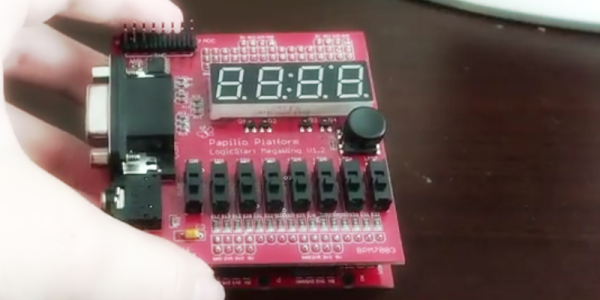
The calculator uses a Papilio FPGA board and a LogicStart accessory board for the display and switches. The Papilio normally uses schematic-based entry and Arduino code, but [LambdaPI] used VHDL. You enter the two 4-bit numbers on the 8 switches and then the joystick selects one of four operations (add, subtract, multiply, and divide).

Continue reading “FPGA Calculator Uses Joystick”