Photograph Of Single Atom Captured With A Plain Old Camera

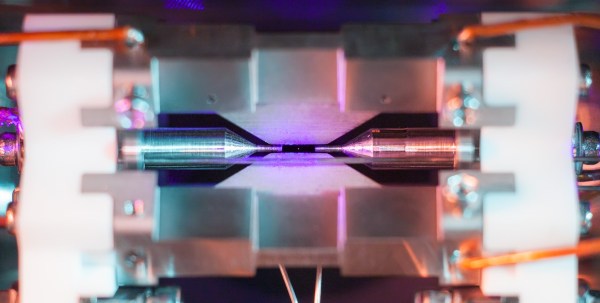
The Engineering and Physical Sciences Research Council awarded a remarkable photograph its overall prize in science photography. The subject of the photograph? A single atom visible to the naked eye. Well, perhaps not exactly the naked eye, but without a microscope. In the picture above (click here to enlarge), the atom is that pale blue dot between the two needle-like structures.
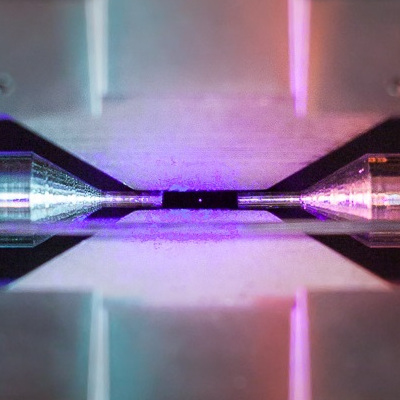
You probably learned in school that you couldn’t see a single atom, and that’s usually true. But [David Nadlinger] from the University of Oxford, trapped a positively charged strontium atom in an ion trap and then irradiated it with a blue-violet laser. The atom absorbs and reemits the light, and a camera can pick up the light, creating a one-of-a-kind photograph. The camera was a Canon 5D Mk II with a 50mm f/1.8 lens — a nice camera, but nothing too exotic.

The ion trap keeps the single atom balanced between two small needle points about 2 millimeters apart. [Nadlinger] did some math that convinced him the photograph could be possible and made it a reality on a Sunday afternoon. The pale dot isn’t especially spectacular by itself, but when you realize that it is the visual effect of a single atom, it is mind-blowing. Turns out, the lab has taken some similar photographs in the past. They don’t remember who took it, but they have a picture of 9 calcium-43 ions trapped, that you can seen below. The ions are 10 microns apart and at an effective temperature of 0.001 degrees Kelvin.

Other winning photographs included patterns on a soap bubble, an EEG headset in use, and microbubbles used to deliver drugs. There’s also an underwater robot, a machine for molecular beam epitaxy that looks like a James Bond villain’s torture device, and lattices made with selective laser melting 3D printing.

If you want to look at atoms from the comfort of your own home, maybe you should build an STM. You might even try NIST’s improved atom probe while you are at it. Just remember you can’t trust atoms. They make up everything.

Photo credit: David Nadlinger
World’s Stupidest Solid State Disk Drive Hack

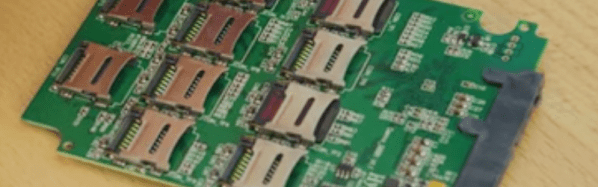
The title might seem a little harsh, but it is a direct quote from the video by [Linus Tech Tips] that you can see below. He picked up a board that is a RAID 0 controller for up to ten SD cards so you can use them as a conventional SATA SSD. Of course, the channel’s tag line is “impractical solutions for improbable problems” but even by his own admission, this is pretty impractical.

It is odd for us to scoff at any kind of hack, but honestly, it is hard to see the value to this, other than it is amusing to think some factory turned these boards out hoping to make a profit. Besides being amusing, though, it is also a good exercise in design trades. For example, when you design a car, you want it to be safe, but you can’t make the body out of four-inch thick steel because of cost, weight, and fuel consumption. So you balance these concerns by making tradeoffs.

Continue reading “World’s Stupidest Solid State Disk Drive Hack”

Getting Started With STM8

There are so many different CPUs today and often the hardest thing about using any of them is getting started and gathering the right software tools. If you’ve ever eyed up the very inexpensive STM8 processor, you’ll want to check out [Shane Burrell’s] video (see below) about how to get started with the STM8.

The STM8 isn’t a 32-bit processor — you could probably guess that from the name. [Shane] uses SDCC (small device C compiler) to target the little chip. He also shows how he manages a fairly substantial piece of code and how he controls the build process.

Continue reading “Getting Started With STM8”

ESP32 Weather Station On A PCB

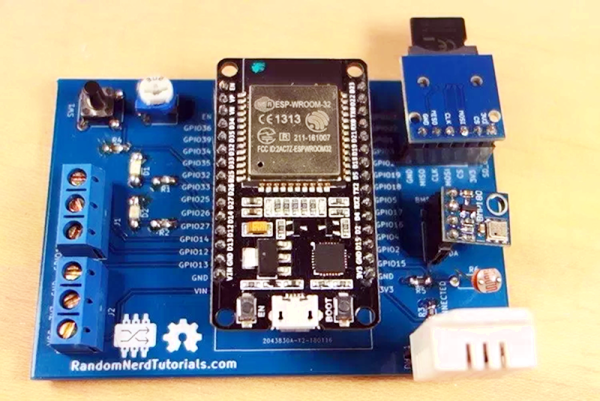
We see lots of ESP8266 projects, but considerably fewer for the ESP32. So this good-looking weather station on a PCB using an ESP32 caught our eye. The board has a few sockets for common weather gear, but with a little modification, it would be a great carrier for an ESP32. Since the PCB layout is available, you could change things around to suit you. You can see a video from [Rui Santos] about his project and its progress from breadboard to PCB in the video below.

Continue reading “ESP32 Weather Station On A PCB”

Voice User Interface Design Practices

Websites used to be uglier than they are now. Sure, you can still find a few disasters, but back in the early days of the Web you’d have found blinking banners, spinning text, music backgrounds, and bizarre navigation themes. Practices evolve, and now there’s much less variation between professionally-designed sites.

In a mirror of the world of hypertext, the same thing is going to happen with voice user interfaces (or VUIs). As products like Google Home and Amazon Echo get more users, developing VUIs will become a big deal. We are also starting to see hacker projects that use VUIs either by leveraging the big guys, using local code on a Raspberry Pi, or even using dedicated speech hardware. So what are the best practices for a VUI? [Frederik Goossens] shares his thoughts on the subject in a recent post.

Truthfully, a lot of the design process [Frederik] suggests mimics conventional user interface design in defining the use case and mapping out the flow. However, there are some unique issues surrounding usable voice interactions.

Continue reading “Voice User Interface Design Practices”

Quantum Searching In Your Browser

If you’ve made it through the last two posts on quantum computing (QC), then you’ve seen the Quirk simulator, a little of IBM’s web-based offering, and how entanglement and superposition can do strange and possibly wonderful things. However, the superdense encoding I showed you didn’t really feel like a real computer algorithm. This time we will look at Grover’s algorithm which is often incorrectly billed as an “unstructured database search.” In reality, it is an algorithm for making a state — that is a set of qubits — match some desired state without simply setting the state.

By analogy, consider a web service where you guess a number. Most discussions of Grover’s algorithm will tell you that the service will only tell you if the number is correct or not. If the number was from 1 to 16, using traditional computing, you’d have to query the values one at a time to see which is correct. You might get lucky and hit the first time. Or it might take 16 times. With qubits you can get the same result in only four attempts. In fact, if you try more times, you might get the wrong answer. Of course, what you really get is an answer that is probably correct, because that how QC works.

Continue reading “Quantum Searching In Your Browser”

ESP32, We Have Ways To Make You Talk

One of our favorite scenes from the [James Bond] franchise is the classic exchange between [Goldfinger] and [Bond]. [Connery] (the One True Bond) says, “You expect me to talk?” And the reply is, “No Mr. Bond, I expect you to die!” When it comes to the ESP32, though, apparently [XTronical] expects it to talk. He posted a library to simplify playing WAV files on the ESP32. There is also a video worth watching, below.

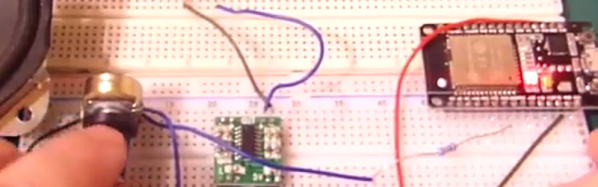
Actually, you might want to back up to his previous post where he connects a speaker via one of the digital to analog converters on the board. In that post, he just pushes out a few simple waveforms, but the hardware is the same setup he uses for playing the WAV files.

Continue reading “ESP32, We Have Ways To Make You Talk”