Testing The Outernet Dreamcatcher SDR

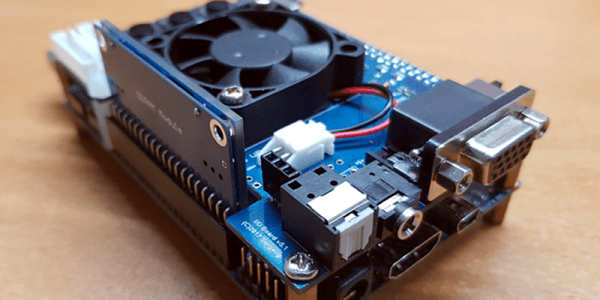
What do you get when you cross an ARM-based Linux PC and an RTL-SDR? Sounds like the start of a joke, but the answer is Outernet’s Dreamcatcher. It is a single PCB with an RTL-SDR software defined radio, an L-band LNA, and an Allwinner A13 processor with 512MB of RAM and a 1 GHz clock speed. The rtl-sdr site recently posted a good review of the $99 board.

We’ll let you read the review for yourself, but the conclusion was that despite some bugs, the board was no more expensive than pulling the parts together separately. On the other hand, if you uses, for example, a Raspberry Pi 3, you might expect more support and more performance.

Despite the L-band hardware, there is a bypass antenna jack that allows you to receive other frequencies. There’s also two SD slots, one to boot from and another for storage. Several pieces of software had trouble running on the somewhat sluggish CPU, although some software that is optimized for the particular processor used fared better. You can read the details in the review.

The board is interesting, although unless you have a special packaging problem, you are probably as well off to combine a Pi and a dongle, as we have seen so many times before. If you have more horsepower you can even make the Pi transmit, although we’d suggest some filtering if you were going to do that for real.

An Antenna That Really Cooks–Really

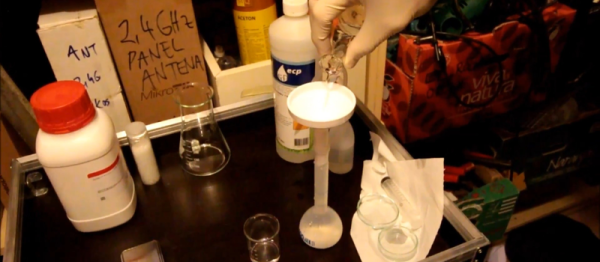
[9A4OV] set up a receiver using the HackRF board and an LNA that can receive the NOAA 19 satellite. Of course, a receiver needs an antenna, and he made one using a cooking pot. The antenna isn’t ideal – at least indoors – but it does work. He’s hoping to tweak it to get better reception. You can see videos of the antenna and the resulting reception, below.

The satellite is sending High-Resolution Picture Transmission (HRPT) data which provides a higher image quality than Automatic Picture Transmission (APT). APT is at 137 MHz, but HRPT is at 1698 MHz and typically requires a better receiver and antenna system.

Continue reading “An Antenna That Really Cooks–Really”

Btrfs For The Pi

File systems are one of those things that typical end users don’t think much about. Apparently, [seaQueue] isn’t a typical end user. He’s posted some instructions on how to run an alternate file system–btrfs–on the Raspberry Pi.

The right file system can make a big difference when it comes to performance and maintainability of any system that deals with storage. Linux, including most OSs for the Raspberry Pi, uses one of the EXT file systems. These are battle-hardened and well understood. However, there are other file systems, many of which have advanced features superior to the default file system for some applications.

Btrfs, often pronounced “butter eff ess”, begin life at Oracle and was born from an idea in an IBM paper. It offers advanced features like pooling, snapshots, and the ability to fuse multiple devices into one logical device. One notable feature the file system offers is copy-on-write. That means file copies can share common blocks as long as they stay common.  Compression is available, as is seeding a file system with read-only storage, which could be very useful in some embedded systems. You can also configure several types of RAID using nothing but btrfs. You can see a video presentation about features of btrfs below.

Continue reading “Btrfs For The Pi”

Holman Is Your Phone’s Best Friend

Let’s get something straight right up front: this isn’t much of an electronics project. But it is a very artistic 3D printing project that contains some electronics. [Sjowett] used an off-the-shelf class D amplifier with BlueTooth input to create a simple BlueTooth speaker with a subwoofer. As you can see from the pictures, woofer is exactly the term to use, too.

The clever mechanical design uses 3D printing and common metric PVC pipe. That’s a great technique and resulted in a very clean and professional-looking build. If you don’t have easy access to metric pipe, you could print the pipes, but it will take longer and might not look quite as good.

Continue reading “Holman Is Your Phone’s Best Friend”

Open Source Digital Cinema

Years in the making, Apertus has released 25 beta developer kits for AXIOM–their open source digital cinema camera. This isn’t your point-and-shoot digital camera. The original proof of concept from 2013 had a Zynq processor (a Zedboard), a super 35 4K image sensor, and a Nikon F-Mount.

The device today is modular with several options. For example, there is an HDMI output module, but  DisplayPort, 4K HDMI, and USB 3.0 options are in development. You can see several sample videos taken with the device, below.

Continue reading “Open Source Digital Cinema”

Imaginary AC Circuits Aren’t Really Complex

If you have ever read advanced textbooks or papers about electronics, you may have been surprised to see the use of complex numbers used in the analysis of AC circuits. A complex number has two parts: a real part and an imaginary part. I’ve often thought that a lot of books and classes just kind of gloss over what this really means. What part of electricity is imaginary? Why do we do this?

The short answer is phase angle: the time delay between a voltage and a current in a circuit. How can an angle be a time? That’s part of what I’ll need to explain.

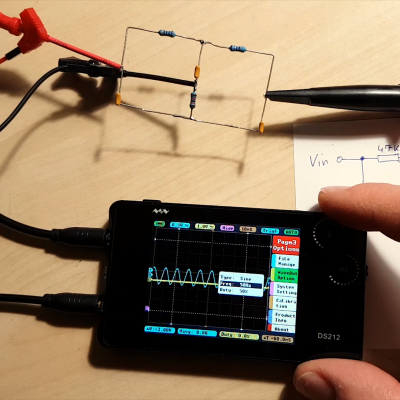
First, consider a resistor. If you apply a voltage to it, a certain current will flow that you can determine by Ohm’s law. If you know the instantaneous voltage across the resistor, you can derive the current and you can find the power–how much work that electricity will do. That’s fine for DC current through resistors. But components like capacitors and inductors with an AC current don’t obey Ohm’s law. Take a capacitor. Current only flows when  the capacitor is charging or discharging, so the current through it relates to the rate of change of the voltage, not the instantaneous voltage level.

That means that if you plot the sine wave voltage against the current, the peak of the voltage will be where the current is minimal, and the peak current will be where the voltage is at zero. You can see that in this image, where the yellow wave is voltage (V) and the green wave is current (I). See how the green peak is where the yellow curve crosses zero? And the yellow peak is where the green curve crosses zero?

These linked sine and cosine waves might remind you of something — the X and Y coordinates of a point being swept around a circle at a constant rate, and that’s our connection to complex numbers. By the end of the post, you’ll see it isn’t all that complicated and the “imaginary” quantity isn’t imaginary at all.

Continue reading “Imaginary AC Circuits Aren’t Really Complex”

You Are Go For FPGA!

Reconfigure.io is accepting beta applications for its environment to configure FPGAs using Go. Yes, Go is a programming language, but the software converts code into FPGA constructs, so you don’t need Verilog or VHDL. Since Go supports concurrent routines and channels for synchronization and communications, the parallel nature of the FPGA should fit well.

According to the project’s website, the tool also allows you to reconfigure the FPGA on the fly using a cloud-based build and deploy system. There isn’t much detail yet, unless you get accepted for the alpha. They claim they’ll give priority to the most interesting use cases, so pitching your blinking LED project probably isn’t going to cut it. There is a bit more detail, however, on their GitHub site.

Continue reading “You Are Go For FPGA!”