DIY Computer — 1968 Style

What does it mean to “build your own computer?” Today, it is likely to mean you bought a motherboard, a power supply, and a case and put it all together. You might even have made an embedded computer using a few chips, including an off the shelf CPU. However, there are those guys (like me) who have built entire computers using FPGAs and some (not like me) who have built computers out of TTL chips, discrete components, and even relays and we have covered quite a few of them.

It hasn’t always been that easy. Components are readily available now and relatively cheap (especially considering inflation). In the 1960’s, simple components cost more than you pay for them today and back then your hypothetical self was making less money. In just about every way imaginable, the cost was prohibitive.
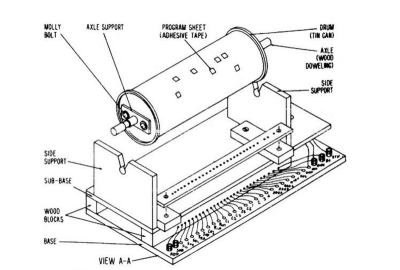
clipSo what did you do if you were a kid saving money from a paper route in 1968 and you wanted to build a computer? Maybe you turned to How to Build a Working Digital Computer a book published in 1968 by [Edward Alcosser], [James Phillips], and [Allen Wolk]. This book did as the title promised: you could build a working digital computer. The components, though, were paper clips, tin cans, thread spools, and other household items. The only real electronic components you had to use were light bulbs and a battery, although you might also use store-bought switches in some places instead of the homemade versions shown in the book.

Continue reading “DIY Computer — 1968 Style”

Rod Logic And Graphene: Elusive Molecule-Scale Computers

I collect slide rules. You probably know a slide rule is a mechanical calculator of sorts. They usually look like a ruler (hence the name) and have a sliding part (hence the name) and by using logarithms you can multiply and divide easily by doing number line addition and subtraction (among other things).

It is easy to dismiss old technology like that out of hand as being antiquated, but mechanical computing may be making a comeback. It may seem ancient, but mechanical adding machines, cash registers, and even weapon control computers were all mechanical devices a few decades ago and there were some pretty sophisticated techniques developed to make them work. Perhaps the most sophisticated of all was Babbage’s difference engine, even though he didn’t have the technology to make one that actually functioned (the Computer History Museum did though; you should see it operating in person, but this is good too).

Continue reading “Rod Logic And Graphene: Elusive Molecule-Scale Computers”

Repairing $55,000 Of Vintage Core Memory

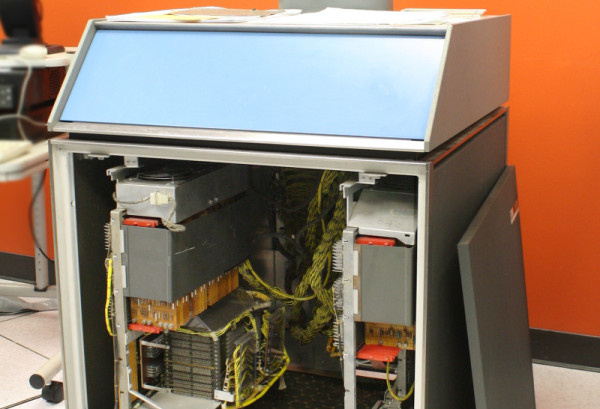
If you find yourself in the vicinity of Mountain View, California you really should stop by the Computer History Museum. Even if you aren’t into the retrocomputer scene, there’s so much cool hardware ranging from a replica of the Babbage engine to nearly modern PCs. There’s even a room dedicated to classic video games. There are two fully working old computers at the museum that have their own special rooms: a PDP-1 (complete with vector scope to run Space War) and an IBM 1401.

The IBM 1401 looks like big iron, but in its day it was a low-end machine (costing an innovative business about $2500 a month). The base unit had 4000 words of magnetic core memory, but if you had a hankering for more memory, you could add the 350 pound dishwasher-sized IBM 1406 (for only $1575 a month or you could buy for $55100). How much memory did you get for $18900 a year? An extra 12000 words!

The problem is, the museum’s 1406 had developed a problem. Some addresses ending in 2, 4 or 6 failed and they were all in the same 4K block. [Ken Shirriff] was asked to go in and try to find the problem. We don’t want to give away the story, but [Ken] wrote up his experience (with lots of pictures).

Continue reading “Repairing $55,000 Of Vintage Core Memory”

Open Source Tracked Robot Supports STEM In Africa

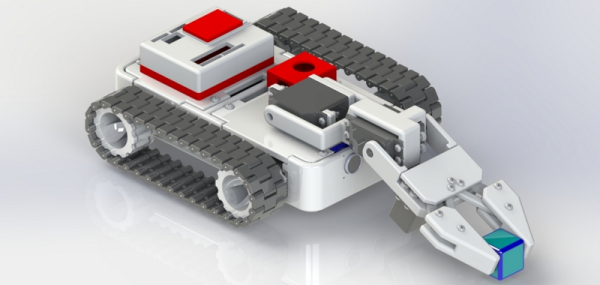
A lot of hacker projects start with education in mind. The Raspberry Pi, for example, started with the goal of making an affordable classroom computer. The Shrimp is a UK-based bare-bones Arduino targeted at schools. We recently saw an effort to make a 3D printed robotic platform aimed at African STEM education: The Azibot.

Azibot has 3D printed treads, a simple gripper arm, and uses an Arduino combined with Scratch. Their web site has the instructions on how to put together the parts and promises to have the custom part of the software available for download soon.

Continue reading “Open Source Tracked Robot Supports STEM In Africa”

3D Printed Gun Is Off The Rails

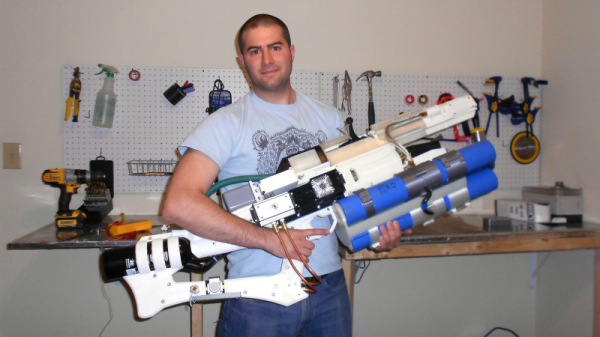
There are certain topics that cause people to have knee-jerk reactions: Try asking a crowd which Star Trek was best or–around here–take a stance for or against the Arduino and you’ll see what we mean. Certainly people polarize quickly when you talk about a 3D printed gun. However, if anyone can sneak [xtamared’s] 3D printed rail gun through airport security, then some guards will have to be fired. It looks like a cool prop from a bad movie, but (as you can see in the videos below) it can project a conductive slug into a decidedly low-tech target.

There aren’t many build details, although you can deduce a few things from the pictures and the captions. At the rear of the gun is a paintball tank that gets the slug moving before it hits the rails which further accelerate the projectile. The electric part is Arduino-based and the very prominent capacitors at the front end can deliver 1800 joules of energy (and add 20 pounds of weight to the gun).

Continue reading “3D Printed Gun Is Off The Rails”

Show A Quadcopter Flight On Google Earth For Under Ten Bucks

[Joop Brokking] wanted to know where his quadcopter was and had been. He thought about Google Earth, but assumed it would be difficult to get the GPS data and integrate it with Google’s imagery. But he discovered it was easier than he thought. He wound up spending around $10, although if his ‘copter didn’t already have GPS, it would have been more.

Hardware-wise, [Joop] made a pretty straightforward data logger using a small Arduino (a Pro Mini) and an SD Card (along with an SD breakout board). With this setup, NMEA data from the GPS comes in the Arduino’s serial port and winds up on the SD Card.

Continue reading “Show A Quadcopter Flight On Google Earth For Under Ten Bucks”

Looking Inside The Arksen Dual Power Supply

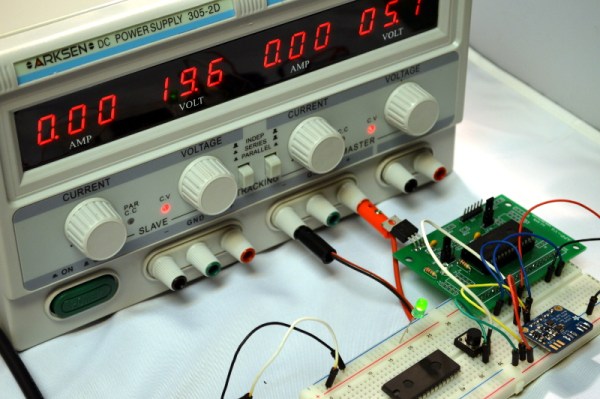
I recently picked up an Arksen dual power supply. You’ve seen these before, I’m sure, under a variety of names in places ranging from electronics stores to eBay. They look amazing for the price, and while I didn’t expect it to measure up to some of the pro supplies I have, I just wanted something to stick under my desk instead of having to move things to the bench or–worse–drag a heavy power supply over to my desk.

When I was putting together the sonic motion sensor, I found that the HC-SR04 module needed more current than I could draw out of an Arduino Leonardo. I figured this would be a good chance to use the new supply in anger. It seemed to work without too many problems. But there were a few things you might want to know if you have a similar supply or are thinking about getting a similar one.

Continue reading “Looking Inside The Arksen Dual Power Supply”