The aviation industry is always seeking advancements to improve efficiency and reduce carbon emissions. The former is due to the never-ending quest for profit, while the latter helps airlines maintain their social license to operate. Less cynically, more efficient technologies are better for the environment, too.
One of the latest innovations in this space is a new sharkskin-like film applied to airliners to help cut drag. Inspired by nature itself, it’s a surface treatment technology that mimics the unique characteristics of sharkskin to enhance aircraft efficiency. Even better, it’s already in commercial service! Continue reading “Sharkskin Coating Reduces Airliner Fuel Use, Emissions”→
As the Earth continues to warm at a worrying rate, scientists continue to work to understand the processes and mechanisms at play. Amidst the myriad of climate-related theories and discussions, the clathrate gun hypothesis stands out not only for its intriguing name but for the profound implications it might have on our understanding of global warming events.
Delving into this hypothesis is akin to reading a detective novel written by Mother Earth, with clues hidden deep beneath the ocean and Arctic ice. It’s a great example of how scientists attempt to predict the future by unpicking the mysteries of the past.
Submarines have always been about stealth; that’s always been the whole point of putting them underwater. Tracking them can be difficult, even to this day, but China may have a new technique to help in this endeavour, as reported by the South China Morning Post.
Nuclear missile subs are nicknamed “boomers,” and can spend months underwater. Tracking them is of prime concern to many countries around the world. US Navy
The news comes from a study published in a Chinese journal, regarding detection of the most advanced American submarines. The stealthiest examples use all kinds of sophisticated systems to damp vibrations and reduce acoustic signatures to make detection as hard as possible. However, a new type of magnetic detector could change all that.
A research team used computer simulations to determine whether nuclear-powered submarines could be detected via the bubbles produced when cruising at high speed underwater. When these bubbles inevitably collapse, it can apparently produce a detectable signal that is orders of magnitude higher than the sensitivity of the best magnetic anomaly detectors. The signal is found on the order of 34.19 to 49.94 Hz, deep in the ELF range, according to researchers.
This could yet create another arms race, as submarine designers begin designing vessels to reduce bubble shedding at speed. Or, for all we know, this is already a well-known principle in the high-stakes world of submarine surveillance and combat. If you’re in the know, please don’t reveal any classified information in the comments section. It’s not worth your job or ours! If you recreate such a detector at home in a non-treasonous manner, though, don’t hesitate to let us know!
Material testing is important in big industry, where manufacturers must be able to trust the properties of the raw materials they’re using. The rest of us generally take a supplier’s word for it that they’re giving us what we’ve paid for. However, you could always take on material testing yourself with the Universal Tensile Testing Machine from [Xieshi Zhang].
Unlike a six-figure industrial machine, this build is much more affordable, costing on the order of $300 to build. It uses an Arduino to read a tensile strain gauge, and is capable of applying up to a kilonewton of force. To achieve this, it uses a NEMA 17 stepper motor driving a lead screw to apply tensile strain or compression to the specimen under test. The test fixture is assembled from 3D-printed components, and built on top of a piece of aluminium extrusion.
Fundamentally, it’s a smaller version of a machine most engineering undergraduates will see in a materials lab experiment. It could be highly useful for anyone wanting to experiment with 3D printed structures; it would be more than capable of testing various filaments and infill types for their tensile and compression performance. Video after the break.
Sometimes you just need to create a creepy robot head and give it an intimidating personality. [Jens] has done just that, and ably so, with his latest eerie creation.
The robot face is introduced to us with a soundtrack befitting Stranger Things, or maybe Luke Million. The build was inspired by The Doorman, a creepy art piece with animatronic eyes. [Jens’] build started with a 3D model of a 3D mask, with the eyes and mouth modified to have rectangular cutouts for LED displays. The displays are run by a Raspberry Pi Pico, which generates a variety of eye and mouth animations. It uses a camera for face tracking, so the robot’s evil eyes seem to follow the viewer as they move around. In good form, the face has a simple switch—from good to evil, happy to angry. Or, as [Jens] designates the modes: “Fren” and “Not Fren.”
[Jens] does a great job explaining the build, and his acting at the end of the video is absolutely worth a chuckle. Given Halloween is around the corner, why not build five to eight of these, and hide them in your roommate’s bedroom?
Before the first atomic bomb was detonated, there were some fears that a fission bomb could “ignite the atmosphere.” Yes, if you’ve just watched Oppenheimer, read about the Manhattan Project, or looked into atomic weapons at all, you’ll be familiar with the concept. Physicists determined the risk was “near zero,” proceeded ahead with the Trinity test, and the world lived to see another day.
You might be wondering what this all means. How could the very air around us be set aflame, and how did physicists figure out it wasn’t a problem? Let’s explore the common misunderstandings around this concept, and the physical reactions at play.
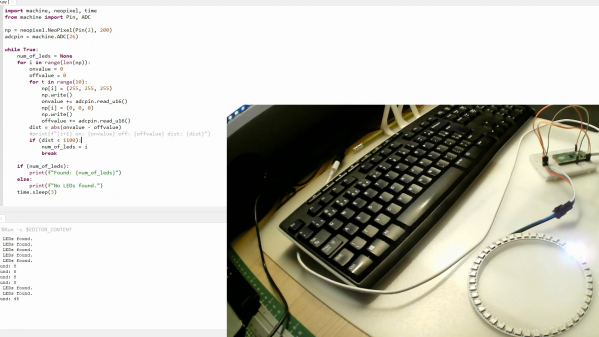
The tool is based on a Raspberry Pi Pico, so it’s easy to replicate at home. The LED strip is simply connected to the microcontroller via a set of jumper wires going to the 5V and GND pins, while one of the Pico’s ADC pins is then connected to the strip’s GND pin after the jumper. A further GPIO pin is used to send data to the strip.
Essentially, this uses the jumper wire as a rudimentary current shunt. The code steps through the string of LEDs, turning each one on and then off in turn, comparing the value read by the ADC pin at each state. When the Pico detects no difference in current draw between the on and off states, that suggests it’s trying to turn on an LED beyond the end of the string, and thus the count is concluded.
You don’t need to understand any of that to put this device to good use, however. You can easily whip it up on a breadboard with a Pi Pico and parts you have lying around in the shop. Video after the break.







 The robot face is introduced to us with a soundtrack befitting Stranger Things, or maybe Luke Million. The build was inspired by The Doorman, a creepy art piece with animatronic eyes. [Jens’] build started with a 3D model of a 3D mask, with the eyes and mouth modified to have rectangular cutouts for LED displays. The displays are run by a Raspberry Pi Pico, which generates a variety of eye and mouth animations. It uses a camera for face tracking, so the robot’s evil eyes seem to follow the viewer as they move around. In good form, the face has a simple switch—from good to evil, happy to angry. Or, as [Jens] designates the modes: “Fren” and “Not Fren.”