Homebrew Stream Deck Pedal Emulates The Real Thing

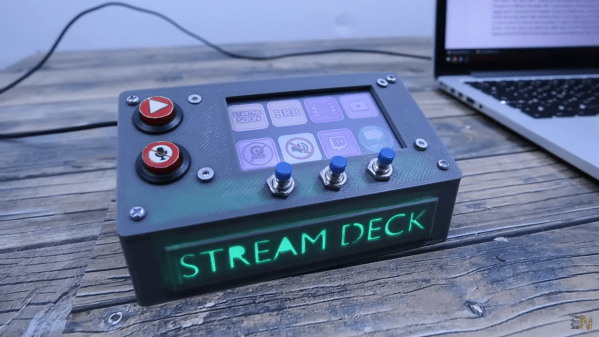
Pedals are a great way to control functions on your computer. You’re rarely using your feet for anything else, so they can handle some tasks, freeing up your hands. This Elgato Stream Deck controller from [DDRBoxman] does just that.

[DDRBoxman] wanted to control Elgato Stream Deck much like the offical pedal sold by the company. Thus, some hacking was in order. Using Wireshark with the Elgato pedal helped to determine the communication method of the real hardware.

Once the protocol was figured out, it was just a task of getting the Raspberry Pi Pico to replicate the same functionality. With the help of the tinyusb library, [DDRBoxman] was able to emulate the real Elgato device successfully. Paired with a 3D-printed footswitch design from Adafruit, and the project was functional and complete.

We’ve seen great foot pedal devices over the years, from a simple macro device to a super-useful page turner for sheet music. If you’ve been hacking away at your own nifty input devices, be sure to drop us a line!

Apple AirTags Hacked And Cloned With Voltage Glitching

Apple AirTags are useful little devices. They essentially use iPhones in the wild as a mesh network to tell the owner where the AirTag is. Now, researchers have shown that it’s possible to clone these devices.

The research paper explains the cloning process, which requires physical access to the hardware. To achieve the hack, the Nordic nRF52832 inside the AirTag must be voltage glitched to enable its debug port. The researchers were able to achieve this with relatively simple tools, using a Pi Pico fitted with a few additional components.

With the debug interface enabled, it’s simple to extract the microcontroller’s firmware. It’s then possible to clone this firmware onto another tag. The team also experimented with other hacks, like having the AirTag regularly rotate its ID to avoid triggering anti-stalking warnings built into Apple’s tracing system.

As the researchers explain, it’s clear that AirTags can’t really be secure as long as they’re based on a microcontroller that is vulnerable to such attacks. It’s not the first AirTag cloning we’ve seen either. They’re an interesting device with some serious privacy and safety implications, so it pays to stay abreast of developments in this area.

[Thanks to Itay for the tip!]

Building A Better 3D Scanner With An IPhone, And Making Art

Apple’s FaceID system uses infrared depth-sensing technology to authenticate people via their faces. It can also be used for simple 3D scanning, and [Scott Yu-Jan] found a better way to do that.

The main problem with using an iPhone as a 3D scanner in this manner is that the sensor is built into the front side of the device. It’s great for scanning your own face, but if you’re trying to scan an object, you can no longer see the iPhone’s screen. [Scott] solved this problem by slapping together a handheld 3D printed device to hold the iPhone along with an external monitor. This allowed Scott to scan while still seeing what was going on.

Having noticed that some of the 3D scanning apps produced strange, glitchy results when scanning faces, [Scott] decided to innovate artistically. He employed [Andrea] to model, took some scans, and Photoshopped the results into some impressive posters.

Overall, [Scott] demonstrates that it’s relatively easy to repurposed the iPhone for improved 3D scanning. With a simple design, he has a handheld scanner that works way better than just the phone on its own. Alternatively, consider getting into photogrammetry instead.

Continue reading “Building A Better 3D Scanner With An IPhone, And Making Art”

Game Boy Repurposed Solely As A Camera

As much as we all love the Game Boy Camera, it’s really just an add-on to the popular handheld console. Twitter user [@thegameboycam] decided to build a dedicated camera platform using the hardware, and the result was the Game Boy DSLR.

Camera pedants will note that it’s not really a DSLR, but that’s not really the point. It’s a Game Boy with the camera accessory built into a proper camera-like housing. There’s a CS/C mount for the lens, and it’s got a custom shell with leatherette, just like the cameras of last century. It’s also got a cold shoe, and a 1/4″ screw thread for tripod mounting. Oh, and strap lugs! So you can really rock that old-school aesthetic with your tweed suit on.

More practical modern features include a 1800 mAh battery that charges over USB Type C and a backlit IPS display. The screen has been turned through 90 degrees, and the cartridge port and buttons are relocated to create a more traditional camera-like form factor. If you really want, though, you can still play it like a regular Game Boy. Just swap out the modified camera cart with the lens mount for a regular Game Boy Camera or another game cartridge.

It’s a fun hack that scores big on style points. No longer can you be the cool kid just by rocking a Game Boy with a big ol’ lens hanging off the back. Now you gotta compete with this!

Our tipsline is waiting for when you’ve got the next big thing in Game Boy Camera hacks. Video after the break.

Continue reading “Game Boy Repurposed Solely As A Camera”

Cracking The MiFare Classic Could Get You Free Snacks

[Guillermo] started a new job a while back. That job came with an NFC access card, which was used for booking rooms and building access. The card also served as a wallet for using the vending machines. He set about hacking the card to see what he could uncover.

Initial scans with NFC Tools revealed the card was an Infineon MIFARE Classic Card 1k. These cards are considered fairly old and insecure by now. There’s plenty of guides online on how to crack the private keys that are supposed to make the card secure. Conveniently, [Guillermo] had a reader/writer on hand for these very cards.

[Guillermo] was able to use a tool called mfoc to dump the keys and data off the card. From there, he was able to determine that the credit for the vending machines was stored on the card itself, rather than on a remote server.

This means that it’s simple to change the values on the card in order to get free credit, and thus free snacks. However, [Guillermo] wisely resisted the urge to cash in on candy and sodas. When totals from the machine and credit system were reconciled, there’d be a clear discrepancy, and a short investigation would quickly point to his own card.

He also managed to successfully clone a card onto a “Magic Mifare” from Amazon. In testing, the card performed flawlessly on all systems he tried it on.

It goes to show just how vulnerable some NFC-based access control systems really are. RFID tags are often not as safe as you’d hope, either!

Throwback: Designing Addressable LEDs From Scratch

These days, addressable LEDs are all the rage. A little chip paired with each LED receives signals and modulates the light output as needed. [John Peterson] was working on a project along these very lines, designing his Curilights back in 2008!

[John] wasn’t the first to come up with the idea; he designed the Curilights to replicate a string of programmable LEDs he’d seen called Triklits. His design involved each RGB LED being fitted with a Microchip PIC 16F688 microcontroller, which could receive serial data and control the LED channels with PWM. These LEDs could then be strung up to create an addressable chain. It’s fundamentally the same concept as the WS2812, just in a larger format and built by hand. His design also had the benefit of non-volatile memory onboard the PICs, so animations could be stored even after power off. [John] later went on to build a controller for his lights, complete with sensors. It could be triggered by a motion sensor or light sensor, and would run animations on the string without the use of a computer.

While [John]’s design didn’t go on to bigger things or commercial success, it did win first place at the Third Annual Lantronix Wireless Design Contest. It also goes to show that many people will come around to the same idea when it makes good sense!

If you’re interested in the wider world of addressable LEDs, check out our breakdown on some of the products out there. Meanwhile, if you’re brewing up your own flashing, glowing projects, be sure to notify the tipsline!

One Shot IR Helper Is A Great Beginner Project

Sometimes you need a little utility device to do a very simple job, and do it well.This one-shot IR helper from [Gregory Sanders] is just that. 

[Gregory] had a TV that didn’t support automatically turning on when the power was applied. This is frustrating when you like to leave devices switched hard off when not in use to save on standby energy draw. Thus, there needed to be a way to send the screen an on signal when his multi-monitor setup was powered on.

A simple circuit paired with a Pi Pico was pressed into service. The Pico flashes an IR LED, squirting out the requisite code to tell the TCL branded TV to switch on. [Gregory] figured out the codes by using an Arduino to read the output of the TV’s remote with an IR sensor. The hook here is the code is written in MicroPython, using IR libraries from [Peter Hinch].

Now, when [Gregory] powers up his rig, the IR sender will trigger the TV to switch on. It’s a little frustrating that the auto-on function wasn’t available in the factory, but regardless, now everything’s working as it should. If you want to do this in reverse, consider building a TV-B-Gone or a silencer for the boomboxes used by dancing grandmas!