Congratulations To The 2025 Component Abuse Challenge Winners

For the Component Abuse Challenge, we asked you to do the wrong thing with electrical parts, but nonetheless come out with the right result. It’s probably the most Hackaday challenge we have run in a long time, and you all delivered! The judging was tight, but in the end three projects rose up to the top, and will each be taking home a $150 DigiKey gift certificate, but that doesn’t mean you shouldn’t give all of the projects a look.

So without further ado, let’s check out the winners and all the others that tickled the hacky regions of our judges’ brains. Continue reading “Congratulations To The 2025 Component Abuse Challenge Winners”
A Quick Primer On TinkerCAD’s New Features

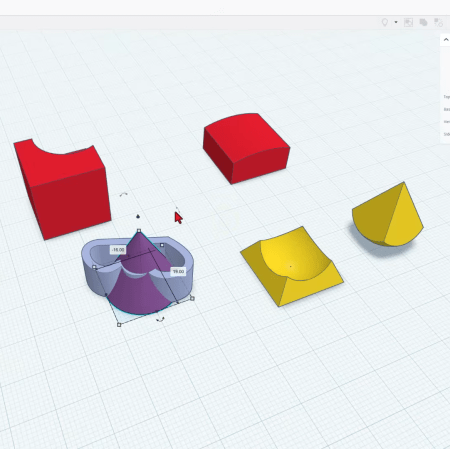
TinkerCAD had its first release all the way back in 2011 and it has come a long way since then. The latest release has introduced a raft of new, interesting features, and [HL ModTech] has been nice enough to sum them up in a recent video.

He starts out by explaining some of the basics before quickly jumping into the new gear. There are two headline features: intersect groups and smooth curves. Where the old union group tool simply merged two pieces of geometry, intersect group allows you to create a shape only featuring the geometry where two individual blocks intersect. It’s a neat addition that allows the creation of complex geometry more quickly. [HL ModTech] demonstrates it with a sphere and a pyramid and his enthusiasm is contagious.

As for smooth curves, it’s an addition to the existing straight line and Bézier curve sketch tools. If you’ve ever struggled making decent curves with Bézier techniques, you might appreciate the ease of working with the smooth curve tool, which avoids any nasty jagged points as a matter of course.

While it’s been gaining new features at an impressive rate, ultimately TinkerCAD is still a pretty basic tool — it’s not the sort of thing you’d expect to see in the aerospace world or anything. ut it’s a great way to start whipping up custom stuff on your 3D printer.

Continue reading “A Quick Primer On TinkerCAD’s New Features”

Photo of [DENKI OTAKU] with his test circuit and oscilloscope

Exploring The Performance Gains Of Four-Pin MOSFETs

Over on YouTube [DENKI OTAKU] runs us through how a 4-pin MOSFET works and what the extra Kelvin source pin does.

A typical MOSFET might come in a 3-pin TO-247 package, but there are 4-pin variants which include an extra pin for the Kelvin source, also known as source sense. These 4-pin packages are known as TO-247-4. The fourth pin provides an additional source for gate current return which can in turn lessen the effect of parasitic inductance on the gate-source when switching current, particularly at high speed.

In the video [DENKI OTAKU] uses his custom made testing board to investigate the performance characteristics of some 4-pin TO-247-4 MOSFETs versus their 3-pin TO-247 equivalents. Spoiler alert: the TO-247-4 MOSFETs have better performance characteristics. The video takes a close look at the results on the oscilloscope. The downside is that as the switching speed increases the ringing in the Vds waveform increases, too. If you’re switching to a 4-pin MOSFET from a 3-pin MOSFET in your design you will need to be aware of this Vds overshoot and make accommodations for it.

If you’d like to go deeper with MOSFET technology check out Introduction To MOSFET Switching Losses and MOSFETs — The Hidden Gate.

Continue reading “Exploring The Performance Gains Of Four-Pin MOSFETs”

Binary Clock Also Monitors Weather

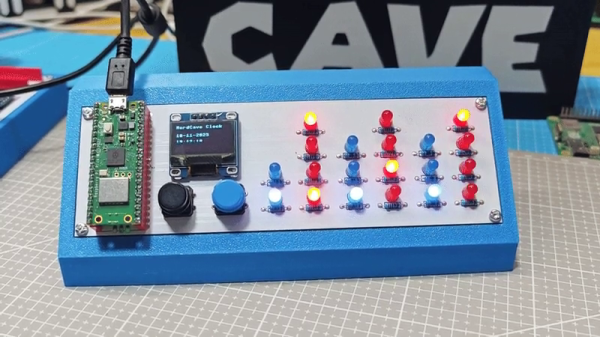
There are two things most of us want to know on a daily basis—the weather, and what time it is. [Guitarman9119] built a single device that can provide both pieces of information with a pleasingly nerdy aesthetic.

The heart of the build is a Raspberry Pi Pico W, which is proudly displayed on the front panel of the device. It’s responsible for driving the array of LEDs that display the time in hours, minutes, and seconds in binary format. The Pi Pico W uses its wireless connection to query the WorldTime API and an IP geolocation server. This provides the local date and time, and the location is then used to query the OpenWeather service for current weather information. The weather information is thankfully not displayed in binary format, because that would be straining to read. Instead, it’s displayed in human-readable format on a small OLED display.

There’s something about the way this is built—the discrete LEDs, that weird blue color that seemed to disappear by 1984—that gives this a wonderfully old school charm. You could imagine it turning up in a college lab full of old blinkenlights gear. Video after the break.

Continue reading “Binary Clock Also Monitors Weather”

Building A Smart Speaker Outside The Corporate Cloud

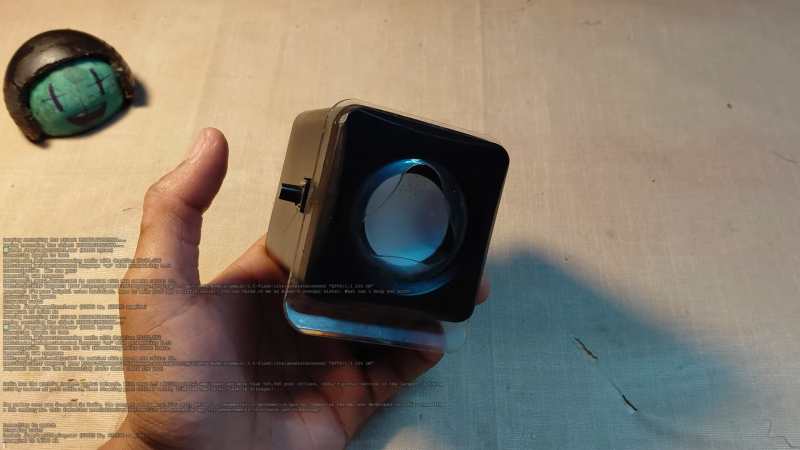
If you’re not worried about corporate surveillance bots scraping your shopping list and manipulating you through marketing, you can buy any number of off-the-shelf smart speakers for your home. Alternatively, you can roll your own like [arpy8] did, and keep your life a little more private.

The build is based around an ESP32 microcontroller. It connects to the ‘net via its inbuilt Wi-Fi connection, and listens out for your voice with an INMP441 omnidirectional microphone module. The audio data is trucked off to a backend server running a Whisper speech-to-text model. The text is then passed to Google’s Gemini 2.5 Flash large language model. The response generated is passed to the Piper Neural Voice text-to-speech engine, sent back to the ESP32, and spat out via the device’s DAC output and a speaker attached to an LM386 amplifier. Basically, anything you could ask Gemini, you can do with this device.

By virtue of using a commercial large language model, it’s not perfectly private by any means. Still, it’s at least a little farther removed than using a smart speaker that’s directly logged in to your Amazon/Google/Hulu/Beanstikk account. Files are on Github for those eager to dive into the code. We’ve seen some other fun builds along these lines before, too. Video after the break.

Continue reading “Building A Smart Speaker Outside The Corporate Cloud”

Tech In Plain Sight: Pneumatic Tubes

Today, if you can find a pneumatic tube system at all, it is likely at a bank drive-through. A conversation in the Hackaday bunker revealed something a bit surprising. Apparently, in some parts of the United States, these have totally disappeared. In other areas, they are not as prevalent as they once were, but are still hanging in there. If you haven’t seen one, the idea is simple: you put things like money or documents into a capsule, put the capsule in a tube, and push a button. Compressed air shoots the capsule to the other end of the tube, where someone can reverse the process to send you something back.

These used to be a common sight in large offices and department stores that needed to send original documents around, and you still see them in some other odd places, like hospitals or pharmacy drive-throughs, where they may move drugs or lab samples, as well as documents. In Munich, for example, a hospital has a system with 200 stations and 1,300 capsules,  also known as carriers. Another medical center in Rotterdam moves 400 carriers an hour through a 16-kilometer network of tubes. However, most systems are much smaller, but they still work on the same principle.

Continue reading “Tech In Plain Sight: Pneumatic Tubes”

[Usagi Electric] and his home brew computer

TMS9900-based Home Brew Computer

[Usagi Electric] is known for minicomputers, but in a recent video, he shows off his TMS9900-based homebrew computer. The TMS9900 CPU was an early 16-bit CPU famously used in the old TI-99/4A computer, but as the video points out, it wasn’t put to particularly good use in the TI-99/4A because its RAM was hidden behind an inefficient interface and it didn’t leverage its 16-bit address space.

The plan is for this computer to have 2K words of ROM, 6K words of RAM, and three serial lines: one for the console terminal, another for a second user console terminal, and the third for access to a tape drive.

Continue reading “TMS9900-based Home Brew Computer”