Custom Controller Ups Heat Pump Efficiency

Heat Pumps are an extremely efficient way to maintain climate control in a building. Unlike traditional air conditioners, heat pumps can also effectively work in reverse to warm a home in winter as well as cool it in summer; with up to five times the efficiency of energy use as a traditional electric heater. Even with those tremendous gains in performance, there are still some ways to improve on them as [Martin] shows us with some modifications he made to his heat pump system.

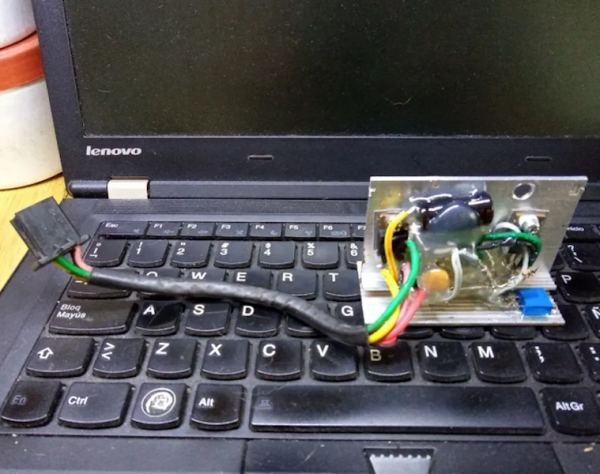
This specific heat pump is being employed not for climate control but for water heating, which sees similar improvements in efficiency over a standard water heater. The problem with [Martin]’s was that even then it was simply running much too often. After sleuthing the energy losses and trying a number of things including a one-way valve on the heating water plumbing to prevent siphoning, he eventually found that the heat pump was ramping up to maximum temperature once per day even if the water tank was already hot. By building a custom master controller for the heat pump which includes some timing relays, the heat pump only runs up to its maximum temperature once per week.

While there are some concerns with Legionnaire’s bacteria if the system is not maintained properly, this modification still meets all of Australia’s stringent building code requirements. His build is more of an investigative journey into a more complex piece of machinery, and his efforts net him a max energy usage of around 1 kWh per day which is 50% more efficient than it was when it was first installed. If you’re looking to investigate more into heat pumps, take a look at this DIY Arduino-controlled mini heat pump.

Continue reading “Custom Controller Ups Heat Pump Efficiency”

LEGO-Sorting Vacuum Defeats The Problem

What’s the worst thing about LEGO? Most would agree that it’s the fact that those bright and colorful pieces of ABS are somehow the most evil thing that can come between your bare feet and solid ground. [Unnecessary Inventions] have done a one-eighty from their handle and made a quite useful invention — a LEGO-sorting vacuum cleaner called Suck It.

Well, technically, it’s a shop vac attachment, but it does the job beautifully. [Unnecessary Inventions] started with a never-used machine and a clear plastic cylinder cut into fourths. Then he designed some 3D printable brackets that have two jobs: they hold the cylinder together again, and they do so in stages that collect and sort LEGO by size.

The sorting brackets have no top and bottom layers to them — they are all sorting holes and infill to allow maximum suction. But wait, it gets even better, because the brackets click together satisfyingly with embedded magnets. The only thing that would make this build better is some kind of head attachment that could gather more than a narrow swath at a time. Be sure to check out the build and demo video after the break.

Of course, with this method, you still have to open up the sections and put your LEGO away. You could just vacuum them straight into the box.

Continue reading “LEGO-Sorting Vacuum Defeats The Problem”

PiSpy, The Camera Setup Designed To Make Biological Observations Better

Back in grad school, we biology students were talking shop at lunch one day. We “lab rats” were talking about the tools of the trade, which for most of us included things like gel electrophoresis, restriction endonucleases, and polymerase chain reaction. Not to be left out, a fellow who studied fire ants chimed in that his main tool was a lawn chair, which he set up by a Dumpster in a convenience store parking lot to watch a fire ant colony. Such is the glamor of field biology.

Ants on the march. Tough luck for the crickets, though.

What our colleague [Mike] wouldn’t have given for something like PiSpy, the automated observation tool for organismal biology by [Greg Pask] of Middlebury College, et al. As discussed in the preprint abstract, an automated imaging platform can be key to accurate observations of some organisms, whose behavior might be influenced by the presence of a human observer, or even a grad student in a lawn chair. Plus, PiSpy offers all the usual benefits of automation — it doesn’t get tired, it doesn’t need to take bathroom breaks, and it can even work around the clock. PiSpy is based on commonly available components, like laser-cut plywood and a Raspberry Pi and camera, so it has the added advantage of being cheap and easy to produce — or at least it will be when the Pi supply picks back up again. PiSpy takes advantage of the Pi’s GPIO pins to enable triggering based on external events, or controlling peripherals like lights or servos.

While built for biological research, there are probably dozens of uses for something like PiSpy. It could be handy for monitoring mechanical testing setups, or perhaps for capturing UI changes during embedded device development. Or you could just use it to watch birds at a feeder. The source is all open-sourced, so whatever you make of PiSpy is up to you — even if it’s not for watching fire ants.

Desktop Performance In A Custom Mac Laptop

Most of us either own or have used a laptop at some point. For traveling, as a student, or even for browsing Hackaday on the couch in front of the TV, they are pretty much indispensable. They do tend to have a sharp performance reduction compared to a desktop though thanks to the thermal and battery limitations of a portable form factor. [Scott Yu-Jan] wanted to solve that in his own life by building a custom Mac laptop with none of these downsides.

Noticing that a modern iPad Mini has exactly the same width of his Mac Mini, [Scott] set about combining the two devices into a single unit that he could assemble when traveling. A 3D printed case with a traditional laptop clamshell design takes care of physically combining these two devices, and a USB-C cable between the two takes care of combining them in software thanks to Apple’s Duet program. While this has better performance than a Macbook Pro it might actually have some perks, since Apple continues to refuse to make a laptop with a touchscreen.

There are some downsides, of course. The price is higher than a comparable Macbook Pro for the iPad and Mac together, plus it doesn’t include a keyboard or mouse. It also has no battery, so it needs to be plugged in. In the follow-up video linked below, though, [Scott] notes that for him this still made sense as he uses the Mac and iPad individually already, and only works remotely at places that have power outlets readily available. For the average person, though, we might recommend something different if you really need an esoteric laptop-like machine.

Thanks to [Varun] for originally sending in this tip!

Continue reading “Desktop Performance In A Custom Mac Laptop”

Used Facemasks Turned Into Rapid Antigen Tests With Injection Molding

Here’s a little eye-opener for you: next time you’re taking a walk, cast your eyes to the ground for a bit and see how far you can go without spotting a carelessly discarded face mask. In our experience, it’s no more than a block or two, especially if you live near a school. Masks and other disposal artifacts of the COVID-19 pandemic have turned into a menace, and uncounted billions of the things will be clogging up landfills, waterways, and byways for decades to come.

Unless they can be recycled into something useful, of course, like the plastic cases used for rapid antigen tests. This comes to us by way of [Ric Real] from the Design and Manufacturing Futures lab at the University of Bristol in the UK. If any of this sounds or looks familiar, refer back to October when the same team presented a method for turning old masks into 3D printer filament. The current work is an extension of that, but feeds the polypropylene pellets recovered from the old masks into a desktop injection molding machine.

The injection molding machine is fitted with 3D-printed molds for the shells of lateral flow devices (LFD) used for COVID-19 rapid antigen testing. The mold tooling was designed in Fusion 360 and printed on an Elegoo Mars MSLA printer using a high-strength, temperature-resistant resin. The molds stood up to the manual injection molding process pretty well, making good-quality parts in the familiar blue and white colors of the starting material. It’s obviously a proof of concept, but it’s good to see someone putting some thought into what we can do with the megatonnes of plastic waste generated by the pandemic response.

A MiniDisc Optical Head Has A Few Surprises Up Its Sleeve

There was an odd era at the start of the 1990s when CDs had taken the lead from vinyl in pre-recorded music, but for consumer recordable formats the analogue cassette was still king. A variety of digital formats came to market to address this, of which Sony’s MiniDisc was the only one to gain significant traction outside the studio. These floppy-disk-like cartridges held a magneto-optical medium , and were the last word in cool until being swept away around the end of the decade by MP3 players. Hackaday alum [Nava Whitford] has disassembled a MiniDisc optical head to document how the physical part of the system worked.

The first surprise is that the MiniDisc was in fact a two-in-one system. The recordable discs were magneto-optical and wrote data by heating the disc with a laser under a magnetic field, while the pre-recorded discs used etched pits and lands in a similar way to the CD. Remembering the technical buzz around the system back in the day, either we audio enthusiasts glossed over this detail, or more likely, Sony’s PR did so to emphasize the all-new aspect of the system.

The teardown goes in depth into how while like a CD player there is a photodiode array involved, the extra components are a diffraction grating and a Wollaston prism, an optical component which splits polarized light into two beams. The photodiode array is more complex than that of a CD player, it’s speculated that this is to detect the different polarized beams as well as for the task of maintaining alignment with the track.

All in all this is a rare chance to look at something we know, but which few of us will probably have dismantled due to its relative scarcity compared to CD mechanisms. Definitely worth a look. Meanwhile if this era is of interest, take a look at a Hack Chat we did a while back looking at the MiniDisc’s would-be competitor.

REMOTICON 2021 // Jay Doscher Proves Tinkercad Isn’t Just For Kids

We invited [Jay Doscher] to give us a view into his process designing 3D printed parts for the impressive array of cyberdecks we’ve covered since 2019.

[Jay] got his start as a maker through woodworking in high school, getting satisfaction from bringing something from idea to reality. After a more recent class in blacksmithing and ax-making showed him what he could do when really focused, his hardware hacking really took off and his line of cyberdecks and other portable computers was born.

If you’ve heard of Tinkercad, you probably think it’s just for kids. While designed as an educational tool, [Jay] found that Autodesk’s younger sibling to the professionally powered (and priced) Fusion 360 had everything needed for making cyberdecks. If you’re willing to work around a few limitations, at the low-low price of free, Tinkercad might be right for you too.

What limitations? To start, Tinkercad is only available in a browser and online. There’s also no guarantee that it will remain free, but [Jay] notes that with its educational focus that is likely to remain the case. There is no library of common components to import while modeling. And, when your model is complete the options for exporting are limited to 2D SVGs and 3D STL, OBJ, and gaming-focused GBL formats. [Jay] has converted those to other formats for laser cutting and the STEP file a machine shop is expecting but admits that it’s something that adds complexity and is an annoyance.

back7-TinkerCad-Alignment

In the talk, [Jay] discusses moving from his initial “cringy” explorations with Tinkercad, to his first cyberdeck, a little history on that term, and the evolution of his craft. It’s mostly a hands-on demo of how to work with Tinkercad, full of tips and tricks for the software itself and implications for 3D printing yourself, assembly, and machining by others.

While quite limited, Tinkercad still allows for boolean operations to join two volumes or the subtraction of one from another. [Jay] does a wonderful job of unpeeling the layers of operations, showing how combinations of “solids” and “holes” generated a complex assembly with pockets, stepped holes for fasteners, and multiple aligned parts for his next cyberdeck. Even if you already have a favorite CAD tool, another approach could expand your mind just like writing software in Strange Programming Languages can.

Continue reading “REMOTICON 2021 // Jay Doscher Proves Tinkercad Isn’t Just For Kids”