Projecting Moving Images In Air With Lasers

You’ve seen it a million times in science fiction movies and TV shows: a moving holographic display. From Princess Leia asking for help to virtual tennis on Total Recall, it is a common enough idea. [Dan Smalley]’s team at BYU has made progress in projecting moving 3D images in thin air. While they might not be movie quality, they are a start, and, after all, you have to start somewhere.

The display traps a small particle in the air with a laser beam and then moves that particle around, leaving behind an illuminated path in the air. You can see the effect in the video below. The full paper explains how a type of ray tracing allows the relatively small optical trap display to appear larger and more fluid. While it does make images seem to appear behind the display’s actual volume, it also requires eye tracking to work since the illusion only works from a certain perspective.

These are not, of course, technically holograms. That’s actually an advantage in some cases because holograms require a tremendous amount of data that increases rapidly as the size of a display scales up. The optical trap display uses a much more manageable data rate.

We’ve seen optical trap displays before. In fact, volumetric displays seem to be all the rage lately.

Continue reading “Projecting Moving Images In Air With Lasers”

Hackaday Podcast 118: Apple AirTag Hacked, Infill Without Perimeters, Hair-Pulling Robots, And Unpacking The 555

Elliot’s keeb: ortho, offset, thumby.

Hackaday editors Elliot Williams and Mike Szczys gather to ooh and aah over a week of interesting hacks. This week we’re delighted to welcome special guest Kristina Panos to talk about the Inputs of Interest series she has been working on over the last couple of years. In the news is the effort to pwn the new Apple AirTags, with much success over the past week. We look at turning a screenless Wacom tablet into something more using a donor iPad, stare right into the heart of a dozen 555 die shots, and watch what happens when you only 3D print the infill and leave the perimeters out.


Take a look at the links below if you want to follow along, and as always, tell us what you think about this episode in the comments!

Direct download (~55 MB)

Places to follow Hackaday podcasts:

Continue reading “Hackaday Podcast 118: Apple AirTag Hacked, Infill Without Perimeters, Hair-Pulling Robots, And Unpacking The 555”

Sit Pretty On Would-Be Garbage With An Upcycled Chair

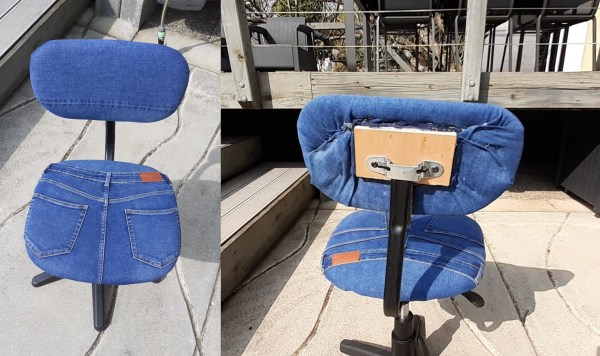
What’s the coolest thing about doing upholstery work? Aside from the fact that you end up with a new thing to sit on, sometimes the work only involves clever stapling, and no sewing is necessary. Such is the case with [wyldestyle]’s upcycled jeans chair, which started as a bare-wood swivel number from the dump. In fact, this project is almost completely made from recycled materials, except of course for those staples that hold it all together. And really, that heavy-duty stapler is likely the fanciest tool you’d need to make your own.

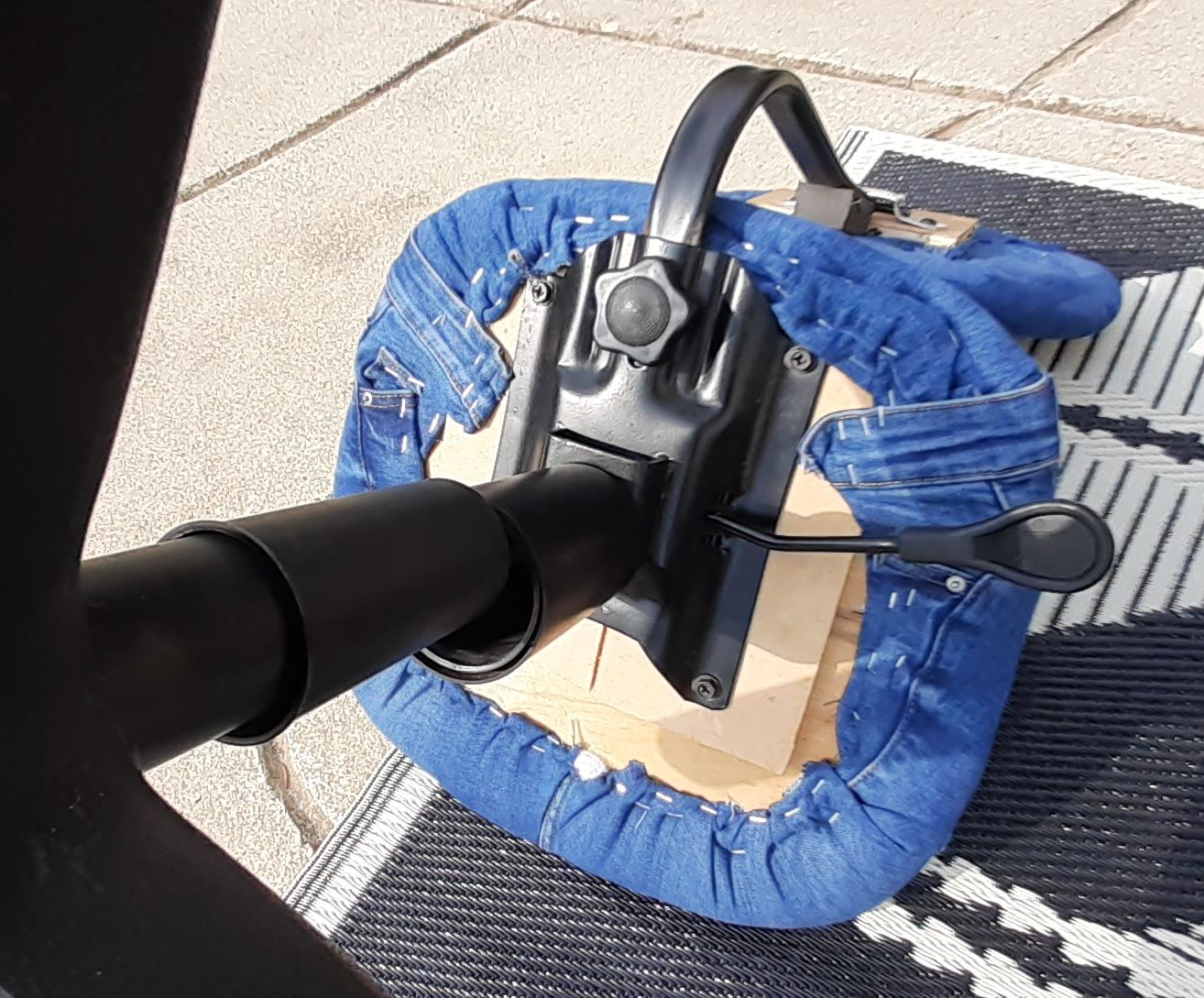
[wyldestyle] didn’t have any furniture foam, and we think that stuff is too expensive, anyway. So the padding treatment begins with a piece of thick Styrofoam that covers the seat screws and bolts. This is glued in place and trimmed down to match the contours of the chair’s seat and back.

Here’s where things gets tricky: the next step is wrapping over the stiff foam board with a few layers of that foam sheeting stuff that’s often used as packing material. This sheeting needs to be taut, but pull it too tight, and it will rip.

To add some loft to the chair, [wyldestyle] stretched and stapled the stuffing from an old pillow that was headed for the garbage. The final step is strategically scissoring jean scraps to fit, then stretching and stapling those to cover all the layers underneath. We like the way this chair looks, and would probably try to place pockets somewhere useful, like the back of the chair.

It’s a shame that so much denim goes to waste all over the world. There’s often a lot of life left in most of the fabric, which can be repurposed into all kinds of things, including eyeglasses frames using a wicked set of jigs.

Sinclair BASIC For Today

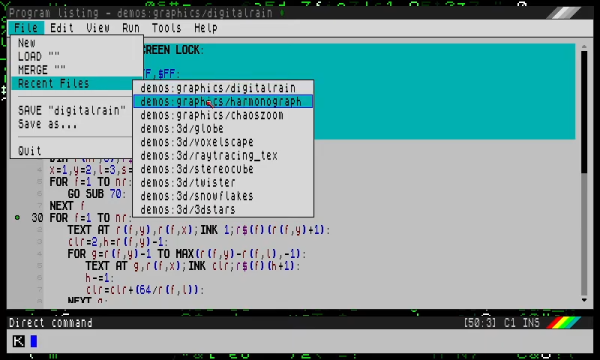
If you are of a certain age, your first exposure to computer programming was probably BASIC. For a few years, there were few cheaper ways to program in BASIC than the Sinclair ZX series of computers. If you long for those days, you might find the 1980-something variant of BASIC a little limiting. Or you could use SpecBasic from [Paul Dunn].

SpecBasic is apparently reasonably compatible with the Spectrum, but lets you use your better hardware. For example, instead of a 256×192 8-color screen, SpecBas accommodates larger screens and up to 256 colors. However, that does lead to certain incompatibilities that you can read about in the project’s README file.

Continue reading “Sinclair BASIC For Today”

Apple AirTag Spills Its Secrets

The Apple AirTag is a $29 Bluetooth beacon that sticks onto your stuff and helps you locate it when lost. It’s more than just a beeper though, the idea is that it can be silently spotted by any iDevice — almost like a crowd-sourced mesh network — and its owner alerted of its position wherever they are in the world.

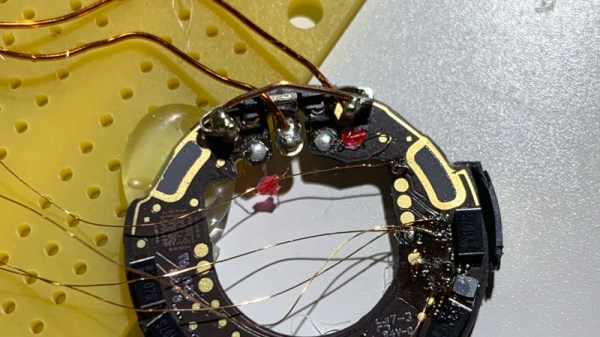
There are so many questions about its privacy implications despite Apple’s reassurances, so naturally it has been of great interest to those who research such things. First among those working on it to gain control of its nRF52832 microcontroller is [Stacksmashing], who used a glitching technique whereby the chip’s internal power supply is interrupted with precise timing, to bypass the internally enabled protection of its debug port. The firmware has been dumped, and of course a tag has been repurposed for the far more worthwhile application of Rickrolling Bluetooth snoopers.

The idea of a global network of every iDevice helping reunite owners with their lost possessions is on the face of it a very interesting one, and Apple are at great pains on the AirTag product page to reassure customers about the system’s security. On one hand this work opens up the AirTag as a slightly expensive way to get an nRF microcontroller for other applications, but the real value will come as the firmware is analysed to see how at the tag itself works.

[Stacksmashing] has appeared on these pages many times before, often in the context of Nintendo hardware. Just one piece of work is the guide to opening up a Nintendo Game and Watch.

Air-Assist Analysis Reveals Most Effective — And Quietest — Methods

If there’s one thing that continues to impress us about the Hackaday community as the years roll by, it’s the willingness to share what we’ve learned with each other. Not every discovery will be news to everyone, and everything won’t be helpful or even interesting to everyone, but the mere act of sharing on the off chance that it’ll help someone else is really what sets the hardware hacking world apart.

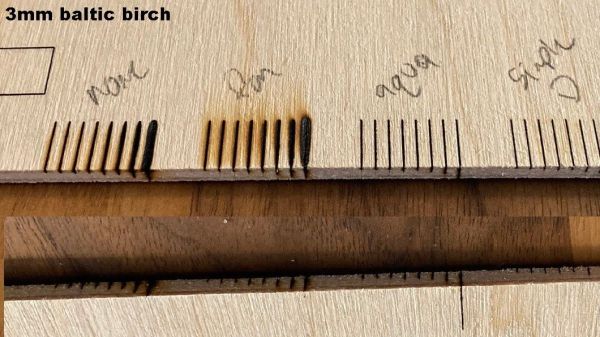
Case in point: this in-depth analysis of laser cutter air-assist methods. Undertaken by [David Tucker], this project reads more like a lab writeup than a build log, because well, that’s pretty much what it is. For those not into laser cutters, an air assist is just a steady flow of air to blow smoke and cutting residue away from the beam path and optics of a laser cutter. It’s simple, but critical; without it, smoke can obscure and reflect the laser beam, foul lenses and mirrors, and severely degrade cut quality.

To see what air-assist methods work best, [David] looked at four different air pumps and compressors, along with a simple fan. Each of these methods was compared to a control of cuts made without air assist. The test was simple: a series of parallel lines cut into particle board with the beam focused on the surface at 80% power, with the cut speed slowly decreasing. It turned out that any air-assist was better than nothing, with the conspicuous exception of using just a fan, which made things worse. Helpfully, [David] included measurements of the noise levels of the compressors he tested, and found there’s no advantage to using an ear-splitting shop compressor over a quieter aquarium air pump. Plus, the aquarium pumps are cheap — always a bonus.

Not sure how to get up to speed with lasers? Laser Cutting 101 might be a great place to start.