Joystick Operated Security Cam Will Overlook The Moat

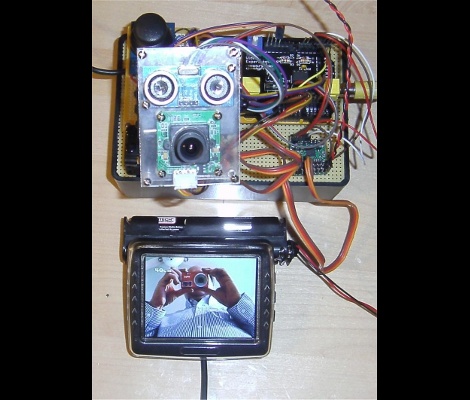
What good is a moat if nobody is guarding it? We suppose that depends on what beasties lurk beneath the surface of the water, but that’s neither here nor there. The members of LVL1 continue their quest to outdo each other in augmenting the building’s automated features. The latest offering is this security camera which is operated with an analog thumb stick.

These are the people who are building a moat (which the city things is a reflecting pool) in front of their main entrance. Now they will be able to see and sense if anyone is trying to get across the watery hazard. The hack marries an ultrasonic rangefinder and camera module with a pair of servo motors. The brackets for the motors allow a full range of motion, and the signal is translated by an Arduino and Video Experimenter shield to put out a composite video signal. That’s not going to make streaming all that easy, but we’re sure that is just one more hack away.
Laser Light Painting Includes Camera Control

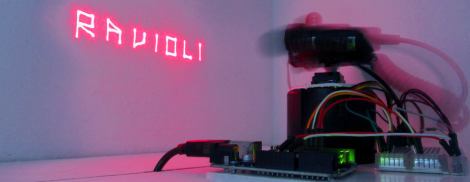
This laser light painting setup can even control the camera. But it probably will not work with your average point-and-shoot. The exposure time used is somewhere around 2 seconds long, a feature which is hard to find on anything but DSLR cameras.

The setup relies on a red laser diode to do the painting. When viewed in real time you only see a dot tracing out a cryptic pattern and occasionally switching on and off. But with a long exposure the intense light persists to achieve an image like the one seen above. Note the ghosting around the rig as it has moved while the shutter was open.

The Arduino controlled device consists of a base which pivots the diode horizontally, with a servo for aiming on the vertical axis. Since the sketch is divided up by letter, we wonder how hard it would be to adapt this for use with a point-and-shoot? Perhaps you could capture one letter at a time and layer the frames in post production?

It seems this is a lot easier to build than some of the LED plotters we’ve looked at. If you do make your own don’t forget to send a link our way.

Continue reading “Laser Light Painting Includes Camera Control”

Garage Door Opener Now A Bedroom Door Closer

[Roy] had an extra garage door opener on hand and decided to put it to use as a remote control closing mechanism for his bedroom door. We gather he has some noisy housemates as the inspiration for the project came from not wanting to get out of bed to close the door when the ruckus interrupts his TV watching.

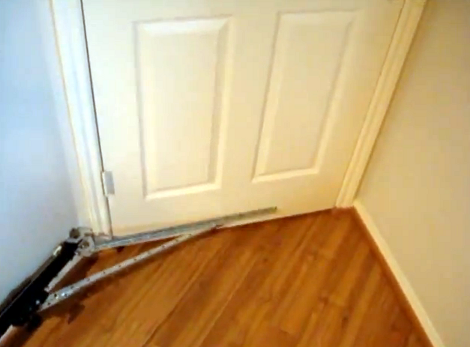
The image above shows the hinged system which translates the linear motion from the garage opener track to the rotational force necessary to swing the door closed. We’d say he really nailed it because the system matches the angle of the door jamb perfectly, and when the door is fully open the angle bracket is almost flat against the wall. We certainly don’t have the same need for closing doors, but the mechanism is something to keep in mind.

The motor for the opener is hidden beneath his desk. You won’t be able to see it in the video after the break because he built a matching enclosure around it. Now he just needs to add some WiFi connectivity and he can ditch the uni-tasking RF remote for a smart phone app.

Continue reading “Garage Door Opener Now A Bedroom Door Closer”

Playing Pong Or Breakout On The Nexus Q

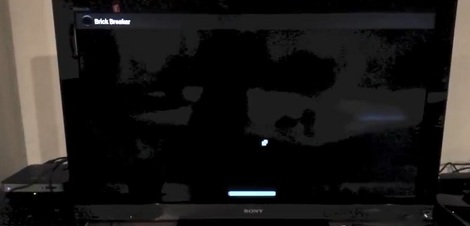
Since Google announced the Nexus Q media streaming device at the Google developers conference a few weeks ago, a lot of devs have been toying around with the idea of running Android apps on this small media sphere. [Det] over at BrickSimple threw his hat into the ring with a Pong and/or Breakout app that showcases the huge rotary volume knob on the Q.

The Nexus Q was hacked into running proper Android apps not long after it made its way into the hands of Google IO conference attendees. Of course with no way to get user input into Google’s little sphere, that hack was of questionable utility. Recently, [kornyone] over on the XDA developers forum got USB HID input on the Q, allowing for full mouse and keyboard support.

Not much has been said about the Q’s most prominent physical feature, the half hemisphere rotary encoder that serves as the volume knob. To build his Pong/Breakout clone, [Det]’s app simply responds to volume up/volume down events by moving the paddle to the left or right.

A neat build, and hopefully we’ll see a few more Nexus Q hacks in short order.

Adding A Heart Rate Monitor To Your Exercise Equipment

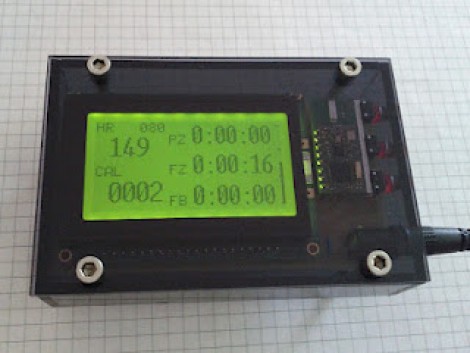
This is the readout which [Remick] added to his stationary bicycle. It displays heart rate, calories burned, and a few other items to help motivate his workout routine.

Back when he was ordering a TI Chronos watch he also picked up a heart rate chest strap and receiver. The receiver can be read using a UART, making it easy to interface with the ATmega328 which drives the system. The screen is a graphic LCD, which gave him a lot of control on how to organize the displayed data. Three buttons on the side operate the menu system into which a user can enter sex, age, and weight information. This is used to calculate the calories burned and the percentage of maximum heart rate. The three readouts to the right are for time spent in each workout zone (fat burning, fitness, or performance). The final product looks great because of the PCB he etched and the case he housed it in.

Cat Trainer Will Keep Them Off The Counters

Our cats are not allowed on the kitchen counters, and [Iron Jungle] has the same rule. But he spotted some foot prints on the hood above his range and the addition of a security camera caught this picture of [Kelso] breaking the rules. Since he’s not always around to make the fur-ball behave he built an electronic cat trainer to do it for him.

The functionality needed isn’t very intricate. You need to monitor when the cat is where it shouldn’t be and then chase it away. For the latter he grabbed an infrared range finder. When the cat passes in front of the sensor it will trigger the second part of the system: a high-pitched buzzer that’s extremely loud. Any microcontroller will have no trouble driving the system. In this case it’s a PICAXE 28X1.

You can see the trainer in action after the break. It definitely works, because just playing the video chased our own sleeping kitty out of the room.

Continue reading “Cat Trainer Will Keep Them Off The Counters”

GSM Controlled Car Without Needing A Microcontroller

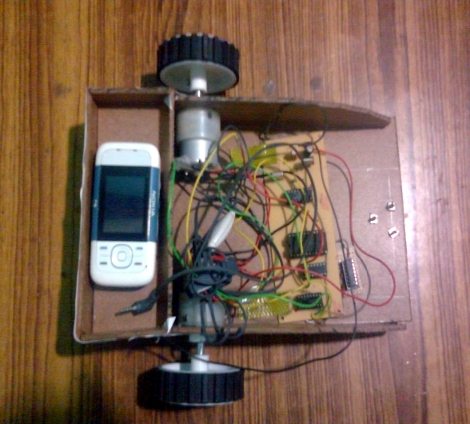
Nope, no microcontroller here, just a full-blown cellphone used as the brains of this little robot. The secret behind how it works is in the sounds the phone makes. The touch tones, known as DTMF, are monitored by the circuit mounted on the front half of the chassis and are responsible for driving the motors.

[Achu Wilson] built the circuit around an MT8870 chip which decodes the DTMF sounds and uses the BCD output to feed some logic chips. A 4 line to 16 line decoder and an inverter chip format the signals for use as inputs to the L293D motor driver. The video after the break shows him driving the rover directly by pressing number on the phone (like a tethered remote control). But he mentions that it’s possible to call the phone and press the numbers remotely. We assume you need to connect the call manually as we see no way to automatically answer calls.

This is certainly a fun way to play around with the DTMF protocol.

Continue reading “GSM Controlled Car Without Needing A Microcontroller”