Ask Hackaday: Has Anyone Built A Radio Telescope?

[Michael] sent in a question regarding the latest advances in software defined radios available for $20 on eBay:

I’ve been looking in to SDR lately, mainly for the possibility of using it for incredibly cheap radio astronomy. So far all I’ve found are whispers. I’m 18 and have very little experience, but I figured you might be able to help me find a little more info.

This really brings me back, [Michael]. I saw Contact in the theater (surprisingly, a rare case when the book and movie are equals), and in my childish exuberance went out and listened to lightning on Jupiter. The financial difficulties of expanding my setup meant the experiments stopped there, but at least I knew amateur radio telescopy was possible.

The latest and greatest advance in software defined radio – namely, a $20 TV tuner dongle – brings something new to the table. Instead of the thousands of dollars in gear that was required in 1997 when I last looked into this, it’s possible to set up a  passable radio telescope for under $100.

I’ll leave it to the Hackaday commentors to fill [Michael] in on the details, but here’s my suggestion:

Optimize your setup for 1420 MHz. There are three reasons for this: firstly, very few things in the universe absorb radio waves at a frequency of 1420MHz; there’s a reason it’s so often used in radio astronomy. Secondly, most government agencies around the world ban (or at least don’t look too kindly upon) transmitting on 1420 MHz. This frequency has been somewhat protected for use by astronomers. Thirdly, most of the Realtek TV tuner dongles have a frequency range of 64 – 1700 MHz, so it’s possible to receive 1420 MHz with this minimal setup.

As far as antennas go, your best bet is probably going to be one of those old C-band parabolic antennas from the 80s. That will make your telescope highly directional and give it a huge amount of gain. There is the problem of having a 20-foot-wide eyesore in your back yard, however. Alternatively, you could use a smaller DirecTV satellite dish, but I’m not making any promises with that. It’ll work, but it’s too small for an optimal setup.

I’ll concede the floor to anyone who has additional information. If you’ve built a radio telescope, send it in and I’ll put it up.
Router Controlling Choo-choos Over The CAN Bus

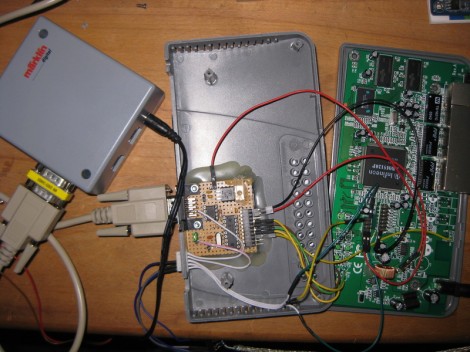
This setup is used to control a model railroad. Well, not entirely this setup. [Gerhard Bertelsmann] already has a proper railroad controller, and it just happens to offer CAN bus communications. He’s using OpenWRT and a cheap router to connect the bus to the network.

Originally he wanted to use a Raspberry Pi board for the project, but the incredible backorder  situation with that hardware led him to grab an old router. After loading OpenWRT he started working out how to connect a couple of ICs (MCP2515 and MCP2551) that will take care of the CAN bus communications. The hardware connections end up being pretty simple, with five data lines (and their pull-up resistors) connecting to the router’s serial header. From there it was a matter of mapping the device in software so that the hardware can be controlled over the network.

We like this example since CAN is used is a lot of other applications.

Using The GPIO Pins On A Raspberry Pi

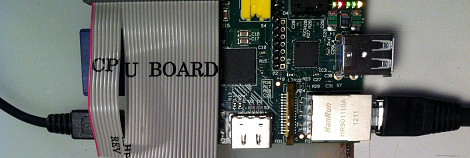
In addition to being a serviceable single board computer, the Raspberry Pi also has a header full of GPIO pins at your beck and call. [Tedbot] sent in a great tutorial on using these pins with Python, Bash, and C.

The GPIO pins on the Raspi are arranged in a 2×13 header. Until Sparkfun manages to manufacture a decent Raspi protoboard, the easiest way to break these pins out is with an old IDE ribbon cable. After plugging the other end into a breadboard, [Tedbot] had an easily accessible set of Raspi pins.

To control these pins, [Tedbot] found two libraries: the first is WiringPi that implements a C-style, Arduino-like programming environment on the Raspi. The second is the RPi.GPIO Python package. Since the Raspi runs Linux, and everything in Unix is a file, [Tedbot] used a shell script to blink a LED.

One word of warning if you’re building a board to extend the capabilities of the Raspi: these pins aren’t 5 V tolerant, so you’ll need to throw in a buffer or level converter when building a Raspi circuit.

Edit: Adafruit is releasing a Pi Plate prototyping board in a few weeks. Neat, huh?

BattMan II: The Charger Your Batteries Deserve

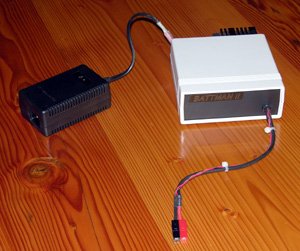
When your radio controlled device batteries are drained, you’ve got no better option than to call on BattMan II. This device is packed full of features for cycling and charging various types of batteries. It is computer controlled via your parallel port (yeah, remember those?) and has companion software that allows you all kinds of control and data.

The writeup is rather extensive and includes schematics so you could build your own. There’s also a step by step breakdown of how each section functions as well as an explanation of each different charging method. Great work [Stefan]

if you just want a peak at the lengthy feature list, keep reading.


Continue reading “BattMan II: The Charger Your Batteries Deserve” →

Template For Building STM32F0-Discovery Project In GCC

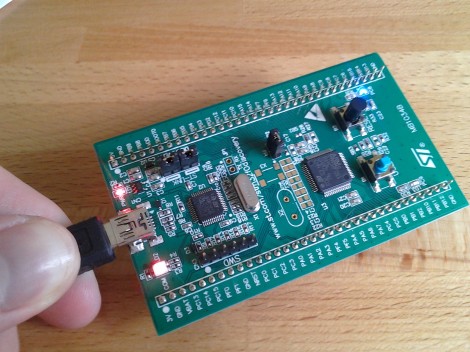
Yep, that blue light is blinking and I made it happen. I’ve been hard at work since I got my free STM32F0-Discovery board in the mail. Most recently I put together a starting template for building STM32F05x project on Linux. You’ll still need to install your own tool chain (I’m using the Code Sourcery G++: Lite Edition), but this makes it a snap to compile your projects with support for STM’s peripheral libraries.

As for programming, you may remember that I added support for writing to RAM in the stlink project. I’ve wasted spent a ton of time trying to get support for writing to Flash into that project. It’s just less of a hassle to use stlink than it is to work with OpenOCD. But I’ve really hit a wall getting the flash loader code to work. If you want to check out what I’ve done so far in that area I committed a very messy branch (see the commits for what code changes I’ve made).

In the mean time you can use OpenOCD to write images compiled with the template to your device. I included the ‘make program’ option in the Makefile to do this from command line. If you need help compiling OpenOCD check the readme in the template repository.

Finally, A 3D Printer For Burritos

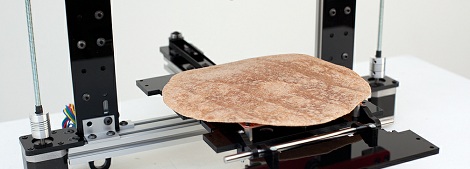
[Marko] created a robot that prints burritos. Truly, we’ve reached new heights as a species.

The Burritob0t is based on the ORD Hadron 3d printer with a pair of air compressor/syringe-based extruders based on the Makerbot Frostruder. All the ingredients – rice, meat, salsa, and molten cheese – will be printed onto the surface of a tortilla heated by a Makerbot heated build platform.

[Marko] has some pretty neat plans for his Burritob0t such as an iPhone app for ordering your burritos and some sort of social commentary thing using burritos. We’re assuming [Marko] hasn’t yet got this Burritob0t up and running for the lack of any action shots or demo videos. That said, there’s a wonderful Flickr gallery and an about page that covers the artistic statement behind the Burritob0t.

If you want to get your own Burritobot, [Marko] hopes to have a Kickstarter up sometime in July.

Recording Off A Reel-to-reel With A Credit Card Reader

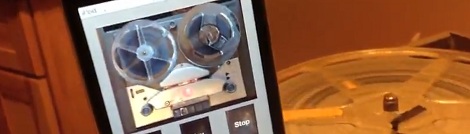
If you’ve got a few reel-to-reel recordings of 1940s radio, how do you transfer those to a digital medium? [Evan Long] and his dad used a credit card reader built for the iPhone to transfer a vintage [Art Kassel] recording from magnetic tape to the digital domain of .MP3s.

A few months ago, we saw what goes into these Square credit card readers. They’re just a magnetic tape head with a resistor an 1/8″ jack that plugs directly into the headphone jack of any iDevice. Because there’s no hardware limitation of what the Square credit card reader can do, [The Long boys] decided to back up some old reel-to-reel tapes with an iPod Touch.

[Evan] and his father needed to perform a few modifications to the credit card reader; the tape head pressed against the plastic case too tightly to allow feeding 70-year-old tape through the device. After bending a bit of metal the credit card reader was ready to record the dulcet tones of the Big Band era.

It’s a neat build, and anything that reuses proprietary hardware (however limited) is alright in our book. Nice job, guys.