[Balint] Is Starting A Software-defined Radio Tutorial Series

A few months ago, we saw a hack where a $20 USB TV tuner was transformed into a software-defined radio capable of reading GPS signals, listening to radio transmissions between aircraft and a control tower, and even a simple FM radio. This project is a perfect introduction to the RTL-SDR and Ham radio scene, but getting these projects up and running can be a bit overwhelming for anyone who hasn’t played around with this before. [Balint] is tackling this problem head on with a series of YouTube tutorials to get SDR noobs up and running with GNU Radio and the Realtec USB TV tuner.

To demonstrate the power of software-defined radio, [Balint] is using GNU Radio and the USB TV tuner that started it all, the Ezcap EZTV668 (conveniently back in stock at DealExtreme, but other options exist). Because software-defined radio is a touch confusing for a beginner to wrap their head around, [Balint] is beginning his tutorial series by explaining radio sources, sinks, and the GNU Radio interface.

Already, [Balint] has put up 5 tutorials and made the flowgraph files available in his gr-baz project. He’s doing a wonderful job opening up the software-defined radio scene to beginners, but he’s still looking for some feedback. If you have a suggestion on what [Balint] should cover next, leave a note in the YouTube comments and we’re sure [Balint] will get around to that eventually.

Talking Resistor Calculator Speaks Component Values

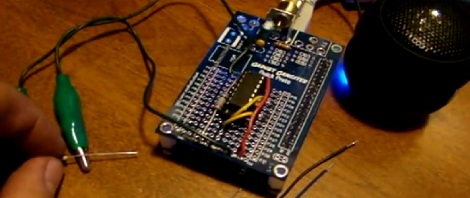
If there’s one thing that will surely blind us, its reading resistor color bands. It doesn’t help that red looks exactly like orange, brown and black are indistinguishable, and different component manufacturers – for some reason – don’t use identical paints for coding their resistors. [Jeff] over at Gadget Gangster has been having the same problem, so he built a talking resistor calculator to speak resistor values to him.

The electronics part of the build is extremely simple with just an MCP3208 ADC providing 12 bits of resolution. The software side is where this project really shines. [Jeff] used a Gadget Gangster QuickStart board housing a Parallax Propeller. With 8 cores running in parallel the Propeller is more than enough to run [Phil Pilgrim]’s software speech synthesizer. When a resistor is connected to the two alligator leads, the Propeller goes through a lookup table and finds a resistor value matching the number coming from the ADC. From there, it’s just sending a string of phonetic text to the speech synthesizer object.

Even though text-to-speech chips have been around for decades now, [Jeff] chose to build his speech synthesis tool with software. It may just be a testament to the power in the Propeller microcontroller, but anything that keeps us from squinting at resistor color bands is alright by us.

Programming FPGAs With Python

If you’ve ever wanted to jump into the world of FPGAs but don’t want to learn yet another language, you can now program an FPGA with Python. PyCPU converts very, very simple Python code into either VHDL or Verilog. From this, a hardware description can be uploaded to an FPGA.

The portion of the Python language supported by PyCPU is extremely minimal, with only ints being the only built-in data type supported. Of course ifs and whiles are still included along with all the assignments and operators. A new addition is a way to get digital IO access with Python, and obvious requirement if you’re going to be programming Silicon.

PyCPU surely won’t replace VHDL or Verilog anytime soon, but if you’re looking to get into FPGAs and the ‘telling a chip what to be’ paradigm it offers, it’s certainly a tool worth looking into.

Hats off to [hardsoftlucid] for sending this in. Our wonderful (we mean that, really) noticed a few mistakes when this was first posted. Those mistakes have been corrected.

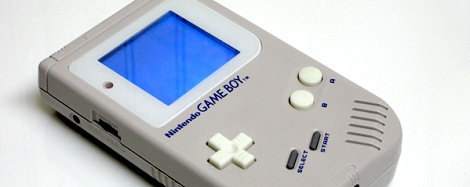
Adding A Backlight To The ‘ol Game Boy Brick

For being more than 20 years old, [Max]’s old brick-sized Game boy still has a lot of life left in it. Even though his Game Boy was still in good condition, there were a few vertical lines in the display, making it a perfect candidate for a restoration. While he had his DMG-01 open on his work bench, [Max] also decided to put in a back light.

After researching the blank vertical lines in his Game Boy’s display, [Max] learned the problem was probably a loose solder connection. [Max] whipped out his tri-wing screwdriver, disassembled his classic plastic friend, took a soldering iron to the LCD’s flex connector, and fixed the problem easily.

Since his Game Boy was already taken apart, he decided to add a 3rd party backlight. The installation was a snap – [Max] only removed the reflective LCD backing and shoved an edge-lit backlight panel into the Game Boy.

If you’re wondering why anyone would still be interested in a 20+ year-old Game Boy, the DMG-01 is highly regarded in the chiptune scene when paired with Little Sound DJ, in part because of the noisy amplifiers and unique sound. Anything that keeps these wonderful machines out of the garbage is alright in our book, so we’ve got to hand it to [Max] for putting together this wonderful tutorial.

Making A Light Orb Thingy

The “light orb” has become a staple of light painting projects. If you’ve ever looked through someone’s gallery of light painting, you’ve probably seen a few. There are multiple ways to make them, this project focuses on swinging a light, or multiple lights at the end of a rope while you slowly turn in a circle.

The addition of addressable RGB LEDs and a micro controller make this rig capable of generating patterns and possibly even simple images in the sphere itself. His results are quite impressive. His spheres actually look even more precisely shaped than the automated sphere rig we shared with you before!

Kinetic Space: Software For Your Kinect Projects

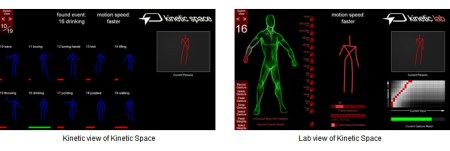
For all of you that  found yourselves wanting to use Kinect to control something but had no idea what to do with it, or how to get the data from it, you’re in luck. Kineticspace is a tool available for Linux/mac/windows that gives you the tools necessary to set up gesture controls quickly and easily. As you can see in the video below, it is fairly simple to set up. You do you action, set the amount of influence from each body part (basically telling it what to ignore), and save the gesture. This system has already been used for tons of projects and has now hit version 2.0.

Continue reading “Kinetic Space: Software For Your Kinect Projects” →

Using A Router As A Wireless Embedded Platform

If you’re going to make your next project wireless, you don’t need an XBee, WiFi shield, or even a Bluetooth module. Turning old hardware into a dev board is extremely easy, as [Taikson] shows us by adding an I2C bus to a Fonera router. (Spanish, here’s the Google translation)

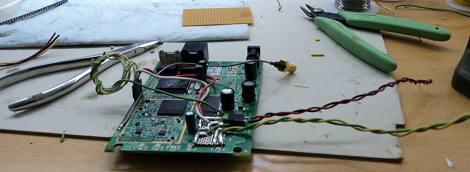
To add an I2C bus, [Taikson] took two pins that originally went to a router status pin and soldered on a pair of wires. [Taikson]’s router is running OpenWrt, so adding support for I2C devices is just a matter of changing a few kernel settings.

As for what you can do with a router development platform, the sky’s the limit. Last year, [Taikson] controlled a quadcopter from within a web browser with a similarly modified I2C-enabled router. It’s a clever hack, and with a little bit of work it should be possible to add a few sensors or even a camera to his quadcopter.