Doubling Up On The USB Supercap Flashlight

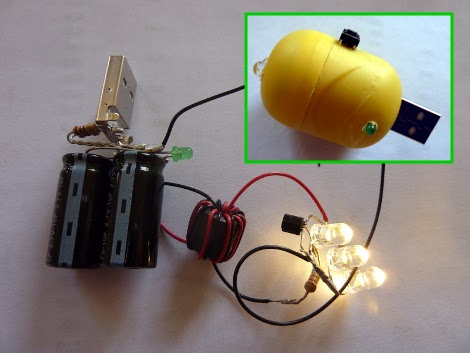
[Antoine] wrote in to let us know that he soldiers on with his flashlight project. He’s doubled up on the supercaps and tripled the LEDs (translated).

The core concept has stayed the same since the original version. He wanted a flashlight that was small and used no batteries. This iteration came about as he looked at increasing the light output of the device. He’s switched to some warm-white LEDs which are easier on the eyes, but was unhappy with the charge life now that he’s using current at a faster rate. The solution, of course, is more potential from the capacitor. He’s now using two 10 Farad caps in parallel. We are a little skeptical about his capacitor theory and ended up using this lecture to defog the issue of parallel and series capacitance.

The upgraded hardware is right at home in that plastic egg like you’d find in a coin-op trinket vending machine. You’ll see there’s still a colored LED to warn when the charge is getting too low.
USB Slingshot Controller Is For The Birds

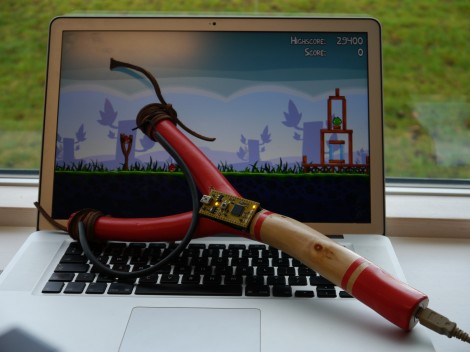
This USB slingshot controller really brought a smile to our faces. Part of it is the delightfully silly promo video you’ll find after the break. [Simon Ford] combined nature and technology to bring this USB-enabled slingshot into existence.

The frame itself is from a branch he found in the Epping Forrest of London. He whittled away the bark, and hollowed out an opening in at the base of the ‘Y’ to receive an accelerometer board. It has a pair of female pin headers to interface with the mbed seen in the image above. But the real hack here is the code he wrote to translate accelerometer data into appropriate mouse movements. His success in the area makes this translate the virtual world of Angry Birds in a visceral experience of killing things with a slingshot.

We’re suckers for this type of project. Two examples that pop into mind are these musical instrument hacks for Rock Band 2.

Continue reading “USB Slingshot Controller Is For The Birds”

Squeezing The Juice Out Of Some AA Batteries

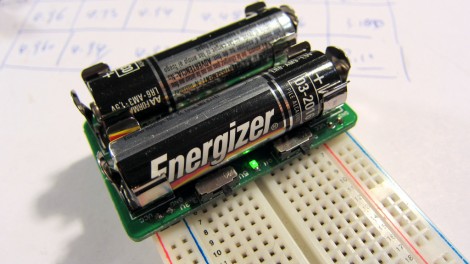
[Ray’s] breadboard power supply lets you drain the last traces of power from ‘dead’ AA batteries. Electronics that are powered off of disposable alkaline batteries have a cutoff voltage that usually leaves a fair amount of potential within. Since many municipal recycling programs don’t take the disposables (you’re just supposed to throw them in the trash!) we love the idea of squeezing them for prototyping use.

His design uses just one IC, the MCP1640, along with a handful of passive components. The chip is a boost converter with a startup voltage of just 0.65V, which means the batteries themselves – normally starting life above 1.5V – can be used until they drop to about 0.3V each.

Above you can see the kit he is selling. But it’s an open source project and the circuit is so simple we’re sure you can build your own. Add that boost converter chip to your next parts order for around $0.40.

[Ray] made a nice demo video for the device which you can see embedded after the break.

Continue reading “Squeezing The Juice Out Of Some AA Batteries”

This Image Contains A Hidden Audio Track

This image contains a hidden audio track which you’re very familiar with. Well, it used to. We’d bet we messed up the careful encoding that [Chris McKenzie] used to hide data within an image when we resized the original.

He’s using a method called Steganography to hide a message in plain sight. Since digital images use millions of colors, you can mess with that color data just a bit and the eye will not really be able to pick up any difference. Each pixel has had the eight least significant bits swapped out for the data [Chris] is hiding. Since the image uses 24-bit color, the largest possible change (going from 0 to 255) in those bottom eight bits will only result in a color change of about 0.15%. And that’s only for one pixel; in most cases the change will be much less.

He shows his work, both decoding and encoding using Ruby, and even provides a one-liner which lets you playback the audio without downloading anything (just make sure you’ve got all of the dependencies installed). Never gonna give, you, up…

[via Reddit]

Display Twitter On An Arduino

If you ever wanted your name out on the Internet, now is your time to shine. [Chris] hooked up an Arduino to the Internet and is streaming the results of combing through Twitter live to the entire world.

The SocialBot9000, as [Chris] calls his build, is an Arduino Uno connected to an Ethernet shield and an LCD character display. The firmware uses the Twitter API to search for recent posts containing the phrase, ‘socialbot9000.’ A PHP script on the Arduino does all the heavy lifting and with the great Bildr tutorial on getting the Ethernet shield up and running, [Chris] was off to the races.

Because it’s extremely doubtful that everyone on the Internet could manage typing a message into Twitter that would be correctly parsed by the SocialBot9000, [Chris] put a small form up on the build log that will correctly generate the message and take you to your Twitter account for posting. After all that was done, [Chris] decided to have some fun and set up a live feed from a camera in front of the LCD display for the world to watch.

Cheap And Easy Logic Signal Generator

While function generators or analog signal generators are ubiquitous in their utility, we haven’t seen much of logic function generators on Hack a Day. Luckily, [Dilshan] sent in a really neat 8-channel signal injector that is amazingly simple to build and comes with a great front end for editing patterns from your computer.

The hardware portion of the build is kept to a minimum with a PIC18F chip, USB socket, and header pins as the only major components. This board serves as the hardware output for the Kidogo software. This software provides a very nice interface to generate 5 volt logic signals on eight separate channels that will immensely help exploring your digital world.

With a great interface and very easy to build hardware, we can easily see the Kidogo hardware finding its way onto workbenches around the world. We’re tempted to build our own version using an AVR, but we would hate to ruin such a simple but useful tool.

Tethering A Kindle For Free 3G

[Excelangue] just posted a guide to using the free 3G connection in your Amazon Kindle to browse the Internet on your computer.

The hack requires a Kindle Keyboard 3G and the free worldwide Internet access that comes along with the purchase price. After jailbreaking the Kindle and applying a USB network hack, [Excelangue] managed to connect his laptop to the Internet through his computer. The process of tethering the Kindle’s 3G is remarkably easy, but we expect a one-click solution will pop up on the web sometime this week.

Of course we have to note here that tethering a Kindle is against the Amazon terms & conditions, and the data going through your Kindle is tied to a unique ID. If you do this, Amazon knows who you are and is more than likely willing to brick your device. [Excelangue] is looking into tethering to the Kindle over WiFi so Android and iOS devices can get in on the action, but he’s still in the process of experimenting with his build.