Baking An HP LaserJet 1522 Series Back To Life

resurrecting_hp_laserjet

[Thice] had himself a problem. As luck would have it his HP laser printer died shortly after the warranty period expired, and HP was ready to charge him €350 to repair it. Since that would pretty much buy [Thice] a new one, he decided to try fixing the problem himself. He scoured the Internet for a solution to his problem, and luckily discovered that his printer might be recoverable.

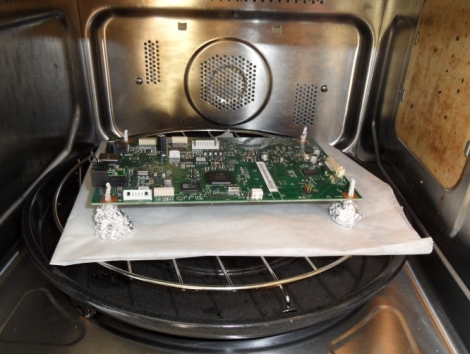
The entire LaserJet M1522 series is apparently pretty prone to breaking, with the formatter board being the usual point of failure. To fix his printer, he disassembled the outer shell, removing the formatter board from the unit. Once the onboard battery was removed, he constructed a set of standoffs using aluminum foil, and set the board in his oven at 180°C (~356°F) for about eight minutes.

After cooling, he reinstalled the board, and his printer behaved as good as new. [Thice] says that the only problem with his fix is that he needs to bake the board every 6 months or so, making this a great hack but not the most ideal solution in the long term.
external_laptop_gpu

Beefing Up Your Laptop’s Gaming Chops With An External GPU

If you’re not willing to shell out for a reasonably powerful laptop it seems that there’s not a ton that can be done to boost your gaming performance. That is, unless you have an empty Express card slot and the right chipset.

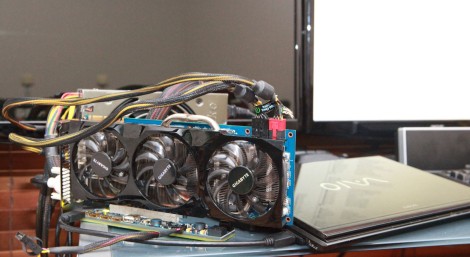
[Phatboy69] recently put together an external video card for his notebook, with fantastic results. His Vaio Z128GG had an Nvidia GT330M graphics card onboard, which is decent but nothing to write home about. Using an Express card to PCIe adapter, he added an external Nvidia GTX580 to his system, and he couldn’t be more pleased with the results. While the card does take a performance hit when connected to his laptop in this way, he claims that his graphics performance has increased ten-fold, which isn’t too shabby.

There are many variables on which this process is heavily dependent, but with the right amount of tweaking, some great laptop gaming performance can be had. That said, it really does take the portability factor of your notebook down to about zero.

If this is something you might be interested in, be sure to check out this thread over at the Notebook Review Forums – it’s where [Phatboy69] found all the information he needed to get his system up and running properly.

[Thanks, Henry]

Creating A Voice Controlled Robotic Arm

robotic_arm_voice_control

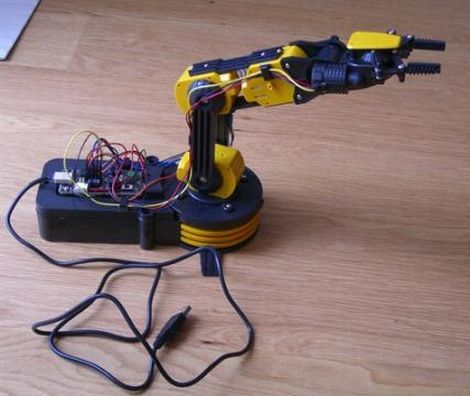
[Arthur] was laid up with a wrist injury, so he decided it would be a great time to hang out around the house and tinker with electronics, since most outdoor activities were out of the question. He picked up a robotic arm kit and assembled it to test out some code written for it that he found online. Since typing commands into a terminal was awfully cumbersome considering his injury, he figured he might as well construct a voice control system for the arm.

He documents his work in a three part series, covering the process from concept to completion. The first part centers around the creation of the vocabulary and grammar for the voice recognition system, along with the how the grammar model was trained using voice samples.

The second and third portions of his tutorial deal with the software’s decoding of his commands and the Python scripts used to translate those commands into something the robotic arm can process.

[Arthur’s] voice control system works pretty well as you can see in the video below, though he already has a wish list full of improvements he hopes to make in the near future.

Continue reading “Creating A Voice Controlled Robotic Arm”

Halloween Props: Pumpkin Battery

This one would make a nice centerpiece for your Halloween party. It’s a battery with tiny pumpkins serving as the cells. [EM Daniels] shows us how to clear out the pumpkins, fill them with some freshly mixed electrolyte, and he even throws in the directions for baking the pumpkin seeds.

Each pumpkin will need a pair of conductors made of dissimilar metals to serve as the anode and cathode. Copper wire is used for one, aluminum for the other, and both wires have a spiral pattern bent on one end to increase the surface area that contacts the electrolytic solution. Now just boil up a slurry of vinegar, gelatin, and salt, then let it sit in the fridge over night. [EM Daniels] was able get 1.5V out of this project (enough to light one LED) for two hours, and 1.4V for six hours by using seven of the pumpkin cells in series.

[Thanks Karen]

Can You Develop Film With Coffee And Vitamin C?

Are you feeling a little MacGyver-ish and have access to a film camera? Perhaps you want to try developing your pictures using coffee and vitamin C instead of a traditional developing solution. [Danish Puthan Valiyandi] does a great job of walking us through the steps he took, including precise measurements, temperatures, and timings involved in achieving great results. This is probably not for the first-timers, as he does use special equipment associated with traditional developing methods.

The process uses a couple of easily obtainable materials: instant coffee, vitamin C powder, and washing soda (sodium carbonate). Once the roll of film has been exposed, it’s put onto a jig for developing (Danish does this with the lights on to make the video after the break worth watching, but you’ll need to do it in the dark). Once nestled inside of the development container, he mixes up a batch of his diy developer and agitates according to a times schedule. When the development is finished, a chemical fixer–no diy alternative used here–is added to set the film. Dry out the strips and use a scanner to digitize your work. We’re surprised by the quality of the finished product, but we shouldn’t be… he certainly knows what he’s doing.

Continue reading “Can You Develop Film With Coffee And Vitamin C?”

C64 Joystick Adapter

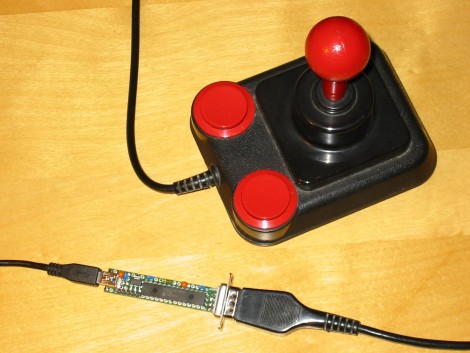
[Marcus Gritsch] wanted to do his retro gaming using retro hardware… or at least using some retro hardware. Although he was playing his Commodore 64 games in an emulator, he figured that using an original controller would boost the nostalgia quite a bit. This is a vintage Competition Pro joystick that has buttons and a joystick of a similar quality to arcade hardware and a DE-9 connector. He managed to connect new to old by building his own USB to C64 joystick adapter.

His project started out by breadboarding a circuit based on a PIC 24FJ64GB002 microcontroller. This does all of the work, having native USB support, and no problem reading and translating the signals from the old hardware which are simply conductors for each internal switch that pull to ground when actuated. Once working, he soldered everything to some protoboard; a connector at each end, the chip itself, a voltage regulator, and some passive components. It’s a, robust build that should give him years of emulated fun.

Years Of Robotic Projects – Dumped For Your Enjoyment

Meet tippy, just one of the multitude of robotic projects [Oneironaut] has taken on over the years. He ‘dug deep’ and put together a huge data dump of pictures and descriptions of his old robotic projects, then posted them for your enjoyment. When he wrote in to Hackaday on Monday he mentioned 33 pages of them, but he must be adding material as he finds it because we see 52 pages.

These aren’t micro-robots either. These are I’m going to chase you down because I’m your worst nightmare robots. They use heavy welded-iron frames, lead-acid batteries, and gear-motor driven locomotion. Some of his project names include The Tank, The Sentinel, and The Megatron. Bookmark the link you see above, because you’re going to want to spend some time sifting through the candy-shop of projects which seem to be too plentiful to be the hobby of just one man. Although we shouldn’t be surprised, just look at the multitude of spy-gadgets he’s come up with lately like the GPS tracker and the long-range laser night vision.