Motorized Faders Make An Awesome Volume Mixer For Your PC

These days, Windows has a moderately robust method for managing the volume across several applications. The only problem is that the controls for this are usually buried away. [CHWTT] found a way to make life easier by creating a physical mixer to handle volume levels instead.

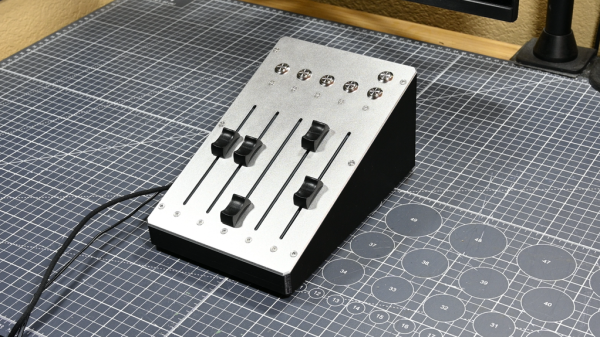
The build relies on a piece of software called MIDI Mixer. It’s designed to control the volume levels of any application or audio device on a Windows system, and responds to MIDI commands. To suit this setup, [CHWTT] built a physical device to send the requisite MIDI commands to vary volume levels as desired. The build runs on an Arduino Micro. It’s set up to work with five motorized faders which are sold as replacements for the Behringer X32 mixer, which makes them very cheap to source. The motorized faders are driven by L293D motor controllers. There are also six additional push-buttons hooked up as well. The Micro reads the faders and sends the requisite MIDI commands to the attached PC over USB, and also moves the faders to different presets when commanded by the buttons.

If you’re a streamer, or just someone that often has multiple audio sources open at once, you might find a build like this remarkably useful. The use of motorized faders is a nice touch, too, easily allowing various presets to be recalled for different use cases.

We love seeing a build that goes to the effort to include motorized faders, there’s just something elegant and responsive about them. Continue reading “Motorized Faders Make An Awesome Volume Mixer For Your PC”

Cheap Smart Ring Becomes MIDI Controller

The Colmi R02 is one of the cheapest smart rings on the market. It costs about $20, and is remarkably easy to hack. [Floyd Steinberg] took advantage of this to turn it into a rather unique MIDI controller.

What makes the Colmi R02 somewhat unique is that the manufacturer did not try to lock out users from uploading their own firmware. You don’t even really need to “hack” it, since there is no code signing or encryption. You can just whip up your own firmware to make it do whatever you want.

To that end, [Floyd] set up the ring to act as a device for musical expression. When connected to a computer over Bluetooth, data from the ring’s accelerometer is converted into MIDI CC commands via a simple web app. The app allows the MIDI messages to be configured so they can control whatever parameter is desired. [Floyd] demonstrates the ring by using it to control filter cutoff frequencies on an outboard synthesizer, with great effect.

You could theoretically just strap an accelerometer to your hand with a microcontroller and achieve similar operation. However, the magic of this is that it costs only $20 and it’s already in a form factor that’s optimized for wearing on your finger. It’s hard to beat that.

Files are on GitHub for those eager to experiment. We’ve previously featured some hacks of this particular smart ring, too, with [Aaron Christophel’s] efforts directly inspiring this work.

Continue reading “Cheap Smart Ring Becomes MIDI Controller”

The finished product

Crouching Typewriter, Hidden PC

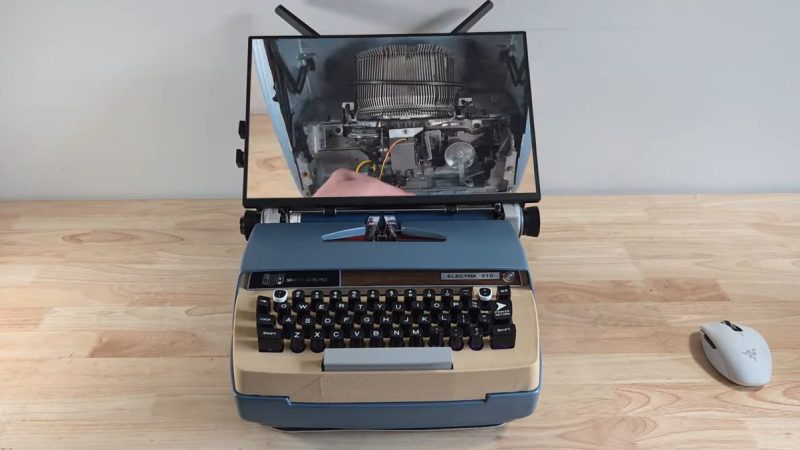
Go back a couple of generations, and rather than a laptop or a luggable, the office accessory of choice was a portable typewriter. As the 20th century wore on, the typewriter became electric before eventually being eclipsed by luggable and laptop computers. On YouTube, [Prototype] is turning back the clock, by turning an old Smith-Corona electric typewriter into a luggable computer– with a stretch goal of still being able to type.

Yeah, just gutting the typewriter and shoving an SBC inside wasn’t ambitious enough for [Prototype]: his goal is a working typewriter and an x86 gaming PC. To facilitate this, he guts the Smith-Corona keyboard, and 3D-prints a new top plate to add a little more vertical space in the old typewriter. The new top does recreate the original layout and the Corona switches get printed adapters to fit them to mechanical switches [Prototype] is using with a vibe-coded Arduino. Why one would bother with ChatGPT when QMK is right there, we could not say, but feel free to skip 6:20 to 15:00 if you’re watching the video but want to avoid that side quest.

Unfortunately, the “get the keyboard working” side-quest is either faked or deferred to video part II, which has not been posted yet. In this video he demonstrates that he can actuate a single hammer with a servo, but that’s a far cry from a working typewriter so, we’re really hoping he comes through on that promise in Part Two. Even if the build stops with just one hammer, that would give the tactile sound-and-feel that other builds turn to solenoids for. Squeezing a small-form-factor motherboard and graphics card into the old Smith-Corona is also going to be an interesting challenge. It’s certainly going to be a step up from using the keyboard as a terminal.

If you like this project but balk at the idea of destroying a working piece of vintage office equipment, it is possible to turn a typewriter into a USB keyboard non-invasively. 

If you like this project at all, join us in thanking [Katie] for the tip. Not your cup of tea? Tell us what is, with a tip of your own. Continue reading “Crouching Typewriter, Hidden PC”

Need A Curved Plastic Mesh? Print Flat, Curve Later

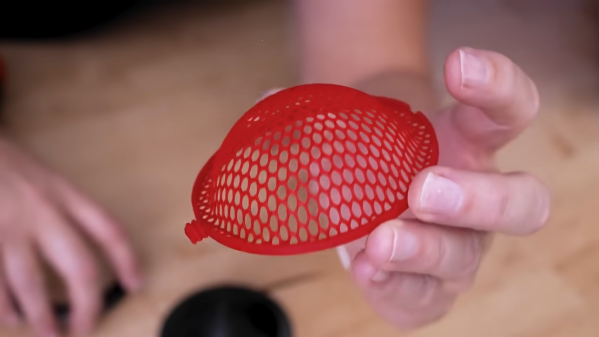
Need a plastic mesh in a custom pattern? 3D print it, no problem. But what if one needs a curved plastic mesh? That’s considerably harder to 3D print, but [Uncle Jessy]’s figured out a simple approach: 3D print the mesh flat, then break out a mold and a heat gun.

Of course, there are a few gotchas, but [Uncle Jessy] shares his tips for getting the most reliable results. The important part is to design and 3D print a mold that represents the final desired shape. Then print the mesh, and fit it into a frame. Heat things up with a heat gun, and press into the mold to deform the mesh while it’s still soft. It’s much easier seen than explained, so take a few moments to check out the video, embedded below the page break.

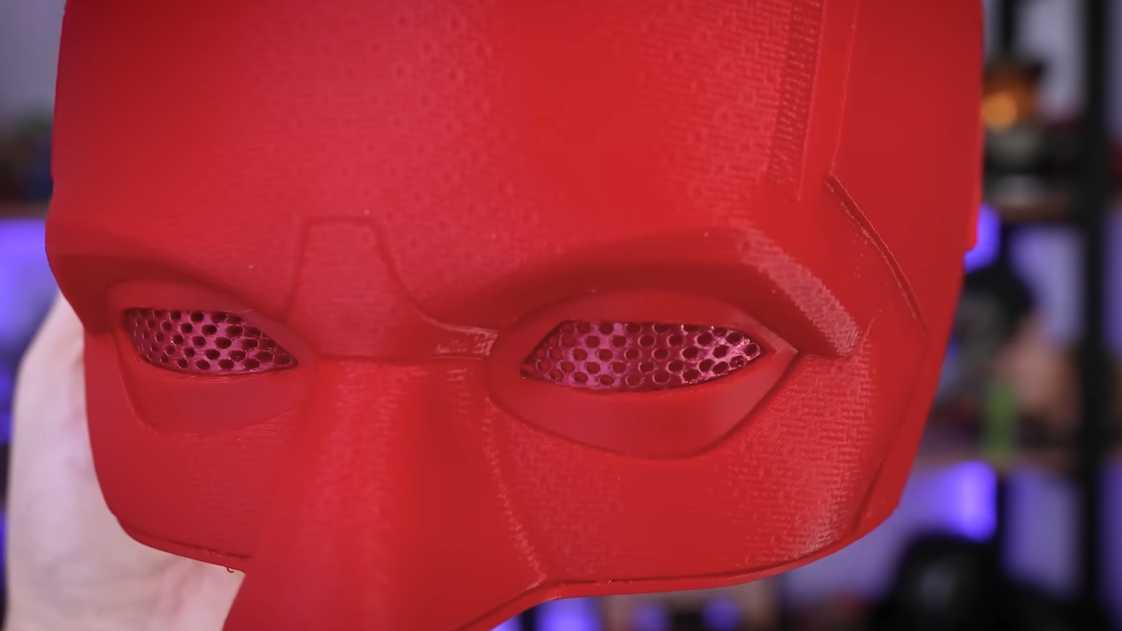
Custom eye inserts become a breeze.

Because the plastic in a mesh is so thin, [Uncle Jessy] says to keep the heat low and slow. The goal is to have the mesh stretch and deform, not melt.

Speaking of heat, when thermoforming, one usually needs to make the mold out of heat-resistant material. But the thermal mass of a mesh is so small that it really doesn’t matter much — there just isn’t enough heat trapped in the mesh to really damage a mold. As long as the mold is reasonably dense, there’s no need to go overboard with making it heat resistant.

The whole process takes a little practice, but since the meshes are so fast to print and use so little plastic it’s easy to experiment a little.

As for the meshes themselves, a simple way to print a mesh is just to print a disc with no top or bottom layers, only infill. Set the infill pattern to honeycomb, for example, for an easy hexagon mesh. We’ve seen a variant of this “exposed infill” idea used to create a desiccant container, and using it to print a mesh pattern easily is a neat trick, too.

Why might one need to reshape a mesh into a curve? Perhaps to custom-fit a costume piece, or make custom eye inserts for masks, as shown here. In any case, it’s a good technique to keep in the back of one’s mind, and if you put it to good use, drop us a tip!

Continue reading “Need A Curved Plastic Mesh? Print Flat, Curve Later”

Ordering Pizza On Your Sega Dreamcast Is Very Clunky Indeed

If you’re ordering pizza these days, you’re probably using a smartphone app or perhaps still making a regular old phone call. If you’re creative and a little bit tricky, though, you can order pizza right from your Sega Dreamcast. You just need to jump through a few hoops, as demonstrated by [Delux] and [The Dreamcast Junkyard] in the recent past.

You used to be able to order pizza on the Dreamcast natively, all the way back in 1999. However, the modern Domino’s website doesn’t really work on the ancient Dreamcast browser anymore. The simple fact is that web technology has advanced a long way in the last couple of decades, and Sega didn’t exactly spend a lot of time maintaining a browser on a console that died mere months after its rivals hit the market.

Thus, to place a pizza order on the Dreamcast these days, you need to work within its limitations. [Delux] uses the Dreamcast with the Broadband Adapter to access a PC on the local network via the XDP web browser. That PC is hosting Web Rendering Proxy, a tool which converts complicated modern websites into something a simpler machine can parse. From there, it’s a matter of connecting to the Domino’s website, and slowly clicking through the online ordering pages. Between the proxy delay, the Dreamcast’s glacial processing speed, and the clunky Domino’s ordering interface, it takes ages. Never before has adding coupons felt like such a hassle. Still, after 15 minutes of fuss, the order is completed… and a short time later, a hot fresh pizza arrives.

It’s a fun hack, but really it’s the PC running the proxy that’s doing the heavy lifting. In 2026, it’s far more elegant to order a pizza from your Nintendo Wii.

Continue reading “Ordering Pizza On Your Sega Dreamcast Is Very Clunky Indeed”

Do Expensive Filaments Make 3D Printed Wrenches Better?

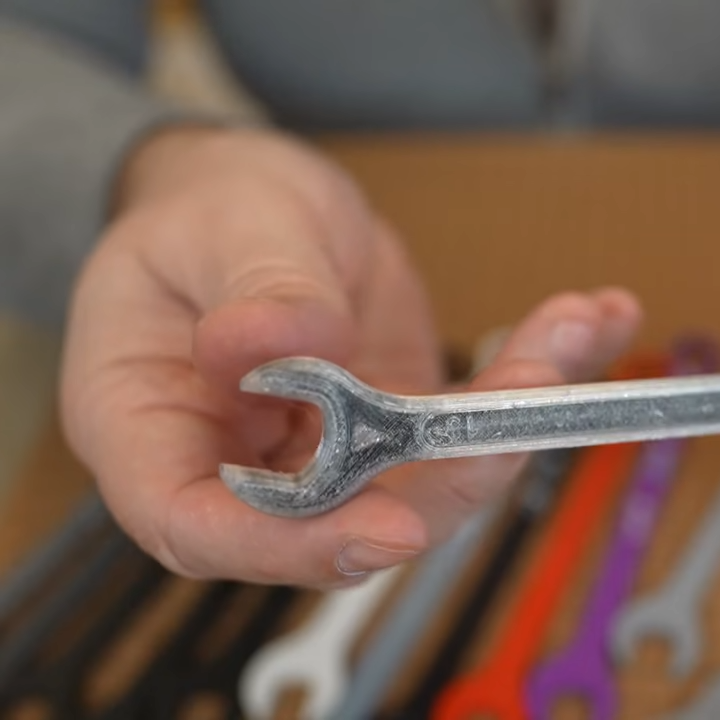
What filament is strongest? The real answer is “it depends”, but sometimes you have a simple question and you just want a simple answer. Like, which material makes the best 3D printed wrench? [My Tech Fun] printed a bunch of options to find out — including some expensive filaments — and got some interesting insights in the process.

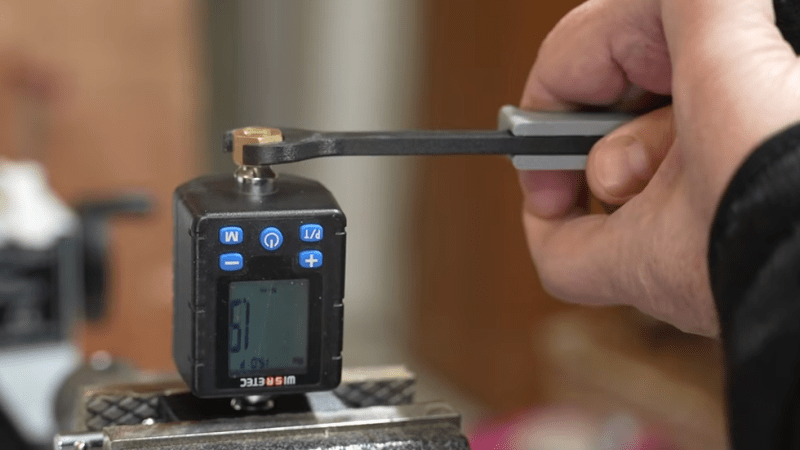
His setup is simple: he printed a bunch of 13 mm open-end wrenches, and tested each one to failure by cranking on a clamped digital torque meter until the wrench failed by breaking, or skipping.

[My Tech Fun] tested a total of eighteen filaments, from regular basic PLA, PETG, ABS and ASA, and a variety of carbon fiber-infused filaments including PPA-CF. TPU is included for fun, and there’s also a wrench printed with continuous carbon fiber, which requires a special printer. More on that in a moment. First, let’s get to the results!

PETG wrench reinforced with continuous carbon fiber. The result is extremely stiff compared to without.

Unsurprisingly, TPU fared the worst at 0.8 nM which is roughly “unscrewing the cap of a water bottle” territory. Top performers included the wrench printed with continuous carbon fiber reinforcement (failing at 3.7 nM) and a couple printed in expensive PPA-CF (high-temperature nylon filament with carbon fiber) topped the list at 4.3 nM. Everything else landed somewhere in between, with plain PLA surprisingly outperforming some CF blends.

The continuous carbon fiber wrench was printed on a FibreSeeker printer, which reinforces a print with solid fibers embedded into the plastic instead of chopped particles, and such prints are noticeably more resistant to bending. Check out our earlier coverage for a closer look at what the FibreSeeker does.

This is a good time to mention that the wrench 3D model used is not at all optimized for best results with 3D printing. But that’s okay; this is really about the filaments, not the wrench.

The wrench model is just a way to test things in a familiar and highly visual, relatable way. You can see each one in action in the video below, and seeing [My Tech Fun] turn the wrenches gives a very good idea of just how much force is involved, with a relatable display of just how strong the different filaments are.

Continue reading “Do Expensive Filaments Make 3D Printed Wrenches Better?”

Lazarustorm Lets A PiStorm Live Outside Your Old Amiga

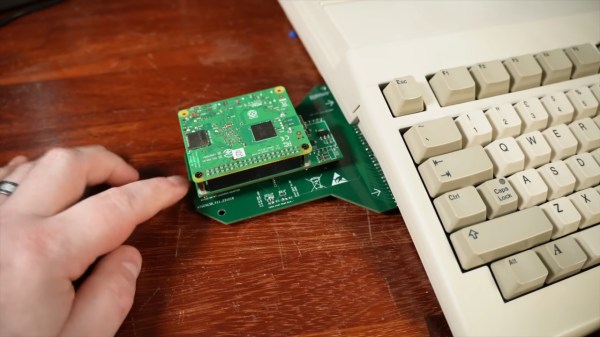
The PiStorm is nothing new; if you’re familiar with the retrocomputer scene, you’ve probably heard of it. By replacing the 68k processor in an old Amiga (or some models of Atari) the PiStorm accelerator gives a multiple order of magnitude speedup. It’s even a reversable mod, plugging in where the original CPU was. What’s not to love? Well, some people would simply prefer to keep their original CPUs in place. [TME Retro] has a video highlighting the solution for those people: the Lazarustorm by [arananet].

It makes perfect sense to us– back in the day, you could plug a whole x86 PC-compatible ‘sidecar’ into your Amiga, so why not a PiStorm? The whole bus is right there for the taking.The Lazarusstorm, as a project, is bog simple compared to the PiStorm itself. A PCB and the connectors to get it plugged into the expansion port on the Amiga side, and the connectors to plug the PiStorm into it on the other. A couple of jumpers and a few passives, and that’s it. [TME Retro] also took the time to come up with a case for it, which sits on felt feet to relieve stress on the PCBs. It’s a nice bit of CAD, but we rather wish he’d done it in beige.

As for the upgraded Amiga, it runs just as fast as it would had the 68k been replaced with a Pi3 and PiStorm internally, which is to say it’s practically a supercomputer by 1980s standards. You get the SD card to serve as a hard drive and can even access the internet via modern WiFi, something Commodore engineers likely never expected an A500 to do. Of course, just connecting to the network is only half the battle when getting these retro machines online. When these accelerators were new, the 68k emulation ran on top of Linux, but now that the EMU68k project has it bare metal and even faster.

This isn’t the first Raspberry-flavoured slice of Amiga sidecar we’ve featured: here’s one running Spotify. If you haven’t got an Amiga, there’s a PiStorm for the FPGA-based MiniMig, too. Continue reading “Lazarustorm Lets A PiStorm Live Outside Your Old Amiga”