Flashing Arduinos With A Zipit

zipit_arduino_flashing

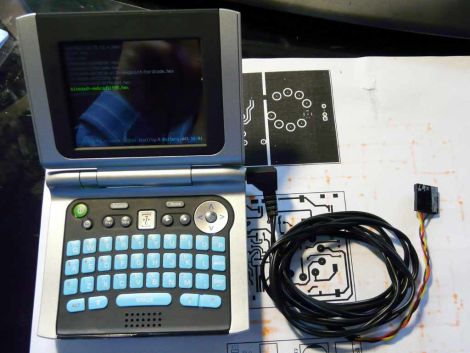
[Giacomo] finds that every once in awhile, he needs to flash a sketch to an Arduino while on the go. While he doesn’t always carry his laptop with him, he almost certainly has his Zipit Z2 on hand. He prefers to use the Zipit because it’s tiny, it uses Debian, has built-in WiFi, and can run for about 5 hours before requiring a recharge. The only shortcoming is that the device lacks a serial port.

Following instructions we featured last year he added a serial port to his device, then built a small converter cable that allows him to connect it to virtually any Arduino. He says it only takes a moment to get avrdude up and running on the Zipit via apt-get, and once that’s done, he is in business. He wrote a short script that saves him from entering the flash command over and over, so the process couldn’t be simpler.

He does mention that since the Zipit does not have a DTR line, Arduino resetting must be done manually. For the convenience of flashing sketches from the palm of our hand, we can deal with that.

Check out the video below for a quick demonstration of his setup.

Continue reading “Flashing Arduinos With A Zipit” →

The WALL-E Robot

[Dino’s] latest Hack a Week project, the WALL-E Robot shows quite simply what you can create from a few dollars worth of toys from garage sales and cheap stores. When he found the WALL-E toy at a garage sale, Dino decided that he had to give it a brain. Using the geared motors from some Rumble Robots, the H-bridges from some $5 remote control cars (after his own H-bridges cooked themselves), an ultrasonic sensor and an Arduino, WALL-E was brought to life.

The WALL-E Robot might not be the brightest bot, or the most stable, but the project definitely demonstrates some effective scrounging for parts that would have done WALL-E proud. It also shows how even the most simple projects can cause the most headaches when they don’t go right. Check out the video after the break for the build details, a demonstration and to see a man talk to a toy robot.

Continue reading “The WALL-E Robot” →

Hackaday Links: Monday June 13

Tim wrote in to tell us about this simple hack where he replaced the stock button lights with some really cool Blue LEDS on an ’87 BMW. He uses some capacitors, to achieve the effect that it takes a bit for the charge to drain out so the lights stay on for a bit after being turned off.  The lights themselves look really nice, so check out the pic.

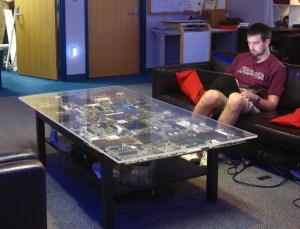
Here’s an awesome coffee Table built using a large electrical board. It definitely would look good in anyone’s den, although it most likely has a low wife approval factor (WAF). This is actually based on a “motherboard wall that HAD covered before, but the “coffee table” form probably looks even better.

Finally, after the break is a video of someone washing an interactive art exhibit. Not sure if it qualifies as a hack, but it looks pretty cool to see lights following someone around when he’s washing the screen/window.

Continue reading “Hackaday Links: Monday June 13” →

An Autonomous Car Using A “Webcam”

This autonomous remote control-style car from Cornell students was designed for a senior level engineering course there. It’s main “sensor” is a low-res webcam style camera. As shown in the video after the break, this car does quite well staying within two black lines on a white surface using it’s vision processing. It also has an IR sensor to detect objects in front of the car and stop without crashing.

All “vision” computations are handled by an Atmel Mega644 MCU, an 8-bit processor. Because of the processing limits of this chip, much work had to be done to make this process computationally efficient. These students go through an incredibly detailed account of their project, focusing on the code and electrical design. Check out the video of their car in action after the break. Continue reading “An Autonomous Car Using A “Webcam”” →

Wifi Sniffing Digital Picture Frame

[AUTUIN] sent in a tip for his wifi sniffing digital picture frame.

A soon-to-be-trashed Pentium II laptop was rescued from Free Geek Vancouver. A lot of coffee shops around Vancouver feature local art and free wifi, so [AUTUIN] decided to combine the two. The project is designed to hang on the wall of a cafe and sniff images transmitted on the wireless network – an invasion of privacy, but as [AUTUIN] says, “that’s kind of the point.”

After gutting the laptop and putting it in a custom picture frame, Driftnet, a program that listens network traffic and picks out images from TCP streams, was installed. [AUTUIN] tested his build with an open wireless connection in his building. The results provided a wonderful narrative that started with pictures from news sites than slowly devolved to pictures from a hot-or-not style website, an online dating site and finally pictures from the inevitable conclusion of that browsing session.

[AUTUIN] is now looking for either a brave or foolish local coffee shop in Vancouver to feature his wifi sniffing picture frame. We think this would be very amusing if we weren’t using that network, not that we have something to hide or anything.

Hacking Cakes With LEDs, The Sequel!

A few weeks back we ran a piece about the convergence of making and baking in an attempt to create a cake festooned with working LEDs. The moral was that not every creative idea ends in victory, but we applauded the spirit it takes to post one’s goofs for the whole internet to see and to learn from.

[Craig]’s LED matrix proved unreliable…and the underlying cake didn’t fare much better, resembling that charred lump in the toaster oven in Time Bandits. The cakes-with-lights meme might have died right there if not for a fluke of association…

Continue reading “Hacking Cakes With LEDs, The Sequel!” →

How Canonical Automates Linux Package Compilation

pandaboard

What do you do when it’s time to port the most popular Linux distribution to a completely different architecture? Canonical employee [David Mandalla] works on their ARM development team and recently shared the answer to that question with his fellow Dallas Makerspace members.

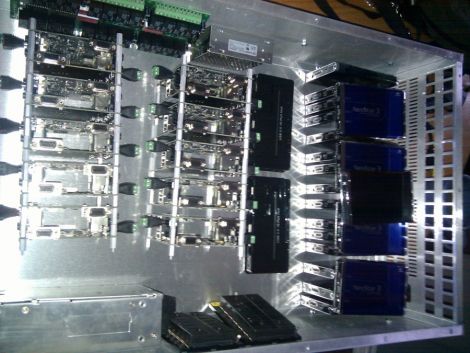
Canonical needed a way to compile about 20,000+ packages for the ARM platform, however they did not want to cross-compile, which is quite time consuming. Instead, they opted to build a native solution that could handle the load while ensuring that all packages were compiled securely. To tackle this immense task, [David] and his team constructed a 4U server that runs 20 fully-independent ARM development platforms simultaneously.

The server is composed of 21 PandaBoards, small OMAP development boards featuring a dual-core ARM cortex processor with just about all the connectivity options you could possibly ask for. One board operates as the server head, keeping track of the other 20 modules. When someone requests server time to build a package, the main board checks for unused server, triggering a relay to reboot it before the server is automatically reimaged. Once the pristine, secure environment is ready to go, it’s handed off to the customer who requested it.

If you’re interested in learning more about the build process, [David] has put together a blog with additional details.

[Thanks Leland]